Skip to content
  • Categories
  • Recent
  • Tags
  • Popular
  • Users
  • Groups
  • Search
  • Get Qt Extensions
  • Unsolved
Collapse
Brand Logo
  1. Home
  2. Qt Development
  3. Qt for Python
  4. Help about PyQt6.QWidgets
Qt 6.11 is out! See what's new in the release blog

Help about PyQt6.QWidgets

Scheduled Pinned Locked Moved Unsolved Qt for Python
6 Posts 2 Posters 1.0k Views
  • Oldest to Newest
  • Newest to Oldest
  • Most Votes
Reply
  • Reply as topic
Log in to reply
This topic has been deleted. Only users with topic management privileges can see it.
  • Z Offline
    Z Offline
    zysay
    wrote on last edited by
    #1

    I'm getting this error. I reinstalled pyqt6, python and vs code but it didn't worked. How can i fix this error?

    Ekran görüntüsü 2023-02-25 144310.png

    JonBJ 1 Reply Last reply
    0
    • Z zysay

      I'm getting this error. I reinstalled pyqt6, python and vs code but it didn't worked. How can i fix this error?

      Ekran görüntüsü 2023-02-25 144310.png

      JonBJ Online
      JonBJ Online
      JonB
      wrote on last edited by
      #2

      @zysay
      There is no such module as QWidgets. Look at the spelling wherever you got this from.

      Z 1 Reply Last reply
      0
      • JonBJ JonB

        @zysay
        There is no such module as QWidgets. Look at the spelling wherever you got this from.

        Z Offline
        Z Offline
        zysay
        wrote on last edited by
        #3

        @JonB I get this codes from another computer and this codes are working on another computers but it didn't working in my computer.

        ae33952b-a31a-47db-8847-0b98d5c5aa17-image.png

        JonBJ 1 Reply Last reply
        0
        • Z zysay

          @JonB I get this codes from another computer and this codes are working on another computers but it didn't working in my computer.

          ae33952b-a31a-47db-8847-0b98d5c5aa17-image.png

          JonBJ Online
          JonBJ Online
          JonB
          wrote on last edited by
          #4

          @zysay
          So at least you have spelled it correctly now, that's a start. I guess you have not installed PyQt6 correctly. Use Python pip3 list (or pip if you don't have pip3) to see what you have installed.

          Z 1 Reply Last reply
          0
          • JonBJ JonB

            @zysay
            So at least you have spelled it correctly now, that's a start. I guess you have not installed PyQt6 correctly. Use Python pip3 list (or pip if you don't have pip3) to see what you have installed.

            Z Offline
            Z Offline
            zysay
            wrote on last edited by
            #5

            @JonB
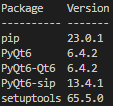
            That is my pip list. PyQt6 is installed but error is continues.
            d8cc41dd-5ecc-455f-b6ed-04b07c4c955a-image.png

            JonBJ 1 Reply Last reply
            0
            • Z zysay

              @JonB
              That is my pip list. PyQt6 is installed but error is continues.
              d8cc41dd-5ecc-455f-b6ed-04b07c4c955a-image.png

              JonBJ Online
              JonBJ Online
              JonB
              wrote on last edited by
              #6

              @zysay
              Looks OK. Try running your program/script outside of "Pylance" from a Command Prompt. If that works it's a problem of configuration in your Pylance.

              1 Reply Last reply
              0

              • Login

              • Login or register to search.
              • First post
                Last post
              0
              • Categories
              • Recent
              • Tags
              • Popular
              • Users
              • Groups
              • Search
              • Get Qt Extensions
              • Unsolved