
Skip to content
  • Categories
  • Recent
  • Tags
  • Popular
  • Users
  • Groups
  • Search
  • Get Qt Extensions
  • Unsolved
Collapse
Brand Logo
  1. Home
  2. Qt Development
  3. General and Desktop
  4. What can I do for my QtWidget-Program's Window correctly positioned on the screen?
Forum Updated to NodeBB v4.3 + New Features

What can I do for my QtWidget-Program's Window correctly positioned on the screen?

Scheduled Pinned Locked Moved Unsolved General and Desktop
45 Posts 8 Posters 17.6k Views 3 Watching
  • Oldest to Newest
  • Newest to Oldest
  • Most Votes
Reply
  • Reply as topic
Log in to reply
This topic has been deleted. Only users with topic management privileges can see it.
  • foghere2023F foghere2023

    @JonB Sorry, I cann't find the similar posts by keyword 'wayland',I think QtWidget APP's QMessageBox cann't locate his parent window position should be a serious mistake,could you give me some similar posts links?

    JonBJ Offline
    JonBJ Offline
    JonB
    wrote on last edited by
    #8

    @foghere2023
    Google qt wayland move window

    1 Reply Last reply
    0
    • jsulmJ jsulm

      @foghere2023 How do you show those messages?
      See https://doc.qt.io/qt-6/qdialog.html#QDialog : if you provide parent to dialog constructor the dialog should be automatically centered on the parent.

      foghere2023F Offline
      foghere2023F Offline
      foghere2023
      wrote on last edited by
      #9

      @jsulm Hi guys ,I find someone had the same problem as me:

      The QDialog default position should locate at centered on top of the parent's top-level widget.
      But QDialog in Wayland shows on a random position. Even I try to use "move" to assign a specific position, it doesn't work.
      

      qdialog-in-wayland-works-incomplete

      1 Reply Last reply
      0
      • jsulmJ jsulm

        @foghere2023 How do you show those messages?
        See https://doc.qt.io/qt-6/qdialog.html#QDialog : if you provide parent to dialog constructor the dialog should be automatically centered on the parent.

        foghere2023F Offline
        foghere2023F Offline
        foghere2023
        wrote on last edited by foghere2023
        #10

        @jsulm

        According to the normal logic, the pop-up message prompt should be suspended on the upper layer of the parent window.

        QMessageBox and some child Dialog cannot on top of its parent window in Wayland,this looks like Qwidget's bug.

        What should i do ?

        JonBJ 1 Reply Last reply
        0
        • foghere2023F foghere2023

          @jsulm

          According to the normal logic, the pop-up message prompt should be suspended on the upper layer of the parent window.

          QMessageBox and some child Dialog cannot on top of its parent window in Wayland,this looks like Qwidget's bug.

          What should i do ?

          JonBJ Offline
          JonBJ Offline
          JonB
          wrote on last edited by
          #11

          @foghere2023
          See if it works under Xorg?
          If so wait for it to work under Wayland at a future date, assuming it can?

          foghere2023F 1 Reply Last reply
          0
          • JonBJ JonB

            @foghere2023
            See if it works under Xorg?
            If so wait for it to work under Wayland at a future date, assuming it can?

            foghere2023F Offline
            foghere2023F Offline
            foghere2023
            wrote on last edited by foghere2023
            #12

            @JonB thank you guys, it works very well under Xorg,and I have test a simple Demo like is :

            void MainWindow::on_pushButton_clicked()
            {
                QMessageBox::information(this,"提示消息","已成功读档!");
            }
            

            This Demo only have one line of command here for QMessageBox , I have spent all day for the workaround,I don't know this is my false or Qt-team‘s. :(
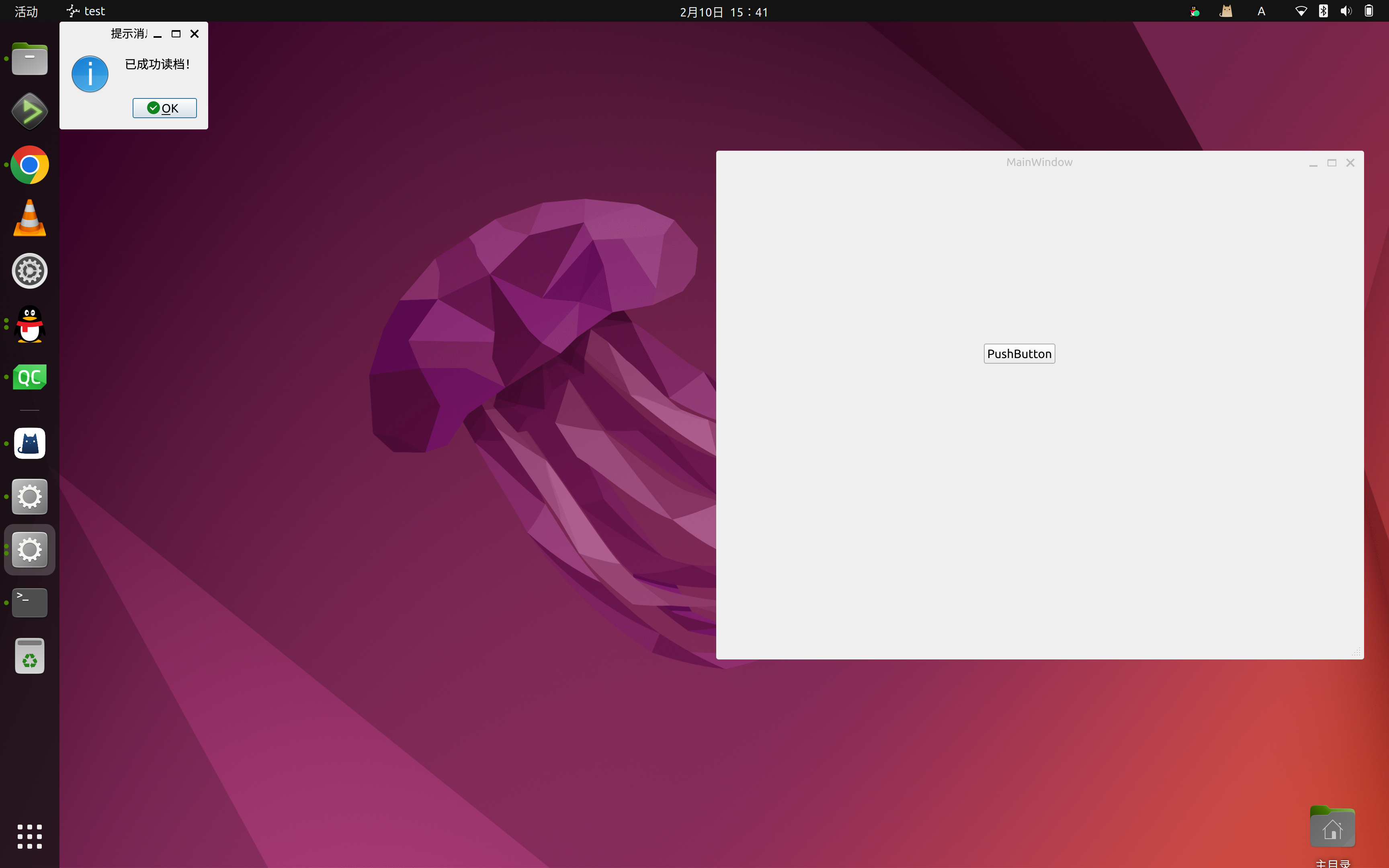
            alt text

            as your piont ,this is not my false ?

            SGaistS 1 Reply Last reply
            0
            • foghere2023F foghere2023

              @JonB thank you guys, it works very well under Xorg,and I have test a simple Demo like is :

              void MainWindow::on_pushButton_clicked()
              {
                  QMessageBox::information(this,"提示消息","已成功读档!");
              }
              

              This Demo only have one line of command here for QMessageBox , I have spent all day for the workaround,I don't know this is my false or Qt-team‘s. :(

              alt text

              as your piont ,this is not my false ?

              SGaistS Offline
              SGaistS Offline
              SGaist
              Lifetime Qt Champion
              wrote on last edited by
              #13

              @foghere2023 hi,

              It's neither. See the Wayland doc.

              Interested in AI ? www.idiap.ch
              Please read the Qt Code of Conduct - https://forum.qt.io/topic/113070/qt-code-of-conduct

              JoeCFDJ foghere2023F 2 Replies Last reply
              0
              • SGaistS SGaist

                @foghere2023 hi,

                It's neither. See the Wayland doc.

                JoeCFDJ Offline
                JoeCFDJ Offline
                JoeCFD
                wrote on last edited by JoeCFD
                #14

                @SGaist https://community.nxp.com/t5/i-MX-Processors/QDialog-in-Wayland-works-incomplete/m-p/1544891#M196925

                foghere2023F 1 Reply Last reply
                0
                • SGaistS SGaist

                  @foghere2023 hi,

                  It's neither. See the Wayland doc.

                  foghere2023F Offline
                  foghere2023F Offline
                  foghere2023
                  wrote on last edited by
                  #15

                  @SGaist So guys,Reading the docs is just too difficult for me, someone tell me to wait, because there is a day that Qwidget App's Popups and parent windows can locate correctly .

                  Is there any way we can get the program to work now?

                  1 Reply Last reply
                  0
                  • JoeCFDJ JoeCFD

                    @SGaist https://community.nxp.com/t5/i-MX-Processors/QDialog-in-Wayland-works-incomplete/m-p/1544891#M196925

                    foghere2023F Offline
                    foghere2023F Offline
                    foghere2023
                    wrote on last edited by
                    #16

                    @JoeCFD

                    I had find this post,And I don't know what is weston.

                    JoeCFDJ 2 Replies Last reply
                    0
                    • foghere2023F Offline
                      foghere2023F Offline
                      foghere2023
                      wrote on last edited by
                      #17

                      Can someone help me?

                      1 Reply Last reply
                      0
                      • JonBJ JonB referenced this topic on
                      • foghere2023F Offline
                        foghere2023F Offline
                        foghere2023
                        wrote on last edited by
                        #18

                        Looking forward to friends repeating this bug

                        SGaistS 1 Reply Last reply
                        0
                        • foghere2023F foghere2023

                          Looking forward to friends repeating this bug

                          SGaistS Offline
                          SGaistS Offline
                          SGaist
                          Lifetime Qt Champion
                          wrote on last edited by
                          #19

                          @foghere2023 please show some patience and allow at least 24 hours to pass before bumping your own thread. This is a voluntary driven forum and people may not live in the same timezone as you.

                          Weston is the reference implementation of a Wayland compositor.

                          As for your issue, the Wayland specification is explicit, windows cannot move themselves around the desktop.

                          Interested in AI ? www.idiap.ch
                          Please read the Qt Code of Conduct - https://forum.qt.io/topic/113070/qt-code-of-conduct

                          JonBJ foghere2023F 2 Replies Last reply
                          2
                          • SGaistS SGaist

                            @foghere2023 please show some patience and allow at least 24 hours to pass before bumping your own thread. This is a voluntary driven forum and people may not live in the same timezone as you.

                            Weston is the reference implementation of a Wayland compositor.

                            As for your issue, the Wayland specification is explicit, windows cannot move themselves around the desktop.

                            JonBJ Offline
                            JonBJ Offline
                            JonB
                            wrote on last edited by
                            #20

                            @SGaist said in What can I do for my QtWidget-Program's Window correctly positioned on the screen?:

                            As for your issue, the Wayland specification is explicit, windows cannot move themselves around the desktop.

                            Thank you for this :)

                            1 Reply Last reply
                            0
                            • foghere2023F foghere2023

                              @JoeCFD

                              I had find this post,And I don't know what is weston.

                              JoeCFDJ Offline
                              JoeCFDJ Offline
                              JoeCFD
                              wrote on last edited by JoeCFD
                              #21

                              @foghere2023 said in What can I do for my QtWidget-Program's Window correctly positioned on the screen?:

                              weston

                              Weston is the reference implementation of a Wayland compositor, as well as a useful environment in and of itself.

                              You can easily create a customized widget to replace it. Make your mainwindow to be its parent and it will always pop-up on top of main window.

                              The source code is here and you can borrow some
                              https://code.qt.io/cgit/qt/qtbase.git/tree/src/widgets/dialogs/qmessagebox.cpp?h=dev

                              1 Reply Last reply
                              0
                              • foghere2023F foghere2023

                                @JoeCFD

                                I had find this post,And I don't know what is weston.

                                JoeCFDJ Offline
                                JoeCFDJ Offline
                                JoeCFD
                                wrote on last edited by JoeCFD
                                #22

                                @foghere2023
                                Two solutions in that post:

                                1. Replace weston with Qtwayland compositor
                                2. Don't use wayland at all, but use the eglfs platform plugin.

                                You may not be able to select 2. Then try solution 1.
                                The side effect is you can't use g2d rendering. If you do not have issues with it, then go with it. Find out how to replace weston with Qtwayland compositor

                                JonBJ 1 Reply Last reply
                                0
                                • SGaistS SGaist

                                  @foghere2023 please show some patience and allow at least 24 hours to pass before bumping your own thread. This is a voluntary driven forum and people may not live in the same timezone as you.

                                  Weston is the reference implementation of a Wayland compositor.

                                  As for your issue, the Wayland specification is explicit, windows cannot move themselves around the desktop.

                                  foghere2023F Offline
                                  foghere2023F Offline
                                  foghere2023
                                  wrote on last edited by
                                  #23

                                  @SGaist @JoeCFD

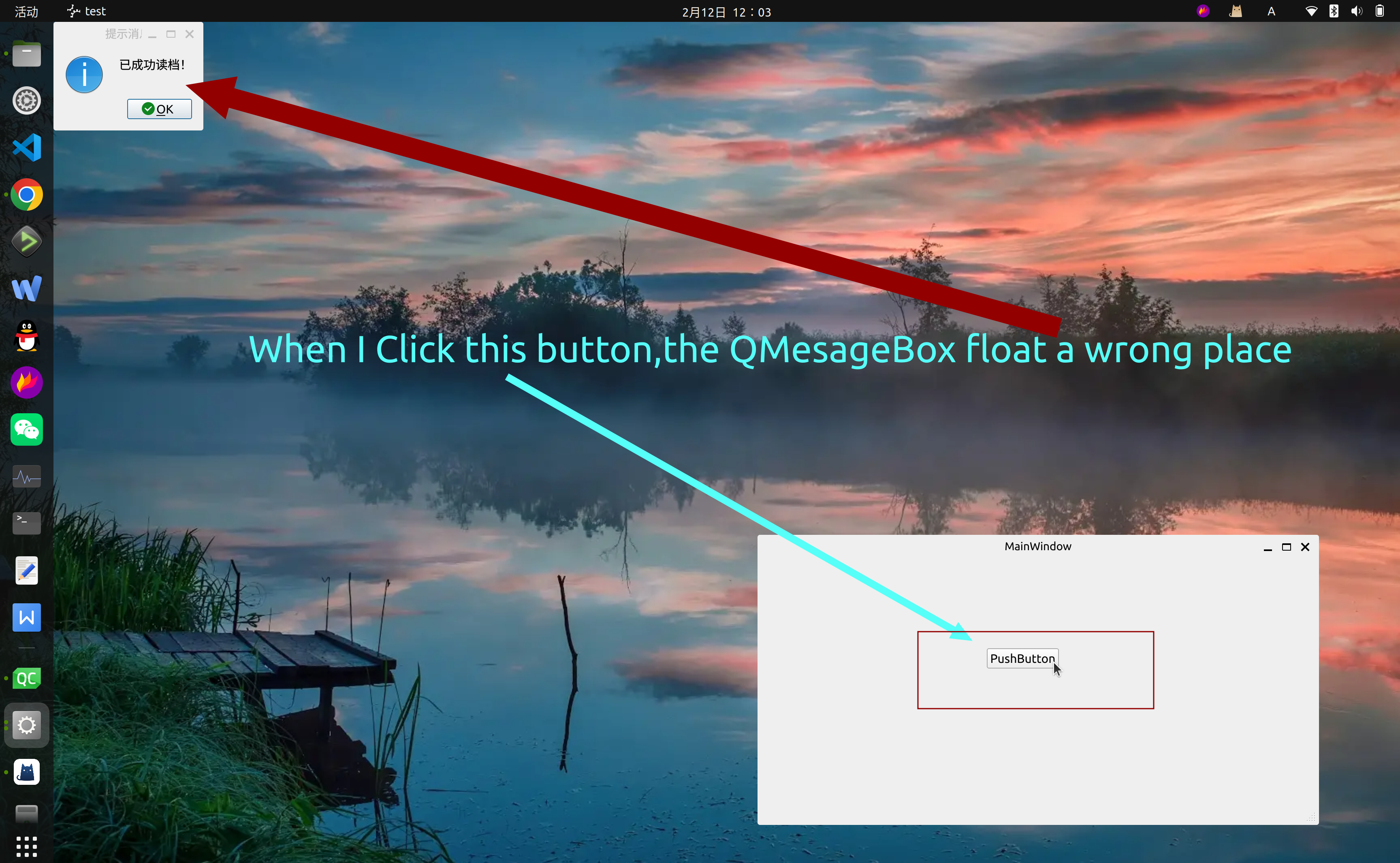
                                  My friends, I may not have accurately described my problem, so that you did not understand what happened here. I didn't want to move the window, but the message pop-up window appeared in the wrong place.

                                  this is a Demo:

                                  https://github.com/cppxiaozhu/Demo
                                  alt text

                                  JoeCFDJ 1 Reply Last reply
                                  0
                                  • foghere2023F foghere2023

                                    @SGaist @JoeCFD

                                    My friends, I may not have accurately described my problem, so that you did not understand what happened here. I didn't want to move the window, but the message pop-up window appeared in the wrong place.

                                    this is a Demo:

                                    https://github.com/cppxiaozhu/Demo

                                    alt text

                                    JoeCFDJ Offline
                                    JoeCFDJ Offline
                                    JoeCFD
                                    wrote on last edited by
                                    #24

                                    @foghere2023 The post in the link had the exactly same problem.

                                    The QDialog default position should locate at centered on top of the parent's top-level widget.
                                    But QDialog in Wayland shows on a random position.

                                    foghere2023F 1 Reply Last reply
                                    0
                                    • JoeCFDJ JoeCFD

                                      @foghere2023 The post in the link had the exactly same problem.

                                      The QDialog default position should locate at centered on top of the parent's top-level widget.
                                      But QDialog in Wayland shows on a random position.

                                      foghere2023F Offline
                                      foghere2023F Offline
                                      foghere2023
                                      wrote on last edited by
                                      #25

                                      @JoeCFD Thank you friend,I have read that post,but I don't know how to do.

                                      1 Reply Last reply
                                      0
                                      • JoeCFDJ JoeCFD

                                        @foghere2023
                                        Two solutions in that post:

                                        1. Replace weston with Qtwayland compositor
                                        2. Don't use wayland at all, but use the eglfs platform plugin.

                                        You may not be able to select 2. Then try solution 1.
                                        The side effect is you can't use g2d rendering. If you do not have issues with it, then go with it. Find out how to replace weston with Qtwayland compositor

                                        JonBJ Offline
                                        JonBJ Offline
                                        JonB
                                        wrote on last edited by JonB
                                        #26

                                        @foghere2023

                                        but I don't know how to do.

                                        @JoeCFD said:

                                        Two solutions in that post:

                                        1. Replace weston with Qtwayland compositor
                                        2. Don't use wayland at all, but use the eglfs platform plugin.

                                        You may not be able to select 2. Then try solution 1.

                                        If that is what @JoeCFD are the alternatives then have you tried either of them?

                                        foghere2023F 1 Reply Last reply
                                        0
                                        • JonBJ JonB

                                          @foghere2023

                                          but I don't know how to do.

                                          @JoeCFD said:

                                          Two solutions in that post:

                                          1. Replace weston with Qtwayland compositor
                                          2. Don't use wayland at all, but use the eglfs platform plugin.

                                          You may not be able to select 2. Then try solution 1.

                                          If that is what @JoeCFD are the alternatives then have you tried either of them?

                                          foghere2023F Offline
                                          foghere2023F Offline
                                          foghere2023
                                          wrote on last edited by
                                          #27

                                          @JonB @SGaist @JoeCFD

                                          Hi friend,this is a simple Demo,could you show me how to improve or repair this issue ?

                                          https://github.com/cppxiaozhu/Demo

                                          I really want to fix this problem, but there is no example to learn.

                                          The compilation environment I use is a binary version downloaded from the QT official website. Now almost all Linux distributions have defaulted to the wayland environment, and the official tools of QT cannot adapt to this new situation. I sincerely hope that someone can seriously deal with
                                          the Bug that can be reproduced in one line of code

                                          JonBJ 1 Reply Last reply
                                          0

                                          • Login

                                          • Login or register to search.
                                          • First post
                                            Last post
                                          0
                                          • Categories
                                          • Recent
                                          • Tags
                                          • Popular
                                          • Users
                                          • Groups
                                          • Search
                                          • Get Qt Extensions
                                          • Unsolved