

SQLDatabase query creates heap error
-
I want to access a SQLite database and I get a heap error. Environment is Visual Studio 2022 with QT 6.4 and QT Visual Studio Tools.
main.cpp
#include <QGuiApplication>
#include <QQmlApplicationEngine>
#include <QQmlContext>
#include "Test.h"

int main(int argc, char* argv[])
{
    QGuiApplication app(argc, argv);
    QQmlApplicationEngine engine;
    QQmlContext* context = engine.rootContext();

    Test* test = new Test();
    test->initialize();

......
}
Test.h
#pragma once
#include <QObject>
#include <QtSql/qsqldatabase.h>
#include <QtSql/qsqldriver.h>
#include <QtSql/qsqlquery.h>
#include <QtSql/qsqlerror.h>

class Test : public QObject
{
    Q_OBJECT

public:
    explicit Test(QObject* parent = nullptr);
    void initialize();

};
Test.cpp
#include <QObject>
#include "Test.h"

Test::Test(QObject* parent) : QObject(parent) { }

void Test::initialize() {
	QMap<QString, QString> rows;
	QSqlDatabase db = QSqlDatabase();
	db = QSqlDatabase::addDatabase("QSQLITE", "system");
	db.setDatabaseName("c:/users/arne/workspace/trm80eplus/trm80eplus.db");

	db.open();
	QSqlQuery qry("select * from configuration_sizes", QSqlDatabase::database("system"));

	db.close();
}
Screenshot from error

Exception error at 0x00007FFB71E8F6A9 (ntdll.dll) in TRM80EPlus.exe: 0xC0000374: A heap was corrupted (parameter: 0x00007FFB71EF97F0)
I have included Qt6Sql.lib to the project, but i am not sure if this is correct.
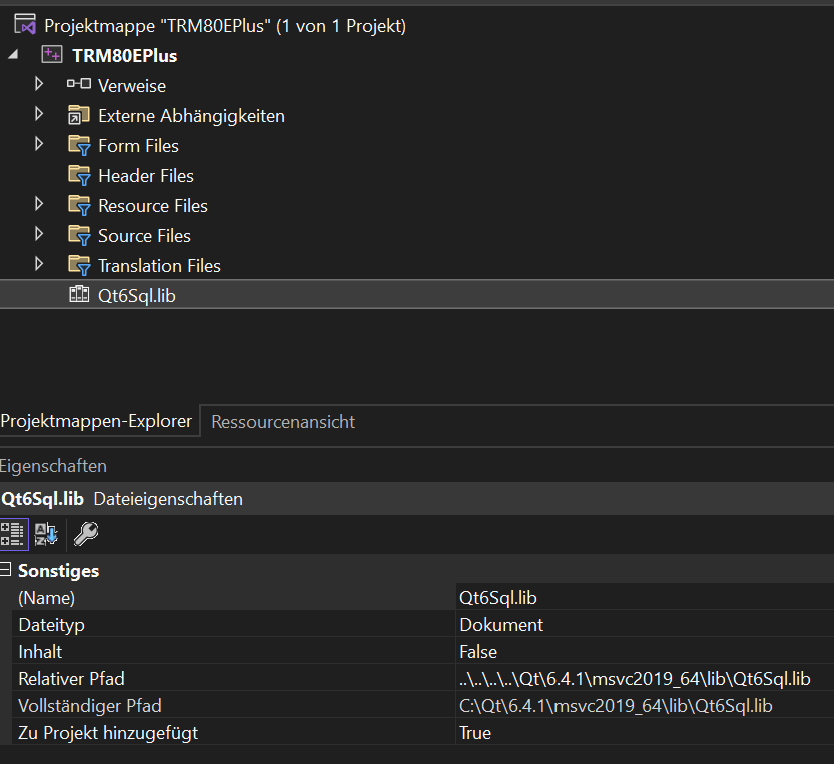
I am quite new to c++ and qt. I can't find the lib in the debug directory after compiling.
But the database opens correctly and the lines are also readed.
It just comes this heap error at the end of the function.@astoffregen What do you see if you click on "Aufrufliste anzeigen"?
QSqlDatabase db = QSqlDatabase();You are creatin a QSqlDatabase just to overwrite it with a new one. This is enough:
QSqlDatabase db = QSqlDatabase::addDatabase("QSQLITE", "system"); -
I want to access a SQLite database and I get a heap error. Environment is Visual Studio 2022 with QT 6.4 and QT Visual Studio Tools.
main.cpp
#include <QGuiApplication>
#include <QQmlApplicationEngine>
#include <QQmlContext>
#include "Test.h"

int main(int argc, char* argv[])
{
    QGuiApplication app(argc, argv);
    QQmlApplicationEngine engine;
    QQmlContext* context = engine.rootContext();

    Test* test = new Test();
    test->initialize();

......
}
Test.h
#pragma once
#include <QObject>
#include <QtSql/qsqldatabase.h>
#include <QtSql/qsqldriver.h>
#include <QtSql/qsqlquery.h>
#include <QtSql/qsqlerror.h>

class Test : public QObject
{
    Q_OBJECT

public:
    explicit Test(QObject* parent = nullptr);
    void initialize();

};
Test.cpp
#include <QObject>
#include "Test.h"

Test::Test(QObject* parent) : QObject(parent) { }

void Test::initialize() {
	QMap<QString, QString> rows;
	QSqlDatabase db = QSqlDatabase();
	db = QSqlDatabase::addDatabase("QSQLITE", "system");
	db.setDatabaseName("c:/users/arne/workspace/trm80eplus/trm80eplus.db");

	db.open();
	QSqlQuery qry("select * from configuration_sizes", QSqlDatabase::database("system"));

	db.close();
}
Screenshot from error
Exception error at 0x00007FFB71E8F6A9 (ntdll.dll) in TRM80EPlus.exe: 0xC0000374: A heap was corrupted (parameter: 0x00007FFB71EF97F0)
I have included Qt6Sql.lib to the project, but i am not sure if this is correct.
I am quite new to c++ and qt. I can't find the lib in the debug directory after compiling.
But the database opens correctly and the lines are also readed.
It just comes this heap error at the end of the function. -
@astoffregen What do you see if you click on "Aufrufliste anzeigen"?
QSqlDatabase db = QSqlDatabase();You are creatin a QSqlDatabase just to overwrite it with a new one. This is enough:
QSqlDatabase db = QSqlDatabase::addDatabase("QSQLITE", "system");@jsulm Hello jsulm - this comes behind "Aufrufliste anzeigen"
ntdll.dll!RtlReportCriticalFailure () Unbekannt
ntdll.dll!RtlpHeapHandleError () Unbekannt
ntdll.dll!RtlpHpHeapHandleError () Unbekannt
ntdll.dll!RtlpLogHeapFailure () Unbekannt
ntdll.dll!RtlpFreeHeapInternal() Unbekannt
ntdll.dll!RtlFreeHeap() Unbekannt
ucrtbase.dll!free_base() Unbekannt
Qt6Sql.dll!00007ffaa37b1645() Unbekannt
qsqlite.dll!00007ffa167720c1() Unbekannt
qsqlite.dll!00007ffa16772064() Unbekannt
Qt6Sql.dll!00007ffaa37bdca9() Unbekannt
TRM80EPlus.exe!Test::initialize() Zeile 25 C++
TRM80EPlus.exe!main(int argc, char * * argv) Zeile 36 C++
TRM80EPlus.exe!WinMain(HINSTANCE_ * formal, HINSTANCE * __formal, char * __formal, int __formal) Zeile 50 C++ -
@jsulm Hello jsulm - this comes behind "Aufrufliste anzeigen"
ntdll.dll!RtlReportCriticalFailure () Unbekannt
ntdll.dll!RtlpHeapHandleError () Unbekannt
ntdll.dll!RtlpHpHeapHandleError () Unbekannt
ntdll.dll!RtlpLogHeapFailure () Unbekannt
ntdll.dll!RtlpFreeHeapInternal() Unbekannt
ntdll.dll!RtlFreeHeap() Unbekannt
ucrtbase.dll!free_base() Unbekannt
Qt6Sql.dll!00007ffaa37b1645() Unbekannt
qsqlite.dll!00007ffa167720c1() Unbekannt
qsqlite.dll!00007ffa16772064() Unbekannt
Qt6Sql.dll!00007ffaa37bdca9() Unbekannt
TRM80EPlus.exe!Test::initialize() Zeile 25 C++
TRM80EPlus.exe!main(int argc, char * * argv) Zeile 36 C++
TRM80EPlus.exe!WinMain(HINSTANCE_ * formal, HINSTANCE * __formal, char * __formal, int __formal) Zeile 50 C++@astoffregen said in SQLDatabase query creates heap error:
TRM80EPlus.exe!Test::initialize() Zeile 25 C++
This does not match your code - neither in the code nor in the images you show us. Please provide a minimal, compilable example to reproduce your problem.
-
@astoffregen
After you have responded to @jsulm, I would start by commenting out the lines in the function till you discover the minimum which causes the problem.@JonB Helllo JonB - unfortunately there is nothing to comment out. Without query call no error, with query call the error
-
@astoffregen said in SQLDatabase query creates heap error:
TRM80EPlus.exe!Test::initialize() Zeile 25 C++
This does not match your code - neither in the code nor in the images you show us. Please provide a minimal, compilable example to reproduce your problem.
@Christian-Ehrlicher - Hello Christian, here is the absolut minimum code
main.cpp
#include <QGuiApplication>
#include <QQmlApplicationEngine>
#include <QQmlContext>
#include "Test.h"

int main(int argc, char* argv[])
{
    Test* test = new Test();
    test->initialize();
}
Test.h
[#pragma once
#include <QObject>
#include <QtSql/qsqldatabase.h>
#include <QtSql/qsqldriver.h>
#include <QtSql/qsqlquery.h>
#include <QtSql/qsqlerror.h>

class Test : public QObject
{
    Q_OBJECT

public:
    explicit Test(QObject* parent = nullptr);
    void initialize();

};
Test.cpp
#include <QObject>
#include "Test.h"

Test::Test(QObject* parent) : QObject(parent) { }

void Test::initialize() {

	QSqlDatabase db = QSqlDatabase();
	db = QSqlDatabase::addDatabase("QSQLITE", "system");
	db.setDatabaseName("c:/users/arne/workspace/trm80eplus/trm80eplus.db");
	db.open();
	QSqlQuery qry("select * from configuration_sizes", QSqlDatabase::database("system"));
	db.close();
}
And the call list
ntdll.dll!RtlReportFatalFailure () Unbekannt ntdll.dll!RtlReportCriticalFailure () Unbekannt ntdll.dll!RtlpHeapHandleError () Unbekannt ntdll.dll!RtlpHpHeapHandleError () Unbekannt ntdll.dll!RtlpLogHeapFailure () Unbekannt ntdll.dll!RtlpFreeHeapInternal() Unbekannt ntdll.dll!RtlFreeHeap() Unbekannt ucrtbase.dll!_free_base() Unbekannt Qt6Sql.dll!00007ffa9ca01645() Unbekannt qsqlite.dll!00007ffa2a7b20c1() Unbekannt qsqlite.dll!00007ffa2a7b2064() Unbekannt Qt6Sql.dll!00007ffa9ca0d867() Unbekannt > TRM80EPlus.exe!Test::initialize() Zeile 14 C++ TRM80EPlus.exe!main(int argc, char * * argv) Zeile 10 C++ TRM80EPlus.exe!WinMain(HINSTANCE__ * __formal, HINSTANCE__ * __formal, char * __formal, int __formal) Zeile 50 C++Error is caused by calling the query
-
Do you compile in release mode? Does it also happen in debug mode?
-
@Christian-Ehrlicher - Hello Christian, here is the absolut minimum code
main.cpp
#include <QGuiApplication>
#include <QQmlApplicationEngine>
#include <QQmlContext>
#include "Test.h"

int main(int argc, char* argv[])
{
    Test* test = new Test();
    test->initialize();
}
Test.h
[#pragma once
#include <QObject>
#include <QtSql/qsqldatabase.h>
#include <QtSql/qsqldriver.h>
#include <QtSql/qsqlquery.h>
#include <QtSql/qsqlerror.h>

class Test : public QObject
{
    Q_OBJECT

public:
    explicit Test(QObject* parent = nullptr);
    void initialize();

};
Test.cpp
#include <QObject>
#include "Test.h"

Test::Test(QObject* parent) : QObject(parent) { }

void Test::initialize() {

	QSqlDatabase db = QSqlDatabase();
	db = QSqlDatabase::addDatabase("QSQLITE", "system");
	db.setDatabaseName("c:/users/arne/workspace/trm80eplus/trm80eplus.db");
	db.open();
	QSqlQuery qry("select * from configuration_sizes", QSqlDatabase::database("system"));
	db.close();
}
And the call list
ntdll.dll!RtlReportFatalFailure () Unbekannt ntdll.dll!RtlReportCriticalFailure () Unbekannt ntdll.dll!RtlpHeapHandleError () Unbekannt ntdll.dll!RtlpHpHeapHandleError () Unbekannt ntdll.dll!RtlpLogHeapFailure () Unbekannt ntdll.dll!RtlpFreeHeapInternal() Unbekannt ntdll.dll!RtlFreeHeap() Unbekannt ucrtbase.dll!_free_base() Unbekannt Qt6Sql.dll!00007ffa9ca01645() Unbekannt qsqlite.dll!00007ffa2a7b20c1() Unbekannt qsqlite.dll!00007ffa2a7b2064() Unbekannt Qt6Sql.dll!00007ffa9ca0d867() Unbekannt > TRM80EPlus.exe!Test::initialize() Zeile 14 C++ TRM80EPlus.exe!main(int argc, char * * argv) Zeile 10 C++ TRM80EPlus.exe!WinMain(HINSTANCE__ * __formal, HINSTANCE__ * __formal, char * __formal, int __formal) Zeile 50 C++Error is caused by calling the query
@astoffregen
If it were me, I would simplify the code a lot to try to narrow down what the exact cause is.You close a database which has a query still in scope. Could you try commenting out:
// db.close(); -
Do you compile in release mode? Does it also happen in debug mode?
@Christian-Ehrlicher Hello Christian, thanks that was the right question. I had included qt6sql.lib, but run the project in debug mode. With qt6sqld.lib it works without error, so the problem is fixed.
Did you know a good guide on how to include external libs/dlls in a visual studio c++ qt project?
In come from c# and there it is done via the references, but this is not offered to me here, so I did it via project -> add -> existing element. -
@Christian-Ehrlicher Hello Christian, thanks that was the right question. I had included qt6sql.lib, but run the project in debug mode. With qt6sqld.lib it works without error, so the problem is fixed.
Did you know a good guide on how to include external libs/dlls in a visual studio c++ qt project?
In come from c# and there it is done via the references, but this is not offered to me here, so I did it via project -> add -> existing element.@astoffregen said in SQLDatabase query creates heap error:
I had included qt6sql.lib, but run the project in debug mode. With qt6sqld.lib
How did you do that? For Qt modules you do not have to care by yourself whether you need to include debug or release versions of these modules.
For QtSQL module and QMake based project this is all you need to do:QT += sqlQt documentation shows what you need to add to pro file. For example for QtSql: see at the top of https://doc.qt.io/qt-6/qsqldatabase.html
-
@Christian-Ehrlicher Hello Christian, thanks that was the right question. I had included qt6sql.lib, but run the project in debug mode. With qt6sqld.lib it works without error, so the problem is fixed.
Did you know a good guide on how to include external libs/dlls in a visual studio c++ qt project?
In come from c# and there it is done via the references, but this is not offered to me here, so I did it via project -> add -> existing element.@astoffregen said in SQLDatabase query creates heap error:
Did you know a good guide on how to include external libs/dlls in a visual studio c++ qt project?
Don't do it by yourself but use qmake or cmake and let them handle this for you.


