
Qt 6.11 is out! See what's new in the release
blog
Qframe not attached correctly
-
Hello everyone,
I am having an issue to attach a parent Qframe to it's layout "vertical layout", in QtDesigner works fine, but when I tried to create multiple QFrames dynamically the css isn't applied at all.
Code of the component:
class News(QFrame):

    def __init__(self, parent, *args, **kwargs):
        super(News, self).__init__(*args, **kwargs)
        N_News_2 = QFrame(parent)
        N_News_2.setObjectName(u"N_News_2_test")
        N_News_2.setStyleSheet(u"border-radius: 20px;\n"
                                "background: #fff;\n"
                                "color: red;"

                                )
        N_News_2.setFrameShape(QFrame.StyledPanel)
        N_News_2.setFrameShadow(QFrame.Raised)


        verticalLayout_10 = QVBoxLayout()
        verticalLayout_10.addWidget(N_News_2)
        verticalLayout_10.setObjectName(u"verticalLayout_10_test")
        frame_10 = QFrame(N_News_2)
        frame_10.setObjectName(u"frame_10_test")
        frame_10.setStyleSheet(u"")
        frame_10.setFrameShape(QFrame.StyledPanel)
        frame_10.setFrameShadow(QFrame.Raised)

        horizontalLayout_10 = QHBoxLayout(frame_10)
        horizontalLayout_10.setObjectName(u"horizontalLayout_10_test")
        frame_11 = QFrame(frame_10)
        frame_11.setObjectName(u"frame_11_test")
        frame_11.setStyleSheet(u"")
        frame_11.setFrameShape(QFrame.StyledPanel)
        frame_11.setFrameShadow(QFrame.Raised)
        horizontalLayout_11 = QHBoxLayout(frame_11)
        horizontalLayout_11.setObjectName(u"horizontalLayout_11_test")
        label_10 = QLabel(frame_11)
        label_10.setObjectName(u"label_10_test")
        font2 = QFont()
        font2.setPointSize(15)
        label_10.setFont(font2)
        label_10.setStyleSheet(u"")
        label_10.setPixmap(QPixmap(u":/icons/news.svg"))

        horizontalLayout_11.addWidget(label_10)

        label_11 = QLabel(frame_11)
        label_11.setObjectName(u"label_11_test")
        label_11.setStyleSheet(u"color: #222831;\n"
                                    "font-family: \"Ubuntu Mono\";\n"
                                    "font-size: 14px;\n"
                                    "font-weight: 700;\n"
                                    "text-align: center;")

        horizontalLayout_11.addWidget(label_11)


        horizontalLayout_10.addWidget(frame_11)

        horizontalSpacer_3 = QSpacerItem(40, 20, QSizePolicy.Expanding, QSizePolicy.Minimum)

        horizontalLayout_10.addItem(horizontalSpacer_3)

        label_12 = QLabel(frame_10)
        label_12.setObjectName(u"label_12_test")
        label_12.setStyleSheet(u"color: #222831;\n"
                                    "font-family: \"Ubuntu Mono\";\n"
                                    "font-size: 14px;\n"
                                    "font-weight: 700;\n"
                                    "text-align: center;")

        horizontalLayout_10.addWidget(label_12)


        verticalLayout_10.addWidget(frame_10)

        textBrowser_3 = QTextBrowser(N_News_2)
        textBrowser_3.setObjectName(u"textBrowser_3_test")
        textBrowser_3.setStyleSheet(u"background-color: rgb(238, 238, 238);\n")

        verticalLayout_10.addWidget(textBrowser_3)

        label_10.setText("")
        label_11.setText("aaaa")
        label_12.setText("2022/06/20")
        textBrowser_3.setHtml("<!DOCTYPE HTML PUBLIC \"-//W3C//DTD HTML 4.0//EN\" \"http://www.w3.org/TR/REC-html40/strict.dtd\">\n"
"<html><head><meta name=\"qrichtext\" content=\"1\" /><style type=\"text/css\">\n"
"p, li { white-space: pre-wrap; }\n"
"</style></head><body style=\" font-family:'MS Shell Dlg 2'; font-size:8.25pt; font-weight:400; font-style:normal;\">\n"
"<p style=\" margin-top:0px; margin-bottom:0px; margin-left:0px; margin-right:0px; -qt-block-indent:0; text-indent:0px;\">Lorem Ipsum is simply dummy text of the printing and typesetting industry. Lorem Ipsum has been the industry's standard dummy text ever since the 1500s, when an unknown printer took a galley of type and scrambled it to make a type specimen book.</p></body></html>")

        # verticalLayout_10.addWidget(N_News_2)

        self.setLayout(verticalLayout_10)
Code in main window:
self.verticalLayout_8.addWidget(News(self.scrollAreaWidgetContents_2))What I want :
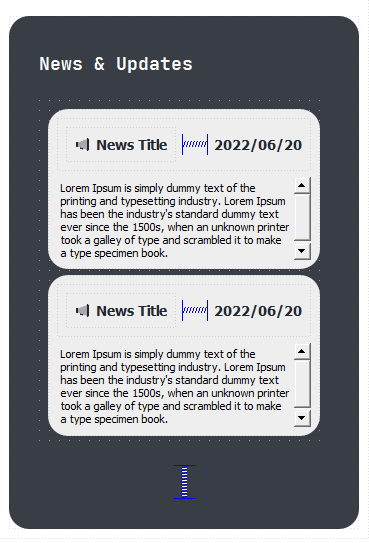
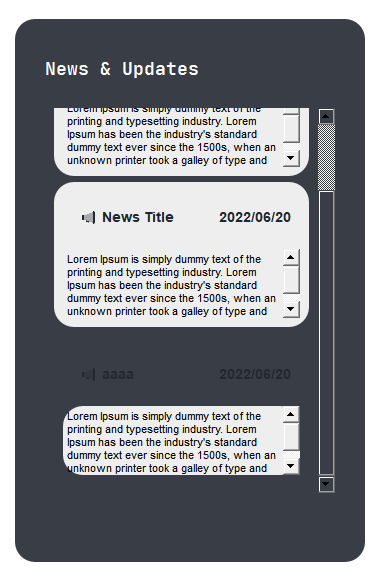
What I am receiving (last component)
Thank you!