Skip to content
  • Categories
  • Recent
  • Tags
  • Popular
  • Users
  • Groups
  • Search
  • Get Qt Extensions
  • Unsolved
Collapse
Brand Logo
  1. Home
  2. Qt Development
  3. General and Desktop
  4. Qt+QML application on remote machine
Qt 6.11 is out! See what's new in the release blog

Qt+QML application on remote machine

Scheduled Pinned Locked Moved Unsolved General and Desktop
11 Posts 2 Posters 2.0k Views 1 Watching
  • Oldest to Newest
  • Newest to Oldest
  • Most Votes
Reply
  • Reply as topic
Log in to reply
This topic has been deleted. Only users with topic management privileges can see it.
  • D Offline
    D Offline
    Damian7546
    wrote on last edited by Damian7546
    #2

    So I prepared remote fresh computer with Debian OS in network 192.168.1.17, enabled SSH on port 22222.
    So In my local machine in qt creator I try connect by SSH and looks like the connection is established but lack of some packages on my remote machine.
    1.jpg
    What I should install on my remote machine to achive my functionality ?

    Whats more, when I choosen KIT created by me: RemoteLinux
    and I tried run my app, the files are send to remote machine but with .exe app.

    19:20:56: The process "C:\Qt\Tools\mingw810_64\bin\mingw32-make.exe" exited normally.
    19:20:56: Trying to kill "ModbusExample/bin/ModbusExample.exe" on remote device...
    19:21:04: Remote application killed.
    19:21:04: Deploy step finished.
    19:21:04: 1 file(s) need to be uploaded.
    19:21:10: sftp> -mkdir ''
    sftp> -mkdir .
    sftp> -mkdir ..
    sftp> -mkdir ModbusExample
    sftp> -mkdir ModbusExample/bin
    sftp> put C:/Users/LENOVO/Documents/qt_proj/modbus_example/build-ModbusExample-RemoteLinuxT1in-Debug/debug/ModbusExample.exe ModbusExample/bin/ModbusExample.exe
    
    19:21:20: All files successfully deployed.
    19:21:20: Deploy step finished.
    19:21:20: Elapsed time: 00:34.
    

    What should have to change in my local machine to generate project to Linux Debian ?

    1 Reply Last reply
    0
    • SGaistS Offline
      SGaistS Offline
      SGaist
      Lifetime Qt Champion
      wrote on last edited by
      #3

      Hi,

      The first thing you need is a cross-compiled Qt. You are building an executable that can only run on Windows.

      Interested in AI ? www.idiap.ch
      Please read the Qt Code of Conduct - https://forum.qt.io/topic/113070/qt-code-of-conduct

      D 1 Reply Last reply
      1
      • SGaistS SGaist

        Hi,

        The first thing you need is a cross-compiled Qt. You are building an executable that can only run on Windows.

        D Offline
        D Offline
        Damian7546
        wrote on last edited by
        #4

        @SGaist
        how to do it?

        1 Reply Last reply
        0
        • SGaistS Offline
          SGaistS Offline
          SGaist
          Lifetime Qt Champion
          wrote on last edited by
          #5

          The technique is similar to the one for RPi.

          Something you can try is QtCrossTool. Note that I have not used it.

          Interested in AI ? www.idiap.ch
          Please read the Qt Code of Conduct - https://forum.qt.io/topic/113070/qt-code-of-conduct

          D 1 Reply Last reply
          1
          • SGaistS SGaist

            The technique is similar to the one for RPi.

            Something you can try is QtCrossTool. Note that I have not used it.

            D Offline
            D Offline
            Damian7546
            wrote on last edited by Damian7546
            #6

            @SGaist
            I took a shortcut and use two Debians. from my develop Debian I connect to remote Debian by SSH. the executable file is send to remote Debian but smoething is wrong.
            When I run my app on remote linux I get respond:

            11:05:13: Starting ModbusExample/bin/ModbusExample ...
            qt.qpa.xcb: could not connect to display 
            qt.qpa.plugin: Could not load the Qt platform plugin "xcb" in "" even though it was found.
            This application failed to start because no Qt platform plugin could be initialized. Reinstalling the application may fix this problem.
            
            Available platform plugins are: eglfs, linuxfb, minimal, minimalegl, offscreen, vnc, xcb.
            
            11:05:13: Remote process crashed.
            
            
            1 Reply Last reply
            0
            • SGaistS Offline
              SGaistS Offline
              SGaist
              Lifetime Qt Champion
              wrote on last edited by
              #7

              Are you forwarding your X server connection ?

              Interested in AI ? www.idiap.ch
              Please read the Qt Code of Conduct - https://forum.qt.io/topic/113070/qt-code-of-conduct

              D 1 Reply Last reply
              0
              • SGaistS SGaist

                Are you forwarding your X server connection ?

                D Offline
                D Offline
                Damian7546
                wrote on last edited by Damian7546
                #8

                @SGaist said in Qt+QML application on remote machine:

                Are you forwarding your X server connection ?

                I don't know what we're talking about ? Can you exaplain me ?

                My Kits to remote linux device is cofigured like below:
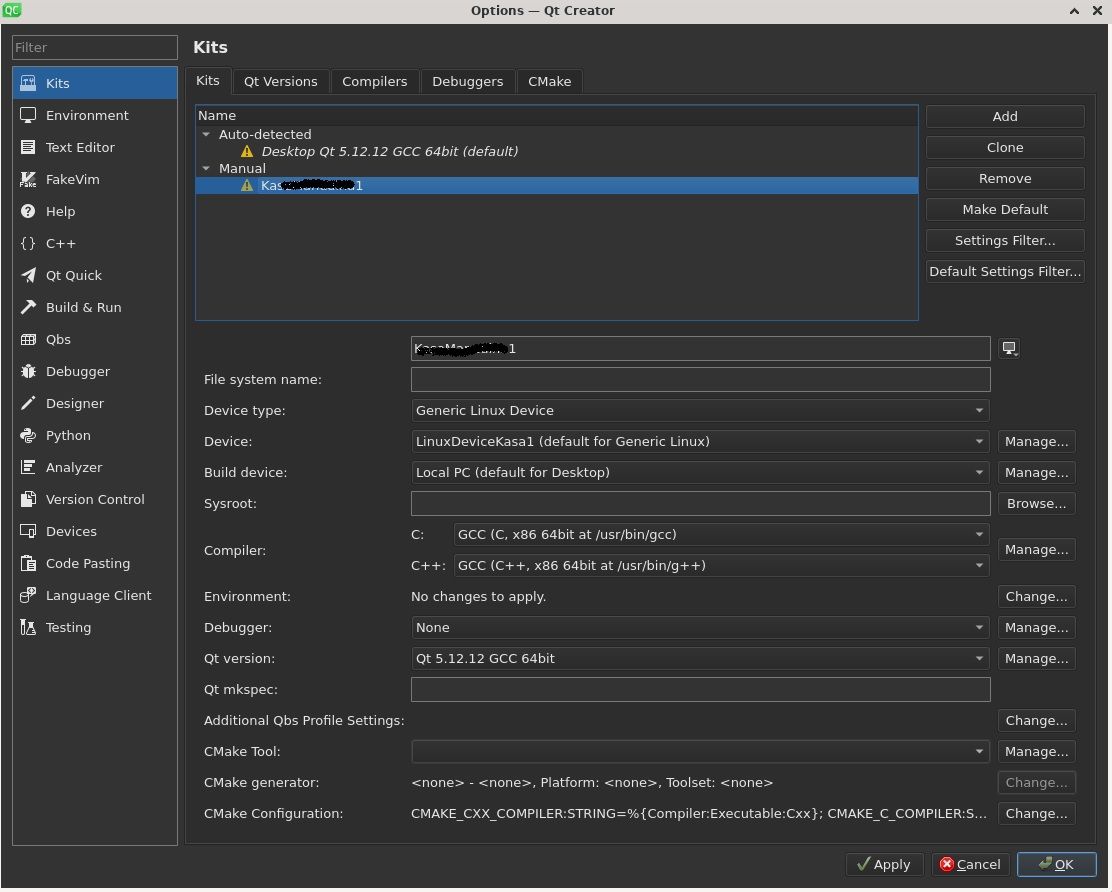
                kits.jpg

                Maybe problem is in Build device ?

                1 Reply Last reply
                0
                • SGaistS Offline
                  SGaistS Offline
                  SGaist
                  Lifetime Qt Champion
                  wrote on last edited by
                  #9

                  What are the device settings ?
                  By the way, are you using Xorg or Wayland on your target machine ?

                  Interested in AI ? www.idiap.ch
                  Please read the Qt Code of Conduct - https://forum.qt.io/topic/113070/qt-code-of-conduct

                  1 Reply Last reply
                  0
                  • D Offline
                    D Offline
                    Damian7546
                    wrote on last edited by Damian7546
                    #10

                    @SGaist I do not know. I only know that remote machine is with Debian 11 OS with Xfce desktop environment

                    1 Reply Last reply
                    0
                    • SGaistS Offline
                      SGaistS Offline
                      SGaist
                      Lifetime Qt Champion
                      wrote on last edited by
                      #11

                      Then, if you don't already have, create a ssh configuration file that sets the parameters connection for your remote machine. Test it by connecting from your terminal and start a GUI app like the one you are developing. Once you have that working, retry with Qt Creator.

                      Interested in AI ? www.idiap.ch
                      Please read the Qt Code of Conduct - https://forum.qt.io/topic/113070/qt-code-of-conduct

                      1 Reply Last reply
                      0

                      • Login

                      • Login or register to search.
                      • First post
                        Last post
                      0
                      • Categories
                      • Recent
                      • Tags
                      • Popular
                      • Users
                      • Groups
                      • Search
                      • Get Qt Extensions
                      • Unsolved