
How to translate text with QUiLoader?
-
Hi guys,
I'm trying to translate the UI texts. The problem is that I useDesignerto design my UI, and so I then use QUiLoader to load my ui file. But when I try to useretranslateUi, it just comes with this error:AttributeError: 'PySide6.QtWidgets.QWidget' object has no attribute 'retranslateUi'. Code:class CustomMessageBox(QMainWindow): def __init__(self): super().__init__() self.ui = QUiLoader().load('../../message.ui') # 主界面 self.setCentralWidget(self.ui) self.trans = QTranslator() self.trans.load('../../message.qm') app = QApplication.instance() app.installTranslator(self.trans) self.ui.retranslateUi(self) if __name__ == '__main__': from PySide6.QtWidgets import QApplication app = QApplication() ui = CustomMessageBox() ui.show() app.exec()Is it possible to translate the UI for application created by QUiLoader?
-
Hi guys,
I'm trying to translate the UI texts. The problem is that I useDesignerto design my UI, and so I then use QUiLoader to load my ui file. But when I try to useretranslateUi, it just comes with this error:AttributeError: 'PySide6.QtWidgets.QWidget' object has no attribute 'retranslateUi'. Code:class CustomMessageBox(QMainWindow): def __init__(self): super().__init__() self.ui = QUiLoader().load('../../message.ui') # 主界面 self.setCentralWidget(self.ui) self.trans = QTranslator() self.trans.load('../../message.qm') app = QApplication.instance() app.installTranslator(self.trans) self.ui.retranslateUi(self) if __name__ == '__main__': from PySide6.QtWidgets import QApplication app = QApplication() ui = CustomMessageBox() ui.show() app.exec()Is it possible to translate the UI for application created by QUiLoader?
@feiyuhuahuo
I wonder whetherQUiLoader().load()already respects current translator and translates for you?? What if you move your translator stuff to before theload()?? -
@feiyuhuahuo
I wonder whetherQUiLoader().load()already respects current translator and translates for you?? What if you move your translator stuff to before theload()??@JonB good point.
QWidgetindeed has noretranslateUi()and it isuicwho adds it to the class when it is created from ui-file.
So either your are right or it isn't possible.But
QUiLoader.load()returnsQWidgetso should type-casting be there?... -
@JonB good point.
QWidgetindeed has noretranslateUi()and it isuicwho adds it to the class when it is created from ui-file.
So either your are right or it isn't possible.But
QUiLoader.load()returnsQWidgetso should type-casting be there?...@StarterKit said in How to translate text with QUiLoader?:
But QUiLoader.load() returns QWidget so should type-casting be there?...
Don't know what you mean here. You are Python, so what "type-casting"??
retranslateUi()is not a method on any widget. It is a little function which is produced by running the "pyuic"-type program for what PySide/PyQt you use on the.uifile produced by the designer. But you don't run these, so I don't think you have one anywhere. See e.g. https://stackoverflow.com/questions/66361580/what-does-retranslateui-do-in-pyqt. -
@feiyuhuahuo
I wonder whetherQUiLoader().load()already respects current translator and translates for you?? What if you move your translator stuff to before theload()??self.trans = QTranslator() self.trans.load('../../message.qm') app = QApplication.instance() app.installTranslator(self.trans)I move the four lines before
QUiLoader().load(), and yes, it works. The UI can be translated successfully. But still, there's a problem. If I want to change the language real-timely,is it possble? I mean that in my UI there are several buttons. Each button means a certain language. By clicking these buttons, the UI can directly update the language without restart the APP. If so, seems I must useretranslateUifunction. But I can't get it if useQUiLoader().load(). -
        self.trans = QTranslator()
        self.trans.load('../../message.qm')
        app = QApplication.instance()
        app.installTranslator(self.trans)
I move the four lines before
QUiLoader().load(), and yes, it works. The UI can be translated successfully. But still, there's a problem. If I want to change the language real-timely,is it possble? I mean that in my UI there are several buttons. Each button means a certain language. By clicking these buttons, the UI can directly update the language without restart the APP. If so, seems I must useretranslateUifunction. But I can't get it if useQUiLoader().load().@feiyuhuahuo
So you want to be able to re-change the language dynamically at runtime. I don't think usingQUiLoader().load()in itself prevents this. It just means that you do not have individual variables pointing to each widget which should be translated, rather any time you want to access widgets you have to walk the hierarchy viaQObject.findChildren<QWidget>. You then need to know which ones (all of them?) you want translated and get the translation.I don't do translation, but one problem I see: I believe the original English (or whatever you type into the Designer) gets completely replaced by the translation (e.g. in
QUiLoader().load()). So I don't know when you want to re-translate you are supposed to find the original text to lookup from?You might want to try running
pyuic(or whatever) on your project or a sample one just to look at the code it generates forretranslateUi(). You will see it's nothing "magic", but has the advantage if called again that it knows exactly which widgets need translating.Google also for something like
qt translation dynamicto see what work you have to do, e.g. an old link is https://forum.qt.io/topic/55200/dynamic-translation-of-strings-in-widgets. -
Provided all the .qm are created and loaded properly, QUiLoader should retranslate on receiving QEvent::LanguageChange if QUiLoader.setLanguageChangeEnabled() was set to true.
See https://doc.qt.io/qtforpython-6/tutorials/basictutorial/translations.html
and https://doc.qt.io/qtforpython-6/PySide6/QtUiTools/QUiLoader.html?highlight=quiloader#PySide6.QtUiTools.PySide6.QtUiTools.QUiLoader.setLanguageChangeEnabledNote we generally recommend using pyside6-uic for Qt Designer forms (see https://doc.qt.io/qtforpython-6/tutorials/basictutorial/uifiles.html ).
-
@feiyuhuahuo
So you want to be able to re-change the language dynamically at runtime. I don't think usingQUiLoader().load()in itself prevents this. It just means that you do not have individual variables pointing to each widget which should be translated, rather any time you want to access widgets you have to walk the hierarchy viaQObject.findChildren<QWidget>. You then need to know which ones (all of them?) you want translated and get the translation.I don't do translation, but one problem I see: I believe the original English (or whatever you type into the Designer) gets completely replaced by the translation (e.g. in
QUiLoader().load()). So I don't know when you want to re-translate you are supposed to find the original text to lookup from?You might want to try running
pyuic(or whatever) on your project or a sample one just to look at the code it generates forretranslateUi(). You will see it's nothing "magic", but has the advantage if called again that it knows exactly which widgets need translating.Google also for something like
qt translation dynamicto see what work you have to do, e.g. an old link is https://forum.qt.io/topic/55200/dynamic-translation-of-strings-in-widgets.@JonB
So I need to add code to translate each widget by myself just like whatretranslateUi()does? I have quite a lot of widgets. I prefer to keep my code short and clean. So I will try some other ways. Thanks for the reply.
By the way, according to @friedemannkleint , I've already done some successful test. But still, there's some problem. Would like to take a look? -
Provided all the .qm are created and loaded properly, QUiLoader should retranslate on receiving QEvent::LanguageChange if QUiLoader.setLanguageChangeEnabled() was set to true.
See https://doc.qt.io/qtforpython-6/tutorials/basictutorial/translations.html
and https://doc.qt.io/qtforpython-6/PySide6/QtUiTools/QUiLoader.html?highlight=quiloader#PySide6.QtUiTools.PySide6.QtUiTools.QUiLoader.setLanguageChangeEnabledNote we generally recommend using pyside6-uic for Qt Designer forms (see https://doc.qt.io/qtforpython-6/tutorials/basictutorial/uifiles.html ).
@friedemannkleint @JonB
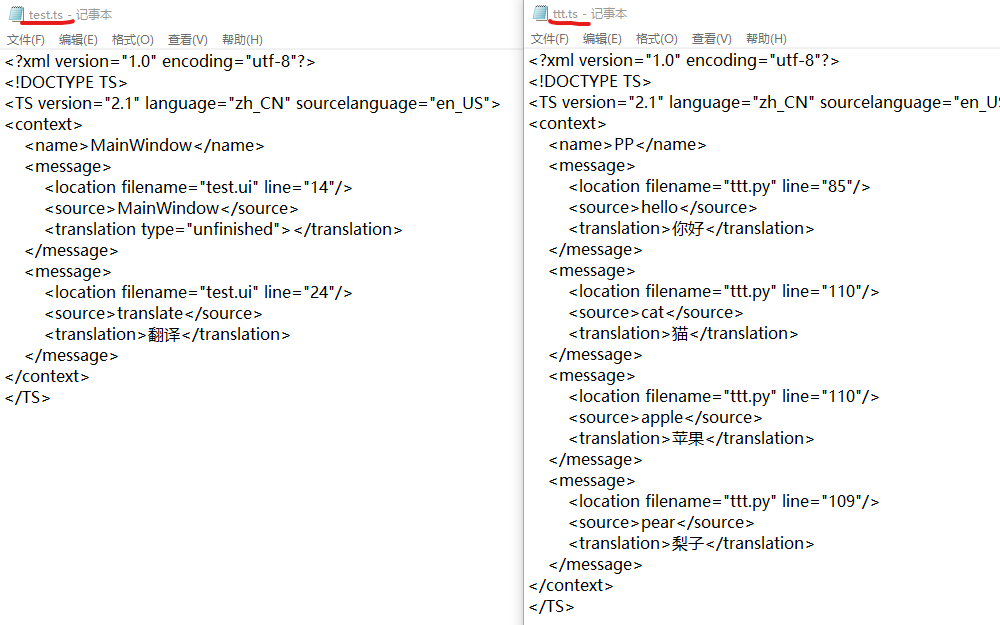
Thanks for the help. I'm going to succeed. There's still a problem. Codes first:from PySide6.QtUiTools import QUiLoader from PySide6.QtWidgets import QMainWindow from PySide6.QtWidgets import QApplication, QMenu, QMessageBox from PySide6.QtGui import QCursor, QAction from PySide6.QtCore import QTranslator class PP(QMainWindow): def __init__(self): super().__init__() loader = QUiLoader() loader.setLanguageChangeEnabled(True) print(loader.isLanguageChangeEnabled()) self.app = QApplication.instance() self.main_ui = loader.load('test.ui') self.setCentralWidget(self.main_ui) self.main_ui.pushButton.clicked.connect(self.trans_ui) self.menu = QMenu(self) self.action = QAction(self.tr('hello'), self) self.action.triggered.connect(self.trans_code) self.menu.addAction(self.action) self.main_ui.pushButton.customContextMenuRequested.connect(self.show_menu) self.show() def changeEvent(self, event): print(event) def load_qm(self): self.trans_window = QTranslator() self.trans_window.load('test.qm') self.app.installTranslator(self.trans_window) self.trans_main = QTranslator() self.trans_main.load('ttt.qm') self.app.installTranslator(self.trans_main) def trans_ui(self): self.load_qm() def trans_code(self): self.main_ui.label.setText(self.tr('pear')) QMessageBox.information(self, self.tr('cat'), self.tr('apple')) def show_menu(self): self.menu.exec(QCursor.pos()) if __name__ == '__main__': app = QApplication() ui = PP() app.exec()The related ts file:
There are a button "translate" and a label. Right click the button, a menu will appear. And then left click the 'hello' action, a QMessage box will appear and text 'pear' will be set to the label. I hope that before I left click the button, all the text are English. And after I left click the button, all the text can be translated to Chinese directly.
But in the below GIF:
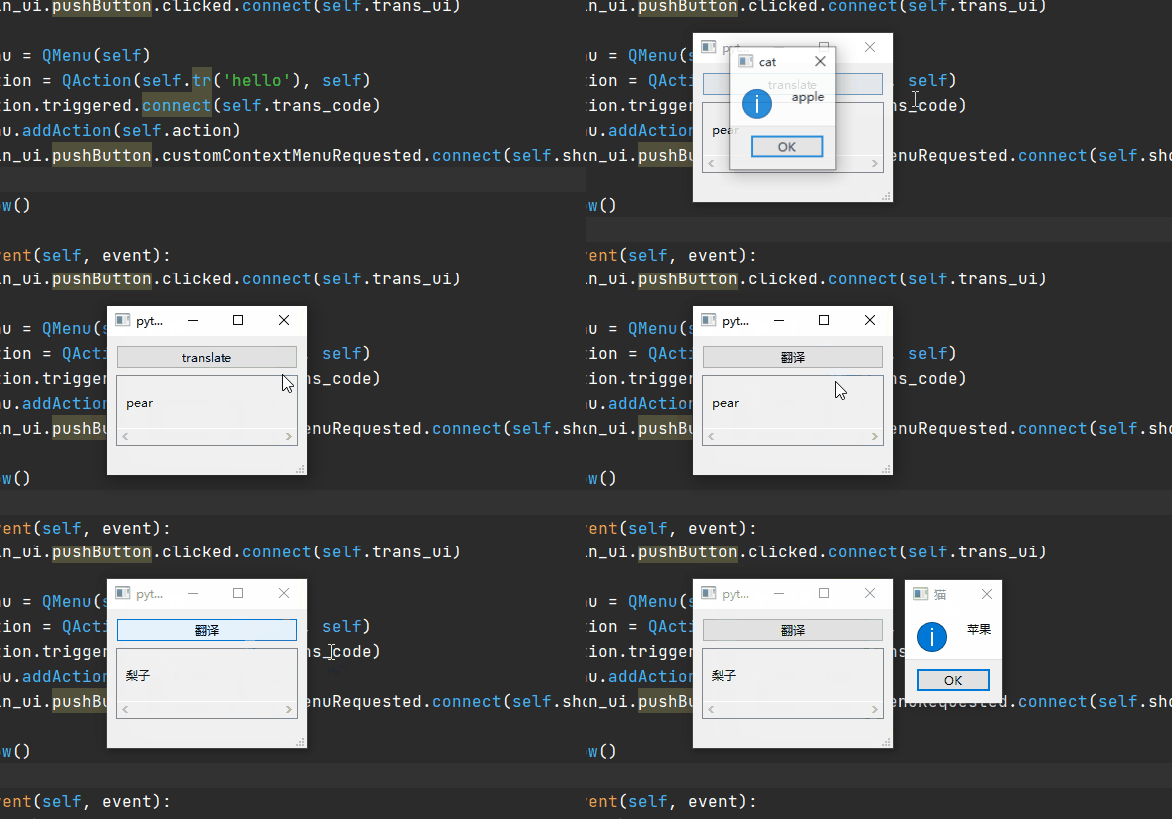
Problem 1: after I left click the button, the action text 'hello' was not translated. The label text 'pear' was translated afterI left click the action. (I hope it can be translated as soon as I left click the button.)If I change the code as follows, which means load 'ttt.qm' before
load()ui file just as what @JonB said.class PP(QMainWindow): def __init__(self): super().__init__() loader = QUiLoader() loader.setLanguageChangeEnabled(True) print(loader.isLanguageChangeEnabled()) self.app = QApplication.instance() self.trans_main = QTranslator() self.trans_main.load('ttt.qm') self.app.installTranslator(self.trans_main) self.main_ui = loader.load('test.ui') self.setCentralWidget(self.main_ui) self.main_ui.pushButton.clicked.connect(self.trans_ui) ...... ...... def load_qm(self): self.trans_window = QTranslator() self.trans_window.load('test.qm') self.app.installTranslator(self.trans_window) def trans_ui(self): self.load_qm() ......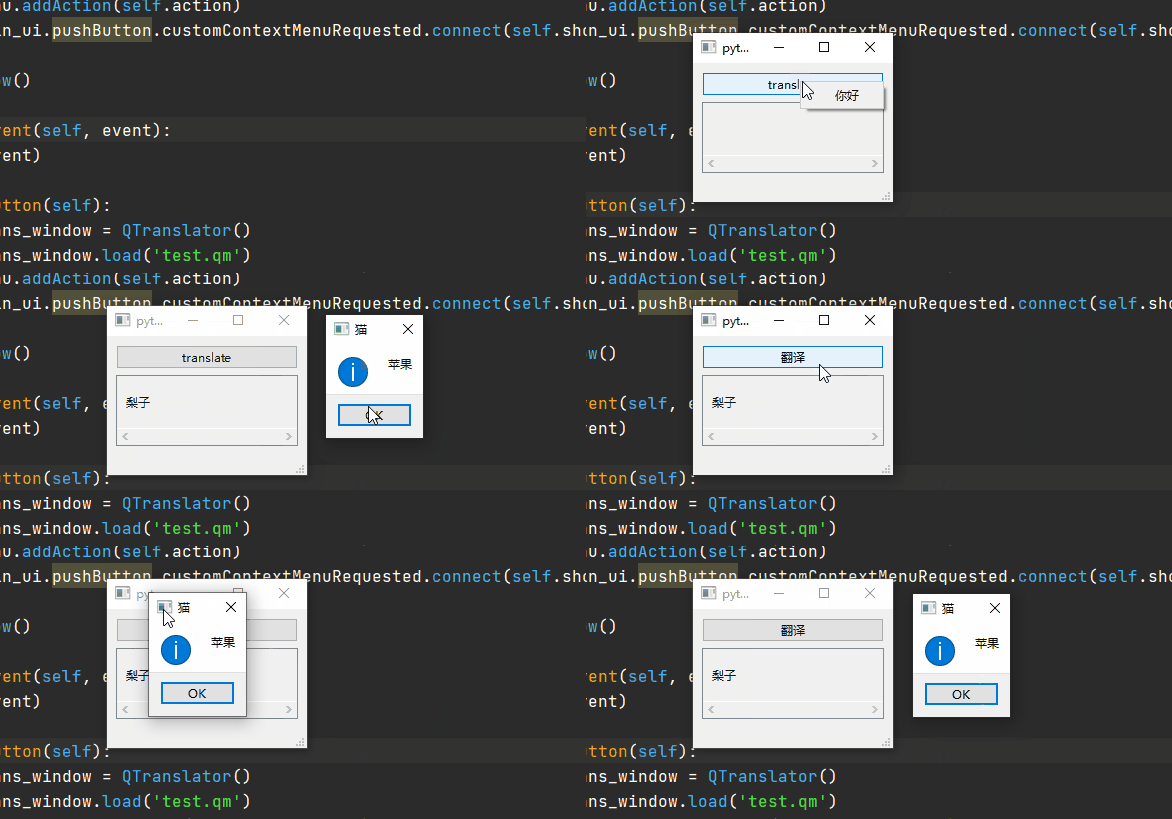
All text in 'ttt.ts' can be translated at the beginning, but this is not what I want.
Problem 2: what's the difference between this two case? I'm puzzled on what the code is doing.

