Skip to content
  • Categories
  • Recent
  • Tags
  • Popular
  • Users
  • Groups
  • Search
  • Get Qt
  • Unsolved
Collapse
Brand Logo
  1. Home
  2. Qt Development
  3. General and Desktop
  4. putting the cursor at the beginning QLineedit
Qt 6.12 LTS is out! See what's new in the release blog

putting the cursor at the beginning QLineedit

Scheduled Pinned Locked Moved Unsolved General and Desktop
18 Posts 4 Posters 6.0k Views 1 Watching
  • Oldest to Newest
  • Newest to Oldest
  • Most Votes
Reply
  • Reply as topic
Log in to reply
This topic has been deleted. Only users with topic management privileges can see it.
  • SGaistS Offline
    SGaistS Offline
    SGaist
    Lifetime Qt Champion
    wrote on last edited by
    #2

    Hi,

    That's something you could do through focusInEvent.

    However, this behaviour will likely surprise your users in the wrong way.

    Interested in AI ? www.idiap.ch
    Please read the Qt Code of Conduct - https://forum.qt.io/topic/113070/qt-code-of-conduct

    1 Reply Last reply
    0
    • T Offline
      T Offline
      thomasGl
      wrote on last edited by thomasGl
      #3

      Do you mean i will suprise the users with focusInEvent like i do now? How would u do that. I need Qlineedit one where i can only input decimal numbers and one with only binary numbers. I dont understand how to start with focusInEvent.tfff.PNG

      jsulmJ 1 Reply Last reply
      0
      • T thomasGl

        Do you mean i will suprise the users with focusInEvent like i do now? How would u do that. I need Qlineedit one where i can only input decimal numbers and one with only binary numbers. I dont understand how to start with focusInEvent.tfff.PNG

        jsulmJ Offline
        jsulmJ Offline
        jsulm
        Lifetime Qt Champion
        wrote on last edited by
        #4

        @thomasGl Now you posted two line edits and it looks like you want to move the cursor to the second one if the user clicks on the first. That is not what you asked first. What is really your use case?

        Surprising for the user would be if he/she clicks in a line edit and the cursor is always at the beginning and not where the user actually clicked.

        https://forum.qt.io/topic/113070/qt-code-of-conduct

        1 Reply Last reply
        1
        • T Offline
          T Offline
          thomasGl
          wrote on last edited by
          #5

          I always want to start from the beginning. When I'm in the first object and then click the second object, I always want to start from the beginning. It doesn't matter whether I click from the second into the first object or from the first into the second. It's supposed to be just like the unmodified QLineedit, so it automatically starts from the beginning when I click on it. It can't start from the center unless I move the cursor with the keyboard. Its because of setInputmask. My first question was correct, I just expanded the questions because I don't understand how to use FocusInEvent for that. I use setInputmask here because I want qline1 to get only decimalnumbers and qline2 only binarynumbers

          jsulmJ 1 Reply Last reply
          0
          • T thomasGl

            I always want to start from the beginning. When I'm in the first object and then click the second object, I always want to start from the beginning. It doesn't matter whether I click from the second into the first object or from the first into the second. It's supposed to be just like the unmodified QLineedit, so it automatically starts from the beginning when I click on it. It can't start from the center unless I move the cursor with the keyboard. Its because of setInputmask. My first question was correct, I just expanded the questions because I don't understand how to use FocusInEvent for that. I use setInputmask here because I want qline1 to get only decimalnumbers and qline2 only binarynumbers

            jsulmJ Offline
            jsulmJ Offline
            jsulm
            Lifetime Qt Champion
            wrote on last edited by
            #6

            @thomasGl Then do what @SGaist suggested: override focusInEvent and call setCursorPosition(0) there.

            https://forum.qt.io/topic/113070/qt-code-of-conduct

            1 Reply Last reply
            1
            • T Offline
              T Offline
              thomasGl
              wrote on last edited by
              #7
              class qlain: public QLineEdit
              {
              public:
                  qlain(QWidget* parent);
              
              
               virtual void focusInEvent(QFocusEvent* )override;
              
              
              };


              void qlain::focusInEvent(QFocusEvent *)
              {
                  this->setCursorPosition(0);
              }


              Like that? now i need to call that function somehow right?

              JonBJ 1 Reply Last reply
              0
              • T thomasGl
                class qlain: public QLineEdit
                {
                public:
                    qlain(QWidget* parent);
                
                
                 virtual void focusInEvent(QFocusEvent* )override;
                
                
                };


                void qlain::focusInEvent(QFocusEvent *)
                {
                    this->setCursorPosition(0);
                }


                Like that? now i need to call that function somehow right?

                JonBJ Offline
                JonBJ Offline
                JonB
                wrote on last edited by JonB
                #8

                @thomasGl
                Assuming code is correct --- which from a glance I think it (mostly) is --- then, no, you do not "need to call that function somehow right?". Because it is an override of focusInEvent() the whole point is that it will get called automatically whenever your widget gets focus, however that occurs.

                For an event you ought always call the base class. I think you should set your focus after that, in case base implementation sets cursor, so:

                void qlain::focusInEvent(QFocusEvent *event)
                {
                    QLineEdit::focusInEvent(event);
                    this->setCursorPosition(0);
                }
                
                1 Reply Last reply
                1
                • T Offline
                  T Offline
                  thomasGl
                  wrote on last edited by
                  #9
                  #ifndef QLAIN_H
                  #define QLAIN_H
                  
                  #include <QLineEdit>
                  #include <QFocusEvent>


                  class qlain: public QLineEdit
                  {
                  public:
                      qlain(QWidget* parent);
                  
                  
                      virtual void focusInEvent(QFocusEvent* event)override;
                  
                  };
                  
                  #endif // QLAIN_H
                  
                  
                  #include "qlain.h"
                  
                  qlain::qlain(QWidget *parent):QLineEdit(parent)
                  {
                  
                  }
                  
                  void qlain::focusInEvent(QFocusEvent *event)
                  {
                      QLineEdit::focusInEvent(event);
                      this->setCursorPosition(0);
                  }
                  
                  #ifndef WindMain_H
                  #define WindMain_H
                  
                  #include <QMainWindow>
                  #include <QLineEdit>
                  #include <qlain.h>
                  
                  
                  class WindMain : public QMainWindow
                  {
                      Q_OBJECT
                  
                  public:
                      WindMain(QWidget *parent = 0);
                      qlain* dec = new qlain(this);   //<----- that needs to start always from the beginning.
                  
                  };
                  
                  #endif // WindMain_H
                  
                  
                  #include "WindMain.h"
                  
                  WindMain::WindMain(QWidget *parent):QMainWindow(parent)
                  {
                     dec->setInputMask("999999999");  //<---that one
                  }
                  

                  Mhhhh doesn't work. here my complete code.

                  JonBJ 1 Reply Last reply
                  0
                  • T thomasGl
                    #ifndef QLAIN_H
                    #define QLAIN_H
                    
                    #include <QLineEdit>
                    #include <QFocusEvent>


                    class qlain: public QLineEdit
                    {
                    public:
                        qlain(QWidget* parent);
                    
                    
                        virtual void focusInEvent(QFocusEvent* event)override;
                    
                    };
                    
                    #endif // QLAIN_H
                    
                    
                    #include "qlain.h"
                    
                    qlain::qlain(QWidget *parent):QLineEdit(parent)
                    {
                    
                    }
                    
                    void qlain::focusInEvent(QFocusEvent *event)
                    {
                        QLineEdit::focusInEvent(event);
                        this->setCursorPosition(0);
                    }
                    
                    #ifndef WindMain_H
                    #define WindMain_H
                    
                    #include <QMainWindow>
                    #include <QLineEdit>
                    #include <qlain.h>
                    
                    
                    class WindMain : public QMainWindow
                    {
                        Q_OBJECT
                    
                    public:
                        WindMain(QWidget *parent = 0);
                        qlain* dec = new qlain(this);   //<----- that needs to start always from the beginning.
                    
                    };
                    
                    #endif // WindMain_H
                    
                    
                    #include "WindMain.h"
                    
                    WindMain::WindMain(QWidget *parent):QMainWindow(parent)
                    {
                       dec->setInputMask("999999999");  //<---that one
                    }
                    

                    Mhhhh doesn't work. here my complete code.

                    JonBJ Offline
                    JonBJ Offline
                    JonB
                    wrote on last edited by
                    #10

                    @thomasGl
                    Under Qt5.15, Ubuntu, it "works" for me. When I run the program I see:
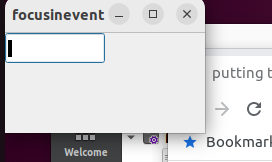
                    Screenshot from 2022-11-29 10-46-56.png

                    Note there is a "heavy/bold cursor" at the left-hand side of the line edit. This must be something to do with the input mask, because I don't usually see such a cursor. At this point I can type digits, and they appear at the left. But if instead I click into the line edit while it is empty the cursor jumps to the middle, and then I don't seem to be able to type anything into it. But I can delete space characters (9 of them present?) and then type. That must all be to do with the input mask.....

                    1 Reply Last reply
                    0
                    • T Offline
                      T Offline
                      thomasGl
                      wrote on last edited by
                      #11

                      Hello. I am trying to put the InputMask inside a Qstring variable, but it does not work. How can i do that?

                      dec->setInputMask("999999999");  //my input for example: 23453
                      
                      QString tempString = bin->text();  //i want 23453 inside tempstring. That does not work.
                      
                      
                      QString tempString = bin->inputMask();  //does not work either, here i am getting 999999999 as a ouput.
                      
                      JonBJ 2 Replies Last reply
                      0
                      • T thomasGl

                        Hello. I am trying to put the InputMask inside a Qstring variable, but it does not work. How can i do that?

                        dec->setInputMask("999999999");  //my input for example: 23453
                        
                        QString tempString = bin->text();  //i want 23453 inside tempstring. That does not work.
                        
                        
                        QString tempString = bin->inputMask();  //does not work either, here i am getting 999999999 as a ouput.
                        
                        JonBJ Offline
                        JonBJ Offline
                        JonB
                        wrote on last edited by
                        #12

                        @thomasGl
                        You don't have any bin inside any code you show....

                        1 Reply Last reply
                        0
                        • T Offline
                          T Offline
                          thomasGl
                          wrote on last edited by
                          #13

                          i mean dec.

                          dec->setInputMask("999999999");  
                          

                          That input inside tempString.

                          1 Reply Last reply
                          0
                          • T thomasGl

                            Hello. I am trying to put the InputMask inside a Qstring variable, but it does not work. How can i do that?

                            dec->setInputMask("999999999");  //my input for example: 23453
                            
                            QString tempString = bin->text();  //i want 23453 inside tempstring. That does not work.
                            
                            
                            QString tempString = bin->inputMask();  //does not work either, here i am getting 999999999 as a ouput.
                            
                            JonBJ Offline
                            JonBJ Offline
                            JonB
                            wrote on last edited by
                            #14

                            @thomasGl said in putting the cursor at the beginning QLineedit:

                            QString tempString = bin->text(); //i want 23453 inside tempstring. That does not work.

                            Then this line returns whatever text is currently in the QLineEdit.

                            1 Reply Last reply
                            0
                            • T Offline
                              T Offline
                              thomasGl
                              wrote on last edited by thomasGl
                              #15
                              QString tempString = dec->text();
                               qDebug()<<tempString;
                              

                              tff.PNG

                              It doesn't show that string.

                              jsulmJ JonBJ 2 Replies Last reply
                              0
                              • T thomasGl
                                QString tempString = dec->text();
                                 qDebug()<<tempString;
                                

                                tff.PNG

                                It doesn't show that string.

                                jsulmJ Offline
                                jsulmJ Offline
                                jsulm
                                Lifetime Qt Champion
                                wrote on last edited by
                                #16

                                @thomasGl said in putting the cursor at the beginning QLineedit:

                                QString tempString = dec->text();
                                qDebug()<<tempString;

                                Where and when do you execute this code?

                                https://forum.qt.io/topic/113070/qt-code-of-conduct

                                1 Reply Last reply
                                0
                                • T thomasGl
                                  QString tempString = dec->text();
                                   qDebug()<<tempString;
                                  

                                  tff.PNG

                                  It doesn't show that string.

                                  JonBJ Offline
                                  JonBJ Offline
                                  JonB
                                  wrote on last edited by
                                  #17

                                  @thomasGl said in putting the cursor at the beginning QLineedit:

                                  It doesn't show that string.

                                  It will show that string if you call it when that string is in there. If when you call it that string is not in there, it cannot guess what you are going to type and return it before you do so....

                                  1 Reply Last reply
                                  0
                                  • T Offline
                                    T Offline
                                    thomasGl
                                    wrote on last edited by
                                    #18

                                    ok, i am executing it in my mainwindow constructor. I think thats why it does not work. I will try to execute it from somewhere else.

                                    1 Reply Last reply
                                    0

                                    • Login

                                    • Login or register to search.
                                    • First post
                                      Last post
                                    0
                                    • Categories
                                    • Recent
                                    • Tags
                                    • Popular
                                    • Users
                                    • Groups
                                    • Search
                                    • Get Qt
                                    • Unsolved