Skip to content
  • Categories
  • Recent
  • Tags
  • Popular
  • Users
  • Groups
  • Search
  • Get Qt Extensions
  • Unsolved
Collapse
Brand Logo
  1. Home
  2. Qt Development
  3. General and Desktop
  4. How to disable click in column tableWidget?

How to disable click in column tableWidget?

Scheduled Pinned Locked Moved Solved General and Desktop
7 Posts 4 Posters 611 Views 1 Watching
  • Oldest to Newest
  • Newest to Oldest
  • Most Votes
Reply
  • Reply as topic
Log in to reply
This topic has been deleted. Only users with topic management privileges can see it.
  • e.ferroE Offline
    e.ferroE Offline
    e.ferro
    wrote on last edited by e.ferro
    #1

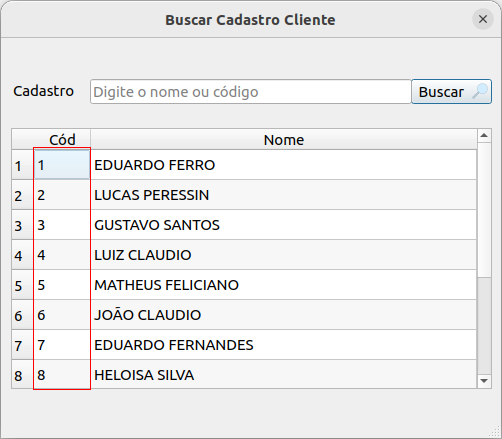
    How do I disable the click on the first column?

    Captura de tela de 2022-11-23 17-00-45.png

    1 Reply Last reply
    0
    • SGaistS Offline
      SGaistS Offline
      SGaist
      Lifetime Qt Champion
      wrote on last edited by
      #2

      Hi,

      The usual way is to make the model's flag method return at least Qt::ItemIsSelectable removed.

      Depending on the model you use, you can set the flag on the item or subclass the and reimplement flags or even have a proxy model that does that.

      Interested in AI ? www.idiap.ch
      Please read the Qt Code of Conduct - https://forum.qt.io/topic/113070/qt-code-of-conduct

      e.ferroE 1 Reply Last reply
      1
      • JoeCFDJ Offline
        JoeCFDJ Offline
        JoeCFD
        wrote on last edited by
        #3

        set each item of that column.
        item->setFlags( item->flags() & ~Qt::ItemIsSelectable );

        1 Reply Last reply
        0
        • SGaistS SGaist

          Hi,

          The usual way is to make the model's flag method return at least Qt::ItemIsSelectable removed.

          Depending on the model you use, you can set the flag on the item or subclass the and reimplement flags or even have a proxy model that does that.

          e.ferroE Offline
          e.ferroE Offline
          e.ferro
          wrote on last edited by
          #4

          @SGaist Sorry, iam newbie in qt, could you give me more examples?

          jsulmJ 1 Reply Last reply
          0
          • e.ferroE e.ferro

            @SGaist Sorry, iam newbie in qt, could you give me more examples?

            jsulmJ Offline
            jsulmJ Offline
            jsulm
            Lifetime Qt Champion
            wrote on last edited by jsulm
            #5

            @e-ferro @JoeCFD gave you an example

            https://forum.qt.io/topic/113070/qt-code-of-conduct

            JoeCFDJ 1 Reply Last reply
            0
            • jsulmJ jsulm

              @e-ferro @JoeCFD gave you an example

              JoeCFDJ Offline
              JoeCFDJ Offline
              JoeCFD
              wrote on last edited by JoeCFD
              #6

              @e-ferro you may have similar code to create this column

                  for ( int idx = 0; idx < m_tableWidget->rowCount(); ++idx ) {
                      auto table_item = new QTableWidgetItem( QString::number( idx + 1 ) );
                      table_item->setFlags( table_item->flags() & ~Qt::ItemIsSelectable );
                      m_tableWidget->setItem( idx, 0, table_item );
                  }
              
              1 Reply Last reply
              1
              • e.ferroE Offline
                e.ferroE Offline
                e.ferro
                wrote on last edited by
                #7

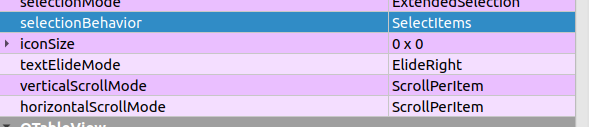
                Captura de tela de 2022-12-13 09-57-42.png

                I found the solution :D

                1 Reply Last reply
                0

                • Login

                • Login or register to search.
                • First post
                  Last post
                0
                • Categories
                • Recent
                • Tags
                • Popular
                • Users
                • Groups
                • Search
                • Get Qt Extensions
                • Unsolved