Skip to content
  • Categories
  • Recent
  • Tags
  • Popular
  • Users
  • Groups
  • Search
  • Get Qt Extensions
  • Unsolved
Collapse
Brand Logo
  1. Home
  2. Qt Development
  3. General and Desktop
  4. Extra window when creating my .exe

Extra window when creating my .exe

Scheduled Pinned Locked Moved Solved General and Desktop
12 Posts 4 Posters 876 Views 2 Watching
  • Oldest to Newest
  • Newest to Oldest
  • Most Votes
Reply
  • Reply as topic
Log in to reply
This topic has been deleted. Only users with topic management privileges can see it.
  • SGaistS Offline
    SGaistS Offline
    SGaist
    Lifetime Qt Champion
    wrote on last edited by
    #2

    Hi,

    Is it a qmake or CMake project ?

    Interested in AI ? www.idiap.ch
    Please read the Qt Code of Conduct - https://forum.qt.io/topic/113070/qt-code-of-conduct

    O 1 Reply Last reply
    0
    • SGaistS SGaist

      Hi,

      Is it a qmake or CMake project ?

      O Offline
      O Offline
      Oumayma
      wrote on last edited by
      #3

      @SGaist Hi, is a qmake proyect.

      1 Reply Last reply
      0
      • SGaistS Offline
        SGaistS Offline
        SGaist
        Lifetime Qt Champion
        wrote on last edited by
        #4

        Any chance you have CONFIG += console in it ?

        Interested in AI ? www.idiap.ch
        Please read the Qt Code of Conduct - https://forum.qt.io/topic/113070/qt-code-of-conduct

        O 1 Reply Last reply
        0
        • SGaistS SGaist

          Any chance you have CONFIG += console in it ?

          O Offline
          O Offline
          Oumayma
          wrote on last edited by
          #5

          @SGaist No, i haven't

          Christian EhrlicherC 1 Reply Last reply
          0
          • O Oumayma

            @SGaist No, i haven't

            Christian EhrlicherC Online
            Christian EhrlicherC Online
            Christian Ehrlicher
            Lifetime Qt Champion
            wrote on last edited by Christian Ehrlicher
            #6

            @Oumayma said in Extra window when creating my .exe:

            No, i haven't

            Then add

            CONFIG -= console to your pro file and take a look if you really don't add it somewhere.

            Qt Online Installer direct download: https://download.qt.io/official_releases/online_installers/
            Visit the Qt Academy at https://academy.qt.io/catalog

            1 Reply Last reply
            0
            • SGaistS Offline
              SGaistS Offline
              SGaist
              Lifetime Qt Champion
              wrote on last edited by
              #7

              Ok, can you share your .pro file ?
              Which compiler are you using ?
              Which version of Qt ?
              How are you starting your application ?

              Interested in AI ? www.idiap.ch
              Please read the Qt Code of Conduct - https://forum.qt.io/topic/113070/qt-code-of-conduct

              O 1 Reply Last reply
              0
              • SGaistS SGaist

                Ok, can you share your .pro file ?
                Which compiler are you using ?
                Which version of Qt ?
                How are you starting your application ?

                O Offline
                O Offline
                Oumayma
                wrote on last edited by
                #8

                @SGaist

                My .pro

                QT       += core gui printsupport testlib
                
                greaterThan(QT_MAJOR_VERSION, 4):  QT += widgets qml quick
                CONFIG(release, debug|release):DEFINES += QT_NO_DEBUG_OUTPUT
                
                CONFIG += c++11
                
                # You can make your code fail to compile if it uses deprecated APIs.
                # In order to do so, uncomment the following line.
                #DEFINES += QT_DISABLE_DEPRECATED_BEFORE=0x060000    # disables all the APIs deprecated before Qt 6.0.0
                INCLUDEPATH += $$PWD
                
                SOURCES += \
                    Manager.cpp \
                    main.cpp
                
                HEADERS += \
                    Constants.h \
                    Manager.h
                
                FORMS += \
                    Interfaz.ui
                
                # Default rules for deployment.
                qnx: target.path = /tmp/$${TARGET}/bin
                else: unix:!android: target.path = /opt/$${TARGET}/bin
                !isEmpty(target.path): INSTALLS += target
                
                RESOURCES += \
                    iconos.qrc
                
                ANDROID_ABIS = armeabi-v7a arm64-v8a x86 x86_64
                ANDROID_PACKAGE_SOURCE_DIR = $$PWD/AndroidSource
                
                DISTFILES += \
                    .gdbinit \
                    AndroidSource/AndroidManifest.xml \
                    TextosAyuda/Ayuda1 \
                    TextosAyuda/Ayuda1.txt \
                    TextosAyuda/Ayuda2 \
                    TextosAyuda/Ayuda3 \
                    TextosAyuda/AyudaPruebas.txt


                Compailer: MinGW 8.1.0 32-bit for C++
                QT version : QT 5.15.1
                I click in .exe of mi app.
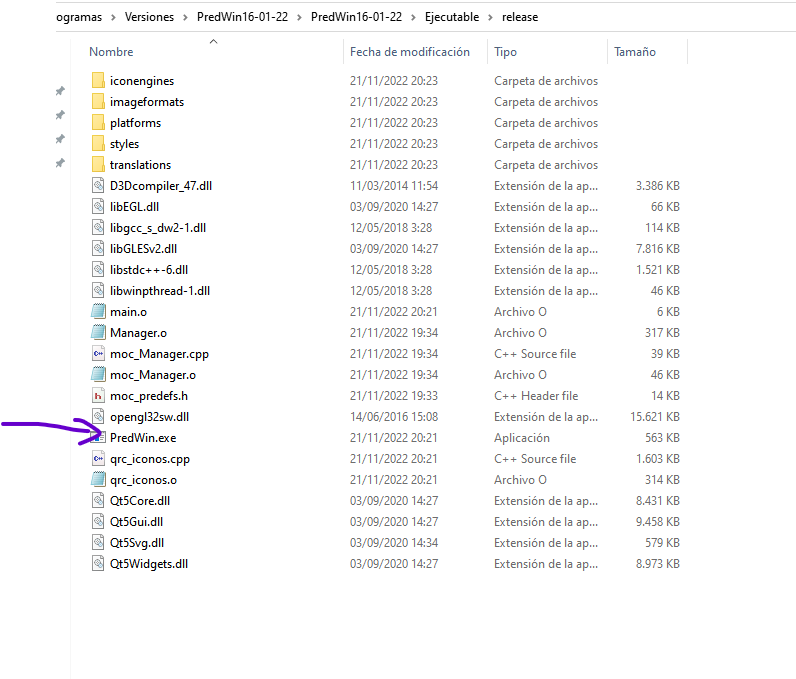
                bb9ec483-9ce7-41be-9ba0-39dfeeb74af5-image.png

                1 Reply Last reply
                0
                • M Offline
                  M Offline
                  mpergand
                  wrote on last edited by mpergand
                  #9

                  Seems similar to this:
                  https://forum.qt.io/topic/133723/two-windows-opening-after-i-deployed-an-application-on-windows

                  1 Reply Last reply
                  1
                  • SGaistS Offline
                    SGaistS Offline
                    SGaist
                    Lifetime Qt Champion
                    wrote on last edited by
                    #10

                    Why do you have testlib in your application dependencies ?

                    Interested in AI ? www.idiap.ch
                    Please read the Qt Code of Conduct - https://forum.qt.io/topic/113070/qt-code-of-conduct

                    O 1 Reply Last reply
                    1
                    • SGaistS SGaist

                      Why do you have testlib in your application dependencies ?

                      O Offline
                      O Offline
                      Oumayma
                      wrote on last edited by
                      #11

                      @SGaist

                      I have reviewed my code and I see why I have the dependencie for testliib in mi app. it is because i have a old import of QTestEventList class. But currently I do not use the QTestEventList class at all, I have removed the import of the code and the testlib from .pro and the second window no longer appears. Thank you very much for the help.

                      1 Reply Last reply
                      0
                      • SGaistS Offline
                        SGaistS Offline
                        SGaist
                        Lifetime Qt Champion
                        wrote on last edited by
                        #12

                        Good cleanup.

                        That said, the test module is meant for that: testing. It shall not be part of an application that is not part of a test bed.

                        Interested in AI ? www.idiap.ch
                        Please read the Qt Code of Conduct - https://forum.qt.io/topic/113070/qt-code-of-conduct

                        1 Reply Last reply
                        0

                        • Login

                        • Login or register to search.
                        • First post
                          Last post
                        0
                        • Categories
                        • Recent
                        • Tags
                        • Popular
                        • Users
                        • Groups
                        • Search
                        • Get Qt Extensions
                        • Unsolved