
Crash adding QVBoxLayout to QDialog
-
Well,
I realized that the problem must be the combination of my QDialog with my simultaniously showed QMainWindow.
I separated the QDialog class into a new, empty project and everything works fine..
I cannot post the whole project code, but maybe you see an error in my main file:
#include <QDebug>
#include <QApplication>
#include <QDir>
#include <QSqlDatabase>
#include <QSqlError>
#include "clsConfigMain.h"
#include "clsWindowMain.h"
#include "myQDialogUseraccountRegistration.h"

int main(int argc, char *argv[])
{
    QApplication App(argc, argv);
    clsConfigMain configMain;
    if(configMain.criticalError())
    {
        QMessageBox::critical(nullptr, "Critical error", "A critical error occured while trying to load the main configuration. The program will exit...");
        return 1;
    }
    clsWindowMain winMain(configMain);
    winMain.showMaximized();
    myQDialogUseraccountRegistrationSetup winURS(&winMain);
    winURS.open();
    int iRet = App.exec();
    qDebug() << iRet;
    return iRet;
}
I think the problem is that I define a QDialog object with the QMainWindow as parent. Hm..
-
Well,
I realized that the problem must be the combination of my QDialog with my simultaniously showed QMainWindow.
I separated the QDialog class into a new, empty project and everything works fine..
I cannot post the whole project code, but maybe you see an error in my main file:
#include <QDebug>
#include <QApplication>
#include <QDir>
#include <QSqlDatabase>
#include <QSqlError>
#include "clsConfigMain.h"
#include "clsWindowMain.h"
#include "myQDialogUseraccountRegistration.h"

int main(int argc, char *argv[])
{
    QApplication App(argc, argv);
    clsConfigMain configMain;
    if(configMain.criticalError())
    {
        QMessageBox::critical(nullptr, "Critical error", "A critical error occured while trying to load the main configuration. The program will exit...");
        return 1;
    }
    clsWindowMain winMain(configMain);
    winMain.showMaximized();
    myQDialogUseraccountRegistrationSetup winURS(&winMain);
    winURS.open();
    int iRet = App.exec();
    qDebug() << iRet;
    return iRet;
}
I think the problem is that I define a QDialog object with the QMainWindow as parent. Hm..
@Binary91 said in Crash adding QVBoxLayout to QDialog:
myQDialogUseraccountRegistrationSetup winURS(&winMain);
You set a parent to a local instance, may lead to a double delete when winUrs runs out of scope.
This line is suspicious:
clsWindowMain winMain(configMain);
is configMain parent of winMain ?Run your app in debug mode !
-
@Binary91 said in Crash adding QVBoxLayout to QDialog:
myQDialogUseraccountRegistrationSetup winURS(&winMain);
You set a parent to a local instance, may lead to a double delete when winUrs runs out of scope.
This line is suspicious:
clsWindowMain winMain(configMain);
is configMain parent of winMain ?Run your app in debug mode !
@mpergand said in Crash adding QVBoxLayout to QDialog:
Run your app in debug mode !
@JonB said in Crash adding QVBoxLayout to QDialog:
In any case, what does "the program crashes without debugging info again" mean, what did you do about running it under the debugger with:
Compile for debug, let it "crash", examine the stack view window carefully to see just where it crashes and maybe why.
-
@mpergand said in Crash adding QVBoxLayout to QDialog:
You set a parent to a local instance, may lead to a double delete when winUrs runs out of scope.
Yes, I think that is the problem. Well, I'm asking myself about the best way to deal with a QDialog in a program where I have a QMainWindow. Should I declare the MainWindow as a parent or should I call the QDialogs independentelly?
Second, I'm asking myself if it's better to call the QDialog withexec()or withopen(). Documentation says I should try to avoid usingexec(), but I see no alteranative to pause the event loop until the QDialog is finished and I need the program to pause until it is finished, I guess it is very often the purpose of QDialogs, isn't it? -
@mpergand said in Crash adding QVBoxLayout to QDialog:
You set a parent to a local instance, may lead to a double delete when winUrs runs out of scope.
Yes, I think that is the problem. Well, I'm asking myself about the best way to deal with a QDialog in a program where I have a QMainWindow. Should I declare the MainWindow as a parent or should I call the QDialogs independentelly?
Second, I'm asking myself if it's better to call the QDialog withexec()or withopen(). Documentation says I should try to avoid usingexec(), but I see no alteranative to pause the event loop until the QDialog is finished and I need the program to pause until it is finished, I guess it is very often the purpose of QDialogs, isn't it?@Binary91
Have advised you several times already, as has @mpergand, to compile for debug, run under debugger and look at/show us the stack view when it crashes. Is there a particular reason you simply ignore this and continue to "guess" each time what might be wrong? Do you not want to help yourself/us?In itself there is no problem having
QDialogwith aQMainWindowor setting that to its parent. @mpergand suggested you might have problem because of the way you choose to use stack rather than heap variables for your windows/dialogs and their parentage, and that this may be problematic.I wonder about something else. You are using
winMainas the parent of a dialog which youopen(). However at that momentwinMainhas not actually been shown yet --- theshowMaximized()only marks it for showing, the showing does not happen until the start ofApp.exec(). That means the dialog has a "non-shown" parent, and I wonder if that would not cause a problem.Ignore what the docs say about not using
QDialog::exec(). That is the right thing to use if you want to show a modal dialog, i.e. one which blocks till the user exits it.I see no point in trying to open a modal dialog with main window as parent if you are going to show it (
open()orexec()) prior to showing the main window itself. In particular if you want it to be modal. I suggest you do one of the following:-
Assuming you want the modal dialog to come up before you show the main window, use
winURS.exec()but do not create viawinURS(&winMain);, just plainwinURS;. Does removing that parentage make it OK? -
If you do not want the dialog to appear till after the main window has been shown, and maybe use that main window for its parent, override
showEvent()in yourclsWindowMain, call the base implementation there first so that it gets shown, and only then create and show the dialog.
-
-
@JonB said in Crash adding QVBoxLayout to QDialog:
Have advised you several times already, as has @mpergand, to compile for debug, run under debugger and look at/show us the stack view when it crashes. Is there a particular reason you simply ignore this and continue to "guess" each time what might be wrong? Do you not want to help yourself/us?
Sorry for the belated response, had no time to answer earlier.
No, I'm interested in helping myself and us understanding the problem I have. I'm simply not used to the debugger, but I tried it now again:
At first, a MessageBox appears in front as far as the program crashes. There it says (translated): "The process was stopped due to a signal of the operating system. Name of the signal: SIGSEGV. Meaning: Segmentation fault."
Then, in the window on the bottom left, I have the following text:
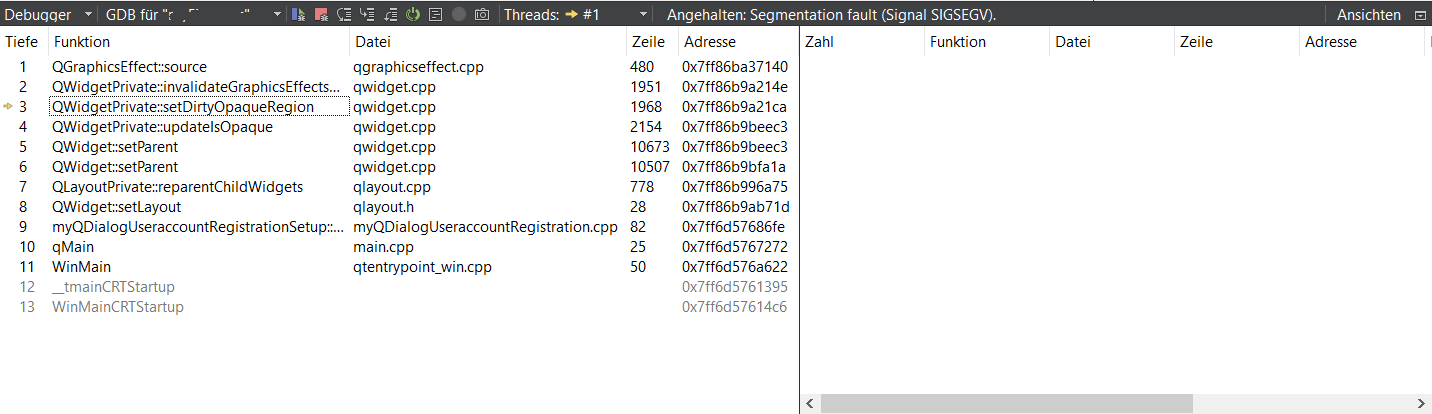
Well, I'm happy to hear that it was totally ok to use QDialog::exec() for my purposes. I don't know why documentation recommends to avoid that."I wonder about something else. You are using winMain as the parent of a dialog which you open(). However at that moment winMain has not actually been shown yet --- the showMaximized() only marks it for showing, the showing does not happen until the start of App.exec(). That means the dialog has a "non-shown" parent, and I wonder if that would not cause a problem."
It is shown directly in the constructor." @mpergand suggested you might have problem because of the way you choose to use stack rather than heap variables for your windows/dialogs and their parentage, and that this may be problematic."
Shouldn't I do so? You mean all my widgets inside the QDialog? In the docu, in most examples the QWidgets are created that way, aren't they? -
@JonB said in Crash adding QVBoxLayout to QDialog:
Have advised you several times already, as has @mpergand, to compile for debug, run under debugger and look at/show us the stack view when it crashes. Is there a particular reason you simply ignore this and continue to "guess" each time what might be wrong? Do you not want to help yourself/us?
Sorry for the belated response, had no time to answer earlier.
No, I'm interested in helping myself and us understanding the problem I have. I'm simply not used to the debugger, but I tried it now again:
At first, a MessageBox appears in front as far as the program crashes. There it says (translated): "The process was stopped due to a signal of the operating system. Name of the signal: SIGSEGV. Meaning: Segmentation fault."
Then, in the window on the bottom left, I have the following text:
Well, I'm happy to hear that it was totally ok to use QDialog::exec() for my purposes. I don't know why documentation recommends to avoid that."I wonder about something else. You are using winMain as the parent of a dialog which you open(). However at that moment winMain has not actually been shown yet --- the showMaximized() only marks it for showing, the showing does not happen until the start of App.exec(). That means the dialog has a "non-shown" parent, and I wonder if that would not cause a problem."
It is shown directly in the constructor." @mpergand suggested you might have problem because of the way you choose to use stack rather than heap variables for your windows/dialogs and their parentage, and that this may be problematic."
Shouldn't I do so? You mean all my widgets inside the QDialog? In the docu, in most examples the QWidgets are created that way, aren't they? -
@JonB said in Crash adding QVBoxLayout to QDialog:
Have advised you several times already, as has @mpergand, to compile for debug, run under debugger and look at/show us the stack view when it crashes. Is there a particular reason you simply ignore this and continue to "guess" each time what might be wrong? Do you not want to help yourself/us?
Sorry for the belated response, had no time to answer earlier.
No, I'm interested in helping myself and us understanding the problem I have. I'm simply not used to the debugger, but I tried it now again:
At first, a MessageBox appears in front as far as the program crashes. There it says (translated): "The process was stopped due to a signal of the operating system. Name of the signal: SIGSEGV. Meaning: Segmentation fault."
Then, in the window on the bottom left, I have the following text:
Well, I'm happy to hear that it was totally ok to use QDialog::exec() for my purposes. I don't know why documentation recommends to avoid that."I wonder about something else. You are using winMain as the parent of a dialog which you open(). However at that moment winMain has not actually been shown yet --- the showMaximized() only marks it for showing, the showing does not happen until the start of App.exec(). That means the dialog has a "non-shown" parent, and I wonder if that would not cause a problem."
It is shown directly in the constructor." @mpergand suggested you might have problem because of the way you choose to use stack rather than heap variables for your windows/dialogs and their parentage, and that this may be problematic."
Shouldn't I do so? You mean all my widgets inside the QDialog? In the docu, in most examples the QWidgets are created that way, aren't they?@Binary91 said in Crash adding QVBoxLayout to QDialog:
It is shown directly in the constructor.
What is shown in what constructor?
In any case, before going any further you need to answer @jsulm's question. The beauty of you having produced a stack trace is that we don't have to guess what might be wrong, we can (hopefully) determine from the trace.
-
@Binary91 What is in line 82 in myQDialogUseraccountRegistrationSetup::myQDialogUseraccountRegistrationSetup? That's the line causing the crash according to the stack trace.
@jsulm said in Crash adding QVBoxLayout to QDialog:
What is in line 82 in myQDialogUseraccountRegistrationSetup::myQDialogUseraccountRegistrationSetup? That's the line causing the crash according to the stack trace.
It is the command where I set the main layout:
myQDialogUseraccountRegistrationSetup::myQDialogUseraccountRegistrationSetup(QWidget *parent) : QDialog(parent)
    {
        twMain = new QTabWidget;

        tabDataPersonal = new QWidget;

        cbDPName = new QCheckBox("Name", tabDataPersonal);
        cbDPPrename = new QCheckBox("Vorname");
        cbDPMiddleNames = new QCheckBox("Zwischennamen");
        cbDPDoB = new QCheckBox("Geburtsdatum");
        cbDPGender = new QCheckBox("Geschlecht");
        cbDPNationality = new QCheckBox("Nationalität");
        layDataPersonal = new QVBoxLayout;
        layDataPersonal->addWidget(cbDPName);
        layDataPersonal->addWidget(cbDPPrename);
        layDataPersonal->addWidget(cbDPMiddleNames);
        layDataPersonal->addWidget(cbDPDoB);
        layDataPersonal->addWidget(cbDPGender);
        layDataPersonal->addWidget(cbDPNationality);
        tabDataPersonal->setLayout(layDataPersonal);
        twMain->addTab(tabDataPersonal, "Persofnalien");

        cbDCStreet = new QCheckBox("Strasse");
        cbDCHouseNr = new QCheckBox("Hausnummer");
        cbDCZipCode = new QCheckBox("Postleitzahl");
        cbDCCity = new QCheckBox("Ort");
        cbDCRegion = new QCheckBox("Region/Kanton/Bundesland");
        cbDCState = new QCheckBox("Land");
        cbDCMail = new QCheckBox("E-Mail");
        cbDCPhoneStateCode = new QCheckBox("Ländervorwahl");
        cbDCPhonePrivate = new QCheckBox("Telefon (Privat)");
        cbDCPhoneMobile = new QCheckBox("Telefon (Mobil)");
        cbDCPhoneBusiness = new QCheckBox("Telefon (Arbeit)");
        cbDCFax = new QCheckBox("Fax");

        tabDataContact = new QWidget;
        layDataContact = new QVBoxLayout;
        layDataContact->addWidget(cbDCStreet);
        layDataContact->addWidget(cbDCHouseNr);
        layDataContact->addWidget(cbDCZipCode);
        layDataContact->addWidget(cbDCCity);
        layDataContact->addWidget(cbDCRegion);
        layDataContact->addWidget(cbDCState);
        layDataContact->addWidget(cbDCMail);
        layDataContact->addWidget(cbDCPhoneStateCode);
        layDataContact->addWidget(cbDCPhonePrivate);
        layDataContact->addWidget(cbDCPhoneMobile);
        layDataContact->addWidget(cbDCPhoneBusiness);
        layDataContact->addWidget(cbDCFax);
        tabDataContact->setLayout(layDataContact);
        twMain->addTab(tabDataContact, "Kontaktdaten");

        tabDataLogin = new QWidget;
        layDataLogin = new QVBoxLayout;
        tabDataLogin->setLayout(layDataLogin);
        twMain->addTab(tabDataLogin, "Logindaten");

        tabDataBanking = new QWidget;
        layDataBanking = new QVBoxLayout;
        tabDataBanking->setLayout(layDataBanking);
        twMain->addTab(tabDataBanking, "Zahlungsinformationen");

        layMain = new QVBoxLayout;
        layMain->addWidget(twMain);
        this->setLayout(layMain);  // <-- line #82
        setWindowTitle("Registration Setup");
From where did you know that it was line 82? How do I interpret the debugger text? And back to my problem: What am I doing wrong? When I use the same code in a separate project without a MainWindow, everything works just fine..
-
@jsulm said in Crash adding QVBoxLayout to QDialog:
What is in line 82 in myQDialogUseraccountRegistrationSetup::myQDialogUseraccountRegistrationSetup? That's the line causing the crash according to the stack trace.
It is the command where I set the main layout:
myQDialogUseraccountRegistrationSetup::myQDialogUseraccountRegistrationSetup(QWidget *parent) : QDialog(parent)
    {
        twMain = new QTabWidget;

        tabDataPersonal = new QWidget;

        cbDPName = new QCheckBox("Name", tabDataPersonal);
        cbDPPrename = new QCheckBox("Vorname");
        cbDPMiddleNames = new QCheckBox("Zwischennamen");
        cbDPDoB = new QCheckBox("Geburtsdatum");
        cbDPGender = new QCheckBox("Geschlecht");
        cbDPNationality = new QCheckBox("Nationalität");
        layDataPersonal = new QVBoxLayout;
        layDataPersonal->addWidget(cbDPName);
        layDataPersonal->addWidget(cbDPPrename);
        layDataPersonal->addWidget(cbDPMiddleNames);
        layDataPersonal->addWidget(cbDPDoB);
        layDataPersonal->addWidget(cbDPGender);
        layDataPersonal->addWidget(cbDPNationality);
        tabDataPersonal->setLayout(layDataPersonal);
        twMain->addTab(tabDataPersonal, "Persofnalien");

        cbDCStreet = new QCheckBox("Strasse");
        cbDCHouseNr = new QCheckBox("Hausnummer");
        cbDCZipCode = new QCheckBox("Postleitzahl");
        cbDCCity = new QCheckBox("Ort");
        cbDCRegion = new QCheckBox("Region/Kanton/Bundesland");
        cbDCState = new QCheckBox("Land");
        cbDCMail = new QCheckBox("E-Mail");
        cbDCPhoneStateCode = new QCheckBox("Ländervorwahl");
        cbDCPhonePrivate = new QCheckBox("Telefon (Privat)");
        cbDCPhoneMobile = new QCheckBox("Telefon (Mobil)");
        cbDCPhoneBusiness = new QCheckBox("Telefon (Arbeit)");
        cbDCFax = new QCheckBox("Fax");

        tabDataContact = new QWidget;
        layDataContact = new QVBoxLayout;
        layDataContact->addWidget(cbDCStreet);
        layDataContact->addWidget(cbDCHouseNr);
        layDataContact->addWidget(cbDCZipCode);
        layDataContact->addWidget(cbDCCity);
        layDataContact->addWidget(cbDCRegion);
        layDataContact->addWidget(cbDCState);
        layDataContact->addWidget(cbDCMail);
        layDataContact->addWidget(cbDCPhoneStateCode);
        layDataContact->addWidget(cbDCPhonePrivate);
        layDataContact->addWidget(cbDCPhoneMobile);
        layDataContact->addWidget(cbDCPhoneBusiness);
        layDataContact->addWidget(cbDCFax);
        tabDataContact->setLayout(layDataContact);
        twMain->addTab(tabDataContact, "Kontaktdaten");

        tabDataLogin = new QWidget;
        layDataLogin = new QVBoxLayout;
        tabDataLogin->setLayout(layDataLogin);
        twMain->addTab(tabDataLogin, "Logindaten");

        tabDataBanking = new QWidget;
        layDataBanking = new QVBoxLayout;
        tabDataBanking->setLayout(layDataBanking);
        twMain->addTab(tabDataBanking, "Zahlungsinformationen");

        layMain = new QVBoxLayout;
        layMain->addWidget(twMain);
        this->setLayout(layMain);  // <-- line #82
        setWindowTitle("Registration Setup");
From where did you know that it was line 82? How do I interpret the debugger text? And back to my problem: What am I doing wrong? When I use the same code in a separate project without a MainWindow, everything works just fine..
@Binary91 said in Crash adding QVBoxLayout to QDialog:
From where did you know that it was line 82?
By looking at the screenshot you show of the stack trace. In the "Zeile" column, which I suppose means "line" or "row"? And the function name in the "Funktion" column. And "Datei" to apparently tell you the file name. And it's showing the "stack" or "call" trace. You just need to look at it.
It is dying during some "reparenting of child widgets", caused from the final
setLayout()causingthisto adopt the whole widget hierarchy. Slightly strange error, not yet sure whether it's your code or something in Qt.One thing I notice is:
cbDPName = new QCheckBox("Name", tabDataPersonal);right at the start. All the others you do not pass a
QWidgetas parent. Try making this one the same, remove the, tabDataPersonal. Any difference?Otherwise there are too many widgets for me to work through. Comment out all those
new QCheckBoxlines and most importantly theaddWidget()s. Does that make it work? Or, build up from justlayMain = new QVBoxLayout; // layMain->addWidget(twMain); this->setLayout(layMain); // <-- line #82Nothing else. Does that work? Add the
QTabWidgetback in, add one page, ..., till it goes wrong. -
@Binary91 said in Crash adding QVBoxLayout to QDialog:
From where did you know that it was line 82?
By looking at the screenshot you show of the stack trace. In the "Zeile" column, which I suppose means "line" or "row"? And the function name in the "Funktion" column. And "Datei" to apparently tell you the file name. And it's showing the "stack" or "call" trace. You just need to look at it.
It is dying during some "reparenting of child widgets", caused from the final
setLayout()causingthisto adopt the whole widget hierarchy. Slightly strange error, not yet sure whether it's your code or something in Qt.One thing I notice is:
cbDPName = new QCheckBox("Name", tabDataPersonal);right at the start. All the others you do not pass a
QWidgetas parent. Try making this one the same, remove the, tabDataPersonal. Any difference?Otherwise there are too many widgets for me to work through. Comment out all those
new QCheckBoxlines and most importantly theaddWidget()s. Does that make it work? Or, build up from justlayMain = new QVBoxLayout; // layMain->addWidget(twMain); this->setLayout(layMain); // <-- line #82Nothing else. Does that work? Add the
QTabWidgetback in, add one page, ..., till it goes wrong.@JonB said in Crash adding QVBoxLayout to QDialog:
One thing I notice is:
cbDPName = new QCheckBox("Name", tabDataPersonal);
right at the start. All the others you do not pass a QWidget as parent. Try making this one the same, remove the , tabDataPersonal. Any difference?
I removed that (did not know why I forgot it here), nothing happened.
It is indeed an interesting error. I tried lots of things, even the way you mentioned with out-commenting all the widgets or not setting the layout.
As I mentioned earlier, even only declaring thelayMaininside the header causes the crash, when I declare it at the first position of all my layouts inside the class declaration. When I put it at the end of the member declarations and do not define it inside the .cpp, then it will not crash...As you say, it is a weird error and I can't believe that the code itsself is the problem. When I separate the QDialog into a separate project, it works just fine..
-
@JonB said in Crash adding QVBoxLayout to QDialog:
One thing I notice is:
cbDPName = new QCheckBox("Name", tabDataPersonal);
right at the start. All the others you do not pass a QWidget as parent. Try making this one the same, remove the , tabDataPersonal. Any difference?
I removed that (did not know why I forgot it here), nothing happened.
It is indeed an interesting error. I tried lots of things, even the way you mentioned with out-commenting all the widgets or not setting the layout.
As I mentioned earlier, even only declaring thelayMaininside the header causes the crash, when I declare it at the first position of all my layouts inside the class declaration. When I put it at the end of the member declarations and do not define it inside the .cpp, then it will not crash...As you say, it is a weird error and I can't believe that the code itsself is the problem. When I separate the QDialog into a separate project, it works just fine..
@Binary91 said in Crash adding QVBoxLayout to QDialog:
As I mentioned earlier, even only declaring the
layMaininside the header causes the crash, when I declare it at the first position of all my layouts inside the class declaration. When I put it at the end of the member declarations and do not define it inside the .cpp, then it will not crash...Hmmm.... In itself, C++ does not care what order you declare your member variables, nor how many you have. Moving them around should have no effect. However: when you create an instance of a class the member variables' area is uninitialized, the variables contain "random" data. And what random value each one contains can indeed be affected by the "coincidences" of where they happen to be in memory, different position => different value. Or same can happen if your code (somehow) "overruns"/"underruns" and writes into the instance's variables' storage area....
One thing: when you change the order of member variables it is vital that all modules using the class be recompiled. Make sure you delete all files in the build output (not source!) directory, re-run
qmake, re-run the build. It would also be interesting to test whether if you compile for release versus for debug the behaviour changes?Since you say behaviour varies according as
layMainis first or last among the declarations, try something like:QVBoxLayout *dummy1, *dummy2, *dummy3, *dummy4; QVBoxLayout *layDataPersonal, *layDataContact, *layDataLogin, *layDataBanking, *layMain; QVBoxLayout *dummy5, *dummy6, *dummy7, *dummy8;moving the
*layMainwithin its line as you please. This gives some "dummy space" on either side of these variables in the class's layout. Does this affect the error behaviour?Also try moving the
winURSfrom the stack to the heap in yourmain():myQDialogUseraccountRegistrationSetup *winURS = new myQDialogUseraccountRegistrationSetup; winURS->open(); -
@Binary91 said in Crash adding QVBoxLayout to QDialog:
As I mentioned earlier, even only declaring the
layMaininside the header causes the crash, when I declare it at the first position of all my layouts inside the class declaration. When I put it at the end of the member declarations and do not define it inside the .cpp, then it will not crash...Hmmm.... In itself, C++ does not care what order you declare your member variables, nor how many you have. Moving them around should have no effect. However: when you create an instance of a class the member variables' area is uninitialized, the variables contain "random" data. And what random value each one contains can indeed be affected by the "coincidences" of where they happen to be in memory, different position => different value. Or same can happen if your code (somehow) "overruns"/"underruns" and writes into the instance's variables' storage area....
One thing: when you change the order of member variables it is vital that all modules using the class be recompiled. Make sure you delete all files in the build output (not source!) directory, re-run
qmake, re-run the build. It would also be interesting to test whether if you compile for release versus for debug the behaviour changes?Since you say behaviour varies according as
layMainis first or last among the declarations, try something like:QVBoxLayout *dummy1, *dummy2, *dummy3, *dummy4; QVBoxLayout *layDataPersonal, *layDataContact, *layDataLogin, *layDataBanking, *layMain; QVBoxLayout *dummy5, *dummy6, *dummy7, *dummy8;moving the
*layMainwithin its line as you please. This gives some "dummy space" on either side of these variables in the class's layout. Does this affect the error behaviour?Also try moving the
winURSfrom the stack to the heap in yourmain():myQDialogUseraccountRegistrationSetup *winURS = new myQDialogUseraccountRegistrationSetup; winURS->open();@JonB said in Crash adding QVBoxLayout to QDialog:
One thing: when you change the order of member variables it is vital that all modules using the class be recompiled. Make sure you delete all files in the build output (not source!) directory, re-run qmake, re-run the build. It would also be interesting to test whether if you compile for release versus for debug the behaviour changes?
Wow, that did the job! I completely deleted the build directory, built the project again and it works without changing anything of the code...
That is interesting, because in the past, I never had to do that and I (really, really often) changed the positions of class members inside the class declaration. I never had such an issue before. Maybe I just had luck till now...
So I have to re-build the project now each time I change anything inside a header file, like modifing member orders in the declaration list?
-
@JonB said in Crash adding QVBoxLayout to QDialog:
One thing: when you change the order of member variables it is vital that all modules using the class be recompiled. Make sure you delete all files in the build output (not source!) directory, re-run qmake, re-run the build. It would also be interesting to test whether if you compile for release versus for debug the behaviour changes?
Wow, that did the job! I completely deleted the build directory, built the project again and it works without changing anything of the code...
That is interesting, because in the past, I never had to do that and I (really, really often) changed the positions of class members inside the class declaration. I never had such an issue before. Maybe I just had luck till now...
So I have to re-build the project now each time I change anything inside a header file, like modifing member orders in the declaration list?
@Binary91 said in Crash adding QVBoxLayout to QDialog:
I completely deleted the build directory, built the project again and it works without changing anything of the code...
Well that is good news! From experience, if something really inexplicable is happening when you try to build your code (unintelligible error messages) or when you run your code (the very odd behaviour you were reporting) it is worth doing a complete delete-and-rebuild in case that is the issue.
That is interesting, because in the past, I never had to do that and I (really, really often) changed the positions of class members inside the class declaration.
So I have to re-build the project now each time I change anything inside a header file, like modifing member orders in the declaration list?100% yes! If you change anything about member variables --- order, size, type --- you must rebuild. And you must rebuild the object files of any other files which use that class too. The C++ compiler generates code which accesses class members by their offset within the class, and if anything "moves" disaster will strike if any object file does not know about this
I cannot believe you have changed order in the past and not recompiled. More to the point, how could it not have recompiled? The make system you use should have the object files as dependencies of the
.hfiles. When you change a.hfile it should see the timestamp change and know to recompile at minimum everything which uses that.hfile. You should not have to tell it to do so. If I were you I would verify this behaviour now: if you make any change inmyQDialogUseraccountRegistrationSetup.hwhat does and does not get recompiled? -
@JonB said in Crash adding QVBoxLayout to QDialog:
100% yes! If you change anything about member variables --- order, size, type --- you must rebuild. And you must rebuild the object files of any other files which use that class too. The C++ compiler generates code which accesses class members by their offset within the class, and if anything "moves" disaster will strike if any object file does not know about this
I cannot believe you have changed order in the past and not recompiled.Well, what do you understand under
recompiling? In the past, after changing header files (or source code) I always just pushed the green triangle button in the QtCreator ("compile & run") and the code was "recompiled". But there is another button with the hammer, the "build" button. This button is what I used when I created new classes that have the Q_OBJECT macro because of themocfiles.
I always had good experience with this, until now. BUT, neigther just recompiling, nor rebuilding my project in this case had a positive effect. Instead, only completely deleting the build directory and completely re-building, compiling and running the program worked. Can you tell me, why?"The make system you use should have the object files as dependencies of the .h files. When you change a .h file it should see the timestamp change and know to recompile at minimum everything which uses that .h file. You should not have to tell it to do so."
So you agree to what I just said? It should not be neccessary to re-build everything each time I change something in the headers?"If I were you I would verify this behaviour now: if you make any change in myQDialogUseraccountRegistrationSetup.h what does and does not get recompiled?"
I'll try it changing something line by line and simply compile it. Let's see what happens... -
@JonB said in Crash adding QVBoxLayout to QDialog:
100% yes! If you change anything about member variables --- order, size, type --- you must rebuild. And you must rebuild the object files of any other files which use that class too. The C++ compiler generates code which accesses class members by their offset within the class, and if anything "moves" disaster will strike if any object file does not know about this
I cannot believe you have changed order in the past and not recompiled.Well, what do you understand under
recompiling? In the past, after changing header files (or source code) I always just pushed the green triangle button in the QtCreator ("compile & run") and the code was "recompiled". But there is another button with the hammer, the "build" button. This button is what I used when I created new classes that have the Q_OBJECT macro because of themocfiles.
I always had good experience with this, until now. BUT, neigther just recompiling, nor rebuilding my project in this case had a positive effect. Instead, only completely deleting the build directory and completely re-building, compiling and running the program worked. Can you tell me, why?"The make system you use should have the object files as dependencies of the .h files. When you change a .h file it should see the timestamp change and know to recompile at minimum everything which uses that .h file. You should not have to tell it to do so."
So you agree to what I just said? It should not be neccessary to re-build everything each time I change something in the headers?"If I were you I would verify this behaviour now: if you make any change in myQDialogUseraccountRegistrationSetup.h what does and does not get recompiled?"
I'll try it changing something line by line and simply compile it. Let's see what happens...@Binary91 said in Crash adding QVBoxLayout to QDialog:
I always just pushed the green triangle button
Be careful, there are two "green triangle" buttons, and (as I discovered) they do not do quite the same thing. The "bigger" one, where you have Run and Debug buttons, is where to press, they cause recompile-before-run. But there is also a "smaller" one, on the debugging pane toolbar along with some other small buttons. This is a dangerous one! It causes re-run, but deliberately does not recompile. It repeats the last run with what you already have compiled, and basically should "never" be used!
But if you are using the right Run button you should always find it does the Build action first, in case things aren't up-to-date. And you can see its action/output in the Compiler output tab.
It should not be neccessary to re-build everything each time I change something in the headers?
I should/may well be necessary to recompile if you change a header file. Indeed it is vital, e.g. if you change variable declarations, as you have seen. But you should not need to take some explicit action for that to happen. When you Build or Run, Qt Creator should invoke the make system for you, and that should recompile as required. As I say, check the Compiler Output tab.
If either the make is not being invoked or it does not cause all object files which depend on the changed header file to be recompiled then you have a problem/something wrong.
-
@JonB said in Crash adding QVBoxLayout to QDialog:
Be careful, there are two "green triangle" buttons, and (as I discovered) they do not do quite the same thing. The "bigger" one, where you have Run and Debug buttons, is where to press, they cause recompile-before-run. But there is also a "smaller" one, on the debugging pane toolbar along with some other small buttons. This is a dangerous one! It causes re-run, but deliberately does not recompile. It repeats the last run with what you already have compiled, and basically should "never" be used!
But if you are using the right Run button you should always find it does the Build action first, in case things aren't up-to-date. And you can see its action/output in the Compiler output tab.Sorry for the belated response.
Ok, well, just to be safe that we're talking about the same stuff:
Overview of the action buttons on the left bottom corner of QtCreator (I'm using a german version, so maybe my translations are not 100 % identical to yours):

The first "button" lets me decide the mode, right? I can choose from 3 modes, Debug, Profile and Release:
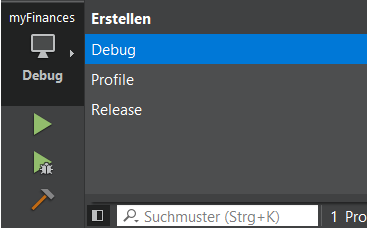
I always use the Debug mode, because it was pre-setted :-)
The next button is the "Run" button:
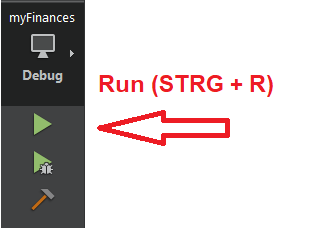
I guess this is the dangerous button you mentioned, right? BUT, this is the button I usually use when I change my code, and till now, it always worked (except creating new Q_OBJECT macros or except this special issue we discussed in this topic). I also get errors/warnings in the compiler output window with it. So why do you say it just runs the project without compiling?
The button next to it is maybe the button you recommed to use instead, right?
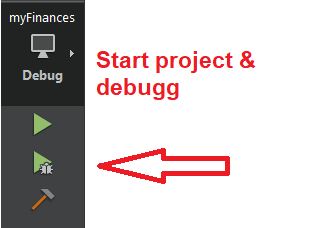
Well, using this button starts a full debugging of the code, it takes long time and I have to go step by step through the code. Then, lots of different output windows are shown like the stack (I already posted that earlier as you recommended) or a debugger window. Is this really the button I should always use? Sounds very time- and energy consuming...
The button on the bottom with the hammer is the build project button, this is what I use when I create new classes with modifications to the MOC system:
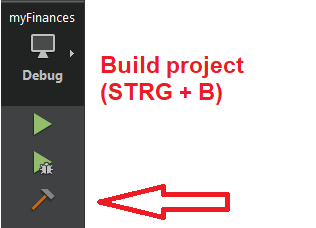
But none of those buttons helped me with my issue in this topic. Instead, I had to completely remove the build directory..."I should/may well be necessary to recompile if you change a header file. Indeed it is vital, e.g. if you change variable declarations, as you have seen. But you should not need to take some explicit action for that to happen. When you Build or Run, Qt Creator should invoke the make system for you, and that should recompile as required. As I say, check the Compiler Output tab.
If either the make is not being invoked or it does not cause all object files which depend on the changed header file to be recompiled then you have a problem/something wrong."So, is it possible that the code compiles (with the dangerous green triangle on the top) and runs without invoking the make? Otherwise I cannot understand how I could create and modify simple projects in the past with only using this button...
-
@JonB said in Crash adding QVBoxLayout to QDialog:
Be careful, there are two "green triangle" buttons, and (as I discovered) they do not do quite the same thing. The "bigger" one, where you have Run and Debug buttons, is where to press, they cause recompile-before-run. But there is also a "smaller" one, on the debugging pane toolbar along with some other small buttons. This is a dangerous one! It causes re-run, but deliberately does not recompile. It repeats the last run with what you already have compiled, and basically should "never" be used!
But if you are using the right Run button you should always find it does the Build action first, in case things aren't up-to-date. And you can see its action/output in the Compiler output tab.Sorry for the belated response.
Ok, well, just to be safe that we're talking about the same stuff:
Overview of the action buttons on the left bottom corner of QtCreator (I'm using a german version, so maybe my translations are not 100 % identical to yours):
The first "button" lets me decide the mode, right? I can choose from 3 modes, Debug, Profile and Release:
I always use the Debug mode, because it was pre-setted :-)
The next button is the "Run" button:
I guess this is the dangerous button you mentioned, right? BUT, this is the button I usually use when I change my code, and till now, it always worked (except creating new Q_OBJECT macros or except this special issue we discussed in this topic). I also get errors/warnings in the compiler output window with it. So why do you say it just runs the project without compiling?
The button next to it is maybe the button you recommed to use instead, right?
Well, using this button starts a full debugging of the code, it takes long time and I have to go step by step through the code. Then, lots of different output windows are shown like the stack (I already posted that earlier as you recommended) or a debugger window. Is this really the button I should always use? Sounds very time- and energy consuming...
The button on the bottom with the hammer is the build project button, this is what I use when I create new classes with modifications to the MOC system:
But none of those buttons helped me with my issue in this topic. Instead, I had to completely remove the build directory..."I should/may well be necessary to recompile if you change a header file. Indeed it is vital, e.g. if you change variable declarations, as you have seen. But you should not need to take some explicit action for that to happen. When you Build or Run, Qt Creator should invoke the make system for you, and that should recompile as required. As I say, check the Compiler Output tab.
If either the make is not being invoked or it does not cause all object files which depend on the changed header file to be recompiled then you have a problem/something wrong."So, is it possible that the code compiles (with the dangerous green triangle on the top) and runs without invoking the make? Otherwise I cannot understand how I could create and modify simple projects in the past with only using this button...
@Binary91 said in Crash adding QVBoxLayout to QDialog:
Is this really the button I should always use?
Only if you want to run your app through debugger.
Else use the other one."So, is it possible that the code compiles (with the dangerous green triangle on the top) and runs without invoking the make?" - make is always used to build your project (this is what the hammer button is doing: start make. It should also first execute qmake if you change your project files, but this is not always happening, that is why it is sometimes necessary to delete build folder).
-
@JonB said in Crash adding QVBoxLayout to QDialog:
Be careful, there are two "green triangle" buttons, and (as I discovered) they do not do quite the same thing. The "bigger" one, where you have Run and Debug buttons, is where to press, they cause recompile-before-run. But there is also a "smaller" one, on the debugging pane toolbar along with some other small buttons. This is a dangerous one! It causes re-run, but deliberately does not recompile. It repeats the last run with what you already have compiled, and basically should "never" be used!
But if you are using the right Run button you should always find it does the Build action first, in case things aren't up-to-date. And you can see its action/output in the Compiler output tab.Sorry for the belated response.
Ok, well, just to be safe that we're talking about the same stuff:
Overview of the action buttons on the left bottom corner of QtCreator (I'm using a german version, so maybe my translations are not 100 % identical to yours):
The first "button" lets me decide the mode, right? I can choose from 3 modes, Debug, Profile and Release:
I always use the Debug mode, because it was pre-setted :-)
The next button is the "Run" button:
I guess this is the dangerous button you mentioned, right? BUT, this is the button I usually use when I change my code, and till now, it always worked (except creating new Q_OBJECT macros or except this special issue we discussed in this topic). I also get errors/warnings in the compiler output window with it. So why do you say it just runs the project without compiling?
The button next to it is maybe the button you recommed to use instead, right?
Well, using this button starts a full debugging of the code, it takes long time and I have to go step by step through the code. Then, lots of different output windows are shown like the stack (I already posted that earlier as you recommended) or a debugger window. Is this really the button I should always use? Sounds very time- and energy consuming...
The button on the bottom with the hammer is the build project button, this is what I use when I create new classes with modifications to the MOC system:
But none of those buttons helped me with my issue in this topic. Instead, I had to completely remove the build directory..."I should/may well be necessary to recompile if you change a header file. Indeed it is vital, e.g. if you change variable declarations, as you have seen. But you should not need to take some explicit action for that to happen. When you Build or Run, Qt Creator should invoke the make system for you, and that should recompile as required. As I say, check the Compiler Output tab.
If either the make is not being invoked or it does not cause all object files which depend on the changed header file to be recompiled then you have a problem/something wrong."So, is it possible that the code compiles (with the dangerous green triangle on the top) and runs without invoking the make? Otherwise I cannot understand how I could create and modify simple projects in the past with only using this button...
@Binary91
Both the "green triangle buttons", so for Debug as well as Run, are the good ones here. The "risky" one does not appear here, it is a "small" one on the Debugger window pane, don't worry about it, you have not shown it or used it.This means that whichever of the buttons you show should be working fine. And that does mean: if you have changed any source code,
.cppor.h, it SHOULD do the same "Build" before running/debugging that you would do by pressing the "hammer" icon.If this is not happening for you, there is a problem....

