LIBS += -lUser32 is no longer working
-
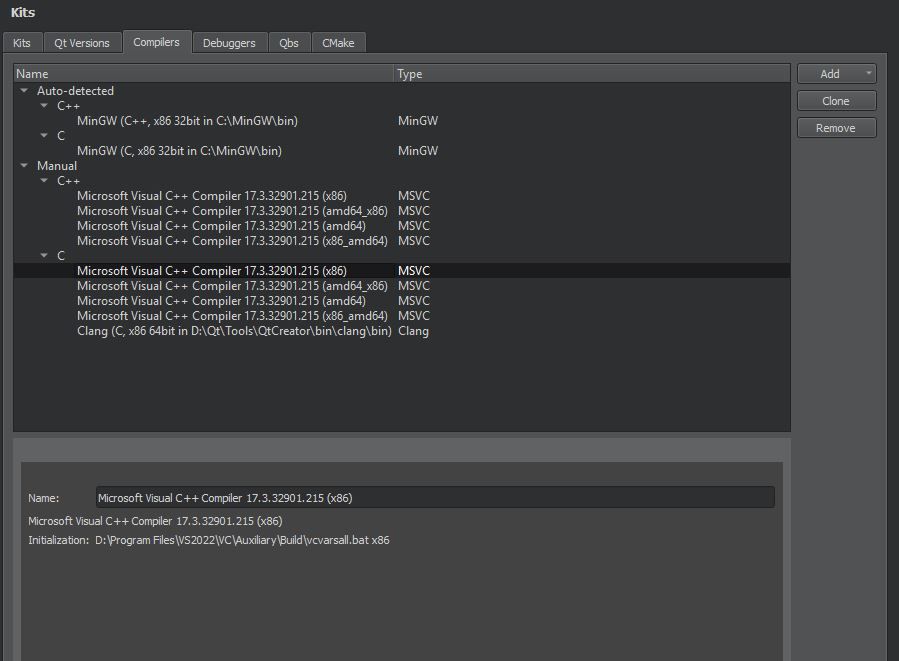
I found that i have in my system much more MS Redistributables then i need, and i suspected Qt might detect some oldest version, instead of newest. So i deleted all, and installed the latest, but nothing changed...
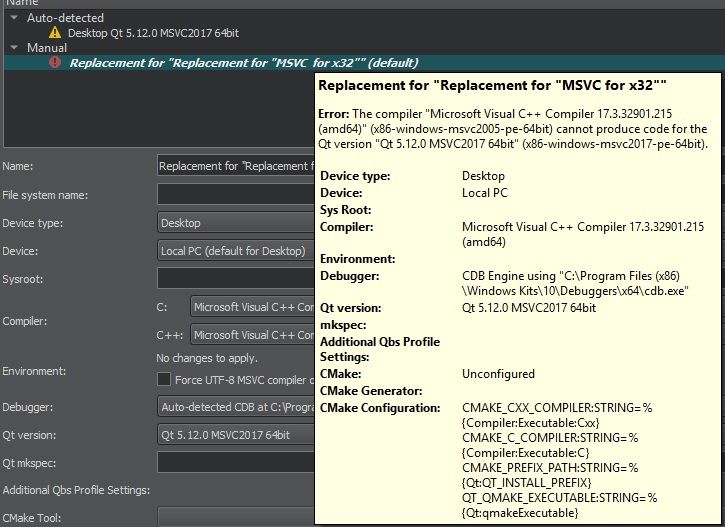
Still that strange 2005 version, and i don't know what to do with it, i have VS 2022, with it obviously comes latest compiler.
-
Hi, to get rid of some of those historical artifacts, you could try creating a new user on your Windows PC and installing Qt logged in as that new user. And if that doesn't cut it, perhaps reformatting your C: and installing a brand new Windows is your best bet (but make a backup first :-)
-
Hi, to get rid of some of those historical artifacts, you could try creating a new user on your Windows PC and installing Qt logged in as that new user. And if that doesn't cut it, perhaps reformatting your C: and installing a brand new Windows is your best bet (but make a backup first :-)
@hskoglund no, i can not reinstall Windows.
I want to understand first, is this problem on side of Qt, or Microsoft compiler?
UPD:
It definitely something wrong with Qt, i can't add MinGW(which i was using back then year ago), same issue "The compiler blablabla cannot produce code for Qt Version" -
@hskoglund no, i can not reinstall Windows.
I want to understand first, is this problem on side of Qt, or Microsoft compiler?
UPD:
It definitely something wrong with Qt, i can't add MinGW(which i was using back then year ago), same issue "The compiler blablabla cannot produce code for Qt Version"@Engelard As we said before - you can't mix MinGW with Qt build for MSVC. That's what the message is saying. If you want to use MinGW you need Qt build for MinGW.
If you go to
%appdata%/QtProject/qtcreator/there's a filetoolchains.xml. Close Qt Creator, make a backup of that file, delete it and start Qt Creator again. It should redetect everything. If it doesn't on its own press Re-detect on the compilers tab. Does it detect the correct 2022 abi then? -
@Engelard As we said before - you can't mix MinGW with Qt build for MSVC. That's what the message is saying. If you want to use MinGW you need Qt build for MinGW.
If you go to
%appdata%/QtProject/qtcreator/there's a filetoolchains.xml. Close Qt Creator, make a backup of that file, delete it and start Qt Creator again. It should redetect everything. If it doesn't on its own press Re-detect on the compilers tab. Does it detect the correct 2022 abi then?@Chris-Kawa said in LIBS += -lUser32 is no longer working:
As we said before - you can't mix MinGW with Qt build for MSVC
I get it, i mean, i was using MinGW Kit before, and now with current mess - i can't. It was properly setuped back then.
@Chris-Kawa said in LIBS += -lUser32 is no longer working:
delete it and start Qt Creator again
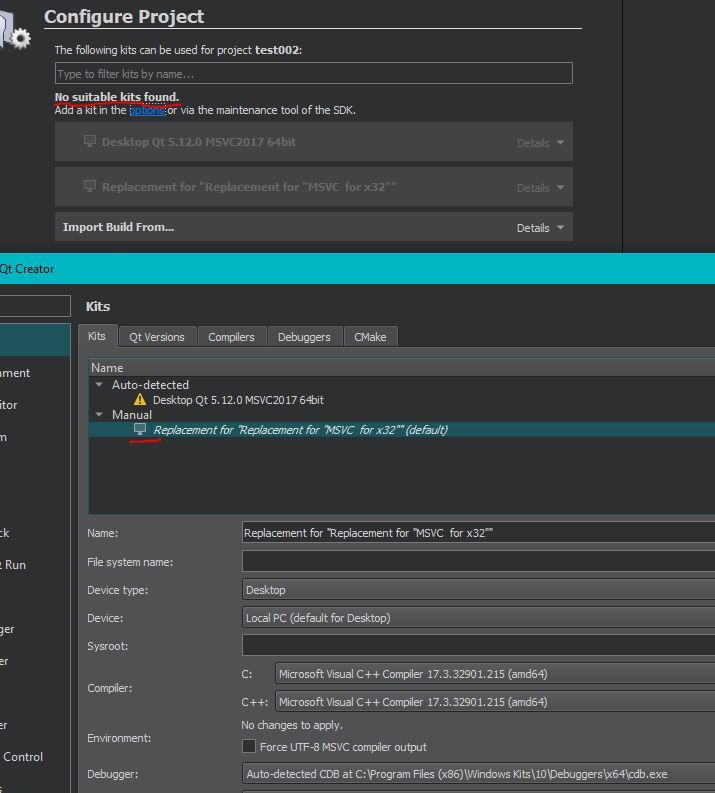
After deleting toolchains something finally changed! It allows me to select proper compilers at least in 'Replacement(whatever that is)' Kit, and it gives normal icon instead of warning or error. But it's complaining in project scope now that there is no Kits to select, but i tried to create new project, and there was option to select that new 'Replacement" kit. After project creation it give out me same complaint and it's not working, but at least some progress i have now. Thank you.
-
@Chris-Kawa said in LIBS += -lUser32 is no longer working:
As we said before - you can't mix MinGW with Qt build for MSVC
I get it, i mean, i was using MinGW Kit before, and now with current mess - i can't. It was properly setuped back then.
@Chris-Kawa said in LIBS += -lUser32 is no longer working:
delete it and start Qt Creator again
After deleting toolchains something finally changed! It allows me to select proper compilers at least in 'Replacement(whatever that is)' Kit, and it gives normal icon instead of warning or error. But it's complaining in project scope now that there is no Kits to select, but i tried to create new project, and there was option to select that new 'Replacement" kit. After project creation it give out me same complaint and it's not working, but at least some progress i have now. Thank you.
@Engelard What Qt version is selected in your "Replacement" Kit?
-
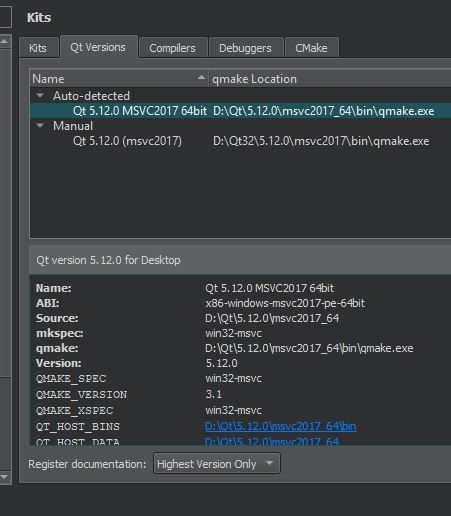
@Engelard Can you show the configuration of that Qt version? According to its name it should actually work with that compiler.
-
@Engelard Can you show the configuration of that Qt version? According to its name it should actually work with that compiler.
-
@Engelard Just realized: you selected msvc2005 compiler which of course is not compatible with Qt for msvc2017.
-
@Engelard Just realized: you selected msvc2005 compiler which of course is not compatible with Qt for msvc2017.
@jsulm He has VS2022 MSVC selected, which is fine for this Qt, but for some reason it detects it as 2005 abi.
@Engelard I'm not sure why this is happening, but maybe you can workaround it. On the compiler tab select the amd64 compiler, click Clone, select the cloned one and see if you can switch the abi to 2022 in the properties below.
Btw. it's not related to the issue but you should rename that kit to something more adequate. It's neither a replacement nor x32. PutQt %{Qt:Version} %{Compiler:Name}in the Name field and it will autogenerate the name based on compiler and Qt build.
Also, just to make sure you actually have a current MSVC compiler installed (it's an optional component in VS installation) - open Visual Studio Installer, switch to Individual Components tab and see if you haveMSVC v143 - VS 2022 C++ x64/x86 build tools (Latest)selected there. If not install that. -
@jsulm He has VS2022 MSVC selected, which is fine for this Qt, but for some reason it detects it as 2005 abi.
@Engelard I'm not sure why this is happening, but maybe you can workaround it. On the compiler tab select the amd64 compiler, click Clone, select the cloned one and see if you can switch the abi to 2022 in the properties below.
Btw. it's not related to the issue but you should rename that kit to something more adequate. It's neither a replacement nor x32. PutQt %{Qt:Version} %{Compiler:Name}in the Name field and it will autogenerate the name based on compiler and Qt build.
Also, just to make sure you actually have a current MSVC compiler installed (it's an optional component in VS installation) - open Visual Studio Installer, switch to Individual Components tab and see if you haveMSVC v143 - VS 2022 C++ x64/x86 build tools (Latest)selected there. If not install that.@Chris-Kawa said in LIBS += -lUser32 is no longer working:
On the compiler tab select the amd64 compiler, click Clone, select the cloned one and see if you can switch the abi to 2022 in the properties below.
OMG finally, i can't even believe is that something gonna to work, thank you. I tried to do that like a week ago, but i wasn't selecting right version in Kit, or something else was wrong, so i gave up and forgot that.
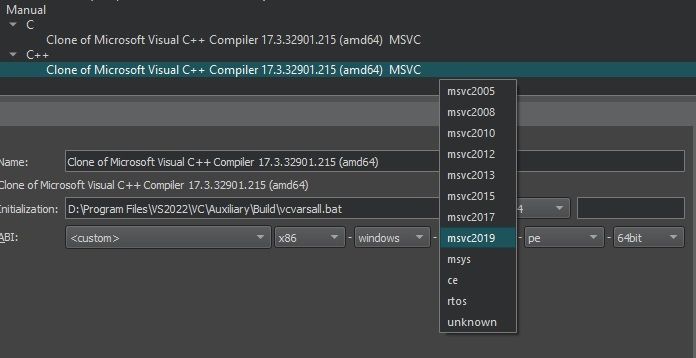
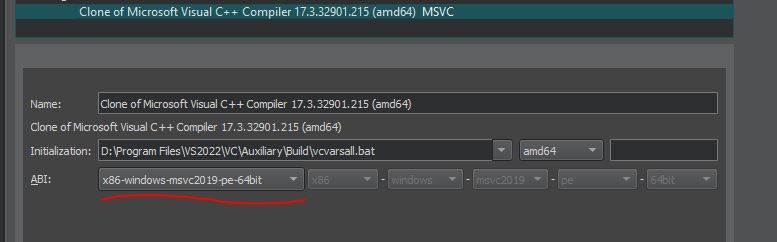
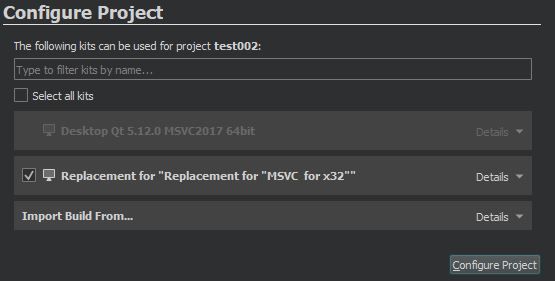
So with manual selection it works, and compiles. Auto-detected Kit and compilers still are not usable for some reason, but that does'nt matter for me, i'm happy with manually selected stuff.
P.S. in x32 Qt creator i can't select version of compiler precisely, simply because there is no such options)