

How to hide the unnessary column of the qwidgetitem ?
-
When i used the qwidgetitem of the qt ui objects ,it comes out that an unnessary column on the last of the column.
Esspesially when I scrolled to the maximum window,the last column of the qtablewidget became the longest column,so ugly.Idont know what to do or search information from the forum.
Here's the code below.setSelectionBehavior(QAbstractItemView::SelectRows); setSelectionMode(QAbstractItemView::SingleSelection); setContextMenuPolicy(Qt::CustomContextMenu);// and how to add a menu trigger with this widgetitem? setAlternatingRowColors(true); verticalHeader()->setHidden(true); //the code created the widgetitems of the qtablewidget for(int rowid = 0;rowid< rowCount;rowid++){ UiBaseComponentTableWidgetItem * edititem = new UiBaseComponentTableWidgetItem(); edititem->onCreateAllChild(); int itemCount = colCount >= edititem->getContentCount() ? edititem->getContentCount() : colCount ; //***when the itemCount equals number 5,there would be 6 columns in the widget *** for(int itemId = 0;itemId < itemCount;itemId++){ QTableWidgetItem * tmpptr =(QTableWidgetItem *)edititem->getTableItem().at(itemId); setItem(rowid,itemId,tmpptr); } mTableItem.push_back(edititem); } -
When i used the qwidgetitem of the qt ui objects ,it comes out that an unnessary column on the last of the column.
Esspesially when I scrolled to the maximum window,the last column of the qtablewidget became the longest column,so ugly.Idont know what to do or search information from the forum.
Here's the code below.setSelectionBehavior(QAbstractItemView::SelectRows); setSelectionMode(QAbstractItemView::SingleSelection); setContextMenuPolicy(Qt::CustomContextMenu);// and how to add a menu trigger with this widgetitem? setAlternatingRowColors(true); verticalHeader()->setHidden(true); //the code created the widgetitems of the qtablewidget for(int rowid = 0;rowid< rowCount;rowid++){ UiBaseComponentTableWidgetItem * edititem = new UiBaseComponentTableWidgetItem(); edititem->onCreateAllChild(); int itemCount = colCount >= edititem->getContentCount() ? edititem->getContentCount() : colCount ; //***when the itemCount equals number 5,there would be 6 columns in the widget *** for(int itemId = 0;itemId < itemCount;itemId++){ QTableWidgetItem * tmpptr =(QTableWidgetItem *)edititem->getTableItem().at(itemId); setItem(rowid,itemId,tmpptr); } mTableItem.push_back(edititem); }@nicker-player said in How to hide the unnessary column of the qwidgetitem ?:
it comes out that an unnessary column on the last of the column
What does this mean please? Do you mean you get a column you don't need? Please explain better.
-
@nicker-player said in How to hide the unnessary column of the qwidgetitem ?:
it comes out that an unnessary column on the last of the column
What does this mean please? Do you mean you get a column you don't need? Please explain better.
-
@jsulm
Yeah,
Its hard to describe the container.
For example,I just want 5 columns of the qtablewidget,but it appears 6 columns,and the last of the columns dosent have anything,It's just a blank column.I dont know howto hide it.@nicker-player If you need 5 columns then insert 5 columns. If you get more then debug your code to see why you're inserting more columns (check itemCount in each iteration of the outer for loop).
-
@nicker-player If you need 5 columns then insert 5 columns. If you get more then debug your code to see why you're inserting more columns (check itemCount in each iteration of the outer for loop).
@jsulm
In fact ,i dont think its the usage of the problem.I think its that maybe was the layout or something.
When minimum the qtablewidget there would be the right columns,
but once maximum the qtablewidget,there would be an extra column seemed in fact was not the column.Cause the last column has diffrent styles with the others before.
I ve marked the area with the red pen.So god pleas help me .I dont know why.
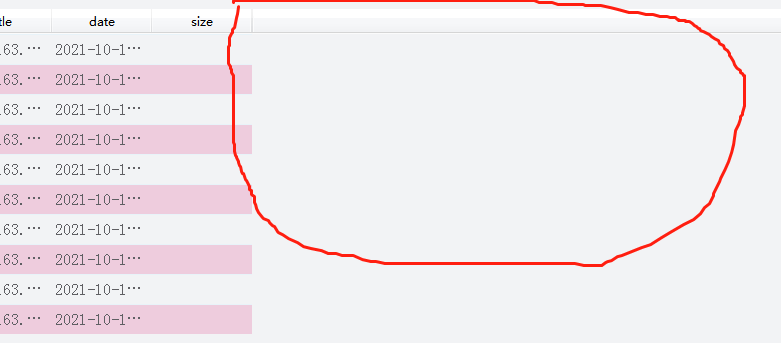
-
@jsulm
In fact ,i dont think its the usage of the problem.I think its that maybe was the layout or something.
When minimum the qtablewidget there would be the right columns,
but once maximum the qtablewidget,there would be an extra column seemed in fact was not the column.Cause the last column has diffrent styles with the others before.
I ve marked the area with the red pen.So god pleas help me .I dont know why.
@nicker-player said in How to hide the unnessary column of the qwidgetitem ?:
there would be an extra column
It's not an extra column, it's simply empty space.
Take a look at https://stackoverflow.com/questions/17411634/resizing-qtablewidget-columns-and-rows-to-fill-table -
@nicker-player said in How to hide the unnessary column of the qwidgetitem ?:
there would be an extra column
It's not an extra column, it's simply empty space.
Take a look at https://stackoverflow.com/questions/17411634/resizing-qtablewidget-columns-and-rows-to-fill-table@jsulm
Yeah ,thanks a lot.
But it would be not what I want.
all the columns have the same width what looks like.
I just wondered if there is a mode that do not have the empty space and user could modified the column width.Now I use the code like this
QHeaderView * header = horizontalHeader();
    header->setSectionResizeMode(QHeaderView::Interactive);
    header->setCascadingSectionResizes(true);
    header->setMinimumSectionSize(60);
    header->setStretchLastSection(true);
I just want to acommplish a function that the user could modified the width of the headerview columns
by themself .
But in fact once one of the columns was modified,the others after the one modified would disappear from the view area if I resize the column the max width.
How could i do to prevent the user maximum the column not to be the max width or maybe this is what i want:
when the user modified the column width there wouldnt appear the horizontal scorllbar of the headerview and all of the columns would be in the view area.
Its very hard to describe the actions. -
@nicker-player said in How to hide the unnessary column of the qwidgetitem ?:
there would be an extra column
It's not an extra column, it's simply empty space.
Take a look at https://stackoverflow.com/questions/17411634/resizing-qtablewidget-columns-and-rows-to-fill-table@jsulm
Could u help me ? it is very hard for me to find an easy way to fix the problem. -
@jsulm
Yeah ,thanks a lot.
But it would be not what I want.
all the columns have the same width what looks like.
I just wondered if there is a mode that do not have the empty space and user could modified the column width.Now I use the code like this
QHeaderView * header = horizontalHeader();
    header->setSectionResizeMode(QHeaderView::Interactive);
    header->setCascadingSectionResizes(true);
    header->setMinimumSectionSize(60);
    header->setStretchLastSection(true);
I just want to acommplish a function that the user could modified the width of the headerview columns
by themself .
But in fact once one of the columns was modified,the others after the one modified would disappear from the view area if I resize the column the max width.
How could i do to prevent the user maximum the column not to be the max width or maybe this is what i want:
when the user modified the column width there wouldnt appear the horizontal scorllbar of the headerview and all of the columns would be in the view area.
Its very hard to describe the actions.@nicker-player said in How to hide the unnessary column of the qwidgetitem ?:
that the user could modified the width of the headerview columns
That should work by default
-
@nicker-player said in How to hide the unnessary column of the qwidgetitem ?:
that the user could modified the width of the headerview columns
That should work by default
@jsulm
In fact its not.Because when i resize one of the columns to the maximum width, then the headview horizonal scollbar appears for a short time .only if i double click the headerview ,then the scrollbar disappeared and the width becomes normally.
So how to prevent this happened.I bind the headerview signal sectionResized to the method to control the width but failed. -
@jsulm
In fact its not.Because when i resize one of the columns to the maximum width, then the headview horizonal scollbar appears for a short time .only if i double click the headerview ,then the scrollbar disappeared and the width becomes normally.
So how to prevent this happened.I bind the headerview signal sectionResized to the method to control the width but failed.@nicker-player said in How to hide the unnessary column of the qwidgetitem ?:
I bind the headerview signal sectionResized to the method to control the width but failed
Please provide more details and show the code. Why do you do that at all?

