Skip to content
  • Categories
  • Recent
  • Tags
  • Popular
  • Users
  • Groups
  • Search
  • Get Qt
  • Unsolved
Collapse
Brand Logo
  1. Home
  2. Qt Development
  3. General and Desktop
  4. QT build from source in windows 10 (shellscalingapi.h not found)
Qt 6.12 LTS is out! See what's new in the release blog

QT build from source in windows 10 (shellscalingapi.h not found)

Scheduled Pinned Locked Moved Unsolved General and Desktop
13 Posts 4 Posters 2.7k Views
  • Oldest to Newest
  • Newest to Oldest
  • Most Votes
Reply
  • Reply as topic
Log in to reply
This topic has been deleted. Only users with topic management privileges can see it.
  • kkoehneK Offline
    kkoehneK Offline
    kkoehne
    Moderators
    wrote on last edited by
    #4

    @vakh said in QT build from source in windows 10 (shellscalingapi.h not found):

    but compiler can not find it. how can i add this directory to compiler include path?

    If you use the gcc from C:\Programs\Qt\Tools\mingw1120_64\bin, the directory is part of the compiler default include path. Which gcc are you using (which path shows up if you run "where gcc")?

    Director R&D, The Qt Company

    V 1 Reply Last reply
    0
    • kkoehneK kkoehne

      @vakh said in QT build from source in windows 10 (shellscalingapi.h not found):

      but compiler can not find it. how can i add this directory to compiler include path?

      If you use the gcc from C:\Programs\Qt\Tools\mingw1120_64\bin, the directory is part of the compiler default include path. Which gcc are you using (which path shows up if you run "where gcc")?

      V Offline
      V Offline
      vakh
      wrote on last edited by vakh
      #5

      @kkoehne
      It is the output of CMD:

      Microsoft Windows [Version 10.0.19043.1110]
      (c) Microsoft Corporation. All rights reserved.
      
      Z:\>where gcc
      C:\Programs\Qt\Tools\mingw1120_64\bin\gcc.exe
      C:\Programs\Strawberry\c\bin\gcc.exe
      

      it seems true.

      jsulmJ 1 Reply Last reply
      0
      • V vakh

        @kkoehne
        It is the output of CMD:

        Microsoft Windows [Version 10.0.19043.1110]
        (c) Microsoft Corporation. All rights reserved.
        
        Z:\>where gcc
        C:\Programs\Qt\Tools\mingw1120_64\bin\gcc.exe
        C:\Programs\Strawberry\c\bin\gcc.exe
        

        it seems true.

        jsulmJ Offline
        jsulmJ Offline
        jsulm
        Lifetime Qt Champion
        wrote on last edited by
        #6

        @vakh You have two GCCs installed. Check the build log to see which one is used during the build.

        https://forum.qt.io/topic/113070/qt-code-of-conduct

        1 Reply Last reply
        1
        • V Offline
          V Offline
          vakh
          wrote on last edited by
          #7

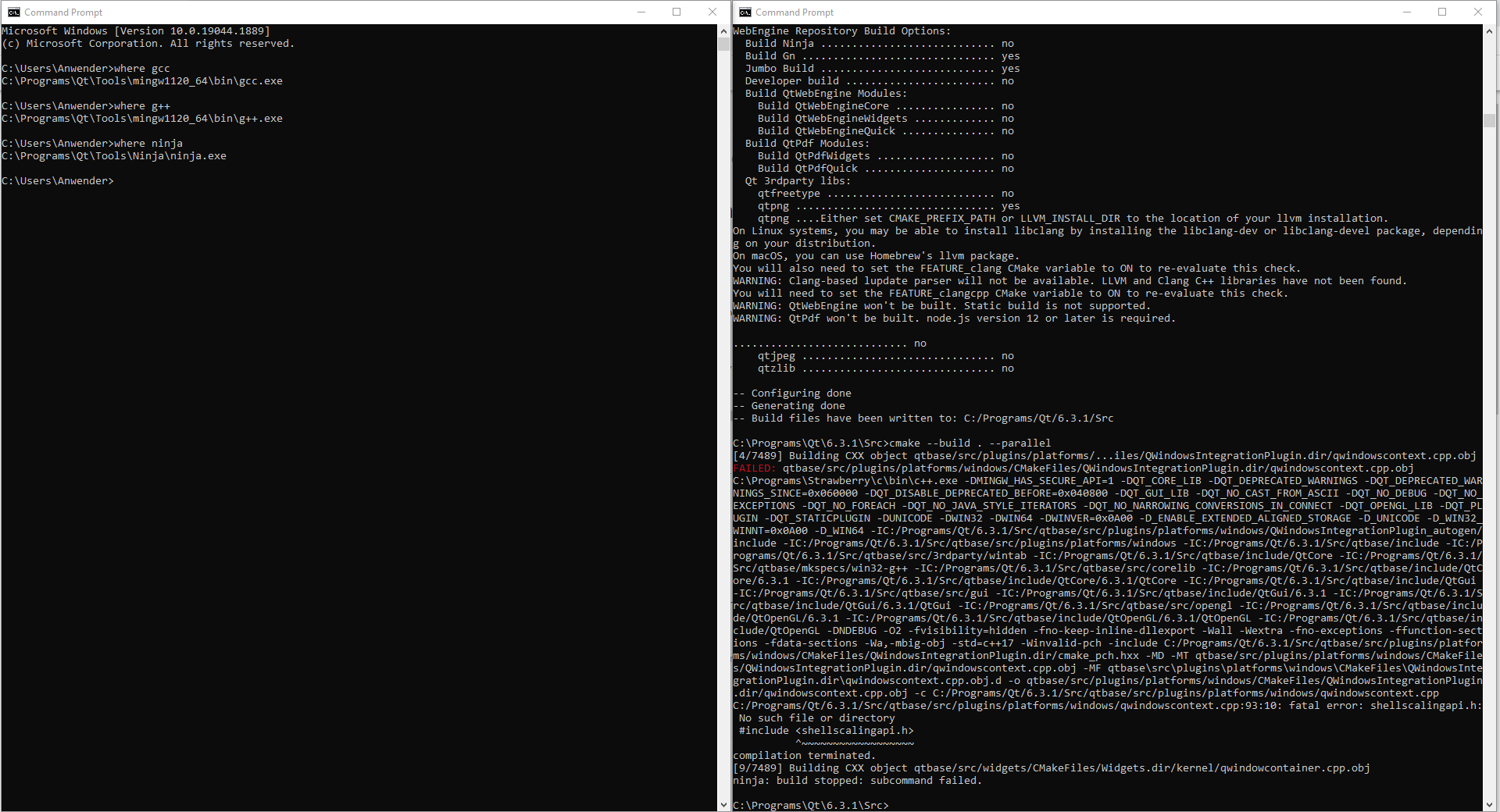
          I solve it. but nothing changed:
          b444b4a2-d931-4fb6-8768-765ff46fe84b-image.png
          i think the problem is related to Ninja.

          jsulmJ 1 Reply Last reply
          0
          • V vakh

            I solve it. but nothing changed:
            b444b4a2-d931-4fb6-8768-765ff46fe84b-image.png
            i think the problem is related to Ninja.

            jsulmJ Offline
            jsulmJ Offline
            jsulm
            Lifetime Qt Champion
            wrote on last edited by
            #8

            @vakh You are apparently usingf wrong compiler!
            Start from scratch: delete build folder, create new one and continue with the build. It should now pick up the correct compiler.

            https://forum.qt.io/topic/113070/qt-code-of-conduct

            V 1 Reply Last reply
            0
            • jsulmJ jsulm

              @vakh You are apparently usingf wrong compiler!
              Start from scratch: delete build folder, create new one and continue with the build. It should now pick up the correct compiler.

              V Offline
              V Offline
              vakh
              wrote on last edited by
              #9

              @jsulm thanks a lot. after I see your answer, I tested it. the problem solved. but another problem appeared.
              909984bd-ab16-4de3-b32d-c106f1071aed-image.png
              is it for little RAM? my system is intel core i5 6500T with 8 GB RAM and 58 GB free space on drive C. (I test this procedure two times and it failed because of low space on memory. then i solve it but now it failed with this error).

              jsulmJ 1 Reply Last reply
              0
              • V vakh

                @jsulm thanks a lot. after I see your answer, I tested it. the problem solved. but another problem appeared.
                909984bd-ab16-4de3-b32d-c106f1071aed-image.png
                is it for little RAM? my system is intel core i5 6500T with 8 GB RAM and 58 GB free space on drive C. (I test this procedure two times and it failed because of low space on memory. then i solve it but now it failed with this error).

                jsulmJ Offline
                jsulmJ Offline
                jsulm
                Lifetime Qt Champion
                wrote on last edited by
                #10

                @vakh said in QT build from source in windows 10 (shellscalingapi.h not found):

                is it for little RAM?

                Yes. You can limit the number of parallel compiler processes using make instead of ninja. For example to only use 4 processes do: make -j 4.

                https://forum.qt.io/topic/113070/qt-code-of-conduct

                1 Reply Last reply
                0
                • V Offline
                  V Offline
                  vakh
                  wrote on last edited by
                  #11

                  thanks a lot! QT static compile successfully done :)
                  now after adding this new qmake.exe to project development kit, I face a new problem. As I said before, doing this steps in ubuntu and macOS solved the need for shared libraries and application works without any problems in other computers (without QT installation). but here after doing all of these steps, application in windows need other libraries like "libgcc_s_seh-1.dll". how can I solve this problem?

                  jsulmJ 1 Reply Last reply
                  0
                  • V vakh

                    thanks a lot! QT static compile successfully done :)
                    now after adding this new qmake.exe to project development kit, I face a new problem. As I said before, doing this steps in ubuntu and macOS solved the need for shared libraries and application works without any problems in other computers (without QT installation). but here after doing all of these steps, application in windows need other libraries like "libgcc_s_seh-1.dll". how can I solve this problem?

                    jsulmJ Offline
                    jsulmJ Offline
                    jsulm
                    Lifetime Qt Champion
                    wrote on last edited by
                    #12

                    @vakh said in QT build from source in windows 10 (shellscalingapi.h not found):

                    how can I solve this problem?

                    Well, you would also have to compile all these libraries as static libraries and rebuild your app...

                    https://forum.qt.io/topic/113070/qt-code-of-conduct

                    V 1 Reply Last reply
                    0
                    • jsulmJ jsulm

                      @vakh said in QT build from source in windows 10 (shellscalingapi.h not found):

                      how can I solve this problem?

                      Well, you would also have to compile all these libraries as static libraries and rebuild your app...
                      V Offline
                      V Offline
                      vakh
                      wrote on last edited by vakh
                      #13
                      This post is deleted!
                      1 Reply Last reply
                      0

                      • Login

                      • Login or register to search.
                      • First post
                        Last post
                      0
                      • Categories
                      • Recent
                      • Tags
                      • Popular
                      • Users
                      • Groups
                      • Search
                      • Get Qt
                      • Unsolved