
canReadLine() working with /n and /r
-
@lukutis222 said in canReadLine() working with /n and /r:
canReadLine
It's always looking for a NewLine Character
\nand not carriage return\rlike the name suggests ;P
https://doc.qt.io/qt-6/qiodevice.html#readLineyou can subclass and override canReadLine, it's virtual.
bool QIODevice::canReadLine() const { Q_D(const QIODevice); return d->buffer.indexOf('\r', d->buffer.size(), d->isSequential() ? d->transactionPos : Q_INT64_C(0)) >= 0; }@J-Hilk said in canReadLine() working with /n and /r:
you can subclass and override canReadLine, it's virtual.
You can, but it will likely take you down a blind alley! The problem is that
QIODevice::readLine()is not virtual, and it is fixed on reading up to\n. This will lead tocanReadLine()returning true whenreadLine()will not read the same line as that. Not advisable.I have tried to use readAll() but for my particular application I must use canReadLine.
If your data uses
\rand no\nfor "line" separation, I suggest you implement a little buffer code usingreadAll()to fill and do you own search/split on\r. That is all the existingreadLine()stuff does and is not hard/only a few lines of code. -
@J-Hilk said in canReadLine() working with /n and /r:
you can subclass and override canReadLine, it's virtual.
You can, but it will likely take you down a blind alley! The problem is that
QIODevice::readLine()is not virtual, and it is fixed on reading up to\n. This will lead tocanReadLine()returning true whenreadLine()will not read the same line as that. Not advisable.I have tried to use readAll() but for my particular application I must use canReadLine.
If your data uses
\rand no\nfor "line" separation, I suggest you implement a little buffer code usingreadAll()to fill and do you own search/split on\r. That is all the existingreadLine()stuff does and is not hard/only a few lines of code.@JonB said in canReadLine() working with /n and /r:
The problem is that QIODevice::readLine() is not virtual
according to the documentation, it is:

https://doc.qt.io/qt-6/qiodevice.html#canReadLine
Be aware of the Qt Code of Conduct, when posting : https://forum.qt.io/topic/113070/qt-code-of-conduct
Q: What's that?
A: It's blue light.
Q: What does it do?
A: It turns blue. -
@JonB said in canReadLine() working with /n and /r:
The problem is that QIODevice::readLine() is not virtual
according to the documentation, it is:
https://doc.qt.io/qt-6/qiodevice.html#canReadLine@J-Hilk
Please read my answer again :) You show thatcanReadLine()isvirtual, which it is, I said the problem is thatreadLine()is not! So for exampleif/while (canReadLine()) line = readLine();will/may not function as you would expect, which is the whole point of using it.
QIODevice::readLineData()is virtual, and is used byreadLine(). The problem is thatreadLineData()leaves the\n("it should return the number of bytes read in this line, including the terminating newline") andreadLine()expects to see a\nat the end of the line, which won't be there....You may be able to make it work, would have to look at the Qt source code. But seems a lot easier/safer to me to just implement
canReadLine/readLine()-type methods, without overriding, which does what the OP wants with\r.... -
@J-Hilk
Please read my answer again :) You show thatcanReadLine()isvirtual, which it is, I said the problem is thatreadLine()is not! So for exampleif/while (canReadLine()) line = readLine();will/may not function as you would expect, which is the whole point of using it.
QIODevice::readLineData()is virtual, and is used byreadLine(). The problem is thatreadLineData()leaves the\n("it should return the number of bytes read in this line, including the terminating newline") andreadLine()expects to see a\nat the end of the line, which won't be there....You may be able to make it work, would have to look at the Qt source code. But seems a lot easier/safer to me to just implement
canReadLine/readLine()-type methods, without overriding, which does what the OP wants with\r.... -
The device that I am monitoring is printing in both (\n and \r) so I need to be able to detect both.
If I understand what you suggested correctly, you say that I can use readAll() to read all data and simply split string into different lines myself. I decided to try the following to split data with \n and \r:void Widget::readData2() { if(ui->autoscroll->isChecked()){ QTextCursor cursor = ui->Console_read_3->textCursor(); cursor.clearSelection(); cursor.movePosition(QTextCursor::End); ui->Console_read_3->setTextCursor(cursor); } QByteArray data = serial_local->serial_connection2.readAll(); QString DataAsString = QString(data); QStringList myStringList1 = DataAsString.split("\n"); for(int i =0;i < myStringList1.length();i++) { qDebug("data split with n = %s \n",myStringList1.at(i).toStdString().c_str()); } QStringList myStringList2 = DataAsString.split("\r"); for(int i =0;i < myStringList2.length();i++) { qDebug("data split with r= %s \n",myStringList2.at(i).toStdString().c_str()); } //ui->Console_read_3->setTextColor(Qt::white); //by default the text will be black //ui->Console_read_3->insertPlainText(DataAsString); }The external device that I am monitoring is simply doing the following:
while(1){
      printf("hello message1 \n");
      printf("hello message2 \n");
      delay(1000); // delay 1 second
      printf("new message1 \r");
      printf("new message2 \r");
      delay(1000);
}
The results checking application output logs:
data split with n =
data split with r= new message1
data split with r= new message2
data split with r= hello message1
data split with r=
hello message2
data split with r=


data split with n =
data split with r= new message1
data split with r= new message2
data split with r= hello message1
data split with r=
hello message2
data split with r=


data split with n =
data split with r= new message1
data split with r= new message2
data split with r= hello message1
data split with r=
hello message2
data split with r=


data split with n =
data split with r= new message1
data split with r= new message2
data split with r= hello message1
data split with r=
hello message2
data split with r=
The results are not quite as expect. I was expecting 2 lines with \n and 2 lines with \r to be printed but that is not really the caes
-
The device that I am monitoring is printing in both (\n and \r) so I need to be able to detect both.
If I understand what you suggested correctly, you say that I can use readAll() to read all data and simply split string into different lines myself. I decided to try the following to split data with \n and \r:void Widget::readData2() { if(ui->autoscroll->isChecked()){ QTextCursor cursor = ui->Console_read_3->textCursor(); cursor.clearSelection(); cursor.movePosition(QTextCursor::End); ui->Console_read_3->setTextCursor(cursor); } QByteArray data = serial_local->serial_connection2.readAll(); QString DataAsString = QString(data); QStringList myStringList1 = DataAsString.split("\n"); for(int i =0;i < myStringList1.length();i++) { qDebug("data split with n = %s \n",myStringList1.at(i).toStdString().c_str()); } QStringList myStringList2 = DataAsString.split("\r"); for(int i =0;i < myStringList2.length();i++) { qDebug("data split with r= %s \n",myStringList2.at(i).toStdString().c_str()); } //ui->Console_read_3->setTextColor(Qt::white); //by default the text will be black //ui->Console_read_3->insertPlainText(DataAsString); }The external device that I am monitoring is simply doing the following:
while(1){
      printf("hello message1 \n");
      printf("hello message2 \n");
      delay(1000); // delay 1 second
      printf("new message1 \r");
      printf("new message2 \r");
      delay(1000);
}
The results checking application output logs:
data split with n =
data split with r= new message1
data split with r= new message2
data split with r= hello message1
data split with r=
hello message2
data split with r=


data split with n =
data split with r= new message1
data split with r= new message2
data split with r= hello message1
data split with r=
hello message2
data split with r=


data split with n =
data split with r= new message1
data split with r= new message2
data split with r= hello message1
data split with r=
hello message2
data split with r=


data split with n =
data split with r= new message1
data split with r= new message2
data split with r= hello message1
data split with r=
hello message2
data split with r=
The results are not quite as expect. I was expecting 2 lines with \n and 2 lines with \r to be printed but that is not really the caes
@lukutis222 said in canReadLine() working with /n and /r:
The device that I am monitoring is printing in both (\n and \r) so I need to be able to detect both.
That sounds pretty bad! You show that lines can be either
\ror\nterminated, never heard of such a device. Anyway just adjust for that, it's just a simple coding requirement. Your code is not good enough, as you can see (e.g. hint: if you want to "split", or detect line break, you need to look for whichever of\ror\ncomes first).P.S.
If you don't actually care whether a "line" arrived with\ror\nas terminator and want them treated the same, this might make it simpler:QString DataAsString = QString(data); DataAsString.replace("\r", "\n"); QStringList myStringList = DataAsString.split("\n"); -
@lukutis222 said in canReadLine() working with /n and /r:
The device that I am monitoring is printing in both (\n and \r) so I need to be able to detect both.
That sounds pretty bad! You show that lines can be either
\ror\nterminated, never heard of such a device. Anyway just adjust for that, it's just a simple coding requirement. Your code is not good enough, as you can see (e.g. hint: if you want to "split", or detect line break, you need to look for whichever of\ror\ncomes first).P.S.
If you don't actually care whether a "line" arrived with\ror\nas terminator and want them treated the same, this might make it simpler:QString DataAsString = QString(data); DataAsString.replace("\r", "\n"); QStringList myStringList = DataAsString.split("\n");@JonB
Yeah.. I also want the terminal to be as much universal as possible. I want it to work with both devices that use \n , \r and even mixture of both.Your suggestion is quite clever :) It seems to work without any issues
-
I was testing a little bit more and I notice a strange behavior. Perhaps you have any ideas why would the following happen? I use the following code:
void Widget::readData()
{

    // save the scrollbar position
    QScrollBar *scrollbar = ui->Console_read->verticalScrollBar();
    bool scrollbarAtBottom  = (scrollbar->value() >= (scrollbar->maximum() - 4));
    int scrollbarPrevValue = scrollbar->value();

    // this moves the cursor to the bottom to avoid writing data in the middle of the console
    QTextCursor cursor = ui->Console_read->textCursor();
    cursor.clearSelection();
    cursor.movePosition(QTextCursor::End);
    ui->Console_read->setTextCursor(cursor);


        QByteArray data = serial_local->serial_connection.readAll();
        QString DataAsString = QString(data);
        DataAsString.replace("\r", "\n");
        QStringList myStringList = DataAsString.split("\n");
        for(int i =0;i < myStringList.length();i++)
        {
            //All other data with ANSI code is printed in black color
                ui->Console_read->setTextColor(Qt::white); //by default the text will be black
                ui->Console_read->insertPlainText(DataAsString);
                break;
        }


    if (scrollbarAtBottom)
    {
        ui->Console_read->ensureCursorVisible();
    }
    else
    {
        ui->Console_read->verticalScrollBar()->setValue(scrollbarPrevValue);
    }


}
I test 3 different scenarios:
SCENARIO1
external device sending:
while(1){
        printf("hello message1 \n");
        printf("hello message2 \n");
        delay(1000);
        printf("new message1 \n");
        printf("new message2 \n");
        delay(1000);
    }
Everything seems to be working nicely. The received data is printed nicely on the console:
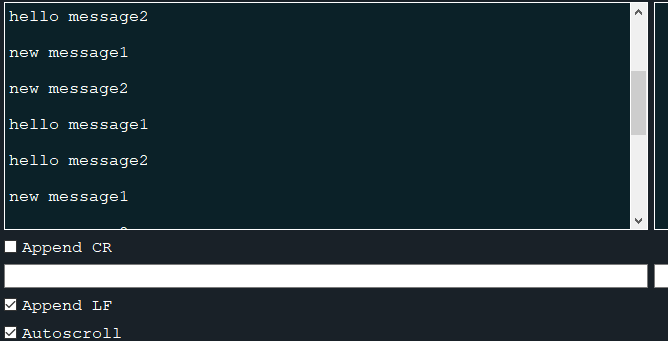
SCENARIO2
external device sending:
while(1){
        printf("hello message1 \n");
        printf("hello message2 \n");
        delay(1000);
        printf("new message1 \r");
        printf("new message2 \r");
        delay(1000);
    }
Something a little strange is starting to happen although all data is being printed in the console. I am expecting to receive 2 lines then 1 second delay, then another 2 lines and another 1 second delay(this is what happens in Scenario1), however that is not the case. All 4 lines are printed at once every 2 seconds due to adding \r.
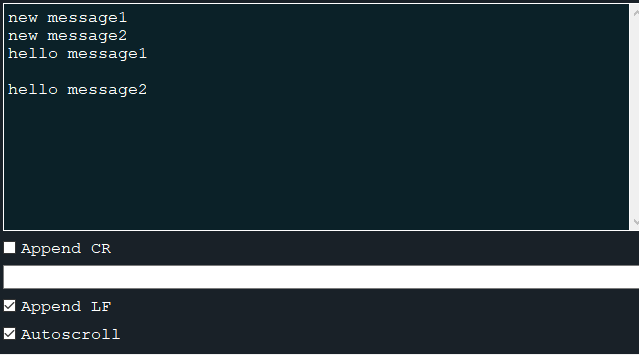
SCENARIO3
external device sending:
while(1){
        printf("hello message1 \r");
        printf("hello message2 \r");
        delay(1000);
        printf("new message1 \r");
        printf("new message2 \r");
        delay(1000);
    }
Even stranger things happen when device is only printing with \r. The device seems to be printing multiple lines (6 to 8 lines) every 3-4 seconds. I am not sure what is happening:
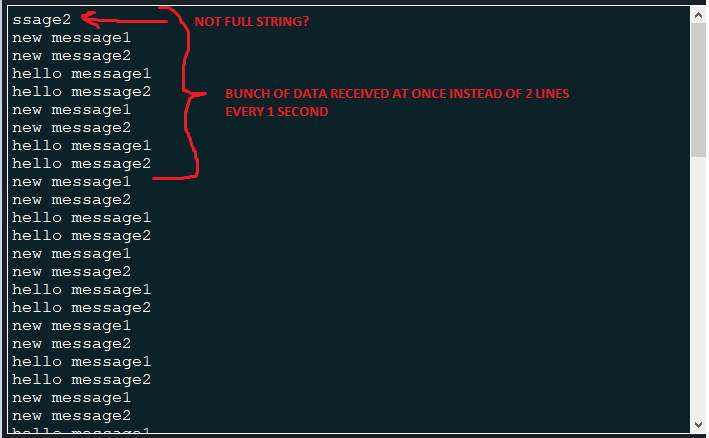
It feels like readAll(); does not want to work properly with \r. Maybe you have some ideas?
-
I was testing a little bit more and I notice a strange behavior. Perhaps you have any ideas why would the following happen? I use the following code:
void Widget::readData()
{

    // save the scrollbar position
    QScrollBar *scrollbar = ui->Console_read->verticalScrollBar();
    bool scrollbarAtBottom  = (scrollbar->value() >= (scrollbar->maximum() - 4));
    int scrollbarPrevValue = scrollbar->value();

    // this moves the cursor to the bottom to avoid writing data in the middle of the console
    QTextCursor cursor = ui->Console_read->textCursor();
    cursor.clearSelection();
    cursor.movePosition(QTextCursor::End);
    ui->Console_read->setTextCursor(cursor);


        QByteArray data = serial_local->serial_connection.readAll();
        QString DataAsString = QString(data);
        DataAsString.replace("\r", "\n");
        QStringList myStringList = DataAsString.split("\n");
        for(int i =0;i < myStringList.length();i++)
        {
            //All other data with ANSI code is printed in black color
                ui->Console_read->setTextColor(Qt::white); //by default the text will be black
                ui->Console_read->insertPlainText(DataAsString);
                break;
        }


    if (scrollbarAtBottom)
    {
        ui->Console_read->ensureCursorVisible();
    }
    else
    {
        ui->Console_read->verticalScrollBar()->setValue(scrollbarPrevValue);
    }


}
I test 3 different scenarios:
SCENARIO1
external device sending:
while(1){
        printf("hello message1 \n");
        printf("hello message2 \n");
        delay(1000);
        printf("new message1 \n");
        printf("new message2 \n");
        delay(1000);
    }
Everything seems to be working nicely. The received data is printed nicely on the console:
SCENARIO2
external device sending:
while(1){
        printf("hello message1 \n");
        printf("hello message2 \n");
        delay(1000);
        printf("new message1 \r");
        printf("new message2 \r");
        delay(1000);
    }
Something a little strange is starting to happen although all data is being printed in the console. I am expecting to receive 2 lines then 1 second delay, then another 2 lines and another 1 second delay(this is what happens in Scenario1), however that is not the case. All 4 lines are printed at once every 2 seconds due to adding \r.
SCENARIO3
external device sending:
while(1){
        printf("hello message1 \r");
        printf("hello message2 \r");
        delay(1000);
        printf("new message1 \r");
        printf("new message2 \r");
        delay(1000);
    }
Even stranger things happen when device is only printing with \r. The device seems to be printing multiple lines (6 to 8 lines) every 3-4 seconds. I am not sure what is happening:
It feels like readAll(); does not want to work properly with \r. Maybe you have some ideas?
@lukutis222 said in canReadLine() working with /n and /r:
printf("new message2 \r");
I bet if you try:
while(1){
        printf("hello message1 \r");
        printf("hello message2 \n");
        delay(1000);
        printf("new message1 \r");
        printf("new message2 \n");
        delay(1000);
    }
You will see on your side perfectly expected behaviour.
Seems like your device is only actually writing to / flushing the serialport when there is
a) a new line character
b) some (probably fixed) amount of time has passed since last flush and new data is available to send -
I was testing a little bit more and I notice a strange behavior. Perhaps you have any ideas why would the following happen? I use the following code:
void Widget::readData()
{

    // save the scrollbar position
    QScrollBar *scrollbar = ui->Console_read->verticalScrollBar();
    bool scrollbarAtBottom  = (scrollbar->value() >= (scrollbar->maximum() - 4));
    int scrollbarPrevValue = scrollbar->value();

    // this moves the cursor to the bottom to avoid writing data in the middle of the console
    QTextCursor cursor = ui->Console_read->textCursor();
    cursor.clearSelection();
    cursor.movePosition(QTextCursor::End);
    ui->Console_read->setTextCursor(cursor);


        QByteArray data = serial_local->serial_connection.readAll();
        QString DataAsString = QString(data);
        DataAsString.replace("\r", "\n");
        QStringList myStringList = DataAsString.split("\n");
        for(int i =0;i < myStringList.length();i++)
        {
            //All other data with ANSI code is printed in black color
                ui->Console_read->setTextColor(Qt::white); //by default the text will be black
                ui->Console_read->insertPlainText(DataAsString);
                break;
        }


    if (scrollbarAtBottom)
    {
        ui->Console_read->ensureCursorVisible();
    }
    else
    {
        ui->Console_read->verticalScrollBar()->setValue(scrollbarPrevValue);
    }


}
I test 3 different scenarios:
SCENARIO1
external device sending:
while(1){
        printf("hello message1 \n");
        printf("hello message2 \n");
        delay(1000);
        printf("new message1 \n");
        printf("new message2 \n");
        delay(1000);
    }
Everything seems to be working nicely. The received data is printed nicely on the console:
SCENARIO2
external device sending:
while(1){
        printf("hello message1 \n");
        printf("hello message2 \n");
        delay(1000);
        printf("new message1 \r");
        printf("new message2 \r");
        delay(1000);
    }
Something a little strange is starting to happen although all data is being printed in the console. I am expecting to receive 2 lines then 1 second delay, then another 2 lines and another 1 second delay(this is what happens in Scenario1), however that is not the case. All 4 lines are printed at once every 2 seconds due to adding \r.
SCENARIO3
external device sending:
while(1){
        printf("hello message1 \r");
        printf("hello message2 \r");
        delay(1000);
        printf("new message1 \r");
        printf("new message2 \r");
        delay(1000);
    }
Even stranger things happen when device is only printing with \r. The device seems to be printing multiple lines (6 to 8 lines) every 3-4 seconds. I am not sure what is happening:
It feels like readAll(); does not want to work properly with \r. Maybe you have some ideas?
@lukutis222
Quite possibly along the lines that @J-Hilk has said. When do you think whatever your "device" is flushes stdout? Maybe at a\n, but why should it flush at a\r? Either put in afflush(stdout)if you want flushing (e.g. before/at the start of each delay), or set stdout to unbuffered if you want that, or usewrite(1, ...)instead ofprintf()if you don't want to deal with stdout buffering? -
Makes sense. Thank you very much for clarifying. I read a little bit about printf in the ESP32 documentation (external device that I have connected)
https://esp32.com/viewtopic.php?t=3447

