Skip to content
  • Categories
  • Recent
  • Tags
  • Popular
  • Users
  • Groups
  • Search
  • Get Qt
  • Unsolved
Collapse
Brand Logo
  1. Home
  2. Qt Development
  3. General and Desktop
  4. I want to write a code that increases the value in the line edit when the checkbox is clicked.
Qt 6.12 LTS is out! See what's new in the release blog

I want to write a code that increases the value in the line edit when the checkbox is clicked.

Scheduled Pinned Locked Moved Unsolved General and Desktop
46 Posts 8 Posters 12.8k Views 3 Watching
  • Oldest to Newest
  • Newest to Oldest
  • Most Votes
Reply
  • Reply as topic
Log in to reply
This topic has been deleted. Only users with topic management privileges can see it.
  • W Offline
    W Offline
    wtimm
    wrote on last edited by
    #34

    i searched and tried but i can't code it

    1 Reply Last reply
    0
    • SGaistS Offline
      SGaistS Offline
      SGaist
      Lifetime Qt Champion
      wrote on last edited by SGaist
      #35

      You do realize that between the wiki page @JonB linked to that is doing what you and the "restoring the state of a GUI application" example of the QSettings class, you have everything you need to write that part for your application ?

      Interested in AI ? www.idiap.ch
      Please read the Qt Code of Conduct - https://forum.qt.io/topic/113070/qt-code-of-conduct

      1 Reply Last reply
      1
      • W Offline
        W Offline
        wtimm
        wrote on last edited by
        #36

        void Widget::on_mt_IncreaseValueButton_clicked()
        {
        auto originalLength = ui->mt_SerialNumberLineEdit->text().length();
        auto val = ui->mt_SerialNumberLineEdit->text().toInt();
        val += ui->mt_SpinBox->value();
        ui->mt_SerialNumberLineEdit->setText(QString::number(val));
        ui->mt_SerialNumberLineEdit->setText(QString::number(val).rightJustified(originalLength , '0'));
        }

        How can I print and read the val variable here in the file ? I also want it to overwrite the value continuously.

        1 Reply Last reply
        0
        • W Offline
          W Offline
          wtimm
          wrote on last edited by
          #37

          bool WriteFile(){

          QFile file("mt_SerialNumber.txt");
          
          QTextStream stream(&file);
          while(val != NULL)
          {
              stream << QString::number(val);
          }
          
          return true;
          

          }

          I defined something like this to main.cpp, but it says undeclared identifier because I can't pull val

          Pl45m4P 1 Reply Last reply
          0
          • W wtimm

            bool WriteFile(){

            QFile file("mt_SerialNumber.txt");
            
            QTextStream stream(&file);
            while(val != NULL)
            {
                stream << QString::number(val);
            }
            
            return true;
            

            }

            I defined something like this to main.cpp, but it says undeclared identifier because I can't pull val

            Pl45m4P Offline
            Pl45m4P Offline
            Pl45m4
            wrote on last edited by
            #38

            @wtimm

            Do you even read what we write?

            I defined something like this to main.cpp, but it says undeclared identifier because I can't pull val

            Because you probably dont have val in your main.cpp. Return it there from your object instance of your widget.


            If debugging is the process of removing software bugs, then programming must be the process of putting them in.

            ~E. W. Dijkstra

            W 1 Reply Last reply
            0
            • W Offline
              W Offline
              wtimm
              wrote on last edited by
              #39

              i tried to return but i got a error message like void function should not return a value

              mrjjM JonBJ 2 Replies Last reply
              0
              • W wtimm

                i tried to return but i got a error message like void function should not return a value

                mrjjM Offline
                mrjjM Offline
                mrjj
                Lifetime Qt Champion
                wrote on last edited by
                #40

                @wtimm
                that means you have something like

                void func() {
                return 20;
                }

                so you need to change the return type unless its a slot as then it wont work as you think.

                1 Reply Last reply
                0
                • W wtimm

                  i tried to return but i got a error message like void function should not return a value

                  JonBJ Offline
                  JonBJ Offline
                  JonB
                  wrote on last edited by
                  #41

                  @wtimm
                  I do not mean to be unkind, but do you not think you should read some books or tutorials about C++ programming? From your problems you need to understand some of the basics, your questions are not really about Qt.

                  1 Reply Last reply
                  2
                  • Pl45m4P Pl45m4

                    @wtimm

                    Do you even read what we write?

                    I defined something like this to main.cpp, but it says undeclared identifier because I can't pull val

                    Because you probably dont have val in your main.cpp. Return it there from your object instance of your widget.

                    W Offline
                    W Offline
                    wtimm
                    wrote on last edited by
                    #42

                    @Pl45m4 yes val in widget.cpp

                    1 Reply Last reply
                    0
                    • W Offline
                      W Offline
                      wtimm
                      wrote on last edited by
                      #43

                      dc363bf8-71d8-4b33-9c2d-66d86638e0ef-image.png

                      By pressing the grab data button, the value in the serial number
                      I am printing to text file
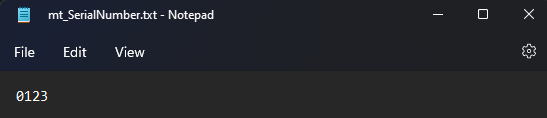
                      f025031e-e4e2-4d1b-a682-5c38e174aa2a-image.png

                      when i reopen the project or widget again how can I extract the value from the file and show it in the serial number line edit every time?

                      JonBJ 1 Reply Last reply
                      0
                      • Christian EhrlicherC Online
                        Christian EhrlicherC Online
                        Christian Ehrlicher
                        Lifetime Qt Champion
                        wrote on last edited by
                        #44

                        @wtimm said in I want to write a code that increases the value in the line edit when the checkbox is clicked.:

                        how can I extract the value from the file

                        open the file and read the content maybe?

                        Qt Online Installer direct download: https://download.qt.io/official_releases/online_installers/
                        Visit the Qt Academy at https://academy.qt.io/catalog

                        1 Reply Last reply
                        0
                        • W wtimm

                          dc363bf8-71d8-4b33-9c2d-66d86638e0ef-image.png

                          By pressing the grab data button, the value in the serial number
                          I am printing to text file

                          f025031e-e4e2-4d1b-a682-5c38e174aa2a-image.png

                          when i reopen the project or widget again how can I extract the value from the file and show it in the serial number line edit every time?

                          JonBJ Offline
                          JonBJ Offline
                          JonB
                          wrote on last edited by
                          #45

                          @wtimm
                          It's just the same as where we advised you to use QSettings for this from the start. It is simply (a bit) more complicated with saving to a file yourself. You will still have to write just the same type of code to read the saved value and set into your line edit.

                          1 Reply Last reply
                          0
                          • W Offline
                            W Offline
                            wtimm
                            wrote on last edited by
                            #46
                                    QFile inputFile(QString("C:/Users/Hakan/Desktop/Qt Businees/da/mt_SerialNumber.txt"));
                                    inputFile.open(QIODevice::ReadOnly);
                                    if (!inputFile.isOpen())
                                        return;
                            
                                    QTextStream stream(&inputFile);
                                    for (QString line = stream.readLine();
                                         
                                         !line.isNull();
                                         line = stream.readLine()) {
                                        /* process information */
                                    };
                            

                            I wrote a code like this but i couldn't get it to print serial number automatically(when i reopen the widget or project)

                            1 Reply Last reply
                            0

                            • Login

                            • Login or register to search.
                            • First post
                              Last post
                            0
                            • Categories
                            • Recent
                            • Tags
                            • Popular
                            • Users
                            • Groups
                            • Search
                            • Get Qt
                            • Unsolved
