Skip to content
  • Categories
  • Recent
  • Tags
  • Popular
  • Users
  • Groups
  • Search
  • Get Qt Extensions
  • Unsolved
Collapse
Brand Logo
  1. Home
  2. Qt Development
  3. General and Desktop
  4. Problem with QMain Window

Problem with QMain Window

Scheduled Pinned Locked Moved Unsolved General and Desktop
11 Posts 4 Posters 1.1k Views 2 Watching
  • Oldest to Newest
  • Newest to Oldest
  • Most Votes
Reply
  • Reply as topic
Log in to reply
This topic has been deleted. Only users with topic management privileges can see it.
  • E Offline
    E Offline
    Ewa Miazga
    wrote on last edited by
    #1

    Hello,
    I have a problem with qt project. I try to build project that was created in 2008, but I encounter a problem with QMainWindow I think, I have 11 errors, but I think that they all reffers to that one problem. Unfortunately, I don't know what can be wrong. Can you help me?

    #ifndef _SERVICESCOMPONENT_H_
    #define _SERVICESCOMPONENT_H_
    
    #include <commons.h>
    //#include <QtGui>
    //#include <QtWidgets>
    #include <QtWidgets/qwidget.h>
    #include <QtCore/qmutex.h>
    #include <QtWidgets/qtreeview.h>
    #include <QtWidgets/qheaderview.h>
    #include <QtWidgets/qtreewidget.h>
    #include <map>
    #include <set>
    #include "DCSCmd.h"
    //#include <QtWidgets/qmainwindow.h>
    #include <QtCore/qobject.h>
    
    class ServicesComponent : public QMainWindow
    {
    }
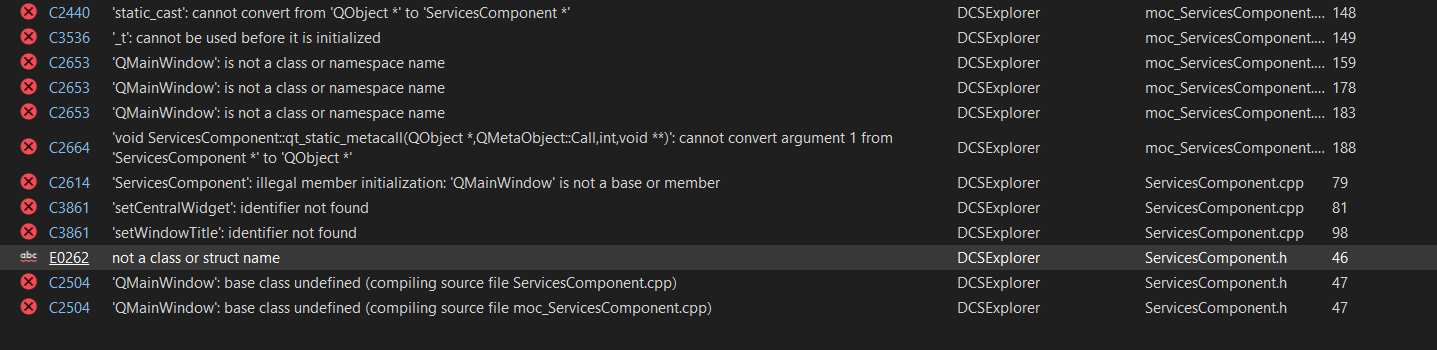
    

    0b7a2b16-0f8a-49fe-9567-e9d6dd06b26f-image.png
    many of errors reffers to moc_[files] but I don't understand why

    When I add #include <QtWidgets/qmainwindow.h> I get 700 errors, which every one of them is like unresolved external ...
    But I had such include in other files, and there are no problem with it. In .pro file I added += widgets.
    I don't have more idea what can help in my situation.
    Thanks for all suggestions.

    1 Reply Last reply
    0
    • mrjjM Offline
      mrjjM Offline
      mrjj
      Lifetime Qt Champion
      wrote on last edited by
      #2

      Hi
      Unless you are using a super old Qt then its just
      #include <QMainWindow>

      also, make SURE no moc__ files are in the project folder. They are generated and should live in the build folder.
      If it find old moc__ files, odd stuff will happen :)

      E 1 Reply Last reply
      0
      • mrjjM mrjj

        Hi
        Unless you are using a super old Qt then its just
        #include <QMainWindow>

        also, make SURE no moc__ files are in the project folder. They are generated and should live in the build folder.
        If it find old moc__ files, odd stuff will happen :)

        E Offline
        E Offline
        Ewa Miazga
        wrote on last edited by
        #3

        @mrjj Hi,
        I had the newest version of Qt, but I don't know why I can't #include <QMainWindow>, because for some reasons ' cannot open source faile "QMainWindow".'
        I should remove all files moc__ .. cpp also? I find them in project in folder x64/release/moc.
        In pre-build event -> command line is command that creates moc.exe MainWindow.h -o moc_MainWindow.cpp
        moc.exe GuiUpdatingThread.h -o moc_GuiUpdatingThread.cpp

        mrjjM 1 Reply Last reply
        0
        • JoeCFDJ Offline
          JoeCFDJ Offline
          JoeCFD
          wrote on last edited by
          #4

          if pro file is used, list its content here.

          E 1 Reply Last reply
          1
          • E Ewa Miazga

            @mrjj Hi,
            I had the newest version of Qt, but I don't know why I can't #include <QMainWindow>, because for some reasons ' cannot open source faile "QMainWindow".'
            I should remove all files moc__ .. cpp also? I find them in project in folder x64/release/moc.
            In pre-build event -> command line is command that creates moc.exe MainWindow.h -o moc_MainWindow.cpp
            moc.exe GuiUpdatingThread.h -o moc_GuiUpdatingThread.cpp

            mrjjM Offline
            mrjjM Offline
            mrjj
            Lifetime Qt Champion
            wrote on last edited by
            #5

            @Ewa-Miazga said in Problem with QMain Window:

            x64/release/moc.

            This seems ok as not a project folder directly.
            But it also seems non standard which means that the -pro file might be special.

            Have you tried to go
            File->New Project
            alt text

            then just Next, Next

            Then you get a clean project with QMainWindow

            Its just to see if that ones just works so we know if its this project somehow or something with the installation

            E 1 Reply Last reply
            0
            • SGaistS Offline
              SGaistS Offline
              SGaist
              Lifetime Qt Champion
              wrote on last edited by
              #6

              Hi,

              Seeing the age of the project, you likely are missing QT += widgets in your .pro file.

              Interested in AI ? www.idiap.ch
              Please read the Qt Code of Conduct - https://forum.qt.io/topic/113070/qt-code-of-conduct

              E 1 Reply Last reply
              1
              • SGaistS SGaist

                Hi,

                Seeing the age of the project, you likely are missing QT += widgets in your .pro file.

                E Offline
                E Offline
                Ewa Miazga
                wrote on last edited by
                #7

                @SGaist I added it, but it changed nothing.

                1 Reply Last reply
                0
                • JoeCFDJ JoeCFD

                  if pro file is used, list its content here.

                  E Offline
                  E Offline
                  Ewa Miazga
                  wrote on last edited by
                  #8

                  @JoeCFD
                  in .pro file:
                  CONFIG += no_fixpath
                  QT += core uitools widgets

                      DEFINES -= UNICODE _UNICODE
                  
                  1 Reply Last reply
                  0
                  • mrjjM mrjj

                    @Ewa-Miazga said in Problem with QMain Window:

                    x64/release/moc.

                    This seems ok as not a project folder directly.
                    But it also seems non standard which means that the -pro file might be special.

                    Have you tried to go
                    File->New Project
                    alt text

                    then just Next, Next

                    Then you get a clean project with QMainWindow

                    Its just to see if that ones just works so we know if its this project somehow or something with the installation

                    E Offline
                    E Offline
                    Ewa Miazga
                    wrote on last edited by
                    #9

                    @mrjj
                    It works.
                    I decided to copy all the files to new console application qt project in visual studio and now I have plenty of unexternal symbols...

                    1 Reply Last reply
                    0
                    • SGaistS Offline
                      SGaistS Offline
                      SGaist
                      Lifetime Qt Champion
                      wrote on last edited by
                      #10

                      The suggestion is to create a Qt Widgets application so you ensure that it's properly configured to build using the widgets module.

                      Interested in AI ? www.idiap.ch
                      Please read the Qt Code of Conduct - https://forum.qt.io/topic/113070/qt-code-of-conduct

                      E 1 Reply Last reply
                      1
                      • SGaistS SGaist

                        The suggestion is to create a Qt Widgets application so you ensure that it's properly configured to build using the widgets module.

                        E Offline
                        E Offline
                        Ewa Miazga
                        wrote on last edited by
                        #11

                        @SGaist I checked it. It works.

                        1 Reply Last reply
                        1

                        • Login

                        • Login or register to search.
                        • First post
                          Last post
                        0
                        • Categories
                        • Recent
                        • Tags
                        • Popular
                        • Users
                        • Groups
                        • Search
                        • Get Qt Extensions
                        • Unsolved