
To go to slot view and to come back
-
Hi,
Please show the rest of your code. As @JonB wrote, the snippet you posted look fine from a connection point of view.
Note, that you seem to use a lot of stack based QObject variables. This is not good practice in your case.
-
that is code for "numbers" slot.
the uppercase and lowercase are similar .void MainWindow:: numbers() { qDebug() << "NUMBERS "; // setup GUI _qView.setReadOnly(true); _qGrid.addWidget(&_qView, 0, 0, 1, 3); _qBtnClr.setShortcut(QKeySequence("CLEAR")); _qGrid.addWidget(&_qBtnClr, 0, 3); _qBtnENTER.setShortcut(QKeySequence("ENTER")); _qGrid.addWidget(&_qBtnENTER, 0, 4); _qBtnLeft.setShortcut(QKeySequence("<")); _qGrid.addWidget(&_qBtnLeft, 0, 5); _qBtnRight.setShortcut(QKeySequence(">")); _qGrid.addWidget(&_qBtnRight, 0, 6); // _qGrid.addWidget(&_qBtnClr, 0, 3); _qBtn9.setShortcut(QKeySequence("9")); _qGrid.addWidget(&_qBtn9, 1, 0); _qBtn8.setShortcut(QKeySequence("8")); _qGrid.addWidget(&_qBtn8, 1, 1); _qBtn7.setShortcut(QKeySequence("7")); _qGrid.addWidget(&_qBtn7, 1, 2); _qBtn6.setShortcut(QKeySequence("6")); _qGrid.addWidget(&_qBtn6, 1, 3); _qBtn5.setShortcut(QKeySequence("5")); _qGrid.addWidget(&_qBtn5, 1, 4); _qBtn4.setShortcut(QKeySequence("4")); _qGrid.addWidget(&_qBtn4, 1, 5); _qBtn3.setShortcut(QKeySequence("3")); _qGrid.addWidget(&_qBtn3, 1, 6); _qBtn2.setShortcut(QKeySequence("2")); _qGrid.addWidget(&_qBtn2, 2,0 ); _qBtn1.setShortcut(QKeySequence("1")); _qGrid.addWidget(&_qBtn1, 2, 1); _qBtn0.setShortcut(QKeySequence("0")); _qGrid.addWidget(&_qBtn0, 2, 2); setLayout(&_qGrid); _qBtnClr.setFocus(); // connect signal handlers connect(&_qBtnClr, &QPushButton::clicked, this, &MainWindow::clear); connect(&_qBtn7, &QPushButton::clicked, [this](bool) { addDigit('7'); }); connect(&_qBtn8, &QPushButton::clicked, [this](bool) { addDigit('8'); }); connect(&_qBtn9, &QPushButton::clicked, [this](bool) { addDigit('9'); }); connect(&_qBtnDiv, &QPushButton::clicked, [this](bool) { eval('/'); }); connect(&_qBtn4, &QPushButton::clicked, [this](bool) { addDigit('4'); }); connect(&_qBtn5, &QPushButton::clicked, [this](bool) { addDigit('5'); }); connect(&_qBtn6, &QPushButton::clicked, [this](bool) { addDigit('6'); }); connect(&_qBtn1, &QPushButton::clicked, [this](bool) { addDigit('1'); }); connect(&_qBtn2, &QPushButton::clicked, [this](bool) { addDigit('2'); }); connect(&_qBtn3, &QPushButton::clicked, [this](bool) { addDigit('3'); }); connect(&_qBtnRight, &QPushButton::clicked, [this](bool) { uppercase(); }); connect(&_qBtnLeft, &QPushButton::clicked, [this](bool) { lowecase(); }); } -
that is code for "numbers" slot.
the uppercase and lowercase are similar .void MainWindow:: numbers() { qDebug() << "NUMBERS "; // setup GUI _qView.setReadOnly(true); _qGrid.addWidget(&_qView, 0, 0, 1, 3); _qBtnClr.setShortcut(QKeySequence("CLEAR")); _qGrid.addWidget(&_qBtnClr, 0, 3); _qBtnENTER.setShortcut(QKeySequence("ENTER")); _qGrid.addWidget(&_qBtnENTER, 0, 4); _qBtnLeft.setShortcut(QKeySequence("<")); _qGrid.addWidget(&_qBtnLeft, 0, 5); _qBtnRight.setShortcut(QKeySequence(">")); _qGrid.addWidget(&_qBtnRight, 0, 6); // _qGrid.addWidget(&_qBtnClr, 0, 3); _qBtn9.setShortcut(QKeySequence("9")); _qGrid.addWidget(&_qBtn9, 1, 0); _qBtn8.setShortcut(QKeySequence("8")); _qGrid.addWidget(&_qBtn8, 1, 1); _qBtn7.setShortcut(QKeySequence("7")); _qGrid.addWidget(&_qBtn7, 1, 2); _qBtn6.setShortcut(QKeySequence("6")); _qGrid.addWidget(&_qBtn6, 1, 3); _qBtn5.setShortcut(QKeySequence("5")); _qGrid.addWidget(&_qBtn5, 1, 4); _qBtn4.setShortcut(QKeySequence("4")); _qGrid.addWidget(&_qBtn4, 1, 5); _qBtn3.setShortcut(QKeySequence("3")); _qGrid.addWidget(&_qBtn3, 1, 6); _qBtn2.setShortcut(QKeySequence("2")); _qGrid.addWidget(&_qBtn2, 2,0 ); _qBtn1.setShortcut(QKeySequence("1")); _qGrid.addWidget(&_qBtn1, 2, 1); _qBtn0.setShortcut(QKeySequence("0")); _qGrid.addWidget(&_qBtn0, 2, 2); setLayout(&_qGrid); _qBtnClr.setFocus(); // connect signal handlers connect(&_qBtnClr, &QPushButton::clicked, this, &MainWindow::clear); connect(&_qBtn7, &QPushButton::clicked, [this](bool) { addDigit('7'); }); connect(&_qBtn8, &QPushButton::clicked, [this](bool) { addDigit('8'); }); connect(&_qBtn9, &QPushButton::clicked, [this](bool) { addDigit('9'); }); connect(&_qBtnDiv, &QPushButton::clicked, [this](bool) { eval('/'); }); connect(&_qBtn4, &QPushButton::clicked, [this](bool) { addDigit('4'); }); connect(&_qBtn5, &QPushButton::clicked, [this](bool) { addDigit('5'); }); connect(&_qBtn6, &QPushButton::clicked, [this](bool) { addDigit('6'); }); connect(&_qBtn1, &QPushButton::clicked, [this](bool) { addDigit('1'); }); connect(&_qBtn2, &QPushButton::clicked, [this](bool) { addDigit('2'); }); connect(&_qBtn3, &QPushButton::clicked, [this](bool) { addDigit('3'); }); connect(&_qBtnRight, &QPushButton::clicked, [this](bool) { uppercase(); }); connect(&_qBtnLeft, &QPushButton::clicked, [this](bool) { lowecase(); }); }@Montanaro
I don't know how it affects your outcome, but you are doing a whole load ofconnect()statements innumbers(). These new connections do not replace the original ones, they add to them (a signal can have multiple slots connected). So once executed your buttons will now be doing multiple things to do with each ofnumbers/lowercase/uppercase. I would guess this causes some undesired effect.connect()statements should only (normally) be performed once, usually just after a widget is created. Hence only once. If you really must do it the way you show, you should be disconnecting the previous signal(s) before adding the new one(s). -
ok.
I disconnect the signals but the result is the same.My problem isnt multiple connections but the whole frame.
@Montanaro said in To go to slot view and to come back:
My problem isnt multiple connections but the whole frame.
Please provide a minimal, compilable example then. Connections are not simply removed by doing nothing.
-
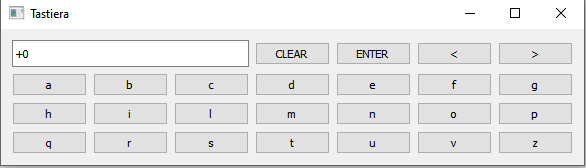
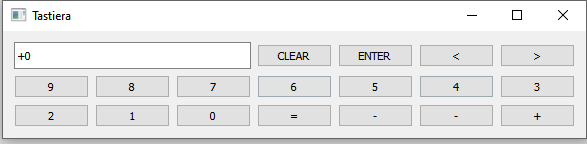
Ok. That is example of code and example of layout of keyboard
My problem:
I can switch from one to other once. I can switch to number keyboard to uppercase or lowercarse.
I can switch to uppercase to lowercase and I can switch to lowercase to uppercase
but I cannot switch to uppercase to lowercase and came backvoid MainWindow:: numbers() { qDebug() << "NUMBERS "; disconnesioniMultiple(); // setup GUI _qView.setReadOnly(true); _qGrid.addWidget(&_qView, 0, 0, 1, 3); _qBtnClr.setShortcut(QKeySequence("CLEAR")); _qGrid.addWidget(&_qBtnClr, 0, 3); _qBtnENTER.setShortcut(QKeySequence("ENTER")); _qGrid.addWidget(&_qBtnENTER, 0, 4); _qBtnLeft.setShortcut(QKeySequence("<")); _qGrid.addWidget(&_qBtnLeft, 0, 5); _qBtnRight.setShortcut(QKeySequence(">")); _qGrid.addWidget(&_qBtnRight, 0, 6); // _qGrid.addWidget(&_qBtnClr, 0, 3); _qBtn9.setShortcut(QKeySequence("9")); _qGrid.addWidget(&_qBtn9, 1, 0); _qBtn8.setShortcut(QKeySequence("8")); _qGrid.addWidget(&_qBtn8, 1, 1); _qBtn7.setShortcut(QKeySequence("7")); _qGrid.addWidget(&_qBtn7, 1, 2); _qBtn6.setShortcut(QKeySequence("6")); _qGrid.addWidget(&_qBtn6, 1, 3); _qBtn5.setShortcut(QKeySequence("5")); _qGrid.addWidget(&_qBtn5, 1, 4); _qBtn4.setShortcut(QKeySequence("4")); _qGrid.addWidget(&_qBtn4, 1, 5); _qBtn3.setShortcut(QKeySequence("3")); _qGrid.addWidget(&_qBtn3, 1, 6); _qBtn2.setShortcut(QKeySequence("2")); _qGrid.addWidget(&_qBtn2, 2,0 ); _qBtn1.setShortcut(QKeySequence("1")); _qGrid.addWidget(&_qBtn1, 2, 1); _qBtn0.setShortcut(QKeySequence("0")); _qGrid.addWidget(&_qBtn0, 2, 2); setLayout(&_qGrid); _qBtnClr.setFocus(); _qBtnRight.disconnect(); _qBtnLeft.disconnect(); connect(&_qBtnRight, &QPushButton::clicked, [this](bool) { uppercase(); }); connect(&_qBtnLeft, &QPushButton::clicked, [this](bool) { lowercase(); }); } void MainWindow::disconnesioniMultiple() { qDebug() << "disconection"; _qBtnA.disconnect(); _qBtnB.disconnect(); _qBtnC.disconnect(); _qBtnD.disconnect(); _qBtnE.disconnect(); _qBtnF.disconnect(); _qBtnG.disconnect(); _qBtnH.disconnect(); _qBtnI.disconnect(); _qBtnL.disconnect(); _qBtnM.disconnect(); _qBtnN.disconnect(); _qBtnO.disconnect(); _qBtnP.disconnect(); _qBtnQ.disconnect(); _qBtnR.disconnect(); _qBtnS.disconnect(); _qBtnT.disconnect(); _qBtnU.disconnect(); _qBtnV.disconnect(); _qBtnZ.disconnect(); _qBtnW.disconnect(); _qBtnX.disconnect(); _qBtnY.disconnect(); _qBtnJ.disconnect(); _qBtnRight.disconnect(); _qBtnLeft.disconnect(); _qBtna.disconnect(); _qBtnb.disconnect(); _qBtnc.disconnect(); _qBtnd.disconnect(); _qBtne.disconnect(); _qBtnf.disconnect(); _qBtng.disconnect(); _qBtnh.disconnect(); _qBtni.disconnect(); _qBtnl.disconnect(); _qBtnm.disconnect(); _qBtnn.disconnect(); _qBtno.disconnect(); _qBtnp.disconnect(); _qBtnq.disconnect(); _qBtnr.disconnect(); _qBtns.disconnect(); _qBtnt.disconnect(); _qBtnu.disconnect(); _qBtnv.disconnect(); _qBtnz.disconnect(); _qBtnw.disconnect(); _qBtnx.disconnect(); _qBtny.disconnect(); _qBtnj.disconnect(); _qBtn0.disconnect(); _qBtn1.disconnect(); _qBtn2.disconnect(); _qBtn3.disconnect(); _qBtn4.disconnect(); _qBtn5.disconnect(); _qBtn6.disconnect(); _qBtn7.disconnect(); _qBtn8.disconnect(); _qBtn9.disconnect(); _qBtnEU.disconnect(); _qBtnDO.disconnect(); _qBtnAT.disconnect(); _qBtnPC.disconnect(); _qBtnAND.disconnect(); _qBtnOR.disconnect(); _qBtnNOT.disconnect(); }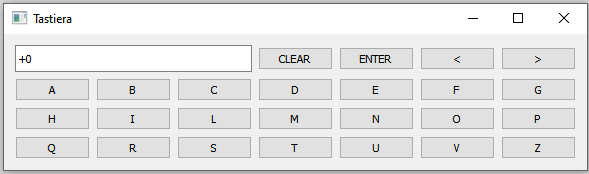
-
You code is neither minimal nor compilable.
One button should be enough per page for a minimal, compilable example.Qt Online Installer direct download: https://download.qt.io/official_releases/online_installers/
Visit the Qt Academy at https://academy.qt.io/catalog -
You code is neither minimal nor compilable.
One button should be enough per page for a minimal, compilable example.@Christian-Ehrlicher what ? your intervention is useless and rude
-
Ok. That is example of code and example of layout of keyboard
My problem:
I can switch from one to other once. I can switch to number keyboard to uppercase or lowercarse.
I can switch to uppercase to lowercase and I can switch to lowercase to uppercase
but I cannot switch to uppercase to lowercase and came backvoid MainWindow:: numbers() { qDebug() << "NUMBERS "; disconnesioniMultiple(); // setup GUI _qView.setReadOnly(true); _qGrid.addWidget(&_qView, 0, 0, 1, 3); _qBtnClr.setShortcut(QKeySequence("CLEAR")); _qGrid.addWidget(&_qBtnClr, 0, 3); _qBtnENTER.setShortcut(QKeySequence("ENTER")); _qGrid.addWidget(&_qBtnENTER, 0, 4); _qBtnLeft.setShortcut(QKeySequence("<")); _qGrid.addWidget(&_qBtnLeft, 0, 5); _qBtnRight.setShortcut(QKeySequence(">")); _qGrid.addWidget(&_qBtnRight, 0, 6); // _qGrid.addWidget(&_qBtnClr, 0, 3); _qBtn9.setShortcut(QKeySequence("9")); _qGrid.addWidget(&_qBtn9, 1, 0); _qBtn8.setShortcut(QKeySequence("8")); _qGrid.addWidget(&_qBtn8, 1, 1); _qBtn7.setShortcut(QKeySequence("7")); _qGrid.addWidget(&_qBtn7, 1, 2); _qBtn6.setShortcut(QKeySequence("6")); _qGrid.addWidget(&_qBtn6, 1, 3); _qBtn5.setShortcut(QKeySequence("5")); _qGrid.addWidget(&_qBtn5, 1, 4); _qBtn4.setShortcut(QKeySequence("4")); _qGrid.addWidget(&_qBtn4, 1, 5); _qBtn3.setShortcut(QKeySequence("3")); _qGrid.addWidget(&_qBtn3, 1, 6); _qBtn2.setShortcut(QKeySequence("2")); _qGrid.addWidget(&_qBtn2, 2,0 ); _qBtn1.setShortcut(QKeySequence("1")); _qGrid.addWidget(&_qBtn1, 2, 1); _qBtn0.setShortcut(QKeySequence("0")); _qGrid.addWidget(&_qBtn0, 2, 2); setLayout(&_qGrid); _qBtnClr.setFocus(); _qBtnRight.disconnect(); _qBtnLeft.disconnect(); connect(&_qBtnRight, &QPushButton::clicked, [this](bool) { uppercase(); }); connect(&_qBtnLeft, &QPushButton::clicked, [this](bool) { lowercase(); }); } void MainWindow::disconnesioniMultiple() { qDebug() << "disconection"; _qBtnA.disconnect(); _qBtnB.disconnect(); _qBtnC.disconnect(); _qBtnD.disconnect(); _qBtnE.disconnect(); _qBtnF.disconnect(); _qBtnG.disconnect(); _qBtnH.disconnect(); _qBtnI.disconnect(); _qBtnL.disconnect(); _qBtnM.disconnect(); _qBtnN.disconnect(); _qBtnO.disconnect(); _qBtnP.disconnect(); _qBtnQ.disconnect(); _qBtnR.disconnect(); _qBtnS.disconnect(); _qBtnT.disconnect(); _qBtnU.disconnect(); _qBtnV.disconnect(); _qBtnZ.disconnect(); _qBtnW.disconnect(); _qBtnX.disconnect(); _qBtnY.disconnect(); _qBtnJ.disconnect(); _qBtnRight.disconnect(); _qBtnLeft.disconnect(); _qBtna.disconnect(); _qBtnb.disconnect(); _qBtnc.disconnect(); _qBtnd.disconnect(); _qBtne.disconnect(); _qBtnf.disconnect(); _qBtng.disconnect(); _qBtnh.disconnect(); _qBtni.disconnect(); _qBtnl.disconnect(); _qBtnm.disconnect(); _qBtnn.disconnect(); _qBtno.disconnect(); _qBtnp.disconnect(); _qBtnq.disconnect(); _qBtnr.disconnect(); _qBtns.disconnect(); _qBtnt.disconnect(); _qBtnu.disconnect(); _qBtnv.disconnect(); _qBtnz.disconnect(); _qBtnw.disconnect(); _qBtnx.disconnect(); _qBtny.disconnect(); _qBtnj.disconnect(); _qBtn0.disconnect(); _qBtn1.disconnect(); _qBtn2.disconnect(); _qBtn3.disconnect(); _qBtn4.disconnect(); _qBtn5.disconnect(); _qBtn6.disconnect(); _qBtn7.disconnect(); _qBtn8.disconnect(); _qBtn9.disconnect(); _qBtnEU.disconnect(); _qBtnDO.disconnect(); _qBtnAT.disconnect(); _qBtnPC.disconnect(); _qBtnAND.disconnect(); _qBtnOR.disconnect(); _qBtnNOT.disconnect(); }@Montanaro said in To go to slot view and to come back:
_qGrid
I assume
_qGridis a QGridlayout ?if so, then the problem is obvious.
each functions adds the Widget to the Gridlayout at the same position. 0,0, spanning 1 row and 3 columns
but, you never remove them when you add one of the other widgets to the exact same position.
So they are stacking on top of each other with only the last one being visible. Than next time addWidget will silently fail, because the widget is already added.
the simplest way to "fix" your code, in the way, that you actually see the widget, would be adding a raise() call after "adding" the widget:
_qView.setReadOnly(true);
_qGrid.addWidget(&_qView, 0, 0, 1, 3);
_qView.raise();
the correct way would be to remove the old widget from the layout before adding the new one.
Be aware of the Qt Code of Conduct, when posting : https://forum.qt.io/topic/113070/qt-code-of-conduct
Q: What's that?
A: It's blue light.
Q: What does it do?
A: It turns blue. -
@Montanaro said in To go to slot view and to come back:
_qGrid
I assume
_qGridis a QGridlayout ?if so, then the problem is obvious.
each functions adds the Widget to the Gridlayout at the same position. 0,0, spanning 1 row and 3 columns
but, you never remove them when you add one of the other widgets to the exact same position.
So they are stacking on top of each other with only the last one being visible. Than next time addWidget will silently fail, because the widget is already added.
the simplest way to "fix" your code, in the way, that you actually see the widget, would be adding a raise() call after "adding" the widget:
_qView.setReadOnly(true);
_qGrid.addWidget(&_qView, 0, 0, 1, 3);
_qView.raise();
the correct way would be to remove the old widget from the layout before adding the new one.
@J-Hilk said in To go to slot view and to come back:
the correct way would be to remove the old widget from the layout before adding the new one.
Or use a QStackedWidget and switch the layouts - this avoids the re-creation.
-
@Montanaro said in To go to slot view and to come back:
_qGrid
I assume
_qGridis a QGridlayout ?if so, then the problem is obvious.
each functions adds the Widget to the Gridlayout at the same position. 0,0, spanning 1 row and 3 columns
but, you never remove them when you add one of the other widgets to the exact same position.
So they are stacking on top of each other with only the last one being visible. Than next time addWidget will silently fail, because the widget is already added.
the simplest way to "fix" your code, in the way, that you actually see the widget, would be adding a raise() call after "adding" the widget:
_qView.setReadOnly(true);
_qGrid.addWidget(&_qView, 0, 0, 1, 3);
_qView.raise();
the correct way would be to remove the old widget from the layout before adding the new one.
@J-Hilk
thanks. I tried that:"
So they are stacking on top of each other with only the last one being visible. Than next time addWidget will silently fail, because the widget is already added.
the simplest way to "fix" your code, in the way, that you actually see the widget, would be adding a raise() call after "adding" the widget: "but with hide and show and now it works :)


