Skip to content
  • Categories
  • Recent
  • Tags
  • Popular
  • Users
  • Groups
  • Search
  • Get Qt Extensions
  • Unsolved
Collapse
Brand Logo
  1. Home
  2. Qt Development
  3. General and Desktop
  4. where is my QLabel getting resized?
Qt 6.11 is out! See what's new in the release blog

where is my QLabel getting resized?

Scheduled Pinned Locked Moved Solved General and Desktop
19 Posts 5 Posters 1.5k Views 2 Watching
  • Oldest to Newest
  • Newest to Oldest
  • Most Votes
Reply
  • Reply as topic
Log in to reply
This topic has been deleted. Only users with topic management privileges can see it.
  • SGaistS Offline
    SGaistS Offline
    SGaist
    Lifetime Qt Champion
    wrote on last edited by
    #2

    Hi,

    The constructor is the wrong place to ask for the size. The first time the size is valid is when showEvent is called.

    Until a widget is shown, it has no "physical presence" and thus the size you get can by anything.

    Interested in AI ? www.idiap.ch
    Please read the Qt Code of Conduct - https://forum.qt.io/topic/113070/qt-code-of-conduct

    mzimmersM 1 Reply Last reply
    2
    • SGaistS SGaist

      Hi,

      The constructor is the wrong place to ask for the size. The first time the size is valid is when showEvent is called.

      Until a widget is shown, it has no "physical presence" and thus the size you get can by anything.

      mzimmersM Offline
      mzimmersM Offline
      mzimmers
      wrote on last edited by
      #3

      @SGaist thank you. This solves part of the problem. I need to scale the image to fit my QLabel. If I try to do it in the c'tor, I run into the problem you pointed out:

      LogoLabel::LogoLabel(QWidget *parent) : QLabel(parent)
      {
          m_pixmap = new QPixmap(filename);
          *m_pixmap = m_pixmap->scaled(width(), height(), Qt::KeepAspectRatio); // bzzt
      }
      

      My only other method for this class is the paintEvent() override. It seems like a waste of CPU to scale in this method. Do I need to create another method for the scaling, and call it from somewhere in my application?

      Thanks...

      1 Reply Last reply
      0
      • SGaistS Offline
        SGaistS Offline
        SGaist
        Lifetime Qt Champion
        wrote on last edited by
        #4

        Why do you need to reimplement the paintEvent method ?

        By the way, there's no need to allocate QPixmap on the heap.

        Interested in AI ? www.idiap.ch
        Please read the Qt Code of Conduct - https://forum.qt.io/topic/113070/qt-code-of-conduct

        mzimmersM 1 Reply Last reply
        2
        • SGaistS SGaist

          Why do you need to reimplement the paintEvent method ?

          By the way, there's no need to allocate QPixmap on the heap.

          mzimmersM Offline
          mzimmersM Offline
          mzimmers
          wrote on last edited by
          #5

          @SGaist this is how someone (in this forum) advised me to do it, probably because I was trying to have the logo automatically resize with the main widget.

          If there's a simpler way to do this, I'm 100% open to it...

          Christian EhrlicherC 1 Reply Last reply
          0
          • mzimmersM mzimmers

            @SGaist this is how someone (in this forum) advised me to do it, probably because I was trying to have the logo automatically resize with the main widget.

            If there's a simpler way to do this, I'm 100% open to it...

            Christian EhrlicherC Online
            Christian EhrlicherC Online
            Christian Ehrlicher
            Lifetime Qt Champion
            wrote on last edited by
            #6

            @mzimmers said in where is my QLabel getting resized?:

            because I was trying to have the logo automatically resize with the main widget.

            See QLabel::setScaledContent()

            Qt Online Installer direct download: https://download.qt.io/official_releases/online_installers/
            Visit the Qt Academy at https://academy.qt.io/catalog

            mzimmersM 1 Reply Last reply
            0
            • Christian EhrlicherC Christian Ehrlicher

              @mzimmers said in where is my QLabel getting resized?:

              because I was trying to have the logo automatically resize with the main widget.

              See QLabel::setScaledContent()

              mzimmersM Offline
              mzimmersM Offline
              mzimmers
              wrote on last edited by
              #7

              @Christian-Ehrlicher I'm doing that, though that call too is currently in my c'tor() -- is that a problem?

              @SGaist I use a pointer to QPixmap so I can give it the filename at the same time -- saves a line of code. Maybe not such a good idea, but I don't think it's affecting this issue.

              Christian EhrlicherC 1 Reply Last reply
              0
              • mzimmersM mzimmers

                @Christian-Ehrlicher I'm doing that, though that call too is currently in my c'tor() -- is that a problem?

                @SGaist I use a pointer to QPixmap so I can give it the filename at the same time -- saves a line of code. Maybe not such a good idea, but I don't think it's affecting this issue.

                Christian EhrlicherC Online
                Christian EhrlicherC Online
                Christian Ehrlicher
                Lifetime Qt Champion
                wrote on last edited by Christian Ehrlicher
                #8

                @mzimmers said in where is my QLabel getting resized?:

                though that call too is currently in my c'tor()

                It's not. And you don't need a custom class for this.

                so I can give it the filename at the same time

                ?

                m_pixmap(filename) in the member init list maybe? Apart from this - where does filename comes from?

                Qt Online Installer direct download: https://download.qt.io/official_releases/online_installers/
                Visit the Qt Academy at https://academy.qt.io/catalog

                mzimmersM 1 Reply Last reply
                0
                • Christian EhrlicherC Christian Ehrlicher

                  @mzimmers said in where is my QLabel getting resized?:

                  though that call too is currently in my c'tor()

                  It's not. And you don't need a custom class for this.

                  so I can give it the filename at the same time

                  ?

                  m_pixmap(filename) in the member init list maybe? Apart from this - where does filename comes from?

                  mzimmersM Offline
                  mzimmersM Offline
                  mzimmers
                  wrote on last edited by mzimmers
                  #9

                  @Christian-Ehrlicher:

                  const QString filename(":/logos/Fluidra_Blue.png");
                  
                  class LogoLabel : public QLabel
                  {
                      Q_OBJECT
                  private:
                      QPixmap *m_pixmap;
                  protected:
                      void paintEvent(QPaintEvent *event) override;
                  ...
                  LogoLabel::LogoLabel(QWidget *parent) : QLabel(parent)
                  {
                      m_pixmap = new QPixmap(filename);
                      setScaledContents(true);
                  }
                  

                  And, my image isn't scaling -- it's just truncating.

                  EDIT: I removed the use of my LogoLabel class and just specified the file (and scaling) in design mode, and it seems to work. I can't remember why I'd originally created a subclass to begin with (this was on another project from a couple years ago), but...don't argue with success, I guess.

                  Thanks for the help.

                  1 Reply Last reply
                  0
                  • C Offline
                    C Offline
                    ChrisW67
                    wrote on last edited by
                    #10

                    @mzimmers said in where is my QLabel getting resized?:

                    And, my image isn't scaling -- it's just truncating.

                    setScaledContents() works as advertised:

                    #include <QApplication>
                    #include <QLabel>
                    
                    class LogoLabel : public QLabel
                    {
                        Q_OBJECT
                    public:
                        explicit LogoLabel(QWidget *parent = nullptr);
                    };
                    
                    LogoLabel::LogoLabel(QWidget *parent) : QLabel(parent)
                    {
                        setPixmap(QPixmap("test.png"));
                        setScaledContents(true);
                    }
                    
                    int main(int argc, char **argv) {
                        QApplication app(argc, argv);
                    
                        LogoLabel l;
                        l.resize(640, 480);
                        l.show();
                        return app.exec();
                    }
                    
                    #include "main.moc"
                    

                    It does not maintain the aspect ratio of the source image, which you are clearly trying to do.

                    This version does:

                    include <QApplication>
                    #include <QLabel>
                    #include <QResizeEvent>
                    
                    class LogoLabel : public QLabel
                    {
                        Q_OBJECT
                    public:
                        explicit LogoLabel(QWidget *parent = nullptr);
                    protected:
                        void resizeEvent(QResizeEvent *event);
                    };
                    
                    LogoLabel::LogoLabel(QWidget *parent) : QLabel(parent)
                    {
                        setPixmap(QPixmap("test.png"));
                        //setScaledContents(true);
                    }
                    
                    void LogoLabel::resizeEvent(QResizeEvent *event)
                    {
                        QPixmap tempPixmap = pixmap(Qt::ReturnByValue);
                        setPixmap(tempPixmap.scaled(event->size(), Qt::KeepAspectRatio));
                    }
                    
                    
                    int main(int argc, char **argv) {
                        QApplication app(argc, argv);
                    
                        LogoLabel l;
                        l.resize(640, 480);
                        l.show();
                        return app.exec();
                    }
                    
                    #include "main.moc"
                    
                    mzimmersM 1 Reply Last reply
                    2
                    • C ChrisW67

                      @mzimmers said in where is my QLabel getting resized?:

                      And, my image isn't scaling -- it's just truncating.

                      setScaledContents() works as advertised:

                      #include <QApplication>
                      #include <QLabel>
                      
                      class LogoLabel : public QLabel
                      {
                          Q_OBJECT
                      public:
                          explicit LogoLabel(QWidget *parent = nullptr);
                      };
                      
                      LogoLabel::LogoLabel(QWidget *parent) : QLabel(parent)
                      {
                          setPixmap(QPixmap("test.png"));
                          setScaledContents(true);
                      }
                      
                      int main(int argc, char **argv) {
                          QApplication app(argc, argv);
                      
                          LogoLabel l;
                          l.resize(640, 480);
                          l.show();
                          return app.exec();
                      }
                      
                      #include "main.moc"
                      

                      It does not maintain the aspect ratio of the source image, which you are clearly trying to do.

                      This version does:

                      include <QApplication>
                      #include <QLabel>
                      #include <QResizeEvent>
                      
                      class LogoLabel : public QLabel
                      {
                          Q_OBJECT
                      public:
                          explicit LogoLabel(QWidget *parent = nullptr);
                      protected:
                          void resizeEvent(QResizeEvent *event);
                      };
                      
                      LogoLabel::LogoLabel(QWidget *parent) : QLabel(parent)
                      {
                          setPixmap(QPixmap("test.png"));
                          //setScaledContents(true);
                      }
                      
                      void LogoLabel::resizeEvent(QResizeEvent *event)
                      {
                          QPixmap tempPixmap = pixmap(Qt::ReturnByValue);
                          setPixmap(tempPixmap.scaled(event->size(), Qt::KeepAspectRatio));
                      }
                      
                      
                      int main(int argc, char **argv) {
                          QApplication app(argc, argv);
                      
                          LogoLabel l;
                          l.resize(640, 480);
                          l.show();
                          return app.exec();
                      }
                      
                      #include "main.moc"
                      
                      mzimmersM Offline
                      mzimmersM Offline
                      mzimmers
                      wrote on last edited by mzimmers
                      #11

                      @ChrisW67 said in where is my QLabel getting resized?:

                      resizeEvent

                      Thanks, Chris - I'm having some measure of success just skipping my LogoLabel class altogether. I did stumble across another oddity regarding scaling, though -- in Design mode, when I specify a large image (and select ScaledContents), it fits...until I try to put that image in a layout, at which point it reverts to original size. Is this expected behavior?

                      Thanks...

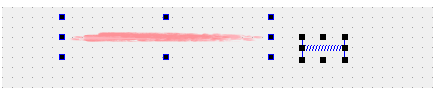
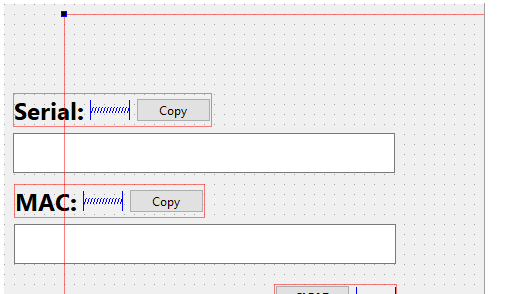
                      EDIT: some pictures might help explain what I'm seeing. Prior to layout:
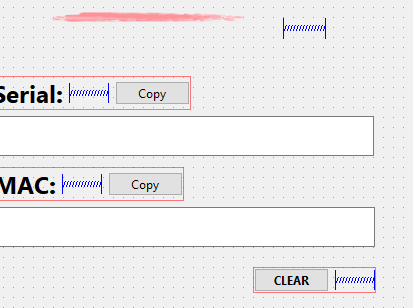
                      beforelayout.PNG

                      Getting ready to layout:
                      layoutready.PNG

                      After the horizontal layout:
                      afterlayout.PNG

                      1 Reply Last reply
                      0
                      • C Offline
                        C Offline
                        ChrisW67
                        wrote on last edited by
                        #12

                        The layout will take on a size dictated by the sizeHints() of the contained objects and any space allocated to it by its parent layout.
                        Given the way the layout resized over/under others it looks to me like your outer, containing widget does not have layout applied, e.g. a QVBoxLayout.

                        mzimmersM 1 Reply Last reply
                        0
                        • C ChrisW67

                          The layout will take on a size dictated by the sizeHints() of the contained objects and any space allocated to it by its parent layout.
                          Given the way the layout resized over/under others it looks to me like your outer, containing widget does not have layout applied, e.g. a QVBoxLayout.

                          mzimmersM Offline
                          mzimmersM Offline
                          mzimmers
                          wrote on last edited by
                          #13

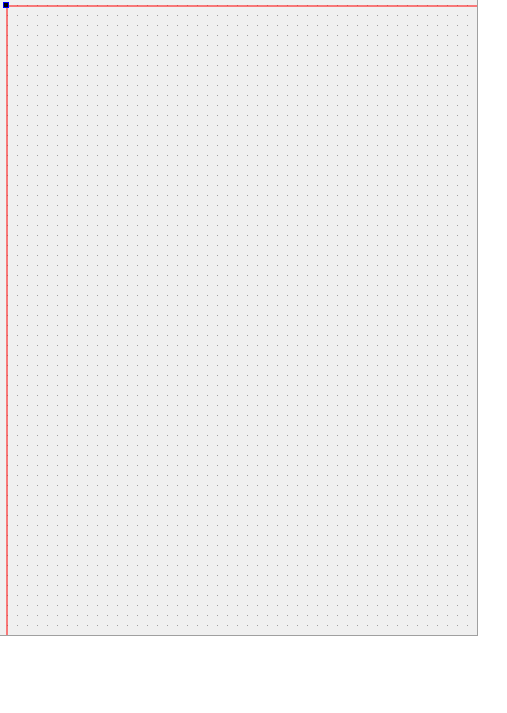
                          @ChrisW67 I tried applying a vertical box layout to the containing widget -- things just get worse:
                          withmainlayout.PNG

                          1 Reply Last reply
                          0
                          • C Offline
                            C Offline
                            ChrisW67
                            wrote on last edited by
                            #14

                            Your label has no maximum size height/width set at the moment?

                            mzimmersM 1 Reply Last reply
                            0
                            • C ChrisW67

                              Your label has no maximum size height/width set at the moment?

                              mzimmersM Offline
                              mzimmersM Offline
                              mzimmers
                              wrote on last edited by
                              #15

                              @ChrisW67 yes it does - I didn't change those values when I created the QLabel in Designer. (Same goes for several of the other objects in the main widget.)

                              Do I need to change these? I set the size to fixed.

                              1 Reply Last reply
                              0
                              • C Offline
                                C Offline
                                ChrisW67
                                wrote on last edited by
                                #16

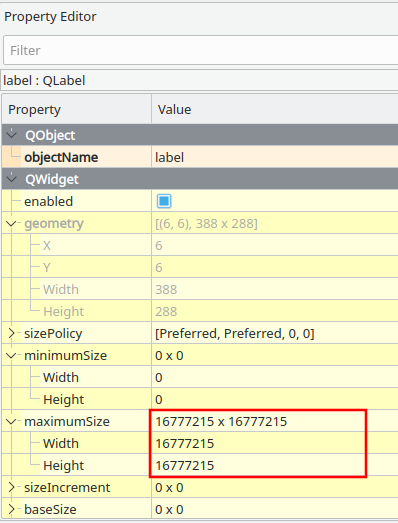
                                Not fixed necessarily, but set a maximum height that is not outrageous:
                                Screenshot_20220609_151457.png

                                mzimmersM 1 Reply Last reply
                                1
                                • C ChrisW67

                                  Not fixed necessarily, but set a maximum height that is not outrageous:
                                  Screenshot_20220609_151457.png

                                  mzimmersM Offline
                                  mzimmersM Offline
                                  mzimmers
                                  wrote on last edited by mzimmers
                                  #17

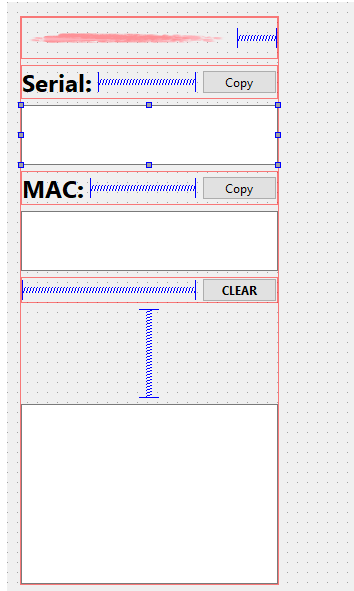
                                  @ChrisW67 that does help. Now, though, my QPlainTextEdit boxes don't resize to fill the main window. I've set the horizontal size policy to Expanding, and also tried MinimumExpanding, but the width remains fixed. I thought this would cause the boxes to expand horizontally -- what might I be doing wrong?
                                  widget.PNG
                                  Thanks...

                                  EDIT: I found my problem - cockpit error. I was selecting everything inside the main widget, instead of selecting the main widget itself. Oops...

                                  1 Reply Last reply
                                  0
                                  • JoeCFDJ Offline
                                    JoeCFDJ Offline
                                    JoeCFD
                                    wrote on last edited by
                                    #18

                                    setScaledContents(true); does not keep the aspect ratio of the image. If you want to keep the ratio, do the following:

                                    1. override resizeEvent to get new label size to compute icon size with the same aspect ratio
                                    2. override paintEvent(QPaintEvent *event) to paint the icon with the icon size from step 1.
                                    1 Reply Last reply
                                    1
                                    • C Offline
                                      C Offline
                                      ChrisW67
                                      wrote on last edited by
                                      #19

                                      In my crude demonstration the pixmap is repeatedly resized and quality will degrade badly if resized a lot. @JoeCFD's approach with an override of paintEvent() is superior to my earlier example because the original pixmap is not modified.

                                      1 Reply Last reply
                                      0

                                      • Login

                                      • Login or register to search.
                                      • First post
                                        Last post
                                      0
                                      • Categories
                                      • Recent
                                      • Tags
                                      • Popular
                                      • Users
                                      • Groups
                                      • Search
                                      • Get Qt Extensions
                                      • Unsolved