
Skip to content
  • Categories
  • Recent
  • Tags
  • Popular
  • Users
  • Groups
  • Search
  • Get Qt Extensions
  • Unsolved
Collapse
Brand Logo
  1. Home
  2. Qt Development
  3. Qt for Python
  4. MenuBar Right to Left
Qt 6.11 is out! See what's new in the release blog

MenuBar Right to Left

Scheduled Pinned Locked Moved Unsolved Qt for Python
2 Posts 2 Posters 405 Views 1 Watching
  • Oldest to Newest
  • Newest to Oldest
  • Most Votes
Reply
  • Reply as topic
Log in to reply
This topic has been deleted. Only users with topic management privileges can see it.
  • A Offline
    A Offline
    Abdulrahman
    wrote on last edited by
    #1

    Hello,
    I want to make the app flow from right to left , I changed layout direction in the main.py to be right to left, but it doesn't make the flow
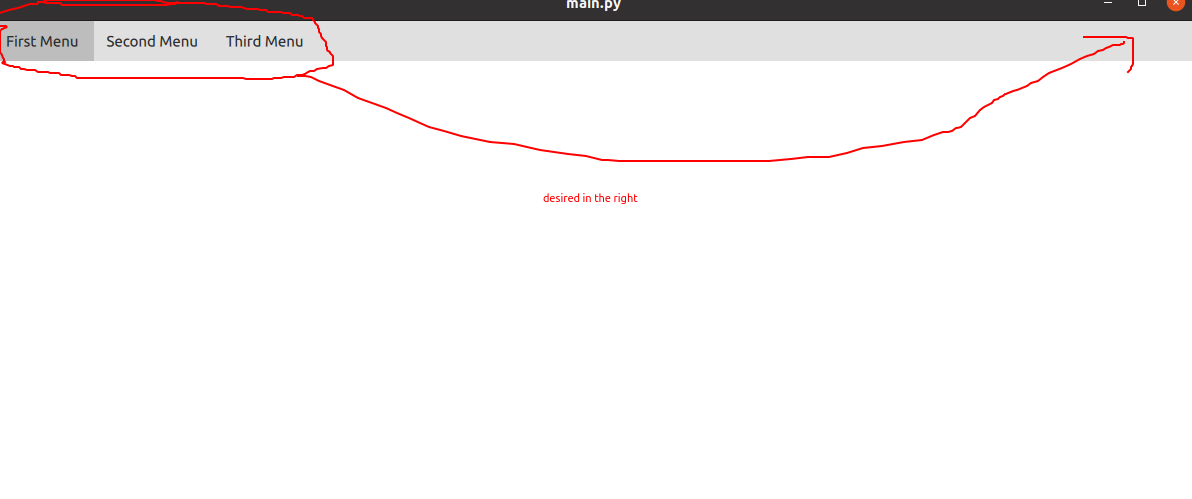
    bf510d1c-1882-4aee-8ba6-5df7df2853b2-image.png

    code for main.py

    # This Python file uses the following encoding: utf-8
    import sys
    import os
    
    from PySide2.QtGui import QGuiApplication
    from PySide2.QtQml import QQmlApplicationEngine
    from PySide2 import QtCore
    
    
    if __name__ == "__main__":
        app = QGuiApplication(sys.argv)
        app.setLayoutDirection(QtCore.Qt.RightToLeft) #Change right to left
        engine = QQmlApplicationEngine()
        engine.load(os.path.join(os.path.dirname(__file__), "main.qml"))
    
        if not engine.rootObjects():
            sys.exit(-1)
        sys.exit(app.exec_())


    code for main.qml

    import QtQuick 2.12
    import QtQuick.Controls 2.12
    import QtQuick.Dialogs 1.2
    
    ApplicationWindow{
        width: 1200
        height: 480
        visible: true
        background: Rectangle{
            color: 'white'
        }
        menuBar: MenuBar{
           Menu{
               title: qsTr("First Menu")
           }
           Menu{
               title: qsTr("Second Menu")
           }
          Menu{
               title: qsTr("Third Menu")
           }
        }
    }
    
    
    1 Reply Last reply
    0
    • F Offline
      F Offline
      friedemannkleint
      wrote on last edited by
      #2

      MenuBar uses a Row; this is implemented via layout mirroring, see https://doc.qt.io/qt-6/qml-qtquick-layoutmirroring.html#details .

      For example:

      LayoutMirroring.enabled: Qt.application.layoutDirection === Qt.RightToLeft
      LayoutMirroring.childrenInherit: true

      1 Reply Last reply
      1

      • Login

      • Login or register to search.
      • First post
        Last post
      0
      • Categories
      • Recent
      • Tags
      • Popular
      • Users
      • Groups
      • Search
      • Get Qt Extensions
      • Unsolved