
Layout problem
-
Hi,
There seems to be some reversed logic here. Why should à layout create widgets at all ?
Also, why a addButton when layouts have addWidgets that takes any QWidget based class ?Your code seems to try to auto-generate itself rather than have one builder class that does this from an "external" point of view.
@SGaist , I've restructured the XML and code, the XML now looks like this:
<layout id="rdoLO" height="12" hspacing="0" type="form"
	vspacing="0" properties="QLayout { background-color:#ffaaaa;}">
	<buttongroup id="enSEX">
		<radiobutton id="rdoM" text="Male" default="true" position="0,0"/>
		<radiobutton id="rdoF" text="Female" position="1,0"/>
	</buttongroup>
</layout>
The prototype for the layout:
#ifndef CLSQTLAYOUT_H
    #define CLSQTLAYOUT_H

    #include <clsMainWnd.h>
    #include <clsSignal.h>

    #include <QAbstractButton>
    #include <QFormLayout>
    #include <QGridLayout>
    #include <QHBoxLayout>
    #include <QLayout>
    #include <QScrollArea>
    #include <QVBoxLayout>

    typedef std::map<QString, QButtonGroup*> mpGroups;

    class clsQtLayout : public QWidget {
        friend class clsXMLnode;

    private:
        mpGroups* mmpGroups;
        QFormLayout* mpobjFLO;
        clsXMLnode* mpobjNode;
        QScrollArea* mpobjScroller;

    public:
        static const char mscszFormLayout[];
        static const char mscszGridLayout[];
        static const char mscszHBoxLayout[];
        static const char mscszVBoxLayout[];
        explicit clsQtLayout(clsXMLnode* pobjNode, QString* pstrCSS
                                                 , QWidget* pobjParent);
        ~clsQtLayout();
        void addButton(QAbstractButton& robjButton, const QString& crstrGroup);
        void addGroup(const QString& crstrGroup);
        void addWidget(QWidget *pobjWidget);
        bool blnIsLayout() { return true; }
        QFormLayout* pobjGetFormLO() { return mpobjFLO; }
        QScrollArea* pobjGetScroller() { return mpobjScroller; }
    };
#endif // CLSQTLAYOUT_H
The implementation:
/**
 * File:    clsQtLayout.cpp
 * Notes:   Contains implementation of the class clsQtLayout
 * History: 2021/10/23 Created by Simon Platten
 */
#include <clsQtLayout.h>
//Static initialisation
const char clsQtLayout::mscszFormLayout[]   = "QFormLayout";
const char clsQtLayout::mscszGridLayout[]   = "QGridLayout";
const char clsQtLayout::mscszHBoxLayout[]   = "QHBoxLayout";
const char clsQtLayout::mscszVBoxLayout[]   = "QVBoxLayout";
/**
 * @brief clsQtLayout::clsQtLayout
 * @param pobjNode : Pointer to XML node
 * @param pstrCSS : Pointer to CSS
 * @param pobjParent : Pointer to parent widget
 */
clsQtLayout::clsQtLayout(clsXMLnode* pobjNode, QString* pstrCSS
                                             , QWidget* pobjParent)
                                    : QWidget(pobjParent), mpobjNode(pobjNode) {
    Q_ASSERT_X(pobjNode!=nullptr, "clsQtLayout::clsQtLayout"
                                , "No node supplied!");
    QString strID(pobjNode->strGetAttribute(clsXMLnode::mscszAttrID))
           ,strHeight(mpobjNode->strGetAttribute(clsXMLnode::mscszAttrHeight))
           ,strHorzSpacing(mpobjNode->strGetAttribute(
                                            clsXMLnode::mscszAttrSpacingH))
           ,strName
           ,strType(pobjNode->strGetAttribute(clsXMLnode::mscszAttrType))
           ,strVertSpacing(mpobjNode->strGetAttribute(
                                            clsXMLnode::mscszAttrSpacingV))
           ,strWidth(mpobjNode->strGetAttribute(clsXMLnode::mscszAttrWidth));
    mmpGroups = nullptr;
    mpobjFLO = nullptr;
    strName = QString("%1: %2").arg(clsXMLnode::mscszNameLayout).arg(strType);
    if ( strID.isEmpty() != true ) {
        strName += QString(", %1: %2").arg(clsXMLnode::mscszNameID).arg(strID);
    }
    clsXMLnode::setObjName(*this, strName);
    if ( strType.compare(clsXMLnode::mscszLayoutForm) == 0 ) {
    //Set-up form
        mpobjFLO = new QFormLayout;
        clsXMLnode::setObjName(*mpobjFLO, strName + ", QFormLayout");
        mpobjFLO->setContentsMargins(0,0,0,0);
        mpobjFLO->setSpacing(0);
        setLayout(mpobjFLO);
    //Any spacing to apply?
        if ( strHorzSpacing.isEmpty() != true ) {
            int intHorzSpacing(strHorzSpacing.toInt());
            if ( intHorzSpacing >= 0 ) {
                mpobjFLO->setHorizontalSpacing(intHorzSpacing);
            }
        }
        if ( strVertSpacing.isEmpty() != true ) {
            int intVertSpacing(strVertSpacing.toInt());
            if ( intVertSpacing >= 0 ) {
                mpobjFLO->setVerticalSpacing(intVertSpacing);
            }
        }
    }
    mpobjScroller = new QScrollArea;
    clsXMLnode::setObjName(*mpobjScroller, strName + ", QScrollArea");
    mpobjScroller->setWidget(this);
    if ( strHeight.isEmpty() != true ) {
        int intHeight(strHeight.toInt());
        if ( intHeight >= 0 ) {
            mpobjScroller->setFixedHeight(intHeight);
        }
    }
    if ( strWidth.isEmpty() != true ) {
        int intWidth(strWidth.toInt());
        if ( intWidth >= 0 ) {
            mpobjScroller->setFixedWidth(intWidth);
        }
    }
    if ( pstrCSS != nullptr && pstrCSS->isEmpty() != true ) {
        mpobjScroller->setStyleSheet(*pstrCSS);
    }
    mpobjScroller->setWidgetResizable(true);
}
/**
 * @brief clsQtLayout::~clsQtLayout
 */
clsQtLayout::~clsQtLayout() {
    if ( mmpGroups != nullptr ) {
        for( mpGroups::iterator itGrp=mmpGroups->begin();
             itGrp!=mmpGroups->end(); itGrp++ ) {
            QButtonGroup* pobjGroup(itGrp->second);
            pobjGroup->deleteLater();
        }
        delete mmpGroups;
    }
   if ( mpobjScroller != nullptr ) {
       mpobjScroller->deleteLater();
   }
}
/**
 * @brief clsQtLayout::addButton
 * @param robjButton : Reference to button
 * @param crstrGroup : Constant reference to button group
 */
void clsQtLayout::addButton(QAbstractButton& robjButton, const QString& crstrGroup) {
    if ( crstrGroup.isEmpty() != true && mmpGroups != nullptr ) {
        mpGroups::iterator itGrp(mmpGroups->find(crstrGroup));
        if ( itGrp != mmpGroups->end() ) {
            QButtonGroup* pobjBtnGrp(itGrp->second);
            pobjBtnGrp->addButton(&robjButton);
        }
    }
    if ( mpobjFLO != nullptr ) {
        mpobjFLO->addWidget(&robjButton);
    }
}
/**
 * @brief clsQtLayout::addGroup
 * @param crstrGroup : Group ID
 */
void clsQtLayout::addGroup(const QString& crstrGroup) {
    if ( crstrGroup.isEmpty() != true ) {
        QButtonGroup* pobjGroup(new QButtonGroup(this));
        clsXMLnode::setObjName(*pobjGroup, QString("%1, %2: %3")
                               .arg(objectName())
                               .arg(clsXMLnode::mscszTypeQButtonGroup)
                               .arg(crstrGroup));
        if ( mmpGroups == nullptr ) {
            mmpGroups = new mpGroups;
        }
        mmpGroups->insert(std::make_pair(crstrGroup, pobjGroup));
    }
}
/**
 * @brief clsQtLayout::addWidget
 * @param pobjWidget    Pointer to widget to add
 */
void clsQtLayout::addWidget(QWidget *pobjWidget) {
    if ( pobjWidget != nullptr && mpobjNode != nullptr ) {
        QLayout* pobjLayout(layout());
        if ( pobjLayout != nullptr ) {
            pobjLayout->addWidget(pobjWidget);
        }
    }
}
When I step into the addButton function above, I can see the widget is added and the debugger shows:
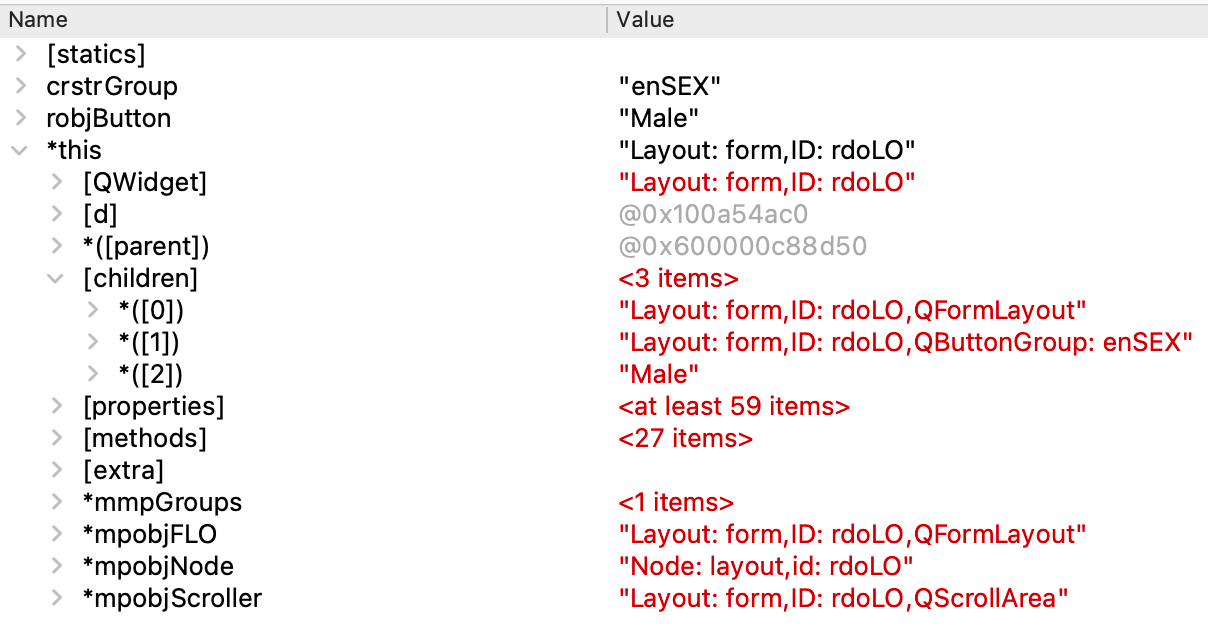
So far so good, but on the next call of addButton:
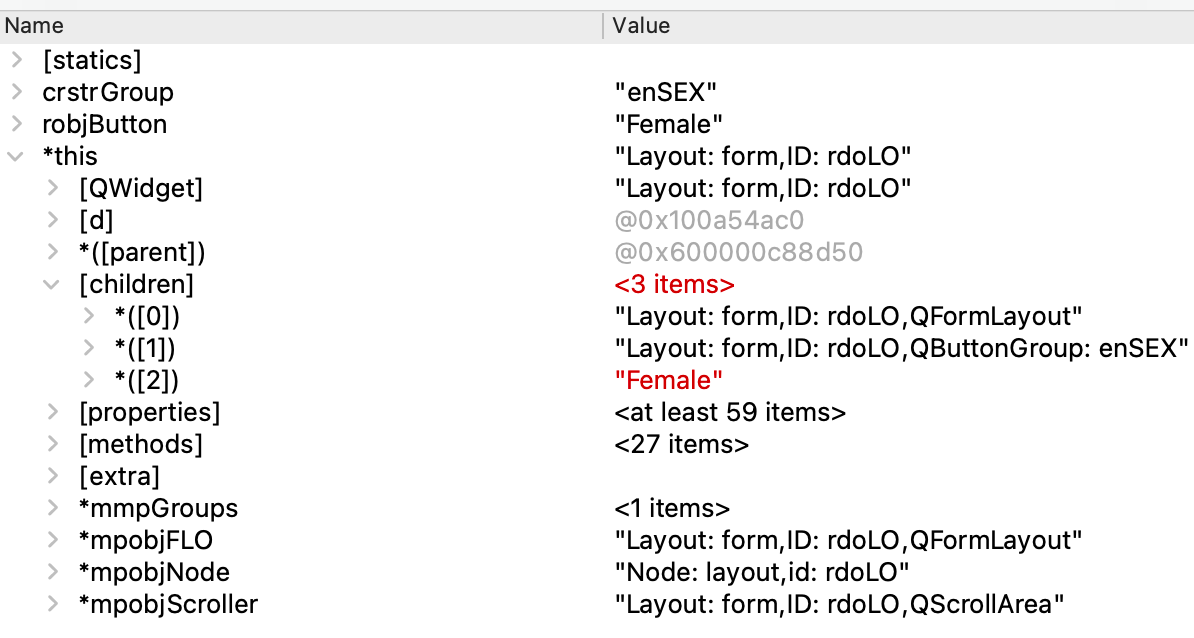
I can see when entering addButton that Male isn't there anymore, I've checked the code and there isn't anything that clears or removes the item and it is the same layout, what is going on?I've checked the code and the button added each time is a different and new object created using new so it isn't the same being replaced.
-
@SPlatten said in Layout problem:
void addButton(QAbstractButton& robjButton, const QString& crstrGroup);
Why are you passing a reference here ? The usual way to pass QObject based class around is through pointers.
Interested in AI ? www.idiap.ch
Please read the Qt Code of Conduct - https://forum.qt.io/topic/113070/qt-code-of-conduct -
@SPlatten said in Layout problem:
void addButton(QAbstractButton& robjButton, const QString& crstrGroup);
Why are you passing a reference here ? The usual way to pass QObject based class around is through pointers.
-
Still trying to figure out what is going on, I have added some debug code to my addButton function:
void clsQtLayout::addButton(QAbstractButton* pobjButton, const QString& crstrGroup) {
    if ( pobjButton == nullptr ) {
        return;
    }
    if ( crstrGroup.isEmpty() != true ) {
        QButtonGroup* pobjBtnGrp(pobjAddGroup(crstrGroup));
        if ( pobjBtnGrp != nullptr ) {
{qdbg() << "BEFORE: " << pobjButton->text();
QButtonGroup* pobjCurGrp(pobjButton->group());
if ( pobjCurGrp != nullptr ) {
qdbg() << "CURRENT GROUP: " << pobjCurGrp;
QList<QAbstractButton*> lstButtons(pobjCurGrp->buttons());
qdbg() << QString("BUTTONS.length=%1 list:").arg(lstButtons.length()) << lstButtons;
}}
            pobjBtnGrp->addButton(pobjButton);
{qdbg() << "AFTER: " << pobjButton->text();
QButtonGroup* pobjCurGrp(pobjButton->group());
if ( pobjCurGrp != nullptr ) {
qdbg() << "CURRENT GROUP: " << pobjCurGrp;
QList<QAbstractButton*> lstButtons(pobjCurGrp->buttons());
qdbg() << QString("BUTTONS.length=%1 list:").arg(lstButtons.length()) << lstButtons;
}}
        }
    }
    if ( mpobjFLO != nullptr ) {
        mpobjFLO->addWidget(pobjButton);
    }
}
The output of from the above:
S000000000036E000000000652T14:12:25.261DL00000113F../clsQtLayout.cpp[void clsQtLayout::addButton]
BEFORE: Male
S000000000037E000000000652T14:12:25.261DL00000121F../clsQtLayout.cpp[void clsQtLayout::addButton]
AFTER: Male
S000000000038E000000000652T14:12:25.262DL00000124F../clsQtLayout.cpp[void clsQtLayout::addButton]
CURRENT GROUP: QButtonGroup(0x600000027fe0, name = Layout: form, ID: rdoLO, QButtonGroup: enSEX)
S000000000039E000000000652T14:12:25.262DL00000126F../clsQtLayout.cpp[void clsQtLayout::addButton]
BUTTONS.length=1 list:(clsQtRadioButton(0x600001774c40, name=Male))
S000000000040E000000000652T14:12:25.262DL00000113F../clsQtLayout.cpp[void clsQtLayout::addButton]
BEFORE: Female
S000000000041E000000000652T14:12:25.262DL00000121F../clsQtLayout.cpp[void clsQtLayout::addButton]
AFTER: Female
S000000000042E000000000652T14:12:25.262DL00000124F../clsQtLayout.cpp[void clsQtLayout::addButton]
CURRENT GROUP: QButtonGroup(0x600000027fe0, name = Layout: form, ID: rdoLO, QButtonGroup: enSEX)
S000000000043E000000000652T14:12:25.262DL00000126F../clsQtLayout.cpp[void clsQtLayout::addButton]
BUTTONS.length=2 list:(clsQtRadioButton(0x600001774c40, name=Widget: radiobutton, id: rdoM), clsQtRadioButton(0x600001774e00, name=Female))
Every line output is prefixed with S the sequence number, E elapsed time, T real time, D = Debug, L = Line number, F = function which includes the file, then the debug message.
From the output when the first button Male is Added to the group the debug output simply shows Male as it has no group, after adding Male to the group the buttons in the list shows simply clsQtRadioButton(0x60000170a180, name=Male. When the Female button is added the buttons in the group changes to clsQtRadioButton(0x60000170a180, name=Widget: radiobutton, id: rdoM), clsQtRadioButton(0x60000170c5c0, name=Female.
From the output after the Female button is added it looks like the Male button is still present but has changed from:
clsQtRadioButton(0x60000170a180, name=Male)
to:
clsQtRadioButton(0x60000170a180, name=Widget: radiobutton, id: rdoM)
Why and is this normal?Kind Regards,
Sy -
Still trying to figure out what is going on, I have added some debug code to my addButton function:
void clsQtLayout::addButton(QAbstractButton* pobjButton, const QString& crstrGroup) {
    if ( pobjButton == nullptr ) {
        return;
    }
    if ( crstrGroup.isEmpty() != true ) {
        QButtonGroup* pobjBtnGrp(pobjAddGroup(crstrGroup));
        if ( pobjBtnGrp != nullptr ) {
{qdbg() << "BEFORE: " << pobjButton->text();
QButtonGroup* pobjCurGrp(pobjButton->group());
if ( pobjCurGrp != nullptr ) {
qdbg() << "CURRENT GROUP: " << pobjCurGrp;
QList<QAbstractButton*> lstButtons(pobjCurGrp->buttons());
qdbg() << QString("BUTTONS.length=%1 list:").arg(lstButtons.length()) << lstButtons;
}}
            pobjBtnGrp->addButton(pobjButton);
{qdbg() << "AFTER: " << pobjButton->text();
QButtonGroup* pobjCurGrp(pobjButton->group());
if ( pobjCurGrp != nullptr ) {
qdbg() << "CURRENT GROUP: " << pobjCurGrp;
QList<QAbstractButton*> lstButtons(pobjCurGrp->buttons());
qdbg() << QString("BUTTONS.length=%1 list:").arg(lstButtons.length()) << lstButtons;
}}
        }
    }
    if ( mpobjFLO != nullptr ) {
        mpobjFLO->addWidget(pobjButton);
    }
}
The output of from the above:
S000000000036E000000000652T14:12:25.261DL00000113F../clsQtLayout.cpp[void clsQtLayout::addButton]
BEFORE: Male
S000000000037E000000000652T14:12:25.261DL00000121F../clsQtLayout.cpp[void clsQtLayout::addButton]
AFTER: Male
S000000000038E000000000652T14:12:25.262DL00000124F../clsQtLayout.cpp[void clsQtLayout::addButton]
CURRENT GROUP: QButtonGroup(0x600000027fe0, name = Layout: form, ID: rdoLO, QButtonGroup: enSEX)
S000000000039E000000000652T14:12:25.262DL00000126F../clsQtLayout.cpp[void clsQtLayout::addButton]
BUTTONS.length=1 list:(clsQtRadioButton(0x600001774c40, name=Male))
S000000000040E000000000652T14:12:25.262DL00000113F../clsQtLayout.cpp[void clsQtLayout::addButton]
BEFORE: Female
S000000000041E000000000652T14:12:25.262DL00000121F../clsQtLayout.cpp[void clsQtLayout::addButton]
AFTER: Female
S000000000042E000000000652T14:12:25.262DL00000124F../clsQtLayout.cpp[void clsQtLayout::addButton]
CURRENT GROUP: QButtonGroup(0x600000027fe0, name = Layout: form, ID: rdoLO, QButtonGroup: enSEX)
S000000000043E000000000652T14:12:25.262DL00000126F../clsQtLayout.cpp[void clsQtLayout::addButton]
BUTTONS.length=2 list:(clsQtRadioButton(0x600001774c40, name=Widget: radiobutton, id: rdoM), clsQtRadioButton(0x600001774e00, name=Female))
Every line output is prefixed with S the sequence number, E elapsed time, T real time, D = Debug, L = Line number, F = function which includes the file, then the debug message.
From the output when the first button Male is Added to the group the debug output simply shows Male as it has no group, after adding Male to the group the buttons in the list shows simply clsQtRadioButton(0x60000170a180, name=Male. When the Female button is added the buttons in the group changes to clsQtRadioButton(0x60000170a180, name=Widget: radiobutton, id: rdoM), clsQtRadioButton(0x60000170c5c0, name=Female.
From the output after the Female button is added it looks like the Male button is still present but has changed from:
clsQtRadioButton(0x60000170a180, name=Male)
to:
clsQtRadioButton(0x60000170a180, name=Widget: radiobutton, id: rdoM)
Why and is this normal?@SPlatten
Bear in mind I have never used aQButtonGroup! Or if I have I didn't look at it, it just worked.A quick glance at https://code.woboq.org/qt5/qtbase/src/widgets/widgets/qbuttongroup.cpp.html, I don't spot anything there changing object names.....
I assume you would know if your code ever generates an object name like
Widget: radiobutton, id: rdoM.Now that you say you (seem to) have a object name being changed (which I did not expect), use signal
QObject::objectNameChangedto monitor when that happens.Otherwise I guess it's possible the debug display of
QButtonGroupjust happens to output more than one button in the format you see, I don't know. (If you then remove the female button, does display output with just male in it revert to how it was originally or remain in the "changed" form?)You could examine what is in your
QButtonGroup::buttons()[0]in more detail to see what is really going there, compared against theQButtonGroup::buttons()[1]. -
@SPlatten
Bear in mind I have never used aQButtonGroup! Or if I have I didn't look at it, it just worked.A quick glance at https://code.woboq.org/qt5/qtbase/src/widgets/widgets/qbuttongroup.cpp.html, I don't spot anything there changing object names.....
I assume you would know if your code ever generates an object name like
Widget: radiobutton, id: rdoM.Now that you say you (seem to) have a object name being changed (which I did not expect), use signal
QObject::objectNameChangedto monitor when that happens.Otherwise I guess it's possible the debug display of
QButtonGroupjust happens to output more than one button in the format you see, I don't know. (If you then remove the female button, does display output with just male in it revert to how it was originally or remain in the "changed" form?)You could examine what is in your
QButtonGroup::buttons()[0]in more detail to see what is really going there, compared against theQButtonGroup::buttons()[1].@JonB , thank you, I modified the function:
void clsQtLayout::addButton(QAbstractButton* pobjButton, const QString& crstrGroup) {
    if ( pobjButton == nullptr ) {
        return;
    }
    if ( crstrGroup.isEmpty() != true ) {
        QButtonGroup* pobjBtnGrp(pobjAddGroup(crstrGroup));
        if ( pobjBtnGrp != nullptr ) {
{qdbg() << "BEFORE: " << pobjButton->text();
QButtonGroup* pobjCurGrp(pobjButton->group());
if ( pobjCurGrp != nullptr ) {
qdbg() << "CURRENT GROUP: " << pobjCurGrp;
QList<QAbstractButton*> lstButtons(pobjCurGrp->buttons());
qdbg() << QString("BUTTONS.length=%1 list:").arg(lstButtons.length()) << lstButtons;
qdbg() << "Button[0]: " << lstButtons[0];
}}
            pobjBtnGrp->addButton(pobjButton);
{qdbg() << "AFTER: " << pobjButton->text();
QButtonGroup* pobjCurGrp(pobjButton->group());
if ( pobjCurGrp != nullptr ) {
qdbg() << "CURRENT GROUP: " << pobjCurGrp;
QList<QAbstractButton*> lstButtons(pobjCurGrp->buttons());
qdbg() << QString("BUTTONS.length=%1 list:").arg(lstButtons.length()) << lstButtons;
qdbg() << "Button[0]: " << lstButtons[0];
if ( lstButtons.length() > 1 ) {
qdbg() << "Button[1]: " << lstButtons[1];
}
}}
        }
    }
    if ( mpobjFLO != nullptr ) {
        mpobjFLO->addWidget(pobjButton);
    }
}
The output is now:
S000000000036E000000000719T14:24:00.461DL00000113F../clsQtLayout.cpp[void clsQtLayout::addButton] BEFORE: Male S000000000037E000000000719T14:24:00.461DL00000122F../clsQtLayout.cpp[void clsQtLayout::addButton] AFTER: Male S000000000038E000000000719T14:24:00.461DL00000125F../clsQtLayout.cpp[void clsQtLayout::addButton] CURRENT GROUP: QButtonGroup(0x600000028f50, name = Layout: form, ID: rdoLO, QButtonGroup: enSEX) S000000000039E000000000719T14:24:00.461DL00000127F../clsQtLayout.cpp[void clsQtLayout::addButton] BUTTONS.length=1 list:(clsQtRadioButton(0x60000176f140, name=Male)) S000000000040E000000009972T14:24:09.714DL00000128F../clsQtLayout.cpp[void clsQtLayout::addButton] Button[0]: clsQtRadioButton(0x60000176f140, name=Male) S000000000041E000000012687T14:24:12.429DL00000113F../clsQtLayout.cpp[void clsQtLayout::addButton] BEFORE: Female S000000000042E000000012687T14:24:12.429DL00000122F../clsQtLayout.cpp[void clsQtLayout::addButton] AFTER: Female S000000000043E000000012687T14:24:12.429DL00000125F../clsQtLayout.cpp[void clsQtLayout::addButton] CURRENT GROUP: QButtonGroup(0x600000028f50, name = Layout: form, ID: rdoLO, QButtonGroup: enSEX) S000000000044E000000012687T14:24:12.429DL00000127F../clsQtLayout.cpp[void clsQtLayout::addButton] BUTTONS.length=2 list:(clsQtRadioButton(0x60000176f140, name=Widget: radiobutton, id: rdoM), clsQtRadioButton(0x600001756d00, name=Female)) S000000000045E000000015192T14:24:14.934DL00000128F../clsQtLayout.cpp[void clsQtLayout::addButton] Button[0]: clsQtRadioButton(0x60000176f140, name=Widget: radiobutton, id: rdoM) S000000000046E000000018239T14:24:17.981DL00000130F../clsQtLayout.cpp[void clsQtLayout::addButton] Button[1]: clsQtRadioButton(0x600001756d00, name=Female) -
@SPlatten
Bear in mind I have never used aQButtonGroup! Or if I have I didn't look at it, it just worked.A quick glance at https://code.woboq.org/qt5/qtbase/src/widgets/widgets/qbuttongroup.cpp.html, I don't spot anything there changing object names.....
I assume you would know if your code ever generates an object name like
Widget: radiobutton, id: rdoM.Now that you say you (seem to) have a object name being changed (which I did not expect), use signal
QObject::objectNameChangedto monitor when that happens.Otherwise I guess it's possible the debug display of
QButtonGroupjust happens to output more than one button in the format you see, I don't know. (If you then remove the female button, does display output with just male in it revert to how it was originally or remain in the "changed" form?)You could examine what is in your
QButtonGroup::buttons()[0]in more detail to see what is really going there, compared against theQButtonGroup::buttons()[1].@JonB said in Layout problem:
I assume you would know if your code ever generates an object name like
Widget: radiobutton, id: rdoM.^^^^^ ?????
Now that you say you (seem to) have a object name being changed (which I did not expect), use signal
QObject::objectNameChangedto monitor when that happens.You could examine what is in your
QButtonGroup::buttons()[0]in more detail --- go find out in code what type it really is.I think I'm seeing
clsQtRadioButton(0x60000176f140throughout for theMaleone, so the object instance does not seem to be changing. -
@JonB said in Layout problem:
I assume you would know if your code ever generates an object name like
Widget: radiobutton, id: rdoM.^^^^^ ?????
Now that you say you (seem to) have a object name being changed (which I did not expect), use signal
QObject::objectNameChangedto monitor when that happens.You could examine what is in your
QButtonGroup::buttons()[0]in more detail --- go find out in code what type it really is.I think I'm seeing
clsQtRadioButton(0x60000176f140throughout for theMaleone, so the object instance does not seem to be changing. -
@JonB said in Layout problem:
I assume you would know if your code ever generates an object name like
Widget: radiobutton, id: rdoM.^^^^^ ?????
Now that you say you (seem to) have a object name being changed (which I did not expect), use signal
QObject::objectNameChangedto monitor when that happens.You could examine what is in your
QButtonGroup::buttons()[0]in more detail --- go find out in code what type it really is.I think I'm seeing
clsQtRadioButton(0x60000176f140throughout for theMaleone, so the object instance does not seem to be changing.@JonB , fixed another bug which prevents renaming of object already assigned a name:
void clsXMLnode::setObjName(QObject& robjObject, const QString& crstrName) {
    if ( crstrName.isEmpty() != true ) {
        QString strCurrent(robjObject.objectName());
        if ( strCurrent.isEmpty() != true ) {
            qdbg() << "Current name: " << strCurrent << ", Tried to change to: " << crstrName;
        } else {
    //Set the object name
            robjObject.setObjectName(crstrName);
        }
    }
}
Now the output is:
S000000000044E000000000659T14:37:04.373DL00000113F../clsQtLayout.cpp[void clsQtLayout::addButton]
BEFORE: Male
S000000000045E000000000659T14:37:04.373DL00000122F../clsQtLayout.cpp[void clsQtLayout::addButton]
AFTER: Male
S000000000046E000000000659T14:37:04.373DL00000125F../clsQtLayout.cpp[void clsQtLayout::addButton]
CURRENT GROUP: QButtonGroup(0x60000002ac70, name = Layout: form, ID: rdoLO, QButtonGroup: enSEX)
S000000000047E000000000659T14:37:04.373DL00000127F../clsQtLayout.cpp[void clsQtLayout::addButton]
BUTTONS.length=1 list:(clsQtRadioButton(0x600001723c00, name=Male))
S000000000048E000000000659T14:37:04.373DL00000128F../clsQtLayout.cpp[void clsQtLayout::addButton]
Button[0]: clsQtRadioButton(0x600001723c00, name=Male)
S000000000049E000000000659T14:37:04.373DL00003730F../clsMainWnd.cpp[static void clsXMLnode::setObjName]
Current name: Male
S000000000050E000000000659T14:37:04.373DL00000051F../clsQtRadionButton.cpp[auto clsQtRadioButton::clsQtRadioButton]
Female
S000000000051E000000000659T14:37:04.373DL00000113F../clsQtLayout.cpp[void clsQtLayout::addButton]
BEFORE: Female
S000000000052E000000000659T14:37:04.373DL00000122F../clsQtLayout.cpp[void clsQtLayout::addButton]
AFTER: Female
S000000000053E000000000659T14:37:04.373DL00000125F../clsQtLayout.cpp[void clsQtLayout::addButton]
CURRENT GROUP: QButtonGroup(0x60000002ac70, name = Layout: form, ID: rdoLO, QButtonGroup: enSEX)
S000000000054E000000000659T14:37:04.373DL00000127F../clsQtLayout.cpp[void clsQtLayout::addButton]
BUTTONS.length=2 list:(clsQtRadioButton(0x600001723c00, name=Male), clsQtRadioButton(0x60000170f340, name=Female))
S000000000055E000000000660T14:37:04.373DL00000128F../clsQtLayout.cpp[void clsQtLayout::addButton]
Button[0]: clsQtRadioButton(0x600001723c00, name=Male)
S000000000056E000000000660T14:37:04.373DL00000130F../clsQtLayout.cpp[void clsQtLayout::addButton]
Button[1]: clsQtRadioButton(0x60000170f340, name=Female)
Kind Regards,
Sy -
@JonB , fixed another bug which prevents renaming of object already assigned a name:
void clsXMLnode::setObjName(QObject& robjObject, const QString& crstrName) {
    if ( crstrName.isEmpty() != true ) {
        QString strCurrent(robjObject.objectName());
        if ( strCurrent.isEmpty() != true ) {
            qdbg() << "Current name: " << strCurrent << ", Tried to change to: " << crstrName;
        } else {
    //Set the object name
            robjObject.setObjectName(crstrName);
        }
    }
}
Now the output is:
S000000000044E000000000659T14:37:04.373DL00000113F../clsQtLayout.cpp[void clsQtLayout::addButton] BEFORE: Male S000000000045E000000000659T14:37:04.373DL00000122F../clsQtLayout.cpp[void clsQtLayout::addButton] AFTER: Male S000000000046E000000000659T14:37:04.373DL00000125F../clsQtLayout.cpp[void clsQtLayout::addButton] CURRENT GROUP: QButtonGroup(0x60000002ac70, name = Layout: form, ID: rdoLO, QButtonGroup: enSEX) S000000000047E000000000659T14:37:04.373DL00000127F../clsQtLayout.cpp[void clsQtLayout::addButton] BUTTONS.length=1 list:(clsQtRadioButton(0x600001723c00, name=Male)) S000000000048E000000000659T14:37:04.373DL00000128F../clsQtLayout.cpp[void clsQtLayout::addButton] Button[0]: clsQtRadioButton(0x600001723c00, name=Male) S000000000049E000000000659T14:37:04.373DL00003730F../clsMainWnd.cpp[static void clsXMLnode::setObjName] Current name: Male S000000000050E000000000659T14:37:04.373DL00000051F../clsQtRadionButton.cpp[auto clsQtRadioButton::clsQtRadioButton] Female S000000000051E000000000659T14:37:04.373DL00000113F../clsQtLayout.cpp[void clsQtLayout::addButton] BEFORE: Female S000000000052E000000000659T14:37:04.373DL00000122F../clsQtLayout.cpp[void clsQtLayout::addButton] AFTER: Female S000000000053E000000000659T14:37:04.373DL00000125F../clsQtLayout.cpp[void clsQtLayout::addButton] CURRENT GROUP: QButtonGroup(0x60000002ac70, name = Layout: form, ID: rdoLO, QButtonGroup: enSEX) S000000000054E000000000659T14:37:04.373DL00000127F../clsQtLayout.cpp[void clsQtLayout::addButton] BUTTONS.length=2 list:(clsQtRadioButton(0x600001723c00, name=Male), clsQtRadioButton(0x60000170f340, name=Female)) S000000000055E000000000660T14:37:04.373DL00000128F../clsQtLayout.cpp[void clsQtLayout::addButton] Button[0]: clsQtRadioButton(0x600001723c00, name=Male) S000000000056E000000000660T14:37:04.373DL00000130F../clsQtLayout.cpp[void clsQtLayout::addButton] Button[1]: clsQtRadioButton(0x60000170f340, name=Female)Finally, fixed!

When processing the widgets, if the type of widget is a layout then the actual widget connected to the parent layout is the scroll area not the layout itself.
I then had another issue which was to take the widgets that are children of any groups in the layout and adding these to the layouts.
Next issue which I'm now going to fix is the individual row height of the children so that have the correct height in the layout.
Final demo with row height fixed:

From XML:
<layout id="rdoLO" height="56" hspacing="0" type="form" vspacing="0" properties="QLayout { background-color:#ffaaaa;}"> <buttongroup id="enSEX"> <radiobutton id="rdoM" height="28" text="Male" default="true" position="0,0"/> <radiobutton id="rdoF" height="28" text="Female" position="1,0"/> </buttongroup> </layout> -
@SPlatten said in Layout problem:
clsQtLayout
Please reconsider the naming of your class. They make things harder to understand for no benefits. Your clsQtLayout is in fact a QWidget. The Qt layout classes are not QWidgets. This name is confusing at best.


