
QT install error
-
Hi, i am a new user and i have downloaded QT install online to install to the data installation step on my computer and it takes more than 20GB and my E:\ drive is more than 100GB free but when i press install then the message Qt install... has stopped working
@FBF-One On Windows the files are first downloaded into the system %TEMP% directory, which is usually placed in the user space on C: - so you need some space for the downloads on C: too.
When you write
stopped working- what exactly do you mean? What error/erratic behaviour do you get? -
@FBF-One On Windows the files are first downloaded into the system %TEMP% directory, which is usually placed in the user space on C: - so you need some space for the downloads on C: too.
When you write
stopped working- what exactly do you mean? What error/erratic behaviour do you get? -
@artwaw so I can only install it on C:\ drive and can't install it on D:\ or E:\ drive...is that so?
@FBF-One No, you're most welcome to install wherever you wish. Just the way system works, during the download temporary files are created and grow as the download progresses. Once all is downloaded those files are expanded (decompressed) into the folder of your choice.
Internally Qt Maintenance Tool uses 7z to compress the packages, so the temporary space on the C: drive that is required is much less than the target size requirement - but it is required.Of course - since you did not provide any meaningful error description - space requirement might not be a problem here at all. I mentioned it as it is the most common one when people report issues with download and install on the non-system drive.
-
@FBF-One No, you're most welcome to install wherever you wish. Just the way system works, during the download temporary files are created and grow as the download progresses. Once all is downloaded those files are expanded (decompressed) into the folder of your choice.
Internally Qt Maintenance Tool uses 7z to compress the packages, so the temporary space on the C: drive that is required is much less than the target size requirement - but it is required.Of course - since you did not provide any meaningful error description - space requirement might not be a problem here at all. I mentioned it as it is the most common one when people report issues with download and install on the non-system drive.
-
@FBF-One Can you try this version please? https://download.qt.io/official_releases/online_installers/qt-unified-windows-x86-online.exe
-
@FBF-One Do you have any antivirus or other protection that could interfere?
Other thing to try is to head down to Windows logs (can be found in the one of the system snap-ins in the start menu - unfortunately I don't have Windows 10 which you seem to be running, right?) and there search for the installer related entries. It should have an error/crash entry with more details.
-
@FBF-One Do you have any antivirus or other protection that could interfere?
Other thing to try is to head down to Windows logs (can be found in the one of the system snap-ins in the start menu - unfortunately I don't have Windows 10 which you seem to be running, right?) and there search for the installer related entries. It should have an error/crash entry with more details.
@artwaw
I've searched the log but there doesn't seem to be any useful informationLog Name: Application Source: Application Error Date: 25/11/2021 7:09:53 CH Event ID: 1000 Task Category: (100) Level: Error Keywords: Classic User: N/A Computer: Admin Description: Faulting application name: qt-unified-windows-x86-4.2.0-online.exe, version: 4.2.0.0, time stamp: 0x61891975 Faulting module name: unknown, version: 0.0.0.0, time stamp: 0x00000000 Exception code: 0xc0000005 Fault offset: 0x00000000 Faulting process id: 0xd0094 Faulting application start time: 0x01d7e1f51a0c676b Faulting application path: E:\qt-unified-windows-x86-4.2.0-online.exe Faulting module path: unknown Report Id: e6f3a010-737b-4fd9-a985-8386801c7a19 Faulting package full name: Faulting package-relative application ID: Event Xml: <Event xmlns="http://schemas.microsoft.com/win/2004/08/events/event"> <System> <Provider Name="Application Error" /> <EventID Qualifiers="0">1000</EventID> <Version>0</Version> <Level>2</Level> <Task>100</Task> <Opcode>0</Opcode> <Keywords>0x80000000000000</Keywords> <TimeCreated SystemTime="2021-11-25T12:09:53.9600961Z" /> <EventRecordID>51843</EventRecordID> <Correlation /> <Execution ProcessID="0" ThreadID="0" /> <Channel>Application</Channel> <Computer>Admin</Computer> <Security /> </System> <EventData> <Data>qt-unified-windows-x86-4.2.0-online.exe</Data> <Data>4.2.0.0</Data> <Data>61891975</Data> <Data>unknown</Data> <Data>0.0.0.0</Data> <Data>00000000</Data> <Data>c0000005</Data> <Data>00000000</Data> <Data>d0094</Data> <Data>01d7e1f51a0c676b</Data> <Data>E:\qt-unified-windows-x86-4.2.0-online.exe</Data> <Data>unknown</Data> <Data>e6f3a010-737b-4fd9-a985-8386801c7a19</Data> <Data> </Data> <Data> </Data> </EventData> </Event> -
@artwaw
I've searched the log but there doesn't seem to be any useful informationLog Name: Application Source: Application Error Date: 25/11/2021 7:09:53 CH Event ID: 1000 Task Category: (100) Level: Error Keywords: Classic User: N/A Computer: Admin Description: Faulting application name: qt-unified-windows-x86-4.2.0-online.exe, version: 4.2.0.0, time stamp: 0x61891975 Faulting module name: unknown, version: 0.0.0.0, time stamp: 0x00000000 Exception code: 0xc0000005 Fault offset: 0x00000000 Faulting process id: 0xd0094 Faulting application start time: 0x01d7e1f51a0c676b Faulting application path: E:\qt-unified-windows-x86-4.2.0-online.exe Faulting module path: unknown Report Id: e6f3a010-737b-4fd9-a985-8386801c7a19 Faulting package full name: Faulting package-relative application ID: Event Xml: <Event xmlns="http://schemas.microsoft.com/win/2004/08/events/event"> <System> <Provider Name="Application Error" /> <EventID Qualifiers="0">1000</EventID> <Version>0</Version> <Level>2</Level> <Task>100</Task> <Opcode>0</Opcode> <Keywords>0x80000000000000</Keywords> <TimeCreated SystemTime="2021-11-25T12:09:53.9600961Z" /> <EventRecordID>51843</EventRecordID> <Correlation /> <Execution ProcessID="0" ThreadID="0" /> <Channel>Application</Channel> <Computer>Admin</Computer> <Security /> </System> <EventData> <Data>qt-unified-windows-x86-4.2.0-online.exe</Data> <Data>4.2.0.0</Data> <Data>61891975</Data> <Data>unknown</Data> <Data>0.0.0.0</Data> <Data>00000000</Data> <Data>c0000005</Data> <Data>00000000</Data> <Data>d0094</Data> <Data>01d7e1f51a0c676b</Data> <Data>E:\qt-unified-windows-x86-4.2.0-online.exe</Data> <Data>unknown</Data> <Data>e6f3a010-737b-4fd9-a985-8386801c7a19</Data> <Data> </Data> <Data> </Data> </EventData> </Event>@FBF-One Do you experience crash of other programs too? From what is written in that event note you can extract exception code.
I found related entries in the Windows help forum https://answers.microsoft.com/en-us/windows/forum/all/exception-code-0xc0000005-crash-to-desktop-in/a4f3d828-823a-41d0-a45d-9e8cd0c19796
EDIT: in general something interferes with running Qt Installer. This can be legitimate antivirus, this can be malware, this can be hardware fault.
-
Hi, i am a new user and i have downloaded QT install online to install to the data installation step on my computer and it takes more than 20GB and my E:\ drive is more than 100GB free but when i press install then the message Qt install... has stopped working
@FBF-One said in QT install error:
and it takes more than 20GB
You probably selected more Qt flavors than you need.
There are different Qt builds for different platforms, like Windows (MinGW and different MSVC versions), Android, ...
You should only select what you really need to not to waste space on your drive. -
For Desktop app, these are the only things I'd selected:
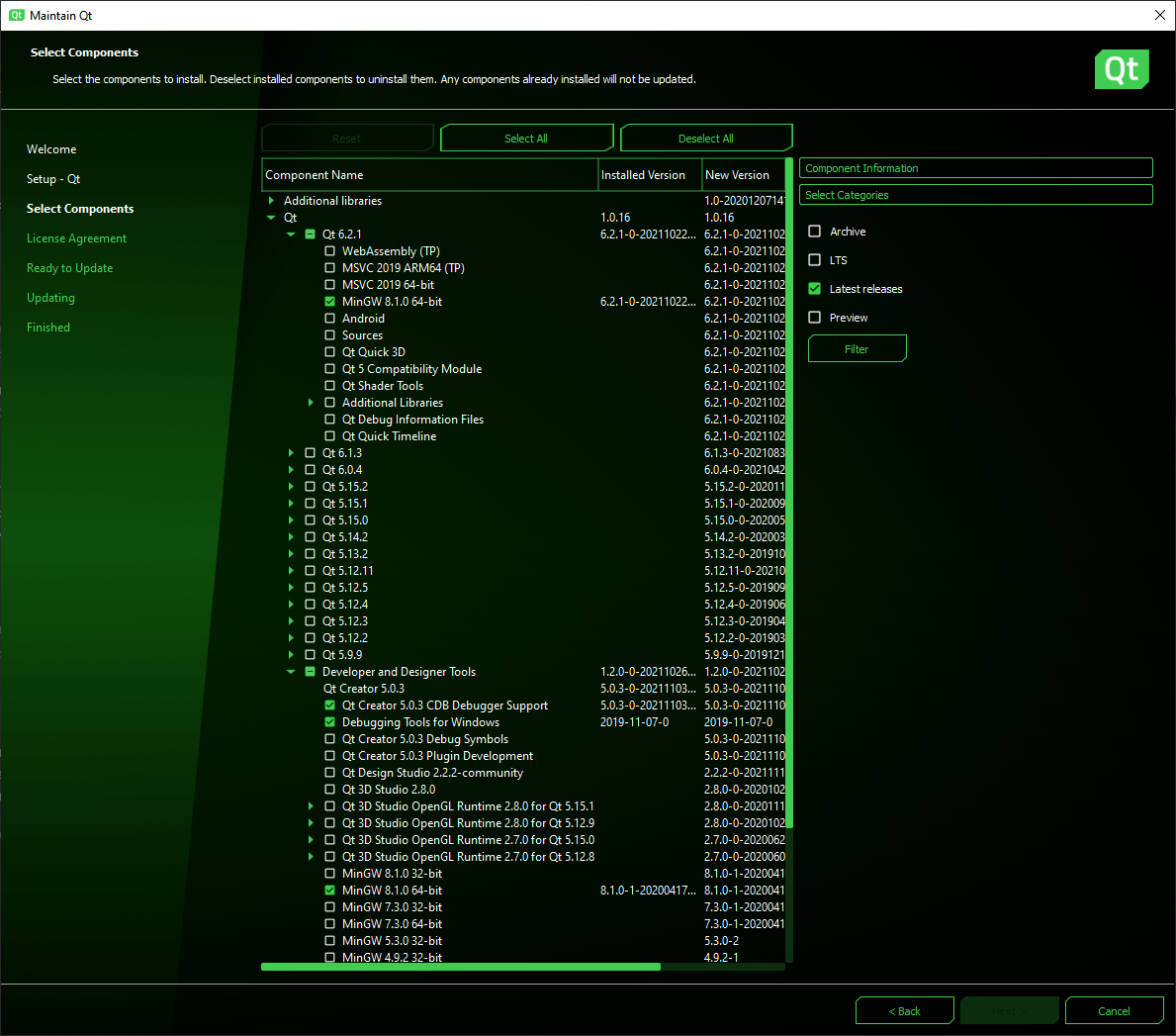
no additional libraries. It took ~1.35GB in my case and a few minutes to install.


