
Skip to content
  • Categories
  • Recent
  • Tags
  • Popular
  • Users
  • Groups
  • Search
  • Get Qt Extensions
  • Unsolved
Collapse
Brand Logo
  1. Home
  2. Qt Development
  3. General and Desktop
  4. KDChart Library Linking Issue
Qt 6.11 is out! See what's new in the release blog

KDChart Library Linking Issue

Scheduled Pinned Locked Moved Solved General and Desktop
9 Posts 4 Posters 635 Views 2 Watching
  • Oldest to Newest
  • Newest to Oldest
  • Most Votes
Reply
  • Reply as topic
Log in to reply
This topic has been deleted. Only users with topic management privileges can see it.
  • P Offline
    P Offline
    Phamy1289
    wrote on last edited by Phamy1289
    #1

    I'm having linking issues to the KDChart library. I've followed the INSTALL.txt. I don't know what I'm doing wrong. I'm using KDChart-2.8.0 and Qt5 on Windows.

    win32:CONFIG(release, debug|release): LIBS += -L$$PWD/../KDAB/KDChart-2.8.0/lib/release -lkdchart
    else:win32:CONFIG(debug, debug|release): LIBS += -L$$PWD/../KDAB/KDChart-2.8.0/lib/debug -lkdchartd
    else:unix:!macx: LIBS += -L$$PWD/../KDAB/KDChart-2.8.0/lib/ -lkdchart

    INCLUDEPATH +=
    $$PWD/../KDAB/KDChart-2.8.0/include
    $$PWD/../KDAB/KDChart-2.8.0/include/KDChart
    $$PWD/../KDAB/KDChart-2.8.0/include/KDGantt
    DEPENDPATH += $$PWD/../KDAB/KDChart-2.8.0/include

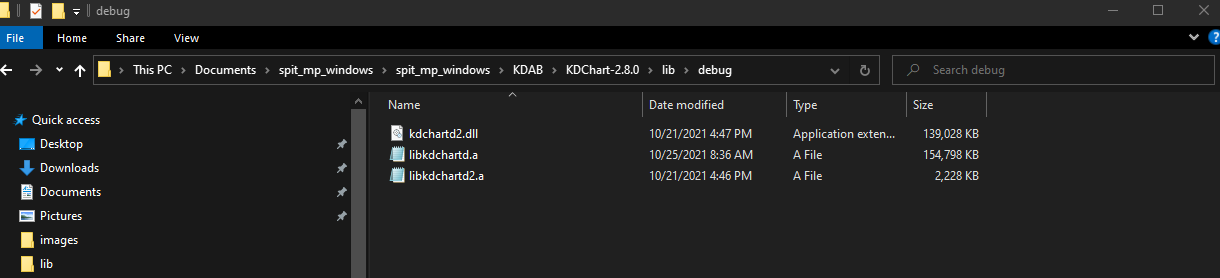
    2313507d-3c13-4b30-95c3-4691f9ee76c9-image.png

    04ec31a9-8536-4739-955f-cce237c0e9c7-image.png

    1 Reply Last reply
    0
    • mrjjM Offline
      mrjjM Offline
      mrjj
      Lifetime Qt Champion
      wrote on last edited by
      #2

      Hi
      What compiler are you using ?
      Are you matching 32 vs 64 bit etc ?

      Did you compile that DLL yourself ?

      P 1 Reply Last reply
      0
      • mrjjM mrjj

        Hi
        What compiler are you using ?
        Are you matching 32 vs 64 bit etc ?

        Did you compile that DLL yourself ?

        P Offline
        P Offline
        Phamy1289
        wrote on last edited by Phamy1289
        #3

        @mrjj I'm using mingw as the compiler. However, I think Qt compiler is 64bit and I'm running mingw32-make to compile the library in the terminal.

        1 Reply Last reply
        0
        • SGaistS Offline
          SGaistS Offline
          SGaist
          Lifetime Qt Champion
          wrote on last edited by
          #4

          Hi,

          Did you use the same compiler for KDChart as you are using for Qt ?
          Are you sure the architecture is correct ?

          Interested in AI ? www.idiap.ch
          Please read the Qt Code of Conduct - https://forum.qt.io/topic/113070/qt-code-of-conduct

          1 Reply Last reply
          0
          • P Offline
            P Offline
            Phamy1289
            wrote on last edited by
            #5

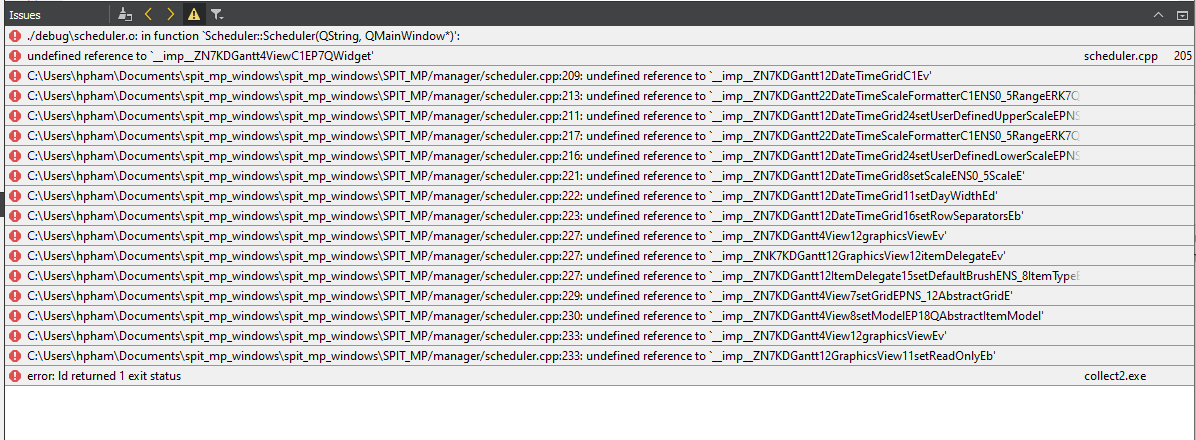
            I checked and the library was compiling with a 32 bit compiler while QtCreator was using a 64 bit compiler. I fixed it and now I'm getting another error that I've not seen before.
            e42524b2-780c-46bf-9f51-1cbd4123e6ba-image.png

            jsulmJ 1 Reply Last reply
            0
            • P Phamy1289

              I checked and the library was compiling with a 32 bit compiler while QtCreator was using a 64 bit compiler. I fixed it and now I'm getting another error that I've not seen before.

              e42524b2-780c-46bf-9f51-1cbd4123e6ba-image.png

              jsulmJ Offline
              jsulmJ Offline
              jsulm
              Lifetime Qt Champion
              wrote on last edited by
              #6

              @Phamy1289 It looks like another lib is missing - the one containing KDGantt (I guess KDChart depends on it).

              https://forum.qt.io/topic/113070/qt-code-of-conduct

              1 Reply Last reply
              1
              • P Offline
                P Offline
                Phamy1289
                wrote on last edited by
                #7

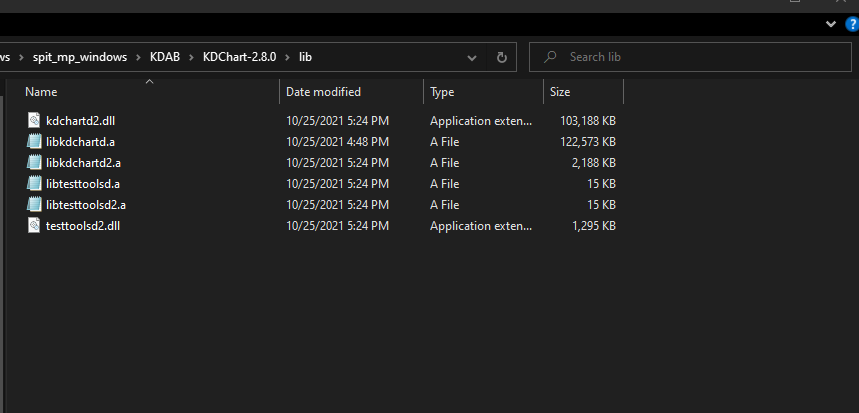
                This is all of the library files it gave me, and I've manage to get it built on Centos 7:
                949f1623-612f-480e-b439-a027bd8a2c32-image.png

                jsulmJ 1 Reply Last reply
                0
                • P Phamy1289

                  This is all of the library files it gave me, and I've manage to get it built on Centos 7:

                  949f1623-612f-480e-b439-a027bd8a2c32-image.png

                  jsulmJ Offline
                  jsulmJ Offline
                  jsulm
                  Lifetime Qt Champion
                  wrote on last edited by
                  #8

                  @Phamy1289 On CentOS you probably already had the library which is now missing on Windows.
                  See https://docs.kdab.com/kdchart/latest/namespace_k_d_gantt.html - this is what linker cannot resolve because you do not link against the lib containing these symbols.

                  https://forum.qt.io/topic/113070/qt-code-of-conduct

                  1 Reply Last reply
                  2
                  • P Offline
                    P Offline
                    Phamy1289
                    wrote on last edited by
                    #9

                    I was missing a library and not only that, I was using a compiler nmake. Which I found out is used for Visual Studios. I should've been using mingw32-make, because I am using mingw. Thanks for your help. I'll mark as solved.

                    1 Reply Last reply
                    0

                    • Login

                    • Login or register to search.
                    • First post
                      Last post
                    0
                    • Categories
                    • Recent
                    • Tags
                    • Popular
                    • Users
                    • Groups
                    • Search
                    • Get Qt Extensions
                    • Unsolved