Skip to content
  • Categories
  • Recent
  • Tags
  • Popular
  • Users
  • Groups
  • Search
  • Get Qt Extensions
  • Unsolved
Collapse
Brand Logo
  1. Home
  2. Qt Development
  3. General and Desktop
  4. Qt fontsize don't take in account font size from Qt Designer

Qt fontsize don't take in account font size from Qt Designer

Scheduled Pinned Locked Moved Unsolved General and Desktop
8 Posts 3 Posters 1.1k Views 1 Watching
  • Oldest to Newest
  • Newest to Oldest
  • Most Votes
Reply
  • Reply as topic
Log in to reply
This topic has been deleted. Only users with topic management privileges can see it.
  • M Offline
    M Offline
    mihdim777
    wrote on last edited by
    #1

    Hello!

    I am trying to modify an application for amateur radio, to fit into a raspberry pi screen 7" (800x480). And the original application minimum resolution is 1024x780.

    I have a main form designed with Qt Designer and I'd like to lower the fonts. All good in designer but when I compile the application it does not take in account the font that I chose. Also not working if I choose a very big font.

    I am compiling on Ubuntu/Raspbian and no success on both.

    How should I force the resolution from Qt Designer to be in executable application?

    I also tried to change with Tweaks the font of Ubuntu, but the qt app doesn't change.

    Thank you!

    1 Reply Last reply
    0
    • SGaistS Offline
      SGaistS Offline
      SGaist
      Lifetime Qt Champion
      wrote on last edited by
      #2

      Hi and welcome to devnet,

      Can you provide a minimal compilable examples that shows this behaviour ?

      Interested in AI ? www.idiap.ch
      Please read the Qt Code of Conduct - https://forum.qt.io/topic/113070/qt-code-of-conduct

      M 1 Reply Last reply
      0
      • M Offline
        M Offline
        mihdim777
        wrote on last edited by
        #3

        Hello! Yes sure!
        The software is called WSJTX. It can be found on github.

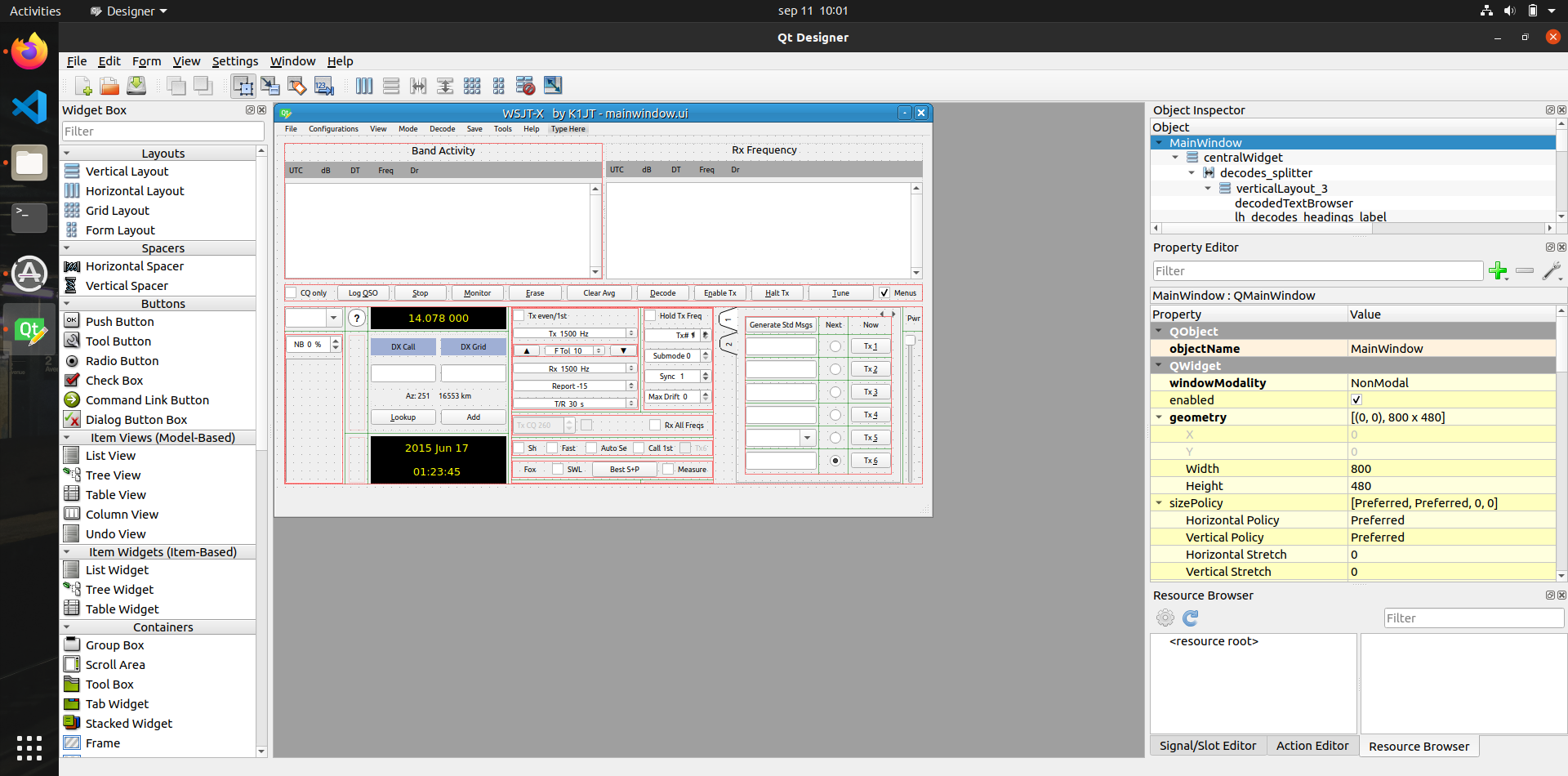
        I would like to know if there are any method to force the qt font from qt designer?
        This is the font that I would like:
        2f382a04-85b2-4f25-9e1f-613df486ece8-image.png

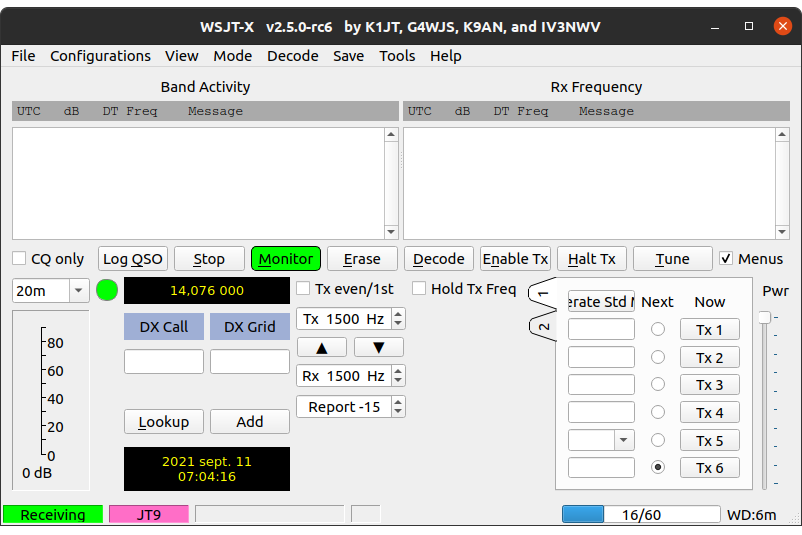
        Check Generate Std Msgs button for example, it should have smaller font:

        But instead I get this when I compile the code:
        Screenshot from 2021-09-11 10-04-16.png

        1 Reply Last reply
        0
        • SGaistS SGaist

          Hi and welcome to devnet,

          Can you provide a minimal compilable examples that shows this behaviour ?

          M Offline
          M Offline
          mihdim777
          wrote on last edited by
          #4

          @SGaist Tagging

          1 Reply Last reply
          0
          • SGaistS Offline
            SGaistS Offline
            SGaist
            Lifetime Qt Champion
            wrote on last edited by
            #5

            Can you share the link to that application ?

            Interested in AI ? www.idiap.ch
            Please read the Qt Code of Conduct - https://forum.qt.io/topic/113070/qt-code-of-conduct

            M 2 Replies Last reply
            0
            • SGaistS SGaist

              Can you share the link to that application ?

              M Offline
              M Offline
              mihdim777
              wrote on last edited by
              #6

              @SGaist yes, sure

              Here : https://physics.princeton.edu/pulsar/k1jt/wsjtx.html

              https://physics.princeton.edu/pulsar/k1jt/wsjtx-2.5.0-rc6.tgz

              It is in wsjtx archive/widgets/mainwindow.ui

              1 Reply Last reply
              0
              • SGaistS SGaist

                Can you share the link to that application ?

                M Offline
                M Offline
                mihdim777
                wrote on last edited by
                #7

                @SGaist So do you think this is os font problem or it can be from qt? maybe overwrite somewhere?

                1 Reply Last reply
                0
                • JoeCFDJ Offline
                  JoeCFDJ Offline
                  JoeCFD
                  wrote on last edited by
                  #8

                  check your ui_*** files to see the font settings.

                  1 Reply Last reply
                  0

                  • Login

                  • Login or register to search.
                  • First post
                    Last post
                  0
                  • Categories
                  • Recent
                  • Tags
                  • Popular
                  • Users
                  • Groups
                  • Search
                  • Get Qt Extensions
                  • Unsolved