
migrate from Qt5.11 to 6
-
I use Apache netbeans 11.2 + Qt 5.11 im not using Qt creator meabe that have something to do about my problem
@SGaist i want to upgrade basically, qt 6 i need to check actually i might download and update but this error is stoping me from doing that
@mchinand if i change the qmake it simply trhow too many warnings and errors, plz check below
using QT 5.11 it works perfectly fine
cd 'C:\Users\Patron\Desktop\Code Projects\Sistema_Silo'
C:\MinGW\msys\1.0\bin\make.exe -f Makefile CONF=Debug QMAKE=/C/Qt/Qt5.11.3/5.11.3/mingw53_32/bin/qmake.exe
"/C/MinGW/msys/1.0/bin/make.exe" -f nbproject/Makefile-Debug.mk QMAKE=/C/Qt/Qt5.11.3/5.11.3/mingw53_32/bin/qmake.exe SUBPROJECTS= .build-conf
make.exe[1]: Entering directory `/c/Users/Patron/Desktop/Code Projects/Sistema_Silo'
/C/Qt/Qt5.11.3/5.11.3/mingw53_32/bin/qmake.exe VPATH=. -spec win32-g++ -o qttmp-Debug.mk nbproject/qt-Debug.pro
mv -f qttmp-Debug.mk nbproject/qt-Debug.mk
"/C/MinGW/msys/1.0/bin/make.exe" -f nbproject/qt-Debug.mk dist/Debug/MinGW-Windows/Sistema_Silo_MinGW-Windows_V1.1.exe
make.exe[2]: Entering directory `/c/Users/Patron/Desktop/Code Projects/Sistema_Silo'
g++ -c -fno-keep-inline-dllexport -g -Wall -W -Wextra -fexceptions -mthreads -DUNICODE -D_UNICODE -DWIN32 -DMINGW_HAS_SECURE_API=1 -DQT_PRINTSUPPORT_LIB -DQT_WIDGETS_LIB -DQT_GUI_LIB -DQT_SQL_LIB -DQT_CORE_LIB -DQT_NEEDS_QMAIN -Inbproject -I. -I../Qt-Frameless-Window-DarkStyle/framelesswindow -I../Qt-Frameless-Window-DarkStyle -I../../../../../Qt/Qt5.11.3/5.11.3/mingw53_32/include -I../curl-7.78.0-win64-mingw/include -I../openssl-1.1.1k-win64-mingw/include -IC:/Qt/Qt5.11.3/5.11.3/mingw53_32/include -IC:/Qt/Qt5.11.3/5.11.3/mingw53_32/include/QtPrintSupport -IC:/Qt/Qt5.11.3/5.11.3/mingw53_32/include/QtWidgets -IC:/Qt/Qt5.11.3/5.11.3/mingw53_32/include/QtGui -IC:/Qt/Qt5.11.3/5.11.3/mingw53_32/include/QtANGLE -IC:/Qt/Qt5.11.3/5.11.3/mingw53_32/include/QtSql -IC:/Qt/Qt5.11.3/5.11.3/mingw53_32/include/QtCore -I. -I. -IC:/Qt/Qt5.11.3/5.11.3/mingw53_32/mkspecs/win32-g++  -o build/Debug/MinGW-Windows/Silo_SaS.o Silo_SaS.cpp
g++ -Wl,-subsystem,windows -mthreads -o dist/Debug/MinGW-Windows/Sistema_Silo_MinGW-Windows_V1.1.exe object_script.Sistema_Silo_MinGW-Windows_V1.1  -lmingw32 -LC:/Qt/Qt5.11.3/5.11.3/mingw53_32/lib C:/Qt/Qt5.11.3/5.11.3/mingw53_32/lib/libqtmaind.a -LC:/openssl/lib -LC:/Utils/my_sql/mysql-5.6.11-win32/lib -LC:/Utils/postgresql/pgsql/lib -lshell32 C:/Qt/Qt5.11.3/5.11.3/mingw53_32/lib/libQt5Cored.a C:/Qt/Qt5.11.3/5.11.3/mingw53_32/lib/libQt5SerialPortd.a ../../../../../MinGW/lib/libiphlpapi.a ../curl-7.78.0-win64-mingw/lib/libcurl.a ../openssl-1.1.1k-win64-mingw/lib/libssl.a ../curl-7.78.0-win64-mingw/lib/libcurl.dll.a C:/Qt/Qt5.11.3/5.11.3/mingw53_32/lib/libQt5PrintSupportd.a C:/Qt/Qt5.11.3/5.11.3/mingw53_32/lib/libQt5Widgetsd.a C:/Qt/Qt5.11.3/5.11.3/mingw53_32/lib/libQt5Guid.a C:/Qt/Qt5.11.3/5.11.3/mingw53_32/lib/libQt5Sqld.a C:/Qt/Qt5.11.3/5.11.3/mingw53_32/lib/libQt5Cored.a build/Debug/MinGW-Windows/Sistema_Silo_MinGW-Windows_V1.1_resource_res.o
make.exe[2]: Leaving directory `/c/Users/Patron/Desktop/Code Projects/Sistema_Silo'
make.exe[1]: Leaving directory `/c/Users/Patron/Desktop/Code Projects/Sistema_Silo'

BUILD SUCCESSFUL (total time: 28s)
If i simply change the qmake it gives me waaaay too much errors, im not sure if i need to modified the make or im mising somthing, heres what i get from the QT 5.14 toolchain, output trimed so it fits in the post , full output here pastebin code https://pastebin.pl/view/d4dcd89d
cd 'C:\Users\Patron\Desktop\Code Projects\Sistema_Silo' C:\MinGW\msys\1.0\bin\make.exe -f Makefile CONF=Debug_MingW_Q14 clean QMAKE=/C/Qt14/5.14.2/mingw73_64/bin/qmake.exe "/C/MinGW/msys/1.0/bin/make.exe" -f nbproject/Makefile-Debug_MingW_Q14.mk QMAKE=/C/Qt14/5.14.2/mingw73_64/bin/qmake.exe SUBPROJECTS= .clean-conf make.exe[1]: Entering directory `/c/Users/Patron/Desktop/Code Projects/Sistema_Silo' /C/Qt14/5.14.2/mingw73_64/bin/qmake.exe VPATH=. -spec win32-g++ -o qttmp-Debug_MingW_Q14.mk nbproject/qt-Debug_MingW_Q14.pro mv -f qttmp-Debug_MingW_Q14.mk nbproject/qt-Debug_MingW_Q14.mk /C/MinGW/msys/1.0/bin/make.exe -f nbproject/qt-Debug_MingW_Q14.mk distclean make.exe[2]: Entering directory `/c/Users/Patron/Desktop/Code Projects/Sistema_Silo' rm -f qrc_darkstyle.cpp qrc_framelesswindow.cpp qrc_LogoSplashScreen.cpp rm -f moc_predefs.h rm -f moc_DarkStyle.cpp moc_framelesswindow.cpp moc_windowdragger.cpp moc_Launcher.cpp moc_Login.cpp moc_Silo_SaS.cpp rm -f ui_framelesswindow.h ui_Launcher.h "ui_Login V0.2.h" "ui_Pantalla_Principal V2.6.h" rm -f build/Debug_MingW_Q14/MinGW_Qt14-Windows/DarkStyle.o build/Debug_MingW_Q14/MinGW_Qt14-Windows/framelesswindow.o build/Debug_MingW_Q14/MinGW_Qt14-Windows/windowdragger.o build/Debug_MingW_Q14/MinGW_Qt14-Windows/Impresora.o build/Debug_MingW_Q14/MinGW_Qt14-Windows/Launcher.o build/Debug_MingW_Q14/MinGW_Qt14-Windows/Login.o build/Debug_MingW_Q14/MinGW_Qt14-Windows/Serial.o build/Debug_MingW_Q14/MinGW_Qt14-Windows/Silo_SaS.o build/Debug_MingW_Q14/MinGW_Qt14-Windows/Web_handler.o build/Debug_MingW_Q14/MinGW_Qt14-Windows/main_Pantalla_Principal.o build/Debug_MingW_QProjects/Sistema_Silo' make.exe[1]: Leaving directory `/c/Users/Patron/Desktop/Code Projects/Sistema_Silo' CLEAN SUCCESSFUL (total time: 4s) cd 'C:\Users\Patron\Desktop\Code Projects\Sistema_Silo' C:\MinGW\msys\1.0\bin\make.exe -f Makefile CONF=Debug_MingW_Q14 QMAKE=/C/Qt14/5.14.2/mingw73_64/bin/qmake.exe "/C/MinGW/msys/1.0/bin/make.exe" -f nbproject/Makefile-Debug_MingW_Q14.mk QMAKE=/C/Qt14/5.14.2/mingw73_64/bin/qmake.exe SUBPROJECTS= .build-conf make.exe[1]: Entering directory `/c/Users/Patron/Desktop/Code Projects/Sistema_Silo' /C/Qt14/5.14.2/mingw73_64/bin/qmake.exe VPATH=. -spec win32-g++ -o qttmp-Debug_MingW_Q14.mk nbproject/qt-Debug_MingW_Q14.pro Info: creating stash file C:\Users\Patron\Desktop\Code Projects\Sistema_Silo\.qmake.stash WARNING: Failure to find: ui_Launcher.h WARNING: Failure to find: ui_Login V0.2.h WARNING: Failure to find: ui_framelesswindow.h mv -f qttmp-Debug_MingW_Q14.mk nbproject/qt-Debug_MingW_Q14.mk "/C/MinGW/msys/1.0/bin/make.exe" -f nbproject/qt-Debug_MingW_Q14.mk dist/Debug_MingW_Q14/MinGW_Qt14-Windows/Sistema_Silo_MinGW_Qt14-Windows_V0.9_64bits.exe 204 | using ::wprintf; | ^~~~~~~ c:\mingw\lib\gcc\mingw32\9.2.0\include\c++\cwchar:205:11: error: '::wscanf' has not been declared 205 | using ::wscanf; | ^~~~~~ c:\mingw\lib\gcc\mingw32\9.2.0\include\c++\cwchar:206:11: error: '::wcschr' has not been declared 206 | using ::wcschr; | ^~~~~~ c:\mingw\lib\gcc\mingw32\9.2.0\include\c++\cwchar:207:11: error: '::wcspbrk' has not been declared 207 | using ::wcspbrk; | ^~~~~~~~ c:\mingw\lib\gcc\mingw32\9.2.0\include\c++\cwchar:268:22: error: '__gnu_cxx::wcstoll' has not been declared 268 | using ::__gnu_cxx::wcstoll; | ^~~~~~~ c:\mingw\lib\gcc\mingw32\9.2.0\include\c++\cwchar:269:22: error: '__gnu_cxx::wcstoull' has not been declared 269 | using ::__gnu_cxx::wcstoull; | ^~~~~~~~ c:\mingw\lib\gcc\mingw32\9.2.0\include\c++\cwchar:286:14: error: 'std::vfwscanf' has not been declared 286 | using std::vfwscanf; | ^~~~~~~~ c:\mingw\lib\gcc\mingw32\9.2.0\include\c++\cwchar:289:14: error: 'std::vswscanf' has not been declared 289 | using std::vswscanf; | ^~~~~~~~ c:\mingw\lib\gcc\mingw32\9.2.0\include\c++\cwchar:292:14: error: 'std::vwscanf' has not been declared 292 | using std::vwscanf; | ^~~~~~~ c:\mingw\lib\gcc\mingw32\9.2.0\include\c++\cwchar:297:14: error: 'std::wcstoll' has not been declared 297 | using std::wcstoll; | ^~~~~~~ c:\mingw\lib\gcc\mingw32\9.2.0\include\c++\cwchar:298:14: error: 'std::wcstoull' has not been declared 298 | using std::wcstoull; | ^~~~~~~~ In file included from c:\mingw\lib\gcc\mingw32\9.2.0\include\c++\bits\char_traits.h:40, from c:\mingw\lib\gcc\mingw32\9.2.0\include\c++\string:40, from c:\qt14\5.14.2\mingw73_64\include\qtcore\qbytearray.h:52, from c:\qt14\5.14.2\mingw73_64\include\qtcore\qstring.h:50, from c:\qt14\5.14.2\mingw73_64\include\qtcore\qcoreapplication.h:44, from C:/Qt14/5.14.2/mingw73_64/include/QtWidgets/qapplication.h:44, from C:/Qt14/5.14.2/mingw73_64/include/QtWidgets/QApplication:1, from ../Qt-Frameless-Window-DarkStyle/DarkStyle.h:19, from ../Qt-Frameless-Window-DarkStyle/DarkStyle.cpp:14: c:\mingw\lib\gcc\mingw32\9.2.0\include\c++\bits\postypes.h:234:16: error: 'mbstate_t' was not declared in this scope 234 | typedef fpos<mbstate_t> streampos; | ^~~~~~~~~ c:\mingw\lib\gcc\mingw32\9.2.0\include\c++\bits\postypes.h:234:25: error: template argument 1 is invalid 234 | typedef fpos<mbstate_t> streampos; | ^ c:\mingw\lib\gcc\mingw32\9.2.0\include\c++\bits\postypes.h:236:16: error: 'mbstate_t' was not declared in this scope 236 | typedef fpos<mbstate_t> wstreampos; | ^~~~~~~~~ c:\mingw\lib\gcc\mingw32\9.2.0\include\c++\bits\postypes.h:236:25: error: template argument 1 is invalid 236 | typedef fpos<mbstate_t> wstreampos; | ^ c:\mingw\lib\gcc\mingw32\9.2.0\include\c++\bits\postypes.h:245:16: error: 'mbstate_t' was not declared in this scope 245 | typedef fpos<mbstate_t> u16streampos; | ^~~~~~~~~ c:\mingw\lib\gcc\mingw32\9.2.0\include\c++\bits\postypes.h:245:25: error: template argument 1 is invalid 245 | typedef fpos<mbstate_t> u16streampos; | ^ c:\mingw\lib\gcc\mingw32\9.2.0\include\c++\bits\postypes.h:247:16: error: 'mbstate_t' was not declared in this scope 247 | typedef fpos<mbstate_t> u32streampos; | ^~~~~~~~~ c:\mingw\lib\gcc\mingw32\9.2.0\include\c++\bits\postypes.h:247:25: error: template argument 1 is invalid 247 | typedef fpos<mbstate_t> u32streampos; | ^ In file included from c:\mingw\lib\gcc\mingw32\9.2.0\include\c++\string:40, from c:\qt14\5.14.2\mingw73_64\include\qtcore\qbytearray.h:52, from c:\qt14\5.14.2\mingw73_64\include\qtcore\qstring.h:50, from c:\qt14\5.14.2\mingw73_64\include\qtcore\qcoreapplication.h:44, from C:/Qt14/5.14.2/mingw73_64/include/QtWidgets/qapplication.h:44, from C:/Qt14/5.14.2/mingw73_64/include/QtWidgets/QApplication:1, from ../Qt-Frameless-Window-DarkStyle/DarkStyle.h:19, from ../Qt-Frameless-Window-DarkStyle/DarkStyle.cpp:14: c:\mingw\lib\gcc\mingw32\9.2.0\include\c++\bits\char_traits.h:67:20: error: 'mbstate_t' in namespace 'std' does not name a type 67 | typedef std::mbstate_t state_type; | ^~~~~~~~~ c:\mingw\lib\gcc\mingw32\9.2.0\include\c++\bits\char_traits.h:296:15: error: 'mbstate_t' does not name a type 296 | typedef mbstate_t state_type; | ^~~~~~~~~ c:\mingw\lib\gcc\mingw32\9.2.0\include\c++\bits\char_traits.h:409:15: error: 'mbstate_t' does not name a type 409 | typedef mbstate_t state_type; | ^~~~~~~~~ c:\mingw\lib\gcc\mingw32\9.2.0\include\c++\bits\char_traits.h: In static member function 'static int std::char_traits<wchar_t>::compare(const char_type*, const char_type*, std::size_t)': c:\mingw\lib\gcc\mingw32\9.2.0\include\c++\bits\char_traits.h:434:9: error: 'wmemcmp' was not declared in this scope; did you mean 'memcmp'? 434 | return wmemcmp(__s1, __s2, __n); | ^~~~~~~ | memcmp c:\mingw\lib\gcc\mingw32\9.2.0\include\c++\bits\char_traits.h: In static member function 'static const char_type* std::char_traits<wchar_t>::find(const char_type*, std::size_t, const char_type&)': c:\mingw\lib\gcc\mingw32\9.2.0\include\c++\bits\char_traits.h:458:17: error: invalid conversion from 'const char_type*' {aka 'const wchar_t*'} to 'wchar_t*' [-fpermissive] 458 | return wmemchr(__s, __a, __n); | ^~~ | | | const char_type* {aka const wchar_t*} In file included from c:\mingw\lib\gcc\mingw32\9.2.0\include\c++\bits\postypes.h:40, from c:\mingw\lib\gcc\mingw32\9.2.0\include\c++\bits\char_traits.h:40, from c:\mingw\lib\gcc\mingw32\9.2.0\include\c++\string:40, from c:\qt14\5.14.2\mingw73_64\include\qtcore\qbytearray.h:52, from c:\qt14\5.14.2\mingw73_64\include\qtcore\qstring.h:50, from c:\qt14\5.14.2\mingw73_64\include\qtcore\qcoreapplication.h:44, from C:/Qt14/5.14.2/mingw73_64/include/QtWidgets/qapplication.h:44, from C:/Qt14/5.14.2/mingw73_64/include/QtWidgets/QApplication:1, from ../Qt-Frameless-Window-DarkStyle/DarkStyle.h:19, from ../Qt-Frameless-Window-DarkStyle/DarkStyle.cpp:14: c:\mingw\lib\gcc\mingw32\9.2.0\include\c++\cwchar:230:20: note: initializing argument 1 of 'wchar_t* std::wmemchr(wchar_t*, wchar_t, std::size_t)' from C:/Qt14/5.14.2/mingw73_64/include/QtWidgets/qapplication.h:43, from C:/Qt14/5.14.2/mingw73_64/include/QtWidgets/QApplication:1, from ../Qt-Frameless-Window-DarkStyle/DarkStyle.h:19, from ../Qt-Frameless-Window-DarkStyle/DarkStyle.cpp:14: c:\mingw\include\stdlib.h:229:20: note: previous declaration as 'int _sys_nerr' 229 | __MINGW_IMPORT int _sys_nerr; | ^~~~~~~~~ In file included from c:\mingw\lib\gcc\mingw32\9.2.0\include\c++\string:55, from c:\qt14\5.14.2\mingw73_64\include\qtcore\qbytearray.h:52, from c:\qt14\5.14.2\mingw73_64\include\qtcore\qstring.h:50, from c:\qt14\5.14.2\mingw73_64\include\qtcore\qcoreapplication.h:44, from C:/Qt14/5.14.2/mingw73_64/include/QtWidgets/qapplication.h:44, from C:/Qt14/5.14.2/mingw73_64/include/QtWidgets/QApplication:1, from ../Qt-Frameless-Window-DarkStyle/DarkStyle.h:19, from ../Qt-Frameless-Window-DarkStyle/DarkStyle.cpp:14: c:\mingw\lib\gcc\mingw32\9.2.0\include\c++\bits\basic_string.h: In function 'long long int std::__cxx11::stoll(const wstring&, std::size_t*, int)': c:\mingw\lib\gcc\mingw32\9.2.0\include\c++\bits\basic_string.h:6625:36: error: 'wcstoll' is not a member of 'std' 6625 | { return __gnu_cxx::__stoa(&std::wcstoll, "stoll", __str.c_str(), | ^~~~~~~ c:\mingw\lib\gcc\mingw32\9.2.0\include\c++\bits\basic_string.h: In function 'long long unsigned int std::__cxx11::stoull(const wstring&, std::size_t*, int)': c:\mingw\lib\gcc\mingw32\9.2.0\include\c++\bits\basic_string.h:6630:36: error: 'wcstoull' is not a member of 'std' 6630 | { return __gnu_cxx::__stoa(&std::wcstoull, "stoull", __str.c_str(), | ^~~~~~~~ In file included from c:\mingw\lib\gcc\mingw32\9.2.0\include\c++\system_error:39, from c:\mingw\lib\gcc\mingw32\9.2.0\include\c++\bits\ios_base.h:46, from c:\mingw\lib\gcc\mingw32\9.2.0\include\c++\ios:42, | ^~~~~~ make.exe[2]: *** [build/Debug_MingW_Q14/MinGW_Qt14-Windows/DarkStyle.o] Error 1 make.exe[2]: Leaving directory `/c/Users/Patron/Desktop/Code Projects/Sistema_Silo' make.exe[1]: *** [.build-conf] Error 2 make.exe[1]: Leaving directory `/c/Users/Patron/Desktop/Code Projects/Sistema_Silo' make.exe": *** [.build-impl] Error 2 BUILD FAILED (exit value 2, total time: 10s)@Lightshadown The log:
c:\mingw\lib\gcc\mingw32\9.2.0\include\c++ ....indicates that your Qt is for 64-bit mingw but you are compiling with 32-bit mingw.try:
cd 'C:\Users\Patron\Desktop\Code Projects\Sistema_Silo' /C/Qt14/5.14.2/mingw73_64/bin/qmake.exe . mingw32-make -
I would also recommend using the MinGW that is provided along the Qt version you installed. With that you ensure that it has been tested and actually built with it.
-
@Lightshadown The log:
c:\mingw\lib\gcc\mingw32\9.2.0\include\c++ ....indicates that your Qt is for 64-bit mingw but you are compiling with 32-bit mingw.try:
cd 'C:\Users\Patron\Desktop\Code Projects\Sistema_Silo' /C/Qt14/5.14.2/mingw73_64/bin/qmake.exe . mingw32-make@eyllanesc said in migrate from Qt5.11 to 6:
@Lightshadown The log:
c:\mingw\lib\gcc\mingw32\9.2.0\include\c++ ....indicates that your Qt is for 64-bit mingw but you are compiling with 32-bit mingw.try:
cd 'C:\Users\Patron\Desktop\Code Projects\Sistema_Silo'
/C/Qt14/5.14.2/mingw73_64/bin/qmake.exe .
mingw32-make
i did try to install mingw64 but for some reason the bin folder its empty and cant used it, but i do have the Msys2 mingw 64bit installed in my computer, but im not so sure how to used it, also i did try to use the mingw32-make from the mingw/bin folder but it said its incompatible
@SGaist said in migrate from Qt5.11 to 6:
I would also recommend using the MinGW that is provided along the Qt version you installed. With that you ensure that it has been tested and actually built with it.
im not so sure where to find that, i did try searching on the Qt14/5.14.2/mingw73_64/ folder but im not so sure what to look for, theres no g++, gcc or make files, only the qmake command that i already have
-
It's an option you select in the online installer or maintenance tool.
-
ok i did try to follow everyones advice, i used the maintainance tool and updated to Qt 6 and also Mingw that is provided with Qt, under the Tools folder got
mingw 530_32
mingw730_32
mingw730_64
mingw810_32
mingw810_64im using the g++ from mingw810_64 and the qmake from Qt 6.1.2 but still got too many warnings. heres the paste.bin with all the warnings, link text
Edit: im not so sure, but under the bin folder theres also several files that looks like this- x86_64-w64-mingw32-c++, x86_64-w64-mingw32-g++, etc
-
ok i did try to follow everyones advice, i used the maintainance tool and updated to Qt 6 and also Mingw that is provided with Qt, under the Tools folder got
mingw 530_32
mingw730_32
mingw730_64
mingw810_32
mingw810_64im using the g++ from mingw810_64 and the qmake from Qt 6.1.2 but still got too many warnings. heres the paste.bin with all the warnings, link text
Edit: im not so sure, but under the bin folder theres also several files that looks like this- x86_64-w64-mingw32-c++, x86_64-w64-mingw32-g++, etc
@Lightshadown said in migrate from Qt5.11 to 6:
heres the paste.bin with all the warnings, link text
- Your log contains references to both Qt 6.12 and Qt 5.11.3. Something has gotten horribly mixed up somewhere. Delete all of your build files and start with a clean slate. Also, make sure that Qt and MinGW are not in your global system PATH.
- You said you are using g++ from Qt's mingw810_64 -- are you sure? I see a reference to C:\MinGW\msys\1.0\bin\
Also, it looks like you're building from the MSYS shell. Sometimes, using the Windows Command Prompt provides better results.
@Lightshadown said in migrate from Qt5.11 to 6:
I have a program i develop in Qt 5.11 using mingw32, it works fine but i want to migrate to 64bits programs so i need either Qt5,14 o Qt 6
The recommended migration path is Qt 5.11 -> Qt 5.15 -> Qt 6.x
You should port to Qt 5.15 first and fix all deprecation warnings before you try to port to Qt 6.
-
ok, it seems my PATH was a complete mess, i erased everything related to qt and ming, i only left the location of make C:\MinGW\msys\1.0\bin and it seems to work kinda ok, now it get other warnings related to things like QApplication::desktop()->size() not a member of QApplication and layout()->setMargin(0), QLayout has no member call set margin or (this is strange), errors like sstream seems to miss a dll, but that seems to be related to changes on QT 6, now i need to figure it out how to fix them, sadly this is part of a repo i downloaded from Github so no way to ask the owner.
Right now will try to find the equivalents to my code, thanks, heres the output https://pastebin.com/vPYy7hfU
-
ok, it seems my PATH was a complete mess, i erased everything related to qt and ming, i only left the location of make C:\MinGW\msys\1.0\bin and it seems to work kinda ok, now it get other warnings related to things like QApplication::desktop()->size() not a member of QApplication and layout()->setMargin(0), QLayout has no member call set margin or (this is strange), errors like sstream seems to miss a dll, but that seems to be related to changes on QT 6, now i need to figure it out how to fix them, sadly this is part of a repo i downloaded from Github so no way to ask the owner.
Right now will try to find the equivalents to my code, thanks, heres the output https://pastebin.com/vPYy7hfU
@Lightshadown said in migrate from Qt5.11 to 6:
now it get other warnings related to things like QApplication::desktop()->size() not a member of QApplication and layout()->setMargin(0), QLayout has no member call set margin
That's why I suggested that you migrate to Qt 5.15 first. When you build in Qt 5.15, you get deprecation warnings instead of compilation errors. Often, the warnings will also tell you how to replace the deprecated functions.
Alternatively, you can check the Qt 5 documentation: https://doc.qt.io/qt-5/qlayout-obsolete.html#margin-prop
All the functions/classes that are deprecated in Qt 5 no longer exist in Qt 6. After you have fixed the deprecation warnings for your app in Qt 5.15, it becomes a lot easier to port your app to Qt 6.
ok, it seems my PATH was a complete mess, i erased everything related to qt
I highly discourage adding Qt to the system PATH. It can cause DLL Hell and break other apps that depend on a different versions of Qt.
-
@Lightshadown said in migrate from Qt5.11 to 6:
now it get other warnings related to things like QApplication::desktop()->size() not a member of QApplication and layout()->setMargin(0), QLayout has no member call set margin
That's why I suggested that you migrate to Qt 5.15 first. When you build in Qt 5.15, you get deprecation warnings instead of compilation errors. Often, the warnings will also tell you how to replace the deprecated functions.
Alternatively, you can check the Qt 5 documentation: https://doc.qt.io/qt-5/qlayout-obsolete.html#margin-prop
All the functions/classes that are deprecated in Qt 5 no longer exist in Qt 6. After you have fixed the deprecation warnings for your app in Qt 5.15, it becomes a lot easier to port your app to Qt 6.
ok, it seems my PATH was a complete mess, i erased everything related to qt
I highly discourage adding Qt to the system PATH. It can cause DLL Hell and break other apps that depend on a different versions of Qt.
@JKSH i did follow your advice and installed Qt 5.15 and using the mingw that is provided with Qt tools/mingw810_64 also i erased all related to Qt on the PATH but instead of deprecated warnings i get no defined or double definition errors from even the basic files, im pasting my log but its kinda odd, something like this
In file included from c:/Qt14/Tools/mingw810_64/lib/gcc/x86_64-w64-mingw32/8.1.0/include/c++/cctype:42,
                 from c:/Qt14/Tools/mingw810_64/lib/gcc/x86_64-w64-mingw32/8.1.0/include/c++/bits/localefwd.h:42,
                 from c:/Qt14/Tools/mingw810_64/lib/gcc/x86_64-w64-mingw32/8.1.0/include/c++/string:43,
                 from C:/Qt14/5.15.0/mingw81_64/include/QtCore/qbytearray.h:52,
                 from C:/Qt14/5.15.0/mingw81_64/include/QtCore/qstring.h:50,
                 from C:/Qt14/5.15.0/mingw81_64/include/QtPrintSupport/qprinter.h:44,
                 from C:/Qt14/5.15.0/mingw81_64/include/QtPrintSupport/QPrinter:1,
                 from Impresora.h:16,
                 from Impresora.cpp:13:
c:/Qt14/Tools/mingw810_64/x86_64-w64-mingw32/include/wctype.h:135:29: error: expected ',' or '...' before numeric constant
 int __cdecl iswblank(wint_t _C);
                             ^~
In file included from c:/Qt14/Tools/mingw810_64/lib/gcc/x86_64-w64-mingw32/8.1.0/include/c++/memory:74,
                 from C:/Qt14/5.15.0/mingw81_64/include/QtCore/qsharedpointer_impl.h:70,
                 from C:/Qt14/5.15.0/mingw81_64/include/QtCore/qsharedpointer.h:48,
                 from C:/Qt14/5.15.0/mingw81_64/include/QtGui/qpagelayout.h:44,
                 from C:/Qt14/5.15.0/mingw81_64/include/QtGui/qpagedpaintdevice.h:45,
                 from C:/Qt14/5.15.0/mingw81_64/include/QtPrintSupport/qprinter.h:46,
                 from C:/Qt14/5.15.0/mingw81_64/include/QtPrintSupport/QPrinter:1,
                 from Impresora.h:16,
                 from Impresora.cpp:13:
c:/Qt14/Tools/mingw810_64/lib/gcc/x86_64-w64-mingw32/8.1.0/include/c++/ext/concurrence.h:124:5: error: '__gthread_mutex_t' does not name a type; did you mean '__gthread_mutex_lock'?
     __gthread_mutex_t _M_mutex;
     ^~~~~~~~~~~~~~~~~
     __gthread_mutex_lock
heres my full log paste.bin https://pastebin.com/Ecms50w8
Edit: i did try using mingw32-make.exe but it said its incompatible and should use MSYS
-
@JKSH i did follow your advice and installed Qt 5.15 and using the mingw that is provided with Qt tools/mingw810_64 also i erased all related to Qt on the PATH but instead of deprecated warnings i get no defined or double definition errors from even the basic files, im pasting my log but its kinda odd, something like this
In file included from c:/Qt14/Tools/mingw810_64/lib/gcc/x86_64-w64-mingw32/8.1.0/include/c++/cctype:42,
                 from c:/Qt14/Tools/mingw810_64/lib/gcc/x86_64-w64-mingw32/8.1.0/include/c++/bits/localefwd.h:42,
                 from c:/Qt14/Tools/mingw810_64/lib/gcc/x86_64-w64-mingw32/8.1.0/include/c++/string:43,
                 from C:/Qt14/5.15.0/mingw81_64/include/QtCore/qbytearray.h:52,
                 from C:/Qt14/5.15.0/mingw81_64/include/QtCore/qstring.h:50,
                 from C:/Qt14/5.15.0/mingw81_64/include/QtPrintSupport/qprinter.h:44,
                 from C:/Qt14/5.15.0/mingw81_64/include/QtPrintSupport/QPrinter:1,
                 from Impresora.h:16,
                 from Impresora.cpp:13:
c:/Qt14/Tools/mingw810_64/x86_64-w64-mingw32/include/wctype.h:135:29: error: expected ',' or '...' before numeric constant
 int __cdecl iswblank(wint_t _C);
                             ^~
In file included from c:/Qt14/Tools/mingw810_64/lib/gcc/x86_64-w64-mingw32/8.1.0/include/c++/memory:74,
                 from C:/Qt14/5.15.0/mingw81_64/include/QtCore/qsharedpointer_impl.h:70,
                 from C:/Qt14/5.15.0/mingw81_64/include/QtCore/qsharedpointer.h:48,
                 from C:/Qt14/5.15.0/mingw81_64/include/QtGui/qpagelayout.h:44,
                 from C:/Qt14/5.15.0/mingw81_64/include/QtGui/qpagedpaintdevice.h:45,
                 from C:/Qt14/5.15.0/mingw81_64/include/QtPrintSupport/qprinter.h:46,
                 from C:/Qt14/5.15.0/mingw81_64/include/QtPrintSupport/QPrinter:1,
                 from Impresora.h:16,
                 from Impresora.cpp:13:
c:/Qt14/Tools/mingw810_64/lib/gcc/x86_64-w64-mingw32/8.1.0/include/c++/ext/concurrence.h:124:5: error: '__gthread_mutex_t' does not name a type; did you mean '__gthread_mutex_lock'?
     __gthread_mutex_t _M_mutex;
     ^~~~~~~~~~~~~~~~~
     __gthread_mutex_lock
heres my full log paste.bin https://pastebin.com/Ecms50w8
Edit: i did try using mingw32-make.exe but it said its incompatible and should use MSYS
@Lightshadown said in migrate from Qt5.11 to 6:
i did try using mingw32-make.exe but it said its incompatible and should use MSYS
- Remove C:\MinGW\msys\1.0\bin from your PATH
- Delete your build folders
- Use the Windows Command Prompt (cmd.exe) rather than MSYS
- Use C:\Qt14\Tools\mingw810_64\bin\mingw32-make.exe rather than C:\MinGW\msys\1.0\bin\make.exe
What happens now?
-
@Lightshadown said in migrate from Qt5.11 to 6:
i did try using mingw32-make.exe but it said its incompatible and should use MSYS
- Remove C:\MinGW\msys\1.0\bin from your PATH
- Delete your build folders
- Use the Windows Command Prompt (cmd.exe) rather than MSYS
- Use C:\Qt14\Tools\mingw810_64\bin\mingw32-make.exe rather than C:\MinGW\msys\1.0\bin\make.exe
What happens now?
- done no reference to qt or msys on the PATH
- deleted as well
- not sure how to do that, im using Netbeans and its not so clear as how to do that, i can use VS code but im unable to link the libraries not sure how,
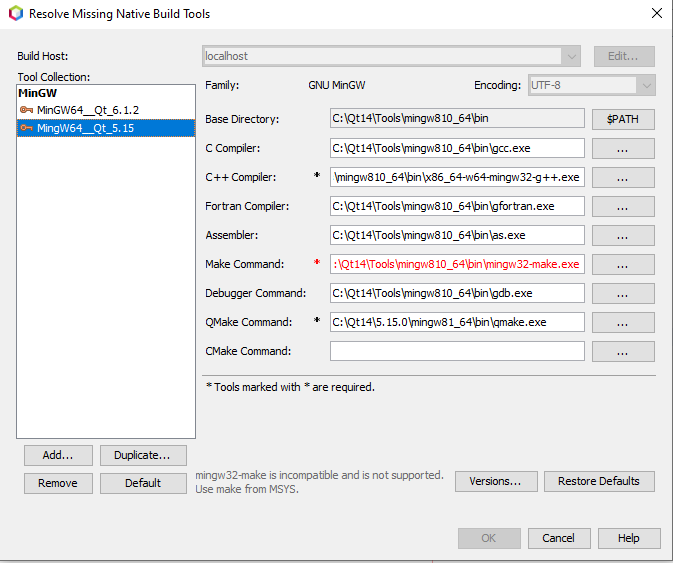
- i just did that but it keeps saying its not suported, plz check the images below
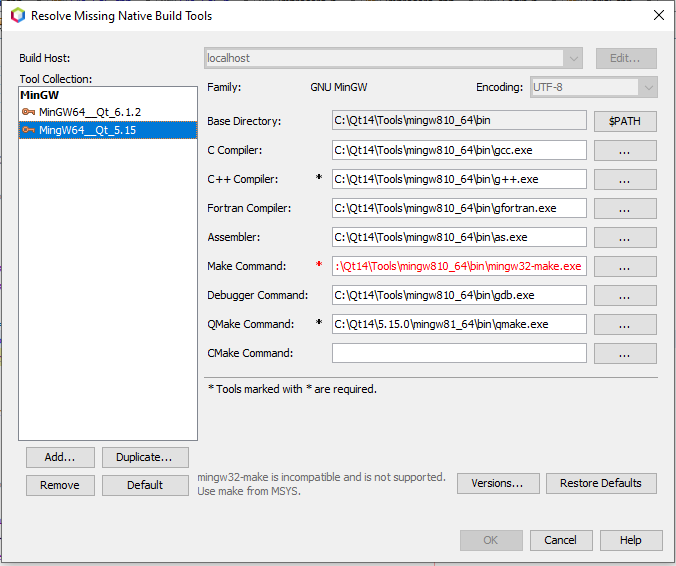
also i did try this
not sure what to do, im tempeted to leave it in Qt 5.11, the alternative its redo ALL THE CODE from scratch and thats a big no.
Any help is welcome -
- done no reference to qt or msys on the PATH
- deleted as well
- not sure how to do that, im using Netbeans and its not so clear as how to do that, i can use VS code but im unable to link the libraries not sure how,
- i just did that but it keeps saying its not suported, plz check the images below
also i did try this
not sure what to do, im tempeted to leave it in Qt 5.11, the alternative its redo ALL THE CODE from scratch and thats a big no.
Any help is welcome@Lightshadown said in migrate from Qt5.11 to 6:
i just did that but it keeps saying its not suported
So Netbeans doesn't support it. Qt Creator does.
OK, try switching back to your MSYS Make with C:\Qt\Tools\mingw810_64\bin\g++.exe (After doing steps #1 and #2 in my previous post)
Anyway, Qt 6.1 uses the same version of MinGW as Qt 5.15. What's in your "MinGW64__Qt_6.1.2" settings? Use the same for Qt 5.15.
- not sure how to do that, im using Netbeans and its not so clear as how to do that
I've never used Netbeans before so I don't know what it can and can't do, sorry.
-
@Lightshadown said in migrate from Qt5.11 to 6:
i just did that but it keeps saying its not suported
So Netbeans doesn't support it. Qt Creator does.
OK, try switching back to your MSYS Make with C:\Qt\Tools\mingw810_64\bin\g++.exe (After doing steps #1 and #2 in my previous post)
Anyway, Qt 6.1 uses the same version of MinGW as Qt 5.15. What's in your "MinGW64__Qt_6.1.2" settings? Use the same for Qt 5.15.
- not sure how to do that, im using Netbeans and its not so clear as how to do that
I've never used Netbeans before so I don't know what it can and can't do, sorry.
@JKSH im gona leave it in Qt 5.11 it seems the problem its netbeans itself for some reason it simply wont compile in a diferente version of Qt, in the Qt MinGW64__Qt_6.1.2" settings theres exacly the same as the 5.15, just the qmake its diferent (qmake for 5.15)


