
Skip to content
  • Categories
  • Recent
  • Tags
  • Popular
  • Users
  • Groups
  • Search
  • Get Qt Extensions
  • Unsolved
Collapse
Brand Logo
  1. Home
  2. Qt Development
  3. General and Desktop
  4. Progress bar and download button
Qt 6.11 is out! See what's new in the release blog

Progress bar and download button

Scheduled Pinned Locked Moved Unsolved General and Desktop
2 Posts 2 Posters 331 Views 1 Watching
  • Oldest to Newest
  • Newest to Oldest
  • Most Votes
Reply
  • Reply as topic
Log in to reply
This topic has been deleted. Only users with topic management privileges can see it.
  • A Offline
    A Offline
    AlexandruToma
    wrote on last edited by
    #1

    Hi can someone give me some advice on how do I create and print a progress bar like in the image? If not like in the image, i woult like to create and print any progress bar and download button.

    sc2.png
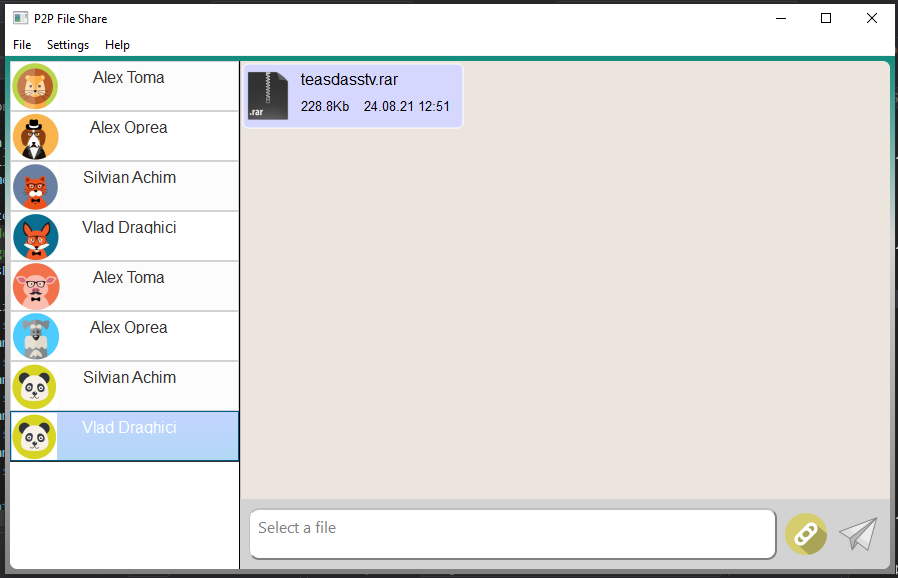
    I have a QListView and I am using a QStyleItemDelegate to print some data, but I have no ideea how to print that progress bar.
    Screenshot (11).png

    Inside of that message I am trying to print a progress bar and a download button. Maybe someone have any ideea or example.

    1 Reply Last reply
    0
    • mrjjM Offline
      mrjjM Offline
      mrjj
      Lifetime Qt Champion
      wrote on last edited by
      #2

      Hi
      QPainter can draw an arc so that could be used for it.
      https://doc.qt.io/qt-5/qpainter.html#drawArc

      The center image could be an image you draw. i think that would be the most easy.

      You could also look at this
      https://github.com/mofr/QtProgressCircle

      1 Reply Last reply
      1

      • Login

      • Login or register to search.
      • First post
        Last post
      0
      • Categories
      • Recent
      • Tags
      • Popular
      • Users
      • Groups
      • Search
      • Get Qt Extensions
      • Unsolved