Skip to content
  • Categories
  • Recent
  • Tags
  • Popular
  • Users
  • Groups
  • Search
  • Get Qt Extensions
  • Unsolved
Collapse
Brand Logo
  1. Home
  2. Qt Development
  3. General and Desktop
  4. My app keeps crashing and i've never used the Debugger befor!

My app keeps crashing and i've never used the Debugger befor!

Scheduled Pinned Locked Moved Unsolved General and Desktop
19 Posts 2 Posters 1.5k Views 1 Watching
  • Oldest to Newest
  • Newest to Oldest
  • Most Votes
Reply
  • Reply as topic
Log in to reply
This topic has been deleted. Only users with topic management privileges can see it.
  • mrjjM Offline
    mrjjM Offline
    mrjj
    Lifetime Qt Champion
    wrote on last edited by
    #2

    Hi
    It's hard to guess at, but maybe the rt is null and hence it crashes asking for ->d

    In the call stack, it seems to be inside Qt
    but if you scroll to the button some of your code should be shown
    alt text

    Such crashes normally comes from openGl issues.

    Can you run any of the QML or openGl examples that comes with Creator ?

    K 1 Reply Last reply
    0
    • mrjjM mrjj

      Hi
      It's hard to guess at, but maybe the rt is null and hence it crashes asking for ->d

      In the call stack, it seems to be inside Qt
      but if you scroll to the button some of your code should be shown
      alt text

      Such crashes normally comes from openGl issues.

      Can you run any of the QML or openGl examples that comes with Creator ?

      K Offline
      K Offline
      Kris Revi
      wrote on last edited by
      #3

      @mrjj but if you scroll to the button some of your code should be shown
      im confused here :P button?

      mrjjM 1 Reply Last reply
      0
      • K Kris Revi

        @mrjj but if you scroll to the button some of your code should be shown
        im confused here :P button?

        mrjjM Offline
        mrjjM Offline
        mrjj
        Lifetime Qt Champion
        wrote on last edited by
        #4

        @Kris-Revi
        sorry fat fingers. :)
        To the bottom. The scrollbar can be dragged more down to see the start of the call stack.

        1 Reply Last reply
        0
        • K Offline
          K Offline
          Kris Revi
          wrote on last edited by
          #5

          This?

          f7e31d6d-40a6-4358-9513-d00113434aaa-image.png

          mrjjM 1 Reply Last reply
          0
          • K Kris Revi

            This?

            f7e31d6d-40a6-4358-9513-d00113434aaa-image.png

            mrjjM Offline
            mrjjM Offline
            mrjj
            Lifetime Qt Champion
            wrote on last edited by
            #6

            @Kris-Revi
            Yes but it didnt show anything interesting.
            Do you call FullScreen any where ?
            seems to start there.

            Also, does other examples work ?
            Could be openGL setup that is messed up.

            K 1 Reply Last reply
            0
            • mrjjM mrjj

              @Kris-Revi
              Yes but it didnt show anything interesting.
              Do you call FullScreen any where ?
              seems to start there.

              Also, does other examples work ?
              Could be openGL setup that is messed up.

              K Offline
              K Offline
              Kris Revi
              wrote on last edited by
              #7

              @mrjj weird hmmm so i found the bit of code that was the cause!

                  const QScreen* screen = qApp->primaryScreen();
                  w.setGeometry( QRect(QPoint(0,0), screen->geometry().size()) );
                  w.setWindowFlag(Qt::MaximizeUsingFullscreenGeometryHint,true);
              
                  w.showFullScreen();
              

              but when i now run my App it's loading and "running" but no window comes up :S

              mrjjM 1 Reply Last reply
              1
              • K Kris Revi

                @mrjj weird hmmm so i found the bit of code that was the cause!

                    const QScreen* screen = qApp->primaryScreen();
                    w.setGeometry( QRect(QPoint(0,0), screen->geometry().size()) );
                    w.setWindowFlag(Qt::MaximizeUsingFullscreenGeometryHint,true);
                
                    w.showFullScreen();
                

                but when i now run my App it's loading and "running" but no window comes up :S

                mrjjM Offline
                mrjjM Offline
                mrjj
                Lifetime Qt Champion
                wrote on last edited by
                #8

                @Kris-Revi
                Did you remove the fullscreen or how did you make it run ?

                Try with
                w.show()

                K 1 Reply Last reply
                0
                • mrjjM mrjj

                  @Kris-Revi
                  Did you remove the fullscreen or how did you make it run ?

                  Try with
                  w.show()

                  K Offline
                  K Offline
                  Kris Revi
                  wrote on last edited by
                  #9

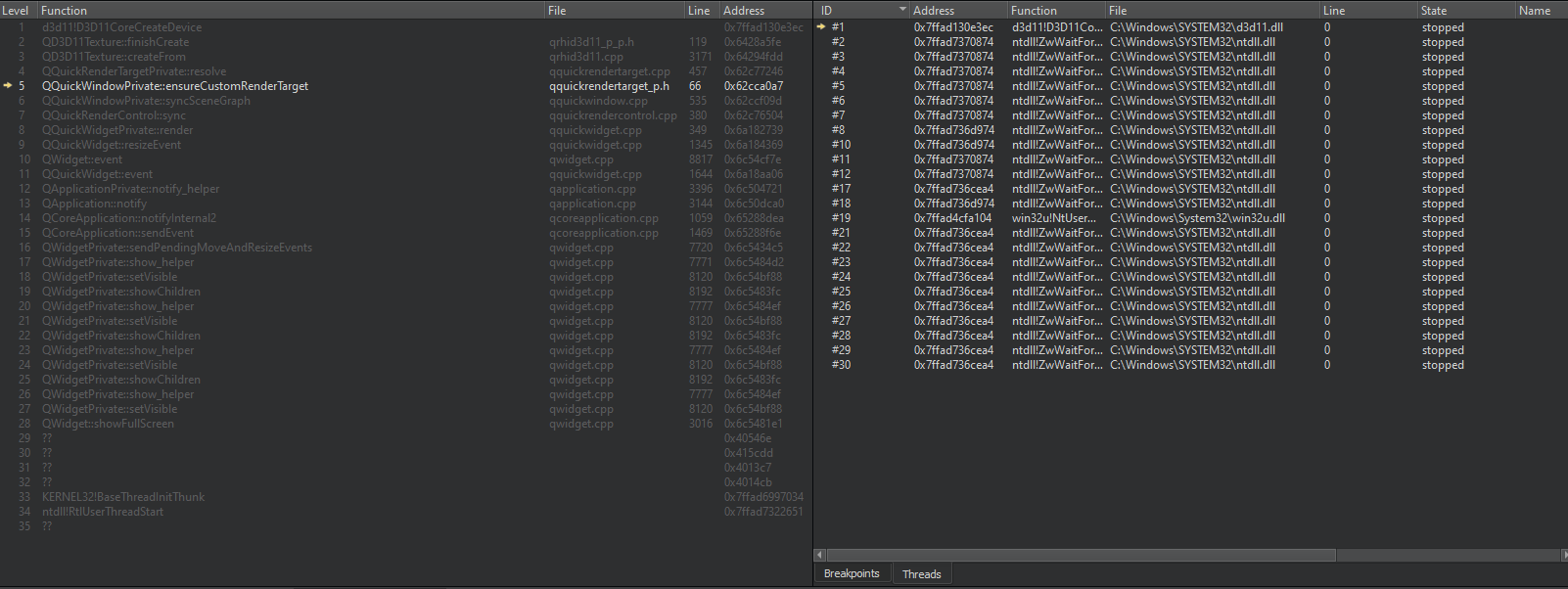
                  @mrjj so i added w.show(); and ran the debugger again and got this
                  5b90eb88-8a23-4998-a7ab-c04894bad95e-image.png

                  mrjjM 1 Reply Last reply
                  0
                  • K Kris Revi

                    @mrjj so i added w.show(); and ran the debugger again and got this
                    5b90eb88-8a23-4998-a7ab-c04894bad95e-image.png

                    mrjjM Offline
                    mrjjM Offline
                    mrjj
                    Lifetime Qt Champion
                    wrote on last edited by
                    #10

                    @Kris-Revi

                    Ok so it is when it tries to show the render surface.

                    You have to try some of the openGl examples and see.

                    I guess its your openGL since it seems to crash on showing.

                    https://doc.qt.io/qt-5/qtopengl-hellogl2-example.html

                    They are available directly in creator.

                    K 2 Replies Last reply
                    0
                    • mrjjM mrjj

                      @Kris-Revi

                      Ok so it is when it tries to show the render surface.

                      You have to try some of the openGl examples and see.

                      I guess its your openGL since it seems to crash on showing.

                      https://doc.qt.io/qt-5/qtopengl-hellogl2-example.html

                      They are available directly in creator.

                      K Offline
                      K Offline
                      Kris Revi
                      wrote on last edited by
                      #11

                      @mrjj so i just ran that example and it worked without problems

                      mrjjM 1 Reply Last reply
                      0
                      • mrjjM mrjj

                        @Kris-Revi

                        Ok so it is when it tries to show the render surface.

                        You have to try some of the openGl examples and see.

                        I guess its your openGL since it seems to crash on showing.

                        https://doc.qt.io/qt-5/qtopengl-hellogl2-example.html

                        They are available directly in creator.

                        K Offline
                        K Offline
                        Kris Revi
                        wrote on last edited by Kris Revi
                        #12

                        @mrjj i just noticed this

                        QQuickWidget is only supported on OpenGL. Use QQuickWindow::setGraphicsApi() to override the default.

                        could this be it?

                        1 Reply Last reply
                        0
                        • K Kris Revi

                          @mrjj so i just ran that example and it worked without problems

                          mrjjM Offline
                          mrjjM Offline
                          mrjj
                          Lifetime Qt Champion
                          wrote on last edited by
                          #13

                          @Kris-Revi

                          Hi
                          yes it could very well as normally Desktop is using openGl and mobile some other ES? but
                          normally it's automatic.

                          This is a Desktop pc windows right ?

                          Did you compile Qt your self ?

                          Maybe its a Qt6 thing. try setting it to openGl via the setGraphicsApi as it says and then see.

                          K 1 Reply Last reply
                          0
                          • mrjjM mrjj

                            @Kris-Revi

                            Hi
                            yes it could very well as normally Desktop is using openGl and mobile some other ES? but
                            normally it's automatic.

                            This is a Desktop pc windows right ?

                            Did you compile Qt your self ?

                            Maybe its a Qt6 thing. try setting it to openGl via the setGraphicsApi as it says and then see.

                            K Offline
                            K Offline
                            Kris Revi
                            wrote on last edited by
                            #14

                            @mrjj yea it's for desktop now :) 6.2.0 but im compiling for both Android and Desktop in same project! and wanted to test the App on the Desktop

                            mrjjM 1 Reply Last reply
                            0
                            • K Kris Revi

                              @mrjj yea it's for desktop now :) 6.2.0 but im compiling for both Android and Desktop in same project! and wanted to test the App on the Desktop

                              mrjjM Offline
                              mrjjM Offline
                              mrjj
                              Lifetime Qt Champion
                              wrote on last edited by
                              #15

                              @Kris-Revi

                              Can it be that on startup some other API is set ?
                              Or you added some defines to .pro so it thinks its Android ?

                              K 2 Replies Last reply
                              0
                              • mrjjM mrjj

                                @Kris-Revi

                                Can it be that on startup some other API is set ?
                                Or you added some defines to .pro so it thinks its Android ?

                                K Offline
                                K Offline
                                Kris Revi
                                wrote on last edited by
                                #16

                                @mrjj so the App works perfectly with QQuickWindow::setGraphicsApi(QSGRendererInterface::OpenGL); weird why i would need to set that tho :S hmmm

                                1 Reply Last reply
                                0
                                • mrjjM mrjj

                                  @Kris-Revi

                                  Can it be that on startup some other API is set ?
                                  Or you added some defines to .pro so it thinks its Android ?

                                  K Offline
                                  K Offline
                                  Kris Revi
                                  wrote on last edited by
                                  #17

                                  @mrjj question in the pro file can't i do this

                                  win32
                                  {
                                      CONFIG(release, debug|release): LIBS += -LC:\QMsgPack\bin -lqmsgpack
                                      INCLUDEPATH += C:\QMsgPack\bin
                                      DEPENDPATH += C:\QMsgPack\bin
                                  }
                                  
                                  win32
                                  {
                                      CONFIG(debug, debug|release): LIBS += -LC:\QMsgPack\bin -lqmsgpack
                                      INCLUDEPATH += C:\QMsgPack\bin
                                      DEPENDPATH += C:\QMsgPack\bin
                                  }
                                  unix
                                  {
                                      contains(ANDROID_TARGET_ARCH,arm64-v8a)
                                      {
                                          ANDROID_PACKAGE_SOURCE_DIR = \
                                             $$PWD/android
                                  
                                          ANDROID_EXTRA_LIBS = \
                                              $$PWD/android/libs/libqmsgpack_arm64-v8a.so
                                      }
                                      LIBS += -L$$PWD/android/libs/ -lqmsgpack_arm64-v8a
                                  
                                      INCLUDEPATH += $$PWD/android/libs
                                      DEPENDPATH += $$PWD/android/libs
                                  }
                                  

                                  ? :S

                                  mrjjM 1 Reply Last reply
                                  0
                                  • K Kris Revi

                                    @mrjj question in the pro file can't i do this

                                    win32
                                    {
                                        CONFIG(release, debug|release): LIBS += -LC:\QMsgPack\bin -lqmsgpack
                                        INCLUDEPATH += C:\QMsgPack\bin
                                        DEPENDPATH += C:\QMsgPack\bin
                                    }
                                    
                                    win32
                                    {
                                        CONFIG(debug, debug|release): LIBS += -LC:\QMsgPack\bin -lqmsgpack
                                        INCLUDEPATH += C:\QMsgPack\bin
                                        DEPENDPATH += C:\QMsgPack\bin
                                    }
                                    unix
                                    {
                                        contains(ANDROID_TARGET_ARCH,arm64-v8a)
                                        {
                                            ANDROID_PACKAGE_SOURCE_DIR = \
                                               $$PWD/android
                                    
                                            ANDROID_EXTRA_LIBS = \
                                                $$PWD/android/libs/libqmsgpack_arm64-v8a.so
                                        }
                                        LIBS += -L$$PWD/android/libs/ -lqmsgpack_arm64-v8a
                                    
                                        INCLUDEPATH += $$PWD/android/libs
                                        DEPENDPATH += $$PWD/android/libs
                                    }
                                    

                                    ? :S

                                    mrjjM Offline
                                    mrjjM Offline
                                    mrjj
                                    Lifetime Qt Champion
                                    wrote on last edited by
                                    #18

                                    @Kris-Revi
                                    Yes that seems perfect. should not interfere with which backend is used.

                                    I cant tell either. Did you use any new Qt6 things ?
                                    Could be fun to see if it does the same say in 5.12

                                    K 1 Reply Last reply
                                    0
                                    • mrjjM mrjj

                                      @Kris-Revi
                                      Yes that seems perfect. should not interfere with which backend is used.

                                      I cant tell either. Did you use any new Qt6 things ?
                                      Could be fun to see if it does the same say in 5.12
                                      K Offline
                                      K Offline
                                      Kris Revi
                                      wrote on last edited by
                                      #19

                                      @mrjj for some reason with the code above it does this

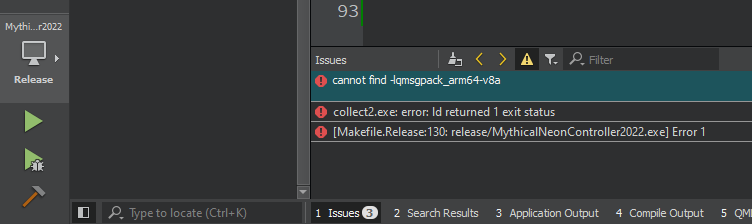
                                      6912ccb5-dad8-42bc-9ff0-a0f5259f3860-image.png

                                      i've selected the Desktop but it is trying to find the "arm / android" version :S

                                      1 Reply Last reply
                                      0

                                      • Login

                                      • Login or register to search.
                                      • First post
                                        Last post
                                      0
                                      • Categories
                                      • Recent
                                      • Tags
                                      • Popular
                                      • Users
                                      • Groups
                                      • Search
                                      • Get Qt Extensions
                                      • Unsolved