
Skip to content
  • Categories
  • Recent
  • Tags
  • Popular
  • Users
  • Groups
  • Search
  • Get Qt Extensions
  • Unsolved
Collapse
Brand Logo
  1. Home
  2. Qt Development
  3. General and Desktop
  4. QSerialPort : no such file or directory
Qt 6.11 is out! See what's new in the release blog

QSerialPort : no such file or directory

Scheduled Pinned Locked Moved Unsolved General and Desktop
11 Posts 3 Posters 5.6k Views 2 Watching
  • Oldest to Newest
  • Newest to Oldest
  • Most Votes
Reply
  • Reply as topic
Log in to reply
This topic has been deleted. Only users with topic management privileges can see it.
  • Z Zakir Hussain

    Hello everyone,

    I have been working on QT Creator 3.5.1 based on Qt 5.5.1.

    I am facing a problem with #include <QSerialPort>

    I get a error message as no such file or directory found.

    I request all to help me to resolve this problem.

    Thanks in advance.

    eyllanescE Offline
    eyllanescE Offline
    eyllanesc
    wrote on last edited by
    #2

    @Zakir-Hussain add QT += serialport in your .pro

    If you want me to help you develop some work then you can write to my email: e.yllanescucho@gmal.com.

    Z 1 Reply Last reply
    0
    • eyllanescE eyllanesc

      @Zakir-Hussain add QT += serialport in your .pro

      Z Offline
      Z Offline
      Zakir Hussain
      wrote on last edited by
      #3

      @eyllanesc I have already added, but didn't work.

      eyllanescE 1 Reply Last reply
      0
      • Z Zakir Hussain

        @eyllanesc I have already added, but didn't work.

        eyllanescE Offline
        eyllanescE Offline
        eyllanesc
        wrote on last edited by
        #4

        @Zakir-Hussain How did you install Qt? what is your OS?

        If you want me to help you develop some work then you can write to my email: e.yllanescucho@gmal.com.

        1 Reply Last reply
        0
        • Z Offline
          Z Offline
          Zakir Hussain
          wrote on last edited by
          #5

          @eyllanesc I installed a open source from Qt website in Windows 10.

          jsulmJ 1 Reply Last reply
          0
          • Z Zakir Hussain

            @eyllanesc I installed a open source from Qt website in Windows 10.

            jsulmJ Offline
            jsulmJ Offline
            jsulm
            Lifetime Qt Champion
            wrote on last edited by
            #6

            @Zakir-Hussain Which Qt version did you install (I don't mean "based on Qt 5.5.1", but the one you installed and are using)?

            https://forum.qt.io/topic/113070/qt-code-of-conduct

            Z 1 Reply Last reply
            0
            • jsulmJ jsulm

              @Zakir-Hussain Which Qt version did you install (I don't mean "based on Qt 5.5.1", but the one you installed and are using)?

              Z Offline
              Z Offline
              Zakir Hussain
              wrote on last edited by
              #7

              Hi,
              @jsulm I have attached the screenshot of the version below. Please check.
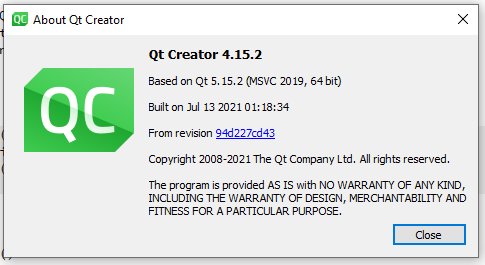
              1c28dd31-1897-4caa-8e00-bf3b470433dc-image.png

              jsulmJ 1 Reply Last reply
              0
              • Z Zakir Hussain

                Hi,
                @jsulm I have attached the screenshot of the version below. Please check.

                1c28dd31-1897-4caa-8e00-bf3b470433dc-image.png

                jsulmJ Offline
                jsulmJ Offline
                jsulm
                Lifetime Qt Champion
                wrote on last edited by jsulm
                #8

                @Zakir-Hussain Again: this is not what I'm asking. This dialog only says which Qt version was used to build QtCreator.
                We need to know what Qt version you did install. So, please tell us which version you installed. If you don't remember then go to the Kit and check there.
                And why did you say you're using QtCreator 3.5.1 at the beginning but now you show us QtCreator 4.15.2?

                https://forum.qt.io/topic/113070/qt-code-of-conduct

                Z 1 Reply Last reply
                2
                • jsulmJ jsulm

                  @Zakir-Hussain Again: this is not what I'm asking. This dialog only says which Qt version was used to build QtCreator.
                  We need to know what Qt version you did install. So, please tell us which version you installed. If you don't remember then go to the Kit and check there.
                  And why did you say you're using QtCreator 3.5.1 at the beginning but now you show us QtCreator 4.15.2?

                  Z Offline
                  Z Offline
                  Zakir Hussain
                  wrote on last edited by
                  #9

                  @jsulm Sorry it was by mistake.
                  The version is Desktop Qt 6.1.2 MinGW 64-bit.
                  I have attached the screenshot for your reference.

                  Thanks & Regards.
                  Zakir Hussain
                  73c59a90-cade-4e9e-bf33-87f1634fec70-image.png

                  eyllanescE 1 Reply Last reply
                  0
                  • Z Zakir Hussain

                    @jsulm Sorry it was by mistake.
                    The version is Desktop Qt 6.1.2 MinGW 64-bit.
                    I have attached the screenshot for your reference.

                    Thanks & Regards.
                    Zakir Hussain
                    73c59a90-cade-4e9e-bf33-87f1634fec70-image.png

                    eyllanescE Offline
                    eyllanescE Offline
                    eyllanesc
                    wrote on last edited by eyllanesc
                    #10

                    @Zakir-Hussain The QtSerialPort module will be available only in Qt 6.2 as indicated in article https://www.qt.io/blog/add-on-support-in-qt-6.0-and-beyond.

                    So you have the following options:

                    • Use Qt5 (the most recommended)
                    • Wait for Qt 6.2
                    • Use the beta version of Qt 6.2

                    If you want me to help you develop some work then you can write to my email: e.yllanescucho@gmal.com.

                    Z 1 Reply Last reply
                    4
                    • eyllanescE eyllanesc

                      @Zakir-Hussain The QtSerialPort module will be available only in Qt 6.2 as indicated in article https://www.qt.io/blog/add-on-support-in-qt-6.0-and-beyond.

                      So you have the following options:

                      • Use Qt5 (the most recommended)
                      • Wait for Qt 6.2
                      • Use the beta version of Qt 6.2
                      Z Offline
                      Z Offline
                      Zakir Hussain
                      wrote on last edited by
                      #11

                      Hi,
                      @eyllanesc Thank you so much for your guidance. I have installed Qt5 and it is working perfectly.

                      1 Reply Last reply
                      0

                      • Login

                      • Login or register to search.
                      • First post
                        Last post
                      0
                      • Categories
                      • Recent
                      • Tags
                      • Popular
                      • Users
                      • Groups
                      • Search
                      • Get Qt Extensions
                      • Unsolved
