Skip to content
  • Categories
  • Recent
  • Tags
  • Popular
  • Users
  • Groups
  • Search
  • Get Qt Extensions
  • Unsolved
Collapse
Brand Logo
  1. Home
  2. Qt Development
  3. General and Desktop
  4. How to change alignment of widget

How to change alignment of widget

Scheduled Pinned Locked Moved Unsolved General and Desktop
20 Posts 4 Posters 25.1k Views 1 Watching
  • Oldest to Newest
  • Newest to Oldest
  • Most Votes
Reply
  • Reply as topic
Log in to reply
This topic has been deleted. Only users with topic management privileges can see it.
  • U Offline
    U Offline
    UG SEP
    wrote on last edited by UG SEP
    #7

    I did as you told but when I add the Horizontal Layout central widget the widget fix on the whole layout
    proof.jpg

    mrjjM 1 Reply Last reply
    0
    • U UG SEP

      I did as you told but when I add the Horizontal Layout central widget the widget fix on the whole layout
      proof.jpg

      mrjjM Offline
      mrjjM Offline
      mrjj
      Lifetime Qt Champion
      wrote on last edited by
      #8

      @UG-SEP

      Yes. That is normal. they have to be linked to the central so they scale with window.
      If you don't add layout to central. the red layout will just float around and nnot react to you scaling the window.

      The normal way to design forms is to have all widgets under the control of a layout. Having them float
      around is not going to work good across multi resolutions etc.

      1 Reply Last reply
      0
      • U Offline
        U Offline
        UG SEP
        wrote on last edited by
        #9

        I haven't achieved whatever I want
        My goal
        I have resized the text edit so after resizing it should be center-aligned but after following the above steps I didn't get the goal

        mrjjM 1 Reply Last reply
        0
        • U UG SEP

          I haven't achieved whatever I want
          My goal
          I have resized the text edit so after resizing it should be center-aligned but after following the above steps I didn't get the goal

          mrjjM Offline
          mrjjM Offline
          mrjj
          Lifetime Qt Champion
          wrote on last edited by
          #10

          @UG-SEP

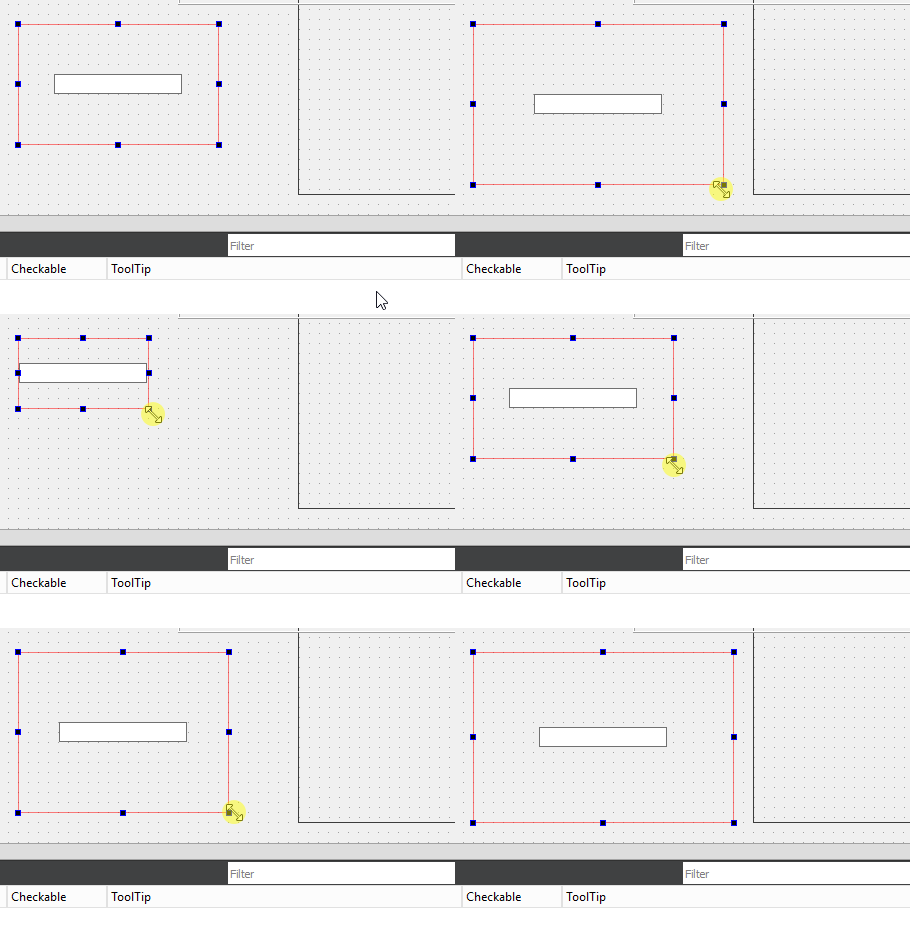
          Odd. Mine will center just fine.
          alt text

          Are you sure the TextEdit is inside the layout ?

          Mine looks far more indented than yours so i think maybe TextEdit is not inside

          alt text

          If you resize the red layout it should also move around-

          1 Reply Last reply
          1
          • U Offline
            U Offline
            UG SEP
            wrote on last edited by
            #11

            I did as you told but as I put TextEdit in Layout the TextEdit capture the whole area but in your case, It didn't hold all areas it's in center
            proof.jpg

            mrjjM 1 Reply Last reply
            0
            • U UG SEP

              I did as you told but as I put TextEdit in Layout the TextEdit capture the whole area but in your case, It didn't hold all areas it's in center
              proof.jpg

              mrjjM Offline
              mrjjM Offline
              mrjj
              Lifetime Qt Champion
              wrote on last edited by
              #12

              @UG-SEP
              The TextEdit will default use all space.
              If you had a certain size in mind you can set a maximum width/height to it to it. ( in the property list )

              alt text

              1 Reply Last reply
              0
              • U Offline
                U Offline
                UG SEP
                wrote on last edited by
                #13

                I try some advanced in this
                I added a button and when it's pressed then
                I resize TextEdit and then and apply layout.set alignment(ui->textedit,Qt::aligncenter);
                but i textedit is not at center
                Code:

                 ui->textEdit->resize(32,54);
                    QHBoxLayout layout;
                    layout.setAlignment(ui->textEdit,Qt::AlignCenter);
                

                Image of ui:
                proof.jpg

                mrjjM 1 Reply Last reply
                0
                • U UG SEP

                  I try some advanced in this
                  I added a button and when it's pressed then
                  I resize TextEdit and then and apply layout.set alignment(ui->textedit,Qt::aligncenter);
                  but i textedit is not at center
                  Code:

                   ui->textEdit->resize(32,54);
                      QHBoxLayout layout;
                      layout.setAlignment(ui->textEdit,Qt::AlignCenter);
                  

                  Image of ui:
                  proof.jpg

                  mrjjM Offline
                  mrjjM Offline
                  mrjj
                  Lifetime Qt Champion
                  wrote on last edited by
                  #14

                  @UG-SEP

                  Hi
                  It's good you play around to learn the layout. Best way to learn.

                  The Qt::AlignCenter only works if the widget is not using all the space of the layout which is the normal
                  setting. So here it will use all space and alignment won't really make sense.

                  Is the goal to have space around it?
                  or why are you so dedicated to it must be center if its the size of the area anyway?

                  U 1 Reply Last reply
                  0
                  • mrjjM mrjj

                    @UG-SEP

                    Hi
                    It's good you play around to learn the layout. Best way to learn.

                    The Qt::AlignCenter only works if the widget is not using all the space of the layout which is the normal
                    setting. So here it will use all space and alignment won't really make sense.

                    Is the goal to have space around it?
                    or why are you so dedicated to it must be center if its the size of the area anyway?

                    U Offline
                    U Offline
                    UG SEP
                    wrote on last edited by
                    #15

                    @mrjj I want to use Page Setup in TextEdit i.e. letter,A4,A3, etc page size so what I did I resize text edit and try to align it center when user click the button

                    mrjjM 1 Reply Last reply
                    0
                    • U UG SEP

                      @mrjj I want to use Page Setup in TextEdit i.e. letter,A4,A3, etc page size so what I did I resize text edit and try to align it center when user click the button

                      mrjjM Offline
                      mrjjM Offline
                      mrjj
                      Lifetime Qt Champion
                      wrote on last edited by
                      #16

                      @UG-SEP

                      Ok so it's like a page preview ? as a real A4 / A3 would be waaay bigger than the layout.

                      You can control its size in a layout by calling

                      ui->textXx->setMaximumSize(100,100);

                      to not allow it to grow to full size of layout.

                      U 1 Reply Last reply
                      0
                      • JoeCFDJ Offline
                        JoeCFDJ Offline
                        JoeCFD
                        wrote on last edited by JoeCFD
                        #17

                        @UG-SEP said in How to change alignment of widget:

                        ui->textEdit->resize(32,54);
                        QHBoxLayout layout;
                        layout.setAlignment(ui->textEdit,Qt::AlignCenter);

                        ui->textEdit->resize(32,54);
                        auto layout = new QHBoxLayout( this ); /* do not do: QHBoxLayout layout; which may cause crash */
                        layout->setAlignment(ui->textEdit,Qt::AlignCenter);

                        1 Reply Last reply
                        0
                        • mrjjM mrjj

                          @UG-SEP

                          Ok so it's like a page preview ? as a real A4 / A3 would be waaay bigger than the layout.

                          You can control its size in a layout by calling

                          ui->textXx->setMaximumSize(100,100);

                          to not allow it to grow to full size of layout.

                          U Offline
                          U Offline
                          UG SEP
                          wrote on last edited by
                          #18

                          @mrjj means there is no way to set page size like A4, A5 etc in textedit

                          mrjjM 1 Reply Last reply
                          0
                          • U UG SEP

                            @mrjj means there is no way to set page size like A4, A5 etc in textedit

                            mrjjM Offline
                            mrjjM Offline
                            mrjj
                            Lifetime Qt Champion
                            wrote on last edited by
                            #19

                            @UG-SEP
                            Hi
                            Well there is
                            https://doc.qt.io/qt-5/qtextdocument.html#pageSize-prop
                            (TextEdit uses this for the page etc)

                            Concrete sizes like A4/A3 is more when you print and QPrinter does know them/support it.
                            Its a paper size

                            However, you can set the page size of the Document to the size of A4 or what ever you want.

                            So if the goal is to resize the TextEdit so it be the size of a A4. then using layout seems a bit odd
                            as it cant be bigger than the layout and a layout cant scroll.

                            So iM not 100ยค sure what you are trying to do.
                            Seems you try to make a really small page so that confuses me :)

                            1 Reply Last reply
                            0
                            • U Offline
                              U Offline
                              UG SEP
                              wrote on last edited by
                              #20

                              Let leave this topic...
                              Thanks, @mrjj for helping me
                              ๐Ÿ˜ƒ๐Ÿ˜ƒ๐Ÿ™‚๐Ÿ™‚

                              1 Reply Last reply
                              1

                              • Login

                              • Login or register to search.
                              • First post
                                Last post
                              0
                              • Categories
                              • Recent
                              • Tags
                              • Popular
                              • Users
                              • Groups
                              • Search
                              • Get Qt Extensions
                              • Unsolved