
QIcon not showing anything
-
Hi experts, actually two questions:
1 - How do I assign a png file to an icon in QT Creator?
When I click on the "icon" part, it asks for a "theme". his is confusing as I expect it to show a dialog and I can simply load an image file.2 - How do I load it in program?
Here is the code:QIcon ButtonIcon("loadbutton.png"); ui.loadButton->setIcon(ButtonIcon); ui.loadButton->setIconSize(pixmap.rect().size());Let me say the filename is perfectly fine (as I put the png in the same directory and it's also the method I use to load all other png files), and ButtonIcon is not NULL. However the icon shows nothing and I don't know why.
Thanks in advance!
-
@Q74r3wq said in QIcon not showing anything:
When I click on the "icon" part, it asks for a "theme".
In the Designer properties panel click the small down arrow, then Choose File... (or Choose Resource... and embed the icon)
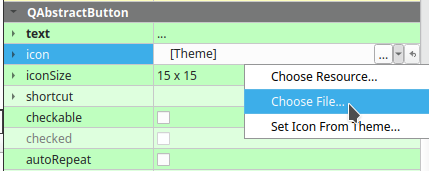
Themes use the Freedesktop Icon Theme Specification and are another way to handle sets of icons.
2 - How do I load it in program?
Like you are doing (assuming the executable's current working directory is where "loadbutton.png" lives).
What is the unrelated pixmap.rect().size()? -
Hi experts, actually two questions:
1 - How do I assign a png file to an icon in QT Creator?
When I click on the "icon" part, it asks for a "theme". his is confusing as I expect it to show a dialog and I can simply load an image file.2 - How do I load it in program?
Here is the code:QIcon ButtonIcon("loadbutton.png"); ui.loadButton->setIcon(ButtonIcon); ui.loadButton->setIconSize(pixmap.rect().size());Let me say the filename is perfectly fine (as I put the png in the same directory and it's also the method I use to load all other png files), and ButtonIcon is not NULL. However the icon shows nothing and I don't know why.
Thanks in advance!
@Q74r3wq said in QIcon not showing anything:
QIcon ButtonIcon("loadbutton.png");
You are using a relative path for the icon. That means your app will look in current working directory for it. You should use resources for such files instead. See https://doc.qt.io/qt-5/resources.html
