Filling StackedWidgets
-
Hello everyone I am having some troubles filling in my StackWidgets.
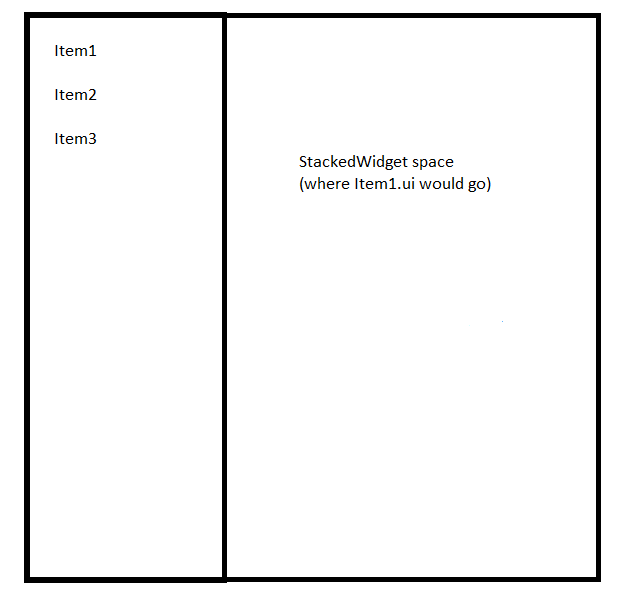
I have created a dialog. When this is opened a list is shown to the left with some objects in it. I am trying to have some ui files I created show up to the right of the list whenever the corresponding item is selected in the list.
In my dialog.cpp I included the .h file of the first ui file. After the ui is set up, I instantiate the first item and then call the stackedWidgets so that the new created instantiation is added. This is my code:
#include "dialog.h"
dialog::dialog(QWidget *parent)
: QDialog(parent)
{
ui.setupUi(this);Item1* newItem = new Item1(); ui.stackedWidget->addWidget(newItem);}
dialog::~dialog()
{
}When I compile and open the dialog I have my list on the left and on the right an empty space. If I click on the first item of the list my newItem instantiation is not there. What did I do wrong?
Please help me understand my mistake. Thanks in advance.
-
Also I forgot to add that StackWidget has as many pages as the number of items in the list to the left. If I go into the ui_dialog.h file and manually add Item1 from there it shows up as I want to. The problem is of course that nothing saves in that ui_dialog.h file after I close and reopen the solution.
-
UPDATE: I managed to show the Item1.ui file simply by adding:
Arinc424Configuration* arincWidget = new Arinc424Configuration();
ui.stackedWidget->addWidget(arincWidget);
arincWidget->show();In the dialog.cpp file. Now I need to understand how to have it only show up when the first item is selected inside the dialog's list.
-
UPDATE: I managed to show the Item1.ui file simply by adding:
Arinc424Configuration* arincWidget = new Arinc424Configuration();
ui.stackedWidget->addWidget(arincWidget);
arincWidget->show();In the dialog.cpp file. Now I need to understand how to have it only show up when the first item is selected inside the dialog's list.
@TommyTLC said in Filling StackedWidgets:
arincWidget->show();
Showing the
arincWidgetdoes not help in your case. You want to show the stackedWidget page with the widget, not the widget itself right?Now I need to understand how to have it only show up when the first item is selected inside the dialog's list.
You can flip the pages according to your clicked items using signals & slots.
Edit:
Do you have any layout in your UI?
-
@TommyTLC said in Filling StackedWidgets:
arincWidget->show();
Showing the
arincWidgetdoes not help in your case. You want to show the stackedWidget page with the widget, not the widget itself right?Now I need to understand how to have it only show up when the first item is selected inside the dialog's list.
You can flip the pages according to your clicked items using signals & slots.
Edit:
Do you have any layout in your UI?
@Pl45m4 My arincWidget.ui has layouts, yes. The show() actually shows the widget exactly where I want it, but yes I need to find a more stable and organized way of instantiating it. As you said the solution is probably using signals and slots. In this case the signal would be the item in the list and the slot the arincWidget.ui instantiation, correct?
-
@Pl45m4 My arincWidget.ui has layouts, yes. The show() actually shows the widget exactly where I want it, but yes I need to find a more stable and organized way of instantiating it. As you said the solution is probably using signals and slots. In this case the signal would be the item in the list and the slot the arincWidget.ui instantiation, correct?
You haven't read the signal & slot doc?! It probably helps you to understand the mechanism better.
A slot is pretty much a function that is called every time you "fire" (emit) the signal.
So you could make a connection to show the correct page of your stackedWidget depending on which item or button you click. -
Hi,
As @Pl45m4 suggests, you will have to write some code yourself. Designer does not generate anything code wise with regard to interaction.
You can click all you want on the items of your QListWidget, it will have no effect on the QStackedWidget.
You have to implement a slot that will switch the QStackedWidget current widget based on the item you clicked.
-
Hi,
As @Pl45m4 suggests, you will have to write some code yourself. Designer does not generate anything code wise with regard to interaction.
You can click all you want on the items of your QListWidget, it will have no effect on the QStackedWidget.
You have to implement a slot that will switch the QStackedWidget current widget based on the item you clicked.
@SGaist Ok thank you for your feedback. Here is what I have done:
ConfigurationDialog::ConfigurationDialog(QWidget* parent)
: QDialog(parent)
{
ui.setupUi(this);
setWindowFlags(Qt::WindowStaysOnTopHint);ui.listWidget->addItem("Text1"); ui.listWidget->addItem("Text2"); ui.listWidget->addItem("Text3"); ui.listWidget->addItem("Text4"); ui.listWidget->addItem("Text5"); item1Configuration* item1 = new item1Configuration; item2Configuration* item2 = new item2Configuration; item3Configuration* item3 = new item3Configuration; item4Configuration* item4 = new item4Configuration; item5Configuration* item5 = new item5Configuration; ui.stackedWidget->addWidget(item1); ui.stackedWidget->addWidget(item2); ui.stackedWidget->addWidget(item3); ui.stackedWidget->addWidget(item4); ui.stackedWidget->addWidget(item5); connect(ui.listWidget, SIGNAL(itemClicked(QListWidgetItem*)), this, SLOT(onListItemClicked(QListWidgetItem*)));}
ConfigurationDialog::~ConfigurationDialog()
{
}void ConfigurationDialog::onListItemClicked(QListWidgetItem* item)
{
ui.stackedWidget->setCurrentIndex(ui.listWidget->currentRow());
}Now I think the logic is correct (I have also implemented the SIGNAL/CONTROL as you suggested). The problem is that the application does not open anymore when I compile. Instead after a little bit of waiting a window opens up with the following error:
Unhandled exception at 0x00007FFD5793B866 (ntdll.dll) in Application.exe: 0xC00000FD: Stack overflow (parameters: 0x0000000000000001, 0x000000190E003FF8).
-
Hi
Looks good and was what was expected with signals / slot.try use the debugger to see where it crashes.
Do you make a ConfigurationDialog in main.cpp and use instead of a MainWindow ?
Did you change anything else as I dont see the code you shown should crash even before you click on stuff.
-
Hi
Looks good and was what was expected with signals / slot.try use the debugger to see where it crashes.
Do you make a ConfigurationDialog in main.cpp and use instead of a MainWindow ?
Did you change anything else as I dont see the code you shown should crash even before you click on stuff.
@mrjj Hello!
By commenting/compiling I have managed to understand who is causing the problem.
This is what the SLOT function looks like now:void ConfigurationDialog::onListItemClicked(QListWidgetItem* item)
{
ui.stackedWidget->setCurrentIndex(ui.listWidget->currentRow());if (ui.stackedWidget->currentIndex() == 0) { item1Configuration* item1Widget = new item1Configuration; ui.stackedWidget->addWidget(item1Widget); ui.stackedWidget->setCurrentWidget(item1Widget); } else if (ui.stackedWidget->currentIndex() == 1) { /*item2Configuration* item2Widget = new item2Configuration; ui.stackedWidget->addWidget(item2Widget); ui.stackedWidget->setCurrentWidget(item2Widget);*/ qDebug() << "hello1"; } else if (ui.stackedWidget->currentIndex() == 2) { /*item3Configuration* item3Widget = new item3Configuration; ui.stackedWidget->addWidget(item3Widget); ui.stackedWidget->setCurrentWidget(item3Widget);*/ qDebug() << "hello2"; } else if (ui.stackedWidget->currentIndex() == 3) { item4Configuration* item4Widget = new item4Configuration; ui.stackedWidget->addWidget(item4Widget); ui.stackedWidget->setCurrentWidget(item4Widget); } else if (ui.stackedWidget->currentIndex() == 4) { item5Configuration* item5Widget = new item5Configuration; ui.stackedWidget->addWidget(item5Widget); ui.stackedWidget->setCurrentWidget(item5Widget); }}
This works well: the correct widget is shown when the corresponding item is selected in the qListWidget. The problem comes from Item2 and Item3 for some reason (that's why I commented them out). I do not understand what the problem could be. They are both QWidget classes created just like items 1,4,5. If included in the code they make the application freeze and then crash. Any thoughts?
-
Hi
That seems odd.I assume it does print the qDebug() << "hello1"; and hello2 ?
Is there anything special with item2Configuration and item3Configuration.
I mean like doing something in their constructor?
-
Hi
That seems odd.I assume it does print the qDebug() << "hello1"; and hello2 ?
Is there anything special with item2Configuration and item3Configuration.
I mean like doing something in their constructor?