
QListWidget connect to QPushButton
-
@mrjj
With my class, I created a new window with a picture of every of my products and underneath those pictures, each of them have a button with the price, and I would like for the product to appear in my QListWidget when I click on the price button. Knowing that I created another class which contains my QListWidget (the product list (product.cpp) and the QListWidget (cart.cpp) are in two separate windows and come from two separate classes (product.h and cart.h)).Hi
Since I'm not sure where you get blocked.let's try to imagine we have this
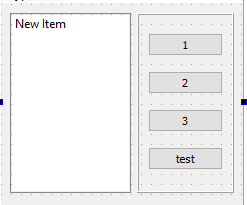
we then connect all buttons to the same slot
MainWindow::MainWindow(QWidget *parent)
    : QMainWindow(parent)
    , ui(new Ui::MainWindow)
{
    ui->setupUi(this);

    // find all buttons and make list
    QList<QPushButton *> buttons = findChildren<QPushButton *>();

    //loop list and connect all buttons
    for (auto button  : buttons) {
     connect( button, &QPushButton::clicked, this, &MainWindow::ProductSelected);
    }
}
in the slot all buttons calls, we want to know which button for which we
can use the sender() function for.void MainWindow::ProductSelected() { // sender returns Qwidget so we try to cast it to our buttons QPushButton *button = qobject_cast<QPushButton *> ( sender() ); if (button) { // if its a button // add the buttons text to the listbox. you will ofc. want something else ui->listWidget->addItem( button->text() ) ; } }then we get
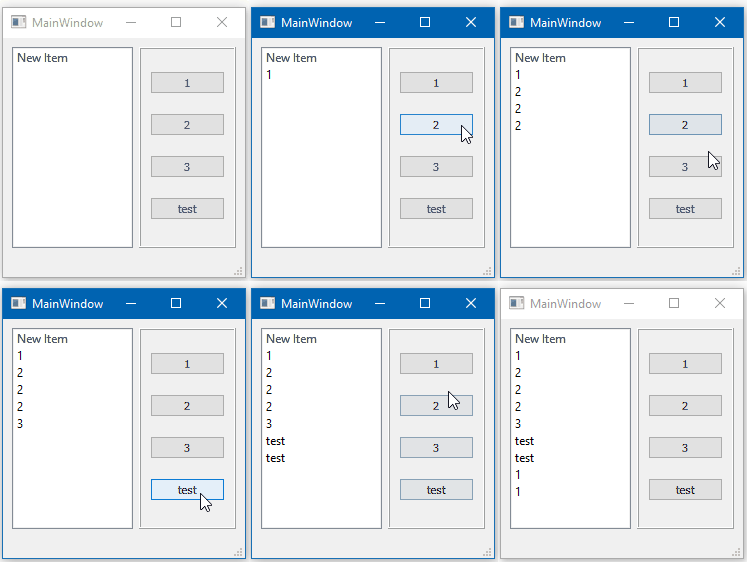
I hope it gives you an idea.
else please show some code so we can find out what is not working for you.
-
Thanks, the idea is exactly that, just two details, in your code you use "ui" but we are not allowed to use QtDesigner so ui. And in your code the buttons and the QListWidget are in the same window, in mine I have two separate windows, the first and that of the products and the other that of QList.
I shiw you my code (without the connection between my button and my QList) :
panier.h (=cart.h in english) :
#ifndef PANIER_H
#define PANIER_H
#include<QGridLayout>
#include <QMainWindow>
#include <QObject>
#include <QWidget>
#include<QPushButton>
#include<QListWidget>class panier: public QWidget
{
Q_OBJECTpublic:
explicit panier(QWidget*parent=0);
signals:public slots :
private :QPushButton*Payer;
};
#endif // PANIER_H
panier.cpp :
#include "panier.h"
#include<QLabel>
#include<QGridLayout>
#include<QPushButton>panier::panier(QWidget * parent) :QWidget(parent)
{
QPixmap bkgnd(":/icones/photo/fond.jpg"); //associe l'image a la variable backgroung
bkgnd = bkgnd.scaled(QSize(1366,768), Qt::IgnoreAspectRatio); // taille de l'image
QPalette palette;
palette.setBrush(QPalette::Window, bkgnd); //l'image devient le background
this->setPalette(palette);QLabel* p= new QLabel(this); // création de la variable "logo" p->setPixmap(QPixmap(":/icones/photo/panier2.JPG")); // affichage de l'image logo a la place d'un texte p->move(100, 10); //Poisition de la photo QLabel *d1 = new QLabel(this); d1->setText("MON PANIER" ) ; d1->setFont(QFont("Segoe UI Semibold",14)); d1->setStyleSheet("QLabel {color :white;}"); d1->setGeometry(80,10,800,200); QLabel *d2 = new QLabel(this); d2->setText("TOTAL :" ) ; d2->setFont(QFont("Segoe UI Semibold",14)); d2->setStyleSheet("QLabel {color :white;}"); d2->setGeometry(10,500,800,200); Payer = new QPushButton("PAYER",this);// nouveau bouton "Commander" Payer-> setFont(QFont("Segoe UI Semibold",18)); Payer->setGeometry(QRect(0,635,300,60)); // géometrie du bouton Payer->setStyleSheet("QPushButton { background-color: orange; color : dark; border: 3px solid black; }"); QListWidget*Liste_produits= new QListWidget(this); QListWidgetItem *produits = new QListWidgetItem("LE BIG TASTY"); Liste_produits->addItem(produits); Liste_produits->setGeometry(0,140,300,440);moment.h (=all my burger) :
#ifndef MOMENT_H
#define MOMENT_H
#include<QWidget>
#include<QPushButton>class moment : public QWidget
{
Q_OBJECTpublic:
explicit moment(QWidget*parent=0);
signals:public slots :
private :
QPushButtonTASTYO;
QPushButtonTASTYP;
QPushButtonMAC;
QPushButtonFISH;
QPushButtonWASABI;
QPushButtonRDELUXE;
QPushButton*RCHEESE;
};#endif // MOMENT_H
and moment.cpp
#include "moment.h"
#include<QLabel>moment::moment(QWidget * parent) :QWidget(parent)
{
QPixmap bkgnd(":/icones/photo/fond.jpg"); //associe l'image a la variable backgroung
bkgnd = bkgnd.scaled(QSize(1366,768), Qt::IgnoreAspectRatio); // taille de l'image
QPalette palette;
palette.setBrush(QPalette::Window, bkgnd); //l'image devient le background
this->setPalette(palette);QLabel* p1= new QLabel(this); // création de la variable "logo" p1->setPixmap(QPixmap(":/icones/photo/bigtasty.png")); // affichage de l'image logo a la place d'un texte p1->move(60, 10); //Poisition de la photo QLabel *d1 = new QLabel(this); d1->setText("LE BIG TASTY" ) ; d1->setFont(QFont("Segoe UI Semibold",14)); d1->setStyleSheet("QLabel {color :white;}"); d1->setGeometry(85,40,800,200); QLabel *d1b = new QLabel(this); d1b->setText("ORIGINALE"); d1b->setFont(QFont("Segoe UI Semibold",14)); d1b->setStyleSheet("QLabel {color :white;}"); d1b->setGeometry(90,60,800,200); QLabel* p2= new QLabel(this); // création de la variable "logo" p2->setPixmap(QPixmap(":/icones/photo/bigtastyc.png")); // affichage de l'image logo a la place d'un texte p2->move(340, 10); //Poisition de la photo QLabel *d2 = new QLabel(this); d2->setText("LE BIG TASTY "); d2->setFont(QFont("Segoe UI Semibold",14)); d2->setStyleSheet("QLabel {color :white;}"); d2->setGeometry(375,50,800,200); QLabel *d2b = new QLabel(this); d2b->setText("POULET"); d2b->setFont(QFont("Segoe UI Semibold",14)); d2b->setStyleSheet("QLabel {color :white;}"); d2b->setGeometry(395,70,800,200); QLabel* p3= new QLabel(this); // création de la variable "logo" p3->setPixmap(QPixmap(":/icones/photo/fishw.png")); // affichage de l'image logo a la place d'un texte p3->move(600, 10); //Poisition de la photo QLabel *d3 = new QLabel(this); d3->setText("LE FISH " ) ; d3->setFont(QFont("Segoe UI Semibold",14)); d3->setStyleSheet("QLabel {color :white;}"); d3->setGeometry(655,40,800,200); QLabel *d3b = new QLabel(this); d3b->setText("WASABI"); d3b->setFont(QFont("Segoe UI Semibold",14)); d3b->setStyleSheet("QLabel {color :white;}"); d3b->setGeometry(655,60,800,200); QLabel* p4= new QLabel(this); // création de la variable "logo" p4->setPixmap(QPixmap(":/icones/photo/wrapw.png")); // affichage de l'image logo a la place d'un texte p4->move(860, 10); //Poisition de la photo QLabel *d4 = new QLabel(this); d4->setText(" LE WRAP" ) ; d4->setFont(QFont("Segoe UI Semibold",14)); d4->setStyleSheet("QLabel {color :white;}"); d4->setGeometry(890,40,800,200); QLabel *d4b = new QLabel(this); d4b->setText("TOKYO"); d4b->setFont(QFont("Segoe UI Semibold",14)); d4b->setStyleSheet("QLabel {color :white;}"); d4b->setGeometry(910,60,800,200); QLabel* p6= new QLabel(this); // création de la variable "logo" p6->setPixmap(QPixmap(":/icones/photo/royalc.png")); // affichage de l'image logo a la place d'un texte p6->move(60, 240); //Poisition de la photo QLabel *d6 = new QLabel(this); d6->setText(" LE ROYAL" ) ; d6->setFont(QFont("Segoe UI Semibold",14)); d6->setStyleSheet("QLabel {color :white;}"); d6->setGeometry(95,270,800,200); QLabel* p7= new QLabel(this); // création de la variable "logo" p7->setPixmap(QPixmap(":/icones/photo/royalcb.png")); // affichage de l'image logo a la place d'un texte p7->move(350, 240); //Poisition de la photo QLabel* p5= new QLabel(this); // création de la variable "logo" p5->setPixmap(QPixmap(":/icones/photo/royald.png")); // affichage de l'image logo a la place d'un texte p5->move(345, 240); //Poisition de la photo QLabel *d5 = new QLabel(this); d5->setText(" LE ROYAL" ) ; d5->setFont(QFont("Segoe UI Semibold",14)); d5->setStyleSheet("QLabel {color :white;}"); d5->setGeometry(375,270,800,200); QLabel *d5b = new QLabel(this); d5b->setText("CHEESE DELUXE"); d5b->setFont(QFont("Segoe UI Semibold",14)); d5b->setStyleSheet("QLabel {color :white;}"); d5b->setGeometry(110,290,800,200); TASTYO = new QPushButton("6,20€",this);// nouveau bouton "Commander" TASTYO-> setFont(QFont("Segoe UI Semibold",18)); TASTYO->setGeometry(QRect(95,180,100,40)); // géometrie du bouton TASTYO->setStyleSheet("QPushButton { background-color: orange; color : dark; border: 3px solid black; }"); TASTYP = new QPushButton("6,20€",this);// nouveau bouton "Commander" TASTYP-> setFont(QFont("Segoe UI Semibold",18)); TASTYP->setGeometry(QRect(385,180,100,40)); // géometrie du bouton TASTYP->setStyleSheet("QPushButton { background-color: orange; color : dark; border: 3px solid black; }"); FISH = new QPushButton("4,80€",this);// nouveau bouton "Commander" FISH-> setFont(QFont("Segoe UI Semibold",18)); FISH->setGeometry(QRect(640,180,100,40)); // géometrie du bouton FISH->setStyleSheet("QPushButton { background-color: orange; color : dark; border: 3px solid black; }"); WASABI = new QPushButton("5,60€",this);// nouveau bouton "Commander" WASABI-> setFont(QFont("Segoe UI Semibold",18)); WASABI->setGeometry(QRect(890,180,100,40)); // géometrie du bouton WASABI->setStyleSheet("QPushButton { background-color: orange; color : dark; border: 3px solid black; }"); RCHEESE = new QPushButton("6,20€",this);// nouveau bouton "Commander" RCHEESE-> setFont(QFont("Segoe UI Semibold",18)); RCHEESE->setGeometry(QRect(375,405,100,40)); // géometrie du bouton RCHEESE->setStyleSheet("QPushButton { background-color: orange; color : dark; border: 3px solid black; }"); RDELUXE = new QPushButton("6,50€",this);// nouveau bouton "Commander" RDELUXE-> setFont(QFont("Segoe UI Semibold",18)); RDELUXE->setGeometry(QRect(95,405,100,40)); // géometrie du bouton RDELUXE->setStyleSheet("QPushButton { background-color: orange; color : dark; border: 3px solid black; }");}
I hope you see the idea of my project a little better with the code.
-
Hi
Since I'm not sure where you get blocked.let's try to imagine we have this
we then connect all buttons to the same slot
MainWindow::MainWindow(QWidget *parent)
    : QMainWindow(parent)
    , ui(new Ui::MainWindow)
{
    ui->setupUi(this);

    // find all buttons and make list
    QList<QPushButton *> buttons = findChildren<QPushButton *>();

    //loop list and connect all buttons
    for (auto button  : buttons) {
     connect( button, &QPushButton::clicked, this, &MainWindow::ProductSelected);
    }
}
in the slot all buttons calls, we want to know which button for which we
can use the sender() function for.void MainWindow::ProductSelected() { // sender returns Qwidget so we try to cast it to our buttons QPushButton *button = qobject_cast<QPushButton *> ( sender() ); if (button) { // if its a button // add the buttons text to the listbox. you will ofc. want something else ui->listWidget->addItem( button->text() ) ; } }then we get
I hope it gives you an idea.
else please show some code so we can find out what is not working for you.
-
Hi
Yes I understand much better now. +10 for the picture.There is no magic with UI files. its just code.
So my ui->listWidget is just a pointer anyway.But you are right. being in different windows does change it a bit.
You need a good place where both moment and panier is known.
Often that is a place where you create both. maybe at start upso what i would do it to define a new signal in moment class
public signals:
void ProductSelected(QString name, QString price);

and then also add a new slot.

public slots:
void ButtonProductClicked();
then for all buttons, like
TASTYOwe connect it to our internal slot
connect( TASTYO , &QPushButton::clicked, this, &moment::ButtonProductClicked);then in moment cpp
void moment::ButtonProductClicked()
{
   // sender returns Qwidget so we try to cast it to our buttons
    QPushButton *button = qobject_cast<QPushButton *> ( sender() );
    if (button) {
       auto price = button->text();
       auto productname = ??? /// we kinda also need access to label to get product name, right ??
       emit  ProductSelected( productname , price); // send our new signal
    }
}
Then in panier you also add a matching slot
public slots:
void ProductSelected(QString name, QString price);
and body in cpp where you just add to the listWidget
Then somewhere you need to connect the moments new signal to the panier slot
often it would be where you do
new panier(this)
if that place also knows the moment instance.then connect
connect( momentPtr,&moment::ProductSelected, panierPtr, panier::ProductSelected );and then it should work.
Pretty cool menu btw. Reminds me of MacDonalds :)
-
@mrjj

 image url)
Here are the results of my interface with the code just above.
and the goal is to create interactions, or when you press the different buttons with the prices, they are added to my cart on the left. -
Hi
Yes I understand much better now. +10 for the picture.There is no magic with UI files. its just code.
So my ui->listWidget is just a pointer anyway.But you are right. being in different windows does change it a bit.
You need a good place where both moment and panier is known.
Often that is a place where you create both. maybe at start upso what i would do it to define a new signal in moment class
public signals:
void ProductSelected(QString name, QString price);

and then also add a new slot.

public slots:
void ButtonProductClicked();
then for all buttons, like
TASTYOwe connect it to our internal slot
connect( TASTYO , &QPushButton::clicked, this, &moment::ButtonProductClicked);then in moment cpp
void moment::ButtonProductClicked()
{
   // sender returns Qwidget so we try to cast it to our buttons
    QPushButton *button = qobject_cast<QPushButton *> ( sender() );
    if (button) {
       auto price = button->text();
       auto productname = ??? /// we kinda also need access to label to get product name, right ??
       emit  ProductSelected( productname , price); // send our new signal
    }
}
Then in panier you also add a matching slot
public slots:
void ProductSelected(QString name, QString price);
and body in cpp where you just add to the listWidget
Then somewhere you need to connect the moments new signal to the panier slot
often it would be where you do
new panier(this)
if that place also knows the moment instance.then connect
connect( momentPtr,&moment::ProductSelected, panierPtr, panier::ProductSelected );and then it should work.
Pretty cool menu btw. Reminds me of MacDonalds :)
@mrjj
For the productname, I used the same technique as for the buttons but with my QLabel. At the end, in panier.cpp, you use in connect, momentPtr and panierPtr, what is it and what does "ptr" mean?
I don't understand what you mean bu new panier(this).
Thank you and great if it looks like it since my goal is to remake their app -
@Eleonore said in QListWidget connect to QPushButton:
Hi" connect, momentPtr and panierPtr, what is it and what does "ptr" mean?"
Hi
Ptr just means pointer. we need pointers to the classes to connect them.- new panier(this).
Some place this window is created.
likepanier *ThePanier = new panier(this). ThePanier ->show();or something like that.
We can call it the creation place.
and we need "ThePanier"the same goes for the moment class. we also need a pointer to an instance
to connect.Well it looks good. Made me feel like eating one :)
-
@mrjj
Hi, I tried doing it myself before asking you for help, my problem is connect( momentPtr,&moment::ProductSelected, panierPtr, panier::ProductSelected ); Qt doesn' recongnize momentPtr and panierPtr. I tried to pu something else instead but nothing works. I think that there is also a problem with my ProductSelected, wwhat I understand is that Qt says it's not defined.
About the ThePanier ->show(); it's a little complicated because it's located in a function called "void opened order, void MainWindow::ouvrircommande()
{
com = new commander();
com->show();
com ->setFixedSize(1065,768);
com->move(0,0);
panier *pan = new panier;
pan ->show();
pan->setFixedSize(300,768);
pan->move(1066,0);}
This function is located in my mainwindow.cpp to open my two windows (the one with written our product and the card) at the same time.
Thanks for your help and my hope my teacher will think the same thing as you about my interface. -
@mrjj
Hi, I tried doing it myself before asking you for help, my problem is connect( momentPtr,&moment::ProductSelected, panierPtr, panier::ProductSelected ); Qt doesn' recongnize momentPtr and panierPtr. I tried to pu something else instead but nothing works. I think that there is also a problem with my ProductSelected, wwhat I understand is that Qt says it's not defined.
About the ThePanier ->show(); it's a little complicated because it's located in a function called "void opened order, void MainWindow::ouvrircommande()
{
com = new commander();
com->show();
com ->setFixedSize(1065,768);
com->move(0,0);
panier *pan = new panier;
pan ->show();
pan->setFixedSize(300,768);
pan->move(1066,0);}
This function is located in my mainwindow.cpp to open my two windows (the one with written our product and the card) at the same time.
Thanks for your help and my hope my teacher will think the same thing as you about my interface.@Eleonore said in QListWidget connect to QPushButton:
Qt doesn' recongnize momentPtr and panierPtr
Please post the relevant code and the while error message.
-
@Eleonore said in QListWidget connect to QPushButton:
Qt doesn' recongnize momentPtr and panierPtr
Please post the relevant code and the while error message.
-
@Eleonore Next time please post text instead of screenshots.
I can't see where momentPtr and panierPtr are declared?@jsulm
I didn't declare them because I'm not sure I understand what I should put at momentPtr, I don't know if I've already declared them under another name or if I have to declare something new. And if I have to declare, I don't know how and where to do it. -
@jsulm
I didn't declare them because I'm not sure I understand what I should put at momentPtr, I don't know if I've already declared them under another name or if I have to declare something new. And if I have to declare, I don't know how and where to do it.Hi. Good you tried first :)
Well those are just dummy names.
It just means a pointer to the class
so maybe here you have both ?
{ com = new commander(); <<< is this MOMENT class ? com->show(); com ->setFixedSize(1065,768); com->move(0,0); panier *pan = new panier; <<<< this is the panierPtr pointer pan ->show(); pan->setFixedSize(300,768); pan->move(1066,0); } -
Hi. Good you tried first :)
Well those are just dummy names.
It just means a pointer to the class
so maybe here you have both ?
{ com = new commander(); <<< is this MOMENT class ? com->show(); com ->setFixedSize(1065,768); com->move(0,0); panier *pan = new panier; <<<< this is the panierPtr pointer pan ->show(); pan->setFixedSize(300,768); pan->move(1066,0); }@mrjj
I kind of knew that it was the pointer, I arleady tried to replace it at that moment but it shows be an error message "use of undeaclared identifier "pan". I have this error message because this part of the code {
com = new commander(); <<< is this MOMENT class ?
com->show();
com ->setFixedSize(1065,768);
com->move(0,0);
panier *pan = new panier; <<<< this is the panierPtr pointer
pan ->show();
pan->setFixedSize(300,768);
pan->move(1066,0);}
is in my main.cpp but this part of code connect( momentPtr,&moment::ProductSelected, panierPtr, panier::ProductSelected ); is in my panier.cpp.
And I don't think I created a pointer for my QPushbutton, I just named it button that I declared in my void moment::ButtonProductClicked(). -
@mrjj
I kind of knew that it was the pointer, I arleady tried to replace it at that moment but it shows be an error message "use of undeaclared identifier "pan". I have this error message because this part of the code {
com = new commander(); <<< is this MOMENT class ?
com->show();
com ->setFixedSize(1065,768);
com->move(0,0);
panier *pan = new panier; <<<< this is the panierPtr pointer
pan ->show();
pan->setFixedSize(300,768);
pan->move(1066,0);}
is in my main.cpp but this part of code connect( momentPtr,&moment::ProductSelected, panierPtr, panier::ProductSelected ); is in my panier.cpp.
And I don't think I created a pointer for my QPushbutton, I just named it button that I declared in my void moment::ButtonProductClicked().@Eleonore
Hi
well we need both a panier pointer and a moment pointer to connect them.its impossible to guess at when i dont have whole project.
so if you have the MOMNET pointer in panier it could work.
also do understand that if inside the panier , then you can use "this" in place of the pointer
Did you read this ?
https://doc.qt.io/qt-5/signalsandslots.htmlIts not complicated but yo udo need a place where both classes are known to connect them.
That is often in MainWindow or some commen place.
Sometimes in main.cppBut i cant say where to do it as i dont know where you NEW a moment instance.
also i guess that
com = new commander();
is another class. so you dont seem to make a MOMENT in main.cpp so it has to be some other place -
@mrjj
Thanks a lot for your help. Unfortunately, after all of this help I still can't create this interraction. I have to hand in my project tonight so I'll just explain that I couldn' t do this part. I hope this conversation can help others in the future.
Thanks a lot!


