Skip to content
  • Categories
  • Recent
  • Tags
  • Popular
  • Users
  • Groups
  • Search
  • Get Qt Extensions
  • Unsolved
Collapse
Brand Logo
  1. Home
  2. Qt Development
  3. General and Desktop
  4. Loop not working with model

Loop not working with model

Scheduled Pinned Locked Moved Solved General and Desktop
20 Posts 6 Posters 1.1k Views 2 Watching
  • Oldest to Newest
  • Newest to Oldest
  • Most Votes
Reply
  • Reply as topic
Log in to reply
This topic has been deleted. Only users with topic management privileges can see it.
  • Christian EhrlicherC Offline
    Christian EhrlicherC Offline
    Christian Ehrlicher
    Lifetime Qt Champion
    wrote on last edited by Christian Ehrlicher
    #2

    So where do you set your model data / from where do you call populateData()? I would guess the vector is filled wrong. Add a debug output there or make a breakpoint and take a look at the content of the variable.

    Qt Online Installer direct download: https://download.qt.io/official_releases/online_installers/
    Visit the Qt Academy at https://academy.qt.io/catalog

    1 Reply Last reply
    1
    • nageshN Offline
      nageshN Offline
      nagesh
      wrote on last edited by
      #3

      @Leopold below virtual function of the model class when you are overriding provides the data for the index with different roles

      QVariant MyModel::data(const QModelIndex &index, int role)const
      

      In current implementation you are using for loop in data member function which is not correct..

      (in spite of for loop which is having return statement )

      1 Reply Last reply
      4
      • L Offline
        L Offline
        Leopold
        wrote on last edited by
        #4

        Thank you both,
        i will have a look to it this evening.

        1 Reply Last reply
        0
        • L Leopold

          Hello again!

          In an app I have a tableWidget what is filled with items. It looks like thistable view.JPG
          To be able to translate all the items and other reasons ,i want to replace this by a QAbstractTableModel.
          I have searched all the examples and took one which fitted best for my purpose but all I try the output is always only one column.![alt text](model_view.JPG image url)
          I can do 9 columns but they are filled all the same. What can I do?```
          mymodel.h

          #ifndef MYMODEL_H
          #define MYMODEL_H
          
          
          #include <QAbstractTableModel>
          
          
          const int COLS= 6;
          const int ROWS= 9;
          class MyModel : public QAbstractTableModel
          {
           Q_OBJECT
          public:
          MyModel(QObject *parent = 0 );
           void populateData(const QList<QString> &contactNames);
           int rowCount(const QModelIndex &parent = QModelIndex())const;
           int columnCount(const QModelIndex &parent = QModelIndex())const  ;
              QVariant data( const QModelIndex &index, int role = Qt::DisplayRole)const ;
          
          private:
           QList<QString> tm_contact_name;
          
            QList<QString> contactNames;
           QString m_gridData[ROWS][COLS];  //holds text entered into QTableView
          
          signals:
              void editCompleted( QString &);
          };
          #endif // MyModel_H


          mymodel.cpp

          // mymodel.cpp
          #include <QMainwindow>
          
          #include "mymodel.h"
          #include <QAbstractTableModel>
          #include <QStringList>
          #include <QString>
          #include <QList>
          
          MyModel::MyModel(QObject *parent) : QAbstractTableModel (parent)
          {
          
          }
          
          
          // Create a method to populate the model with data:
          void MyModel::populateData(const QList<QString> &contactNames)
          {
              tm_contact_name.clear();
              tm_contact_name = contactNames;
          
              return;
          }
          
          int MyModel::rowCount(const QModelIndex &parent)const
           {
          
              Q_UNUSED(parent);
             return tm_contact_name.length();
              //return 6;
          }
          
          int MyModel::columnCount(const QModelIndex &parent)const
           {
          
              Q_UNUSED(parent);
              return 1;
          
              //return 3;
          }
          
          QVariant MyModel::data(const QModelIndex &index, int role)const
          {
              int row = index.row();
              int col = index.column();
          
              // generate a log message when this method gets called
          
          
              switch(role){
              case Qt::DisplayRole:
          { if (!index.isValid() || role != Qt::DisplayRole) {
                      return QVariant();
                  }
           for (col=1;col<9; col++)
          
               // if (col=1 && col<9)
                      {
                    // if (row=0 && row<6  )
              for (row=0; row<6 ; row++)
                      {
                         return tm_contact_name[row];//[index.row()];
          
                      }
          
          }
          
          }
                  break;
          
          
              case Qt::CheckStateRole:
          
                  if (row == 0 && col == 0) //add a checkbox to cell(0,0)
                      {
                      return Qt::Checked;
                        }
                  else
                        {
                   return Qt::Unchecked;
                       }
              }
              return QVariant();
          }


          Part of mainwindow.cpp

          kshegunovK Offline
          kshegunovK Offline
          kshegunov
          Moderators
          wrote on last edited by
          #5

          @Leopold said in Loop not working with model:

          for (row=0; row<6 ; row++)
          

          What is this for?

          tm_contact_name.length()

          That doesn't even make any sense. What is .length() on a QList<>?

          Read and abide by the Qt Code of Conduct

          1 Reply Last reply
          0
          • L Offline
            L Offline
            Leopold
            wrote on last edited by
            #6

            @kshegunov
            the amount of entries in the list, in my case its 54.
            I want 9 columns with 6 rows like the example.
            When I uncommand the for loops and if loops I get the column with all the entries from QlistQString.
            When I set columnCount to 9 I get 9 columns all with the same entries.

            ![alt text](column1.JPG image url)```
            case Qt::DisplayRole:
            { if (!index.isValid() || role != Qt::DisplayRole) {
            return QVariant();
            }

            //for (row=0; row<6 ; row++)
            // if (col=1 && col<9)
            // {
            // if (row=0 && row<6 )
            // for (col=1;col<9; col++)

                 //   {
                       return tm_contact_name[row];//[index.row()];
                        //row++:
                 //   }
              // col++;
            

            //}

            }
            break;

            kshegunovK 1 Reply Last reply
            0
            • L Leopold

              @kshegunov
              the amount of entries in the list, in my case its 54.
              I want 9 columns with 6 rows like the example.
              When I uncommand the for loops and if loops I get the column with all the entries from QlistQString.
              When I set columnCount to 9 I get 9 columns all with the same entries.

              ![alt text](column1.JPG image url)```
              case Qt::DisplayRole:
              { if (!index.isValid() || role != Qt::DisplayRole) {
              return QVariant();
              }

              //for (row=0; row<6 ; row++)
              // if (col=1 && col<9)
              // {
              // if (row=0 && row<6 )
              // for (col=1;col<9; col++)

                   //   {
                         return tm_contact_name[row];//[index.row()];
                          //row++:
                   //   }
                // col++;
              

              //}

              }
              break;

              kshegunovK Offline
              kshegunovK Offline
              kshegunov
              Moderators
              wrote on last edited by
              #7

              @Leopold said in Loop not working with model:

              When I uncommand the for loops and if loops I get the column with all the entries from QlistQString.
              When I set columnCount to 9 I get 9 columns all with the same entries.

              Of course you do, because you don't handle both the row and the column that was passed to you. You take the row'th element from the list (why the row I don't even know). How are you supposed to have 9 columns from a list to begin with?

              Read and abide by the Qt Code of Conduct

              1 Reply Last reply
              4
              • L Offline
                L Offline
                Leopold
                wrote on last edited by
                #8

                Excuse me, I do not understand what you want to say.
                If I have a construct like this for loops I can usually fill a table with. Item 1 to 6 in column 1, if item> 6 take column 2, now Item 7to 12, now increase columns and so on.

                JonBJ 1 Reply Last reply
                0
                • L Leopold

                  Excuse me, I do not understand what you want to say.
                  If I have a construct like this for loops I can usually fill a table with. Item 1 to 6 in column 1, if item> 6 take column 2, now Item 7to 12, now increase columns and so on.

                  JonBJ Offline
                  JonBJ Offline
                  JonB
                  wrote on last edited by JonB
                  #9

                  @Leopold
                  From your commented lines you say you uncomment:

                  // if (col=1 && col<9)
                  

                  The above will always be true, and assigns col to 1.

                  // if (row=0 && row<6 )
                  

                  The above will always be true, and assigns row to 0.

                  If you actually want help with this: remove all your commented-out lines, they are just confusing. Show the exact lines which you are actually using, and what incorrect behaviour is observed.

                  1 Reply Last reply
                  3
                  • L Offline
                    L Offline
                    Leopold
                    wrote on last edited by
                    #10

                    @JonB
                    this is my actual code:

                    // mymodel.cpp
                    #include <QMainwindow>
                    
                    #include "mymodel.h"
                    #include <QAbstractTableModel>
                    #include <QStringList>
                    #include <QString>
                    #include <QList>
                    
                    MyModel::MyModel(QObject *parent) : QAbstractTableModel (parent)
                    {
                    
                    }
                    
                    
                    // Create a method to populate the model with data:
                    void MyModel::populateData(const QList<QString> &contactNames)
                    {
                              tm_contact_name.clear();
                              tm_contact_name = contactNames;
                    
                        return;
                    }
                    
                    int MyModel::rowCount(const QModelIndex &parent)const
                     {
                    
                        Q_UNUSED(parent);
                       return tm_contact_name.length();
                        //return 6;
                    }
                    
                    int MyModel::columnCount(const QModelIndex &parent)const
                     {
                    
                        Q_UNUSED(parent);
                        return 1;
                    
                        //return 3;
                    }
                    
                    QVariant MyModel::data(const QModelIndex &index, int role)const
                    
                    {
                        int row = index.row();
                        int col = index.column();
                    
                       switch(role)
                    
                       {
                        case Qt::DisplayRole:
                        { if (!index.isValid() || role != Qt::DisplayRole)
                           {
                                return QVariant();
                           }
                    
                           for (int row =0; row <6; row++)
                               {
                               for (int col= 1; col < 9; col++)
                    
                            return tm_contact_name[index.row()];
                    
                                }
                    
                    	}
                            break;
                    
                    
                    	{ 
                    	case Qt::CheckStateRole:
                    
                            if (row == 0 && col == 0) //add a checkbox to cell(0,0)
                                {
                                return Qt::Checked;
                                }
                            else
                                 {
                             return Qt::Unchecked;
                                 }
                        }
                        return QVariant();
                       }
                    
                    }
                    

                    This is what I get:![alt text](column1.JPG image url)

                    L 1 Reply Last reply
                    0
                    • L Leopold

                      @JonB
                      this is my actual code:

                      // mymodel.cpp
                      #include <QMainwindow>
                      
                      #include "mymodel.h"
                      #include <QAbstractTableModel>
                      #include <QStringList>
                      #include <QString>
                      #include <QList>
                      
                      MyModel::MyModel(QObject *parent) : QAbstractTableModel (parent)
                      {
                      
                      }
                      
                      
                      // Create a method to populate the model with data:
                      void MyModel::populateData(const QList<QString> &contactNames)
                      {
                                tm_contact_name.clear();
                                tm_contact_name = contactNames;
                      
                          return;
                      }
                      
                      int MyModel::rowCount(const QModelIndex &parent)const
                       {
                      
                          Q_UNUSED(parent);
                         return tm_contact_name.length();
                          //return 6;
                      }
                      
                      int MyModel::columnCount(const QModelIndex &parent)const
                       {
                      
                          Q_UNUSED(parent);
                          return 1;
                      
                          //return 3;
                      }
                      
                      QVariant MyModel::data(const QModelIndex &index, int role)const
                      
                      {
                          int row = index.row();
                          int col = index.column();
                      
                         switch(role)
                      
                         {
                          case Qt::DisplayRole:
                          { if (!index.isValid() || role != Qt::DisplayRole)
                             {
                                  return QVariant();
                             }
                      
                             for (int row =0; row <6; row++)
                                 {
                                 for (int col= 1; col < 9; col++)
                      
                              return tm_contact_name[index.row()];
                      
                                  }
                      
                      	}
                              break;
                      
                      
                      	{ 
                      	case Qt::CheckStateRole:
                      
                              if (row == 0 && col == 0) //add a checkbox to cell(0,0)
                                  {
                                  return Qt::Checked;
                                  }
                              else
                                   {
                               return Qt::Unchecked;
                                   }
                          }
                          return QVariant();
                         }
                      
                      }
                      

                      This is what I get:![alt text](column1.JPG image url)

                      L Offline
                      L Offline
                      Leopold
                      wrote on last edited by
                      #11

                      Sorry, I couldn`t continue writing. You see I have drawn the slider downwards.
                      The complete QListQString is in one column, I want it divided into 9 columns and 6 rows like the example in my first thread.

                      JonBJ kshegunovK 2 Replies Last reply
                      0
                      • L Leopold

                        Sorry, I couldn`t continue writing. You see I have drawn the slider downwards.
                        The complete QListQString is in one column, I want it divided into 9 columns and 6 rows like the example in my first thread.

                        JonBJ Offline
                        JonBJ Offline
                        JonB
                        wrote on last edited by JonB
                        #12

                        @Leopold
                        I think you are saying:

                        • You have a QStringList
                        • You want to treat it as representing rows and columns, with each row containing 9 columns
                        • You want to know what element is at (index.row(), index.column())

                        [That's what you say. But your code also has columnCount() return 1;. Why do you put that in code if you say you want 9 columns?]

                        So simple math is

                        int offset = index.row() * 9 + index.column();
                        return tm_contact_name[offset];    // or tm_contact_name.at(offset) if it is a `QStringList`
                        

                        ?
                        No loops. Just basic arithmetic.

                        1 Reply Last reply
                        1
                        • mrjjM Offline
                          mrjjM Offline
                          mrjj
                          Lifetime Qt Champion
                          wrote on last edited by mrjj
                          #13

                          Hi
                          Also

                          int MyModel::columnCount(const QModelIndex &parent)const
                           {
                          
                              Q_UNUSED(parent);
                              return 1;
                          
                              //return 3;
                          }
                          

                          tells it to use one col so that should be fixed.

                          and this too

                          int MyModel::rowCount(const QModelIndex &parent)const
                           {
                          
                              Q_UNUSED(parent);
                             return tm_contact_name.length();
                              //return 6;
                          }
                          

                          should also return the wanted number of rows. tm_contact_name.length(); will return ALL strings you have
                          but that is not the number of rows.

                          Then the view will ask you
                          give me data for
                          0,0
                          0,1
                          0,2
                          etc.
                          for all cols, for all rows.
                          So data function must return one "data" for each combination of row and col. ( as nagesh explained)
                          So we cant use a for loop as we give the data one by one so to speak.
                          Since you have all the names in one big list, you must calculate an offset as JonB shows
                          to return the right col data since your internal list is not ordered as you want it to be displayed.

                          1 Reply Last reply
                          1
                          • L Leopold

                            Sorry, I couldn`t continue writing. You see I have drawn the slider downwards.
                            The complete QListQString is in one column, I want it divided into 9 columns and 6 rows like the example in my first thread.

                            kshegunovK Offline
                            kshegunovK Offline
                            kshegunov
                            Moderators
                            wrote on last edited by
                            #14

                            @Leopold I was specifically confused because

                            for (int row =0; row <6; row++)
                                       {
                                       for (int col= 1; col < 9; col++)
                            

                            has no place in data(). There you return one item - the one that corresponds to the row and column - you don't fill anything. And I continue not to understand what the loops have to do with it.

                            Read and abide by the Qt Code of Conduct

                            1 Reply Last reply
                            1
                            • L Offline
                              L Offline
                              Leopold
                              wrote on last edited by
                              #15

                              JonB' s mathematics and his solution with offset was not the right way.But I guess offset is the way.
                              This is his solution:new column.JPG
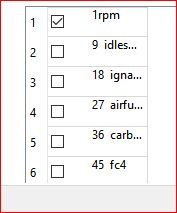
                              I tried the two loops again and I tried a switch case but not corect too:
                              ![alt text](table.JPG image url)
                              now it starts in every new column with the next row!
                              Here is the code:```
                              // mymodel.cpp
                              #include <QMainwindow>

                              #include "mymodel.h"
                              #include <QAbstractTableModel>
                              #include <QStringList>
                              #include <QString>
                              #include <QList>

                              MyModel::MyModel(QObject *parent) : QAbstractTableModel (parent)
                              {

                              }

                              // Create a method to populate the model with data:
                              void MyModel::populateData(const QList<QString> &contactNames)
                              {
                              tm_contact_name.clear();
                              tm_contact_name = contactNames;

                              return;
                              

                              }

                              int MyModel::rowCount(const QModelIndex &parent)const
                              {

                              Q_UNUSED(parent);
                              

                              // return tm_contact_name.length();
                              return 6;
                              }

                              int MyModel::columnCount(const QModelIndex &parent)const
                              {

                              Q_UNUSED(parent);
                              return 9;
                              
                              //return 9;
                              

                              }

                              QVariant MyModel::data(const QModelIndex &index, int role)const

                              {
                              int row = index.row();
                              int col = index.column();
                              int offset;

                              switch(role)

                              {
                              case Qt::DisplayRole:
                              { if (!index.isValid() || role != Qt::DisplayRole)
                              {
                              return QVariant();
                              }
                              { for ( col=0; col < 9; col++)
                              {switch(col)
                              case 0:
                              index.row()<6;
                              offset = index.row() + index.column();
                              break;
                              case 1:
                              index.row()>6<12;
                              offset = index.row() + index.column();
                              break;
                              case 2:
                              index.row()>12<19;
                              offset = index.row() + index.column();
                              break;
                              }

                              }

                              }

                                 return  tm_contact_name.at(offset);
                              
                              
                                  break;
                              
                              
                              { 
                              case Qt::CheckStateRole:
                              
                                  if (row == 0 && col == 0) //add a checkbox to cell(0,0)
                                      {
                                      return Qt::Checked;
                                      }
                                  else
                                       {
                                   return Qt::Unchecked;
                                       }
                              }
                              return QVariant();
                              

                              }

                              }

                              1 Reply Last reply
                              0
                              • JonBJ Offline
                                JonBJ Offline
                                JonB
                                wrote on last edited by JonB
                                #16

                                @Leopold said in Loop not working with model:

                                JonB' s mathematics and his solution with offset was not the right way.But I guess offset is the way.

                                Fascinating, because I believe it is from what you said:

                                I want 9 columns with 6 rows like the example.

                                Mind you, the example you show does not have 9 columns, nor does it have 6 rows (try counting them), and you have given different values for the number of columns in your various posts & code.

                                This is his solution:

                                My solution does not produce one column. It has nothing to do with how many columns your table has, that is down to you.

                                At no point do I see where you have actually stated how your items in one QStringList are supposed to map to your desired rows/columns. Maybe if you did that people would understand.

                                I try again on your:

                                Item 1 to 6 in column 1, if item> 6 take column 2, now Item 7to 12, now increase columns and so on.

                                So if that means the items are laid out in the list such that you get all rows in column #0 first, then all rows in column #1, you obviously need to use your own math knowledge to alter my suggested

                                int offset = index.row() * 9 + index.column();
                                

                                to

                                int offset = index.column() * 6 +  index.row();
                                

                                Did you try that, instead of saying mine "was not the right way"?

                                I tried the two loops again

                                As people have said many times, there is no loop to be put inside your data() method. You ignore these comments and persist with loops, without understanding.

                                Your new switch statement is pointless, as in every case you set offset = index.row() + index.column();.

                                index.row()<6;
                                index.row()>6<12;
                                index.row()>12<19;
                                

                                All these statements do nothing. If there is meant to be an if there, it is not present. Your apparent conception of how to check for a range does not correspond to how C++ works. The result your code comes up with for setting offset is quite wrong in all cases.

                                Sorry, but to get anywhere with Qt or any other toolkit you need to concentrate on the basics of programming in general and C++ in particular.

                                1 Reply Last reply
                                1
                                • L Offline
                                  L Offline
                                  Leopold
                                  wrote on last edited by
                                  #17

                                  @JonB
                                  Sorry if I offended you .

                                  @JonB said in Loop not working with model:

                                  Sorry, but to get anywhere with Qt or any other toolkit you need to concentrate on the basics of programming in general and C++ in particular.

                                  I am working on that. :-)

                                  But good news : this was the solution!
                                  Thank you.

                                  JonBJ 1 Reply Last reply
                                  0
                                  • L Leopold

                                    @JonB
                                    Sorry if I offended you .

                                    @JonB said in Loop not working with model:

                                    Sorry, but to get anywhere with Qt or any other toolkit you need to concentrate on the basics of programming in general and C++ in particular.

                                    I am working on that. :-)

                                    But good news : this was the solution!
                                    Thank you.

                                    JonBJ Offline
                                    JonBJ Offline
                                    JonB
                                    wrote on last edited by JonB
                                    #18

                                    @Leopold
                                    If I understand your string list layout correctly, try the

                                    int offset = index.column() * 6 +  index.row();
                                    

                                    Even better, to allow for a different number of rows from the 6 your rowCount() currently returns you could write:

                                    int offset = index.column() * rowCount() +  index.row();
                                    

                                    You showed my solution as only "producing" one column in the table, but the number of rows/columns in the table is determined by the return values of rowCount()/columnCount(), not whatever you do in the data() method.

                                    It is still the case that data(const QModelIndex &index, int role=Qt::DisplayRole)'s job is to return the item in the list corresponding to (index.row(), index.column()). This should involve some multiplication and addition of the row/column to reach the right offset element in the list. There should be no loop involved.

                                    1 Reply Last reply
                                    0
                                    • L Offline
                                      L Offline
                                      Leopold
                                      wrote on last edited by
                                      #19

                                      @JonB
                                      like I said already, it is working perfect now.
                                      Now I have to fight how I can attach a hint to the different items. The callenge is that I will have different QListStrings with different hints.
                                      If other people have the same problem with model, here is the code:```
                                      // mymodel.cpp
                                      #include <QMainwindow>

                                      #include "mymodel.h"
                                      #include <QAbstractTableModel>
                                      #include <QStringList>
                                      #include <QString>
                                      #include <QList>

                                      MyModel::MyModel(QObject *parent) : QAbstractTableModel (parent)
                                      {

                                      }

                                      // Create a method to populate the model with data:
                                      void MyModel::populateData(const QList<QString> &contactNames)
                                      {
                                      tm_contact_name.clear();
                                      tm_contact_name = contactNames;

                                      return;
                                      

                                      }

                                      int MyModel::rowCount(const QModelIndex &parent)const
                                      {

                                      Q_UNUSED(parent);
                                      

                                      // return tm_contact_name.length();
                                      return 6;
                                      }

                                      int MyModel::columnCount(const QModelIndex &parent)const
                                      {

                                      Q_UNUSED(parent);
                                      return 9;
                                      
                                      //return 9;
                                      

                                      }

                                      QVariant MyModel::data(const QModelIndex &index, int role)const

                                      {
                                      int row = index.row();
                                      int col = index.column();
                                      int offset;

                                      switch(role)

                                      {
                                      case Qt::DisplayRole:
                                      { if (!index.isValid() || role != Qt::DisplayRole)
                                      {
                                      return QVariant();
                                      }

                                        int offset = index.column() * 6 +  index.row();
                                      
                                         return  tm_contact_name.at(offset);
                                          break;
                                      }
                                      case Qt::CheckStateRole:
                                      {
                                          if (row == 0 && col == 0) //add a checkbox to cell(0,0)
                                              {
                                              return Qt::Checked;
                                              }
                                          else
                                               {
                                           return Qt::Unchecked;
                                               }
                                      }
                                      return QVariant();
                                      

                                      }

                                      }

                                      and here the output:
                                      ![alt text](![tableviewworking.JPG](https://ddgobkiprc33d.cloudfront.net/317aa69f-226f-4271-badc-88bc206eceee.JPG) image url)
                                      JonBJ 1 Reply Last reply
                                      0
                                      • L Leopold

                                        @JonB
                                        like I said already, it is working perfect now.
                                        Now I have to fight how I can attach a hint to the different items. The callenge is that I will have different QListStrings with different hints.
                                        If other people have the same problem with model, here is the code:```
                                        // mymodel.cpp
                                        #include <QMainwindow>

                                        #include "mymodel.h"
                                        #include <QAbstractTableModel>
                                        #include <QStringList>
                                        #include <QString>
                                        #include <QList>

                                        MyModel::MyModel(QObject *parent) : QAbstractTableModel (parent)
                                        {

                                        }

                                        // Create a method to populate the model with data:
                                        void MyModel::populateData(const QList<QString> &contactNames)
                                        {
                                        tm_contact_name.clear();
                                        tm_contact_name = contactNames;

                                        return;
                                        

                                        }

                                        int MyModel::rowCount(const QModelIndex &parent)const
                                        {

                                        Q_UNUSED(parent);
                                        

                                        // return tm_contact_name.length();
                                        return 6;
                                        }

                                        int MyModel::columnCount(const QModelIndex &parent)const
                                        {

                                        Q_UNUSED(parent);
                                        return 9;
                                        
                                        //return 9;
                                        

                                        }

                                        QVariant MyModel::data(const QModelIndex &index, int role)const

                                        {
                                        int row = index.row();
                                        int col = index.column();
                                        int offset;

                                        switch(role)

                                        {
                                        case Qt::DisplayRole:
                                        { if (!index.isValid() || role != Qt::DisplayRole)
                                        {
                                        return QVariant();
                                        }

                                          int offset = index.column() * 6 +  index.row();
                                        
                                           return  tm_contact_name.at(offset);
                                            break;
                                        }
                                        case Qt::CheckStateRole:
                                        {
                                            if (row == 0 && col == 0) //add a checkbox to cell(0,0)
                                                {
                                                return Qt::Checked;
                                                }
                                            else
                                                 {
                                             return Qt::Unchecked;
                                                 }
                                        }
                                        return QVariant();
                                        

                                        }

                                        }

                                        and here the output:
                                        ![alt text](![tableviewworking.JPG](https://ddgobkiprc33d.cloudfront.net/317aa69f-226f-4271-badc-88bc206eceee.JPG) image url)
                                        JonBJ Offline
                                        JonBJ Offline
                                        JonB
                                        wrote on last edited by JonB
                                        #20

                                        @Leopold
                                        This looks much better! No loops, just a multiply & divide :) I trust you understand how that calculation maps correctly to the desired elements in the list :)

                                        Now I have to fight how I can attach a hint to the different items. The challenge is that I will have different QListStrings with different hints.

                                        Maybe (I'm picking simplest for you, not necessarily what I would do): for each individual QStringList --- which you effectively set via your populateData(const QList<QString> &contactNames) --- have another QStringList of the "hints" (say tm_contact_tooltip) with the same number of elements in the same order. Therefore for a given calculated offset (from colum & row) the same offset applies to the hint list as to the data list.

                                        Then in your data() method you will see from https://doc.qt.io/qt-5/qabstractitemmodel.html#data and https://doc.qt.io/qt-5/qt.html#ItemDataRole-enum that if the int role parameter to data() equals Qt::ToolTipRole (instead of Qt::DisplayRole) --- which Qt will call your data() method when it wants to return "The data displayed in the item's tooltip." --- you should return tm_contact_tooltip.at(offset).

                                        1 Reply Last reply
                                        0

                                        • Login

                                        • Login or register to search.
                                        • First post
                                          Last post
                                        0
                                        • Categories
                                        • Recent
                                        • Tags
                                        • Popular
                                        • Users
                                        • Groups
                                        • Search
                                        • Get Qt Extensions
                                        • Unsolved