
Skip to content
  • Categories
  • Recent
  • Tags
  • Popular
  • Users
  • Groups
  • Search
  • Get Qt Extensions
  • Unsolved
Collapse
Brand Logo
  1. Home
  2. Qt Development
  3. General and Desktop
  4. how to set columnWidth correctly without having to use StretchMethods on a QTableView
Qt 6.11 is out! See what's new in the release blog

how to set columnWidth correctly without having to use StretchMethods on a QTableView

Scheduled Pinned Locked Moved Unsolved General and Desktop
21 Posts 3 Posters 3.5k Views
  • Oldest to Newest
  • Newest to Oldest
  • Most Votes
Reply
  • Reply as topic
Log in to reply
This topic has been deleted. Only users with topic management privileges can see it.
  • Christian EhrlicherC Offline
    Christian EhrlicherC Offline
    Christian Ehrlicher
    Lifetime Qt Champion
    wrote on last edited by
    #10

    Then don't use setStretchLastSection

    Qt Online Installer direct download: https://download.qt.io/official_releases/online_installers/
    Visit the Qt Academy at https://academy.qt.io/catalog

    A 1 Reply Last reply
    0
    • Christian EhrlicherC Christian Ehrlicher

      Then don't use setStretchLastSection

      A Offline
      A Offline
      aftalib
      wrote on last edited by
      #11

      @Christian-Ehrlicher but if i do so my cells wont fill my QTableView

      Christian EhrlicherC 1 Reply Last reply
      0
      • A aftalib

        @Christian-Ehrlicher but if i do so my cells wont fill my QTableView

        Christian EhrlicherC Offline
        Christian EhrlicherC Offline
        Christian Ehrlicher
        Lifetime Qt Champion
        wrote on last edited by
        #12

        @aftalib said in how to set columnWidth correctly without having to use StretchMethods on a QTableView:

        but if i do so my cells wont fill my QTableView

        That's why I said 'Then you have to adjust your others accordingly after the resize.'

        Qt Online Installer direct download: https://download.qt.io/official_releases/online_installers/
        Visit the Qt Academy at https://academy.qt.io/catalog

        A 1 Reply Last reply
        0
        • Christian EhrlicherC Christian Ehrlicher

          @aftalib said in how to set columnWidth correctly without having to use StretchMethods on a QTableView:

          but if i do so my cells wont fill my QTableView

          That's why I said 'Then you have to adjust your others accordingly after the resize.'

          A Offline
          A Offline
          aftalib
          wrote on last edited by aftalib
          #13

          @Christian-Ehrlicher yes that's what i want to do but i dont really know how to do this with the available functions

          1 Reply Last reply
          0
          • Christian EhrlicherC Offline
            Christian EhrlicherC Offline
            Christian Ehrlicher
            Lifetime Qt Champion
            wrote on last edited by
            #14

            @aftalib said in how to set columnWidth correctly without having to use StretchMethods on a QTableView:

            how to do this with the available functions

            What are you missing? Getting the size of the view? How you resize a section was already answered:

            What's wrong with QHeaderView::resizeSection()?

            Qt Online Installer direct download: https://download.qt.io/official_releases/online_installers/
            Visit the Qt Academy at https://academy.qt.io/catalog

            1 Reply Last reply
            0
            • A Offline
              A Offline
              aftalib
              wrote on last edited by
              #15

              here's what happens when i set resizeSection() to interactive : 4ac06f6a-ba3c-43e1-ae14-3ac1e510f6e8-image.png

              i have worse or even results with Stretch or Fixed.

              to get the size of the view i do : QRect rect2 = ui->tableView->frameGeometry();

              is this correct ?

              thank you for taking the time to answer me

              1 Reply Last reply
              0
              • A Offline
                A Offline
                aftalib
                wrote on last edited by
                #16

                my solution was to set the maximum width of each of my tableviews by the number of the future columns plus the vertical header width, the problem is when i stretch the window the last tableview is going away on the right as you can see here : 69f2a6db-a6ef-4f67-932a-5b989e5885e0-image.png
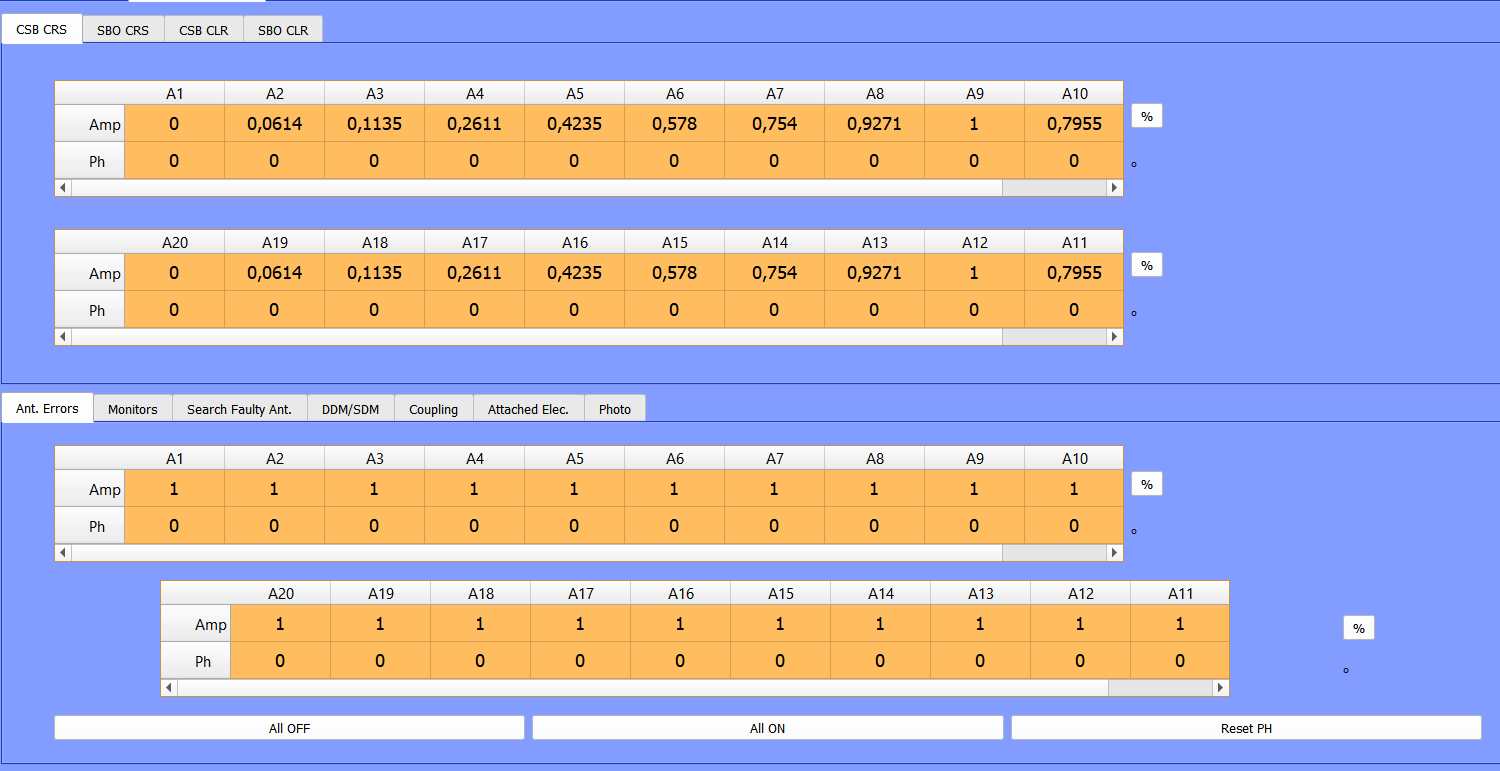
                and i have no explanation for this to happen. each of these tableviews have the exact same settings

                A 1 Reply Last reply
                0
                • A aftalib

                  my solution was to set the maximum width of each of my tableviews by the number of the future columns plus the vertical header width, the problem is when i stretch the window the last tableview is going away on the right as you can see here : 69f2a6db-a6ef-4f67-932a-5b989e5885e0-image.png

                  and i have no explanation for this to happen. each of these tableviews have the exact same settings

                  A Offline
                  A Offline
                  aftalib
                  wrote on last edited by
                  #17

                  @aftalib if anyone knows where the issue from my previous screen comes from i'd be very happy to know, this is the only thing getting in my way..

                  1 Reply Last reply
                  0
                  • A Offline
                    A Offline
                    aftalib
                    wrote on last edited by aftalib
                    #18

                    hello, posting as a last hope..

                    1 Reply Last reply
                    0
                    • N Offline
                      N Offline
                      n-2204
                      wrote on last edited by
                      #19

                      you can make fixed size , setcolumn size
                      ui.tableView_1->setColumnWidth(4, 130);
                      ui.tableView_1->setColumnWidth(3, 110);
                      ui.tableView_1->setColumnWidth(2, 120);
                      ui.tableView_1->setColumnWidth(1, 120);
                      ui.tableView_1->setColumnWidth(0, 120);
                      Are you using layout for tables in mainwindow?

                      A 1 Reply Last reply
                      0
                      • N n-2204

                        you can make fixed size , setcolumn size
                        ui.tableView_1->setColumnWidth(4, 130);
                        ui.tableView_1->setColumnWidth(3, 110);
                        ui.tableView_1->setColumnWidth(2, 120);
                        ui.tableView_1->setColumnWidth(1, 120);
                        ui.tableView_1->setColumnWidth(0, 120);
                        Are you using layout for tables in mainwindow?
                        A Offline
                        A Offline
                        aftalib
                        wrote on last edited by aftalib
                        #20

                        @n-2204 yes i am using layouts which i why i am afraid this wont work

                        1 Reply Last reply
                        0
                        • A Offline
                          A Offline
                          aftalib
                          wrote on last edited by
                          #21

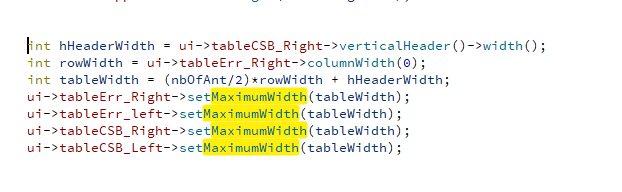
                          here is what i did in order to set the size of my tableviews : 2c09aabf-08bd-4ecd-9164-5a902d7cb04d-image.png

                          where nbOfAnt/2 is the number of elements that are going to be in my table view

                          1 Reply Last reply
                          0

                          • Login

                          • Login or register to search.
                          • First post
                            Last post
                          0
                          • Categories
                          • Recent
                          • Tags
                          • Popular
                          • Users
                          • Groups
                          • Search
                          • Get Qt Extensions
                          • Unsolved