
Skip to content
  • Categories
  • Recent
  • Tags
  • Popular
  • Users
  • Groups
  • Search
  • Get Qt
  • Unsolved
Collapse
qtws26_logo

The Qt Event of the Year: Qt World Summit 2026

Save Your Spot >
Brand Logo
  1. Home
  2. Qt Development
  3. General and Desktop
  4. how to set columnWidth correctly without having to use StretchMethods on a QTableView
Qt 6.12 LTS is out! See what's new in the release blog

how to set columnWidth correctly without having to use StretchMethods on a QTableView

Scheduled Pinned Locked Moved Unsolved General and Desktop
21 Posts 3 Posters 5.3k Views
  • Oldest to Newest
  • Newest to Oldest
  • Most Votes
Reply
  • Reply as topic
Log in to reply
This topic has been deleted. Only users with topic management privileges can see it.
  • Christian EhrlicherC Christian Ehrlicher

    Retrieve the width of the view and resize your sections to fill the whole view.

    A Offline
    A Offline
    aftalib
    wrote on last edited by
    #4

    @Christian-Ehrlicher i thought about that but the witdh of my view is interactive. if i stretch it during the program it wont be fitting my cells anymore

    Christian EhrlicherC 1 Reply Last reply
    0
    • A aftalib

      @Christian-Ehrlicher i thought about that but the witdh of my view is interactive. if i stretch it during the program it wont be fitting my cells anymore

      Christian EhrlicherC Offline
      Christian EhrlicherC Offline
      Christian Ehrlicher
      Lifetime Qt Champion
      wrote on last edited by
      #5

      @aftalib Then you have to adjust your others accordingly after the resize.

      Qt Online Installer direct download: https://download.qt.io/official_releases/online_installers/
      Visit the Qt Academy at https://academy.qt.io/catalog

      1 Reply Last reply
      0
      • A Offline
        A Offline
        aftalib
        wrote on last edited by
        #6

        my others cells ?
        i'm sorry i'm kind of a beginner i don't know how can i get my cells to resize along with my TableView

        1 Reply Last reply
        0
        • A Offline
          A Offline
          aftalib
          wrote on last edited by
          #7

          so i went through a lot of documentation this morning and apparently there is no way/or existing function allowing to do this, apart from SetStretchLastSection(true). do you think there is a way to set the size of the last section in an absolute way ?

          1 Reply Last reply
          0
          • Christian EhrlicherC Offline
            Christian EhrlicherC Offline
            Christian Ehrlicher
            Lifetime Qt Champion
            wrote on last edited by
            #8

            What's wrong with QHeaderView::resizeSection()?

            Qt Online Installer direct download: https://download.qt.io/official_releases/online_installers/
            Visit the Qt Academy at https://academy.qt.io/catalog

            A 1 Reply Last reply
            1
            • Christian EhrlicherC Christian Ehrlicher

              What's wrong with QHeaderView::resizeSection()?

              A Offline
              A Offline
              aftalib
              wrote on last edited by
              #9

              @Christian-Ehrlicher i tried it but SetStretchLastSection overrides resizeSection() : no matter if i put interactive, stretch or fixed, the last section is still wider than the other ones when i stretch it .

              1 Reply Last reply
              0
              • Christian EhrlicherC Offline
                Christian EhrlicherC Offline
                Christian Ehrlicher
                Lifetime Qt Champion
                wrote on last edited by
                #10

                Then don't use setStretchLastSection

                Qt Online Installer direct download: https://download.qt.io/official_releases/online_installers/
                Visit the Qt Academy at https://academy.qt.io/catalog

                A 1 Reply Last reply
                0
                • Christian EhrlicherC Christian Ehrlicher

                  Then don't use setStretchLastSection

                  A Offline
                  A Offline
                  aftalib
                  wrote on last edited by
                  #11

                  @Christian-Ehrlicher but if i do so my cells wont fill my QTableView

                  Christian EhrlicherC 1 Reply Last reply
                  0
                  • A aftalib

                    @Christian-Ehrlicher but if i do so my cells wont fill my QTableView

                    Christian EhrlicherC Offline
                    Christian EhrlicherC Offline
                    Christian Ehrlicher
                    Lifetime Qt Champion
                    wrote on last edited by
                    #12

                    @aftalib said in how to set columnWidth correctly without having to use StretchMethods on a QTableView:

                    but if i do so my cells wont fill my QTableView

                    That's why I said 'Then you have to adjust your others accordingly after the resize.'

                    Qt Online Installer direct download: https://download.qt.io/official_releases/online_installers/
                    Visit the Qt Academy at https://academy.qt.io/catalog

                    A 1 Reply Last reply
                    0
                    • Christian EhrlicherC Christian Ehrlicher

                      @aftalib said in how to set columnWidth correctly without having to use StretchMethods on a QTableView:

                      but if i do so my cells wont fill my QTableView

                      That's why I said 'Then you have to adjust your others accordingly after the resize.'

                      A Offline
                      A Offline
                      aftalib
                      wrote on last edited by aftalib
                      #13

                      @Christian-Ehrlicher yes that's what i want to do but i dont really know how to do this with the available functions

                      1 Reply Last reply
                      0
                      • Christian EhrlicherC Offline
                        Christian EhrlicherC Offline
                        Christian Ehrlicher
                        Lifetime Qt Champion
                        wrote on last edited by
                        #14

                        @aftalib said in how to set columnWidth correctly without having to use StretchMethods on a QTableView:

                        how to do this with the available functions

                        What are you missing? Getting the size of the view? How you resize a section was already answered:

                        What's wrong with QHeaderView::resizeSection()?

                        Qt Online Installer direct download: https://download.qt.io/official_releases/online_installers/
                        Visit the Qt Academy at https://academy.qt.io/catalog

                        1 Reply Last reply
                        0
                        • A Offline
                          A Offline
                          aftalib
                          wrote on last edited by
                          #15

                          here's what happens when i set resizeSection() to interactive : 4ac06f6a-ba3c-43e1-ae14-3ac1e510f6e8-image.png

                          i have worse or even results with Stretch or Fixed.

                          to get the size of the view i do : QRect rect2 = ui->tableView->frameGeometry();

                          is this correct ?

                          thank you for taking the time to answer me

                          1 Reply Last reply
                          0
                          • A Offline
                            A Offline
                            aftalib
                            wrote on last edited by
                            #16

                            my solution was to set the maximum width of each of my tableviews by the number of the future columns plus the vertical header width, the problem is when i stretch the window the last tableview is going away on the right as you can see here : 69f2a6db-a6ef-4f67-932a-5b989e5885e0-image.png
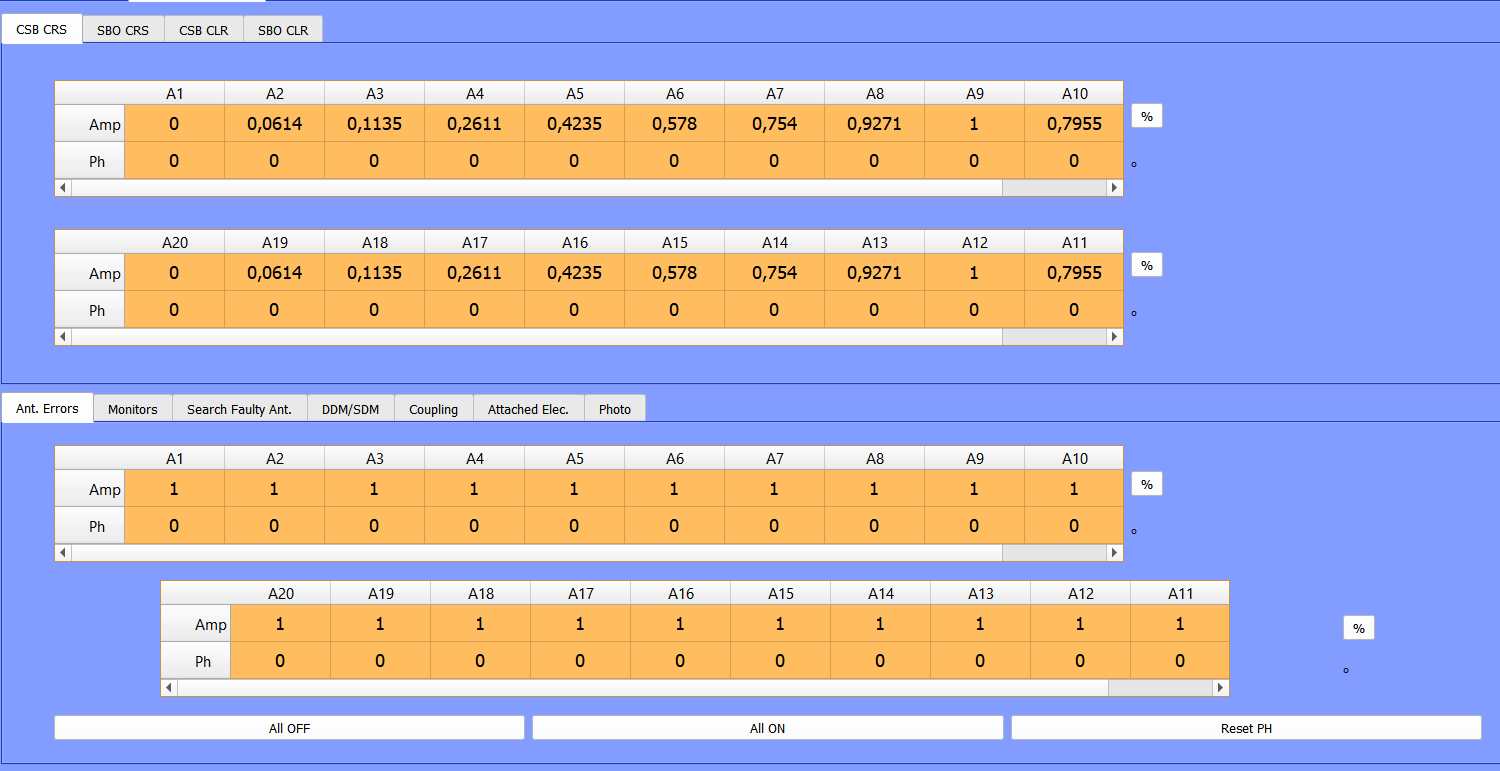
                            and i have no explanation for this to happen. each of these tableviews have the exact same settings

                            A 1 Reply Last reply
                            0
                            • A aftalib

                              my solution was to set the maximum width of each of my tableviews by the number of the future columns plus the vertical header width, the problem is when i stretch the window the last tableview is going away on the right as you can see here : 69f2a6db-a6ef-4f67-932a-5b989e5885e0-image.png

                              and i have no explanation for this to happen. each of these tableviews have the exact same settings

                              A Offline
                              A Offline
                              aftalib
                              wrote on last edited by
                              #17

                              @aftalib if anyone knows where the issue from my previous screen comes from i'd be very happy to know, this is the only thing getting in my way..

                              1 Reply Last reply
                              0
                              • A Offline
                                A Offline
                                aftalib
                                wrote on last edited by aftalib
                                #18

                                hello, posting as a last hope..

                                1 Reply Last reply
                                0
                                • N Offline
                                  N Offline
                                  n-2204
                                  wrote on last edited by
                                  #19

                                  you can make fixed size , setcolumn size
                                  ui.tableView_1->setColumnWidth(4, 130);
                                  ui.tableView_1->setColumnWidth(3, 110);
                                  ui.tableView_1->setColumnWidth(2, 120);
                                  ui.tableView_1->setColumnWidth(1, 120);
                                  ui.tableView_1->setColumnWidth(0, 120);
                                  Are you using layout for tables in mainwindow?

                                  A 1 Reply Last reply
                                  0
                                  • N n-2204

                                    you can make fixed size , setcolumn size
                                    ui.tableView_1->setColumnWidth(4, 130);
                                    ui.tableView_1->setColumnWidth(3, 110);
                                    ui.tableView_1->setColumnWidth(2, 120);
                                    ui.tableView_1->setColumnWidth(1, 120);
                                    ui.tableView_1->setColumnWidth(0, 120);
                                    Are you using layout for tables in mainwindow?
                                    A Offline
                                    A Offline
                                    aftalib
                                    wrote on last edited by aftalib
                                    #20

                                    @n-2204 yes i am using layouts which i why i am afraid this wont work

                                    1 Reply Last reply
                                    0
                                    • A Offline
                                      A Offline
                                      aftalib
                                      wrote on last edited by
                                      #21

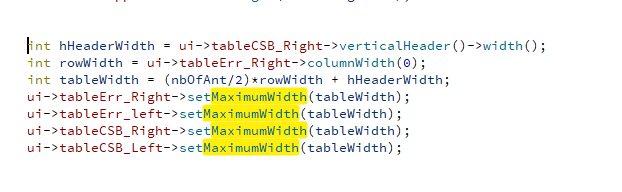
                                      here is what i did in order to set the size of my tableviews : 2c09aabf-08bd-4ecd-9164-5a902d7cb04d-image.png

                                      where nbOfAnt/2 is the number of elements that are going to be in my table view

                                      1 Reply Last reply
                                      0

                                      • Login

                                      • Login or register to search.
                                      • First post
                                        Last post
                                      0
                                      • Categories
                                      • Recent
                                      • Tags
                                      • Popular
                                      • Users
                                      • Groups
                                      • Search
                                      • Get Qt
                                      • Unsolved