

Qt Creator C++ folding region
-
@JonB You wil be happy to find out that you can do this!
Goto tools>options>display>display>see image.
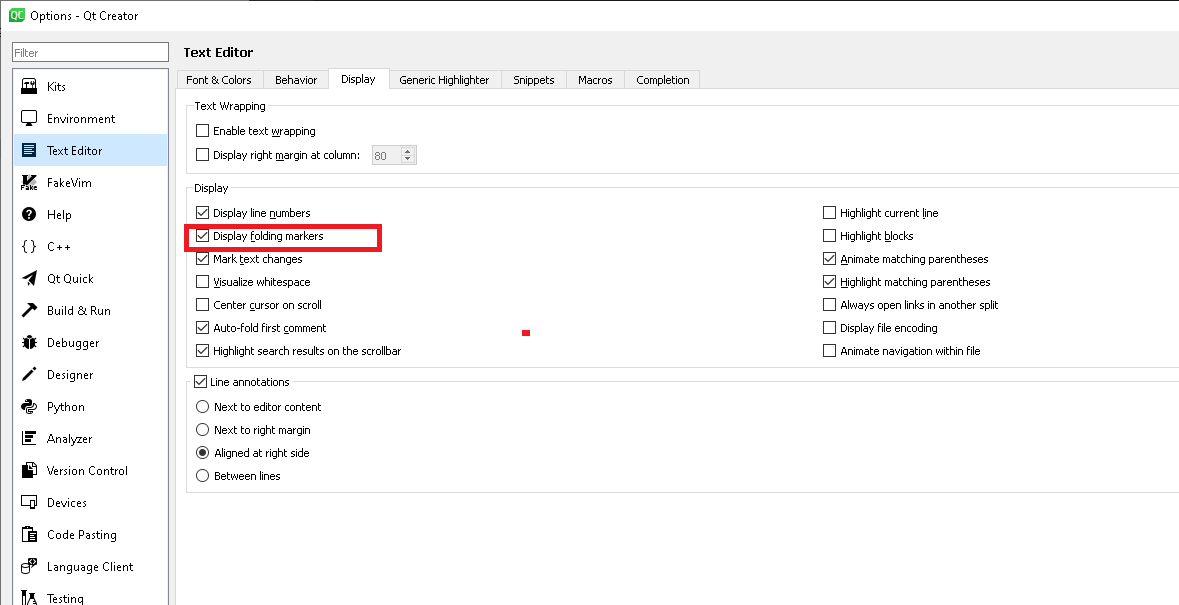
@JoeJoe_000
I would be happy if that did it (don't have Qt Creator to hand atm), but surely it does not? Doesn't that just determine whether folding markers are visible or not, nothing to do with my question about wanting#region-type folding areas? -
@JoeJoe_000
I would be happy if that did it (don't have Qt Creator to hand atm), but surely it does not? Doesn't that just determine whether folding markers are visible or not, nothing to do with my question about wanting#region-type folding areas?@JonB said in Qt Creator C++ folding region:
Doesn't that just determine whether folding markers are visible or not
Yes, it does.
-
-
If you encapsulate in { }.
-
@Justin-Pattison-Schmidt
You can't encapsulate multiple function definitions inside{}, nor lists of#includestatements....@JonB you could encapsulate it in
#ifdefand#endifbut that won't make magically create folding markers either 🤷♂️When IMHO it actually should!
Be aware of the Qt Code of Conduct, when posting : https://forum.qt.io/topic/113070/qt-code-of-conduct
Q: What's that?
A: It's blue light.
Q: What does it do?
A: It turns blue. -
@JonB you could encapsulate it in
#ifdefand#endifbut that won't make magically create folding markers either 🤷♂️When IMHO it actually should!
@J-Hilk
I would be prepared to do that (well, probably#ifndefrather, so that I don't have to do anything for the code to still be active!). But if it doesn't give me my folding it doesn't help, does it? :)As you say, I checked an it does not fold at
#if-ers. Lazy Creator! :( Even worse, I see that if the expression is false (e.g.#if 0) you lose the ability to fold the individual methods within it (presumably because it no longer has to examine/parse content). So if you have a large list of functions which are all#if-ed out for whatever reason, you then have to have all the code expanded and scroll through it all the time. Grrr! -
I know this is old, but here is what works for me in QT Creator 4.13.3.
- Make sure 'Display Folding markers' is enabled
- 'Tools' -> 'Options' -> 'Text Editor' -> 'Display' tab
- In the '.cpp' or '.h' file you want to add the region to:
- Add '#pragma region RegionNameHere{'
- Note the '{' at the end
- Add '#pragma endregion }'
- Note the '}' at the end
- Add '#pragma region RegionNameHere{'
Some sample code:
#pragma region TIMER:Filter Change Delay {

void CLog_EntryList::init_Timer_FilterChangeDelay()
{
    m_timerFilterChangeDelay.setInterval(5000);
    m_timerFilterChangeDelay.setSingleShot(true);
    connect(&m_timerFilterChangeDelay, &QTimer::timeout, this, &CLog_EntryList::slot_Timer_FilterChangeDelay_Timedout);
}

void CLog_EntryList::slot_Timer_FilterChangeDelay_Start()
{
    if(m_timerFilterChangeDelay.isActive())
        return;

    m_timerFilterChangeDelay.setInterval(5000);
    m_timerFilterChangeDelay.setSingleShot(true);
    m_timerFilterChangeDelay.start();
}

void CLog_EntryList::slot_Timer_FilterChangeDelay_Timedout()
{

}
#pragma endregion}
And some proof in the pudding:
Not Folded
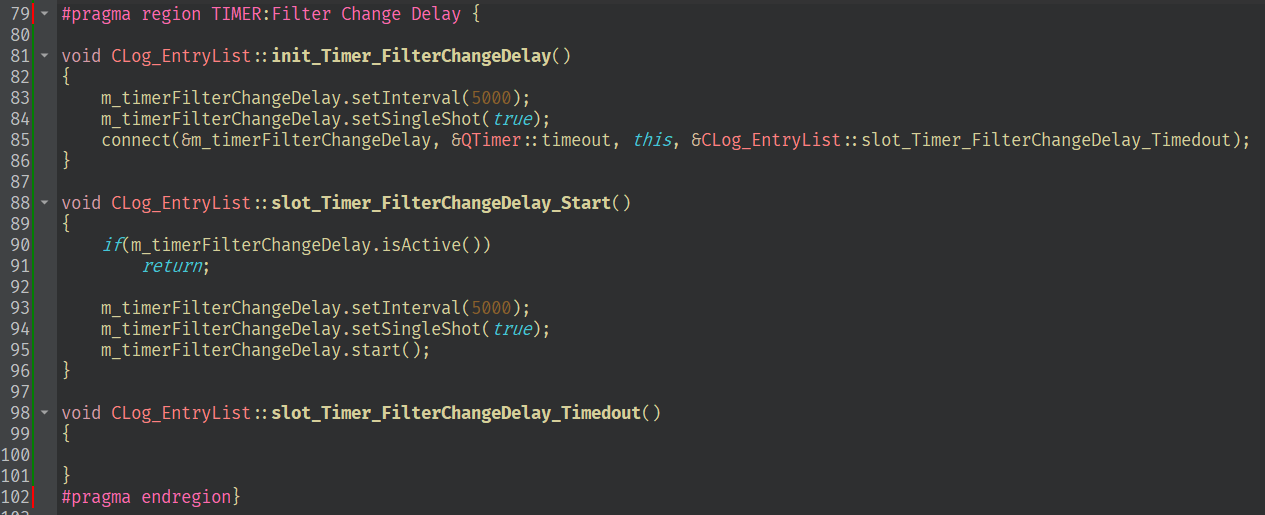
Folded

Enjoy ;)
- Make sure 'Display Folding markers' is enabled
-
I know this is old, but here is what works for me in QT Creator 4.13.3.
- Make sure 'Display Folding markers' is enabled
- 'Tools' -> 'Options' -> 'Text Editor' -> 'Display' tab
- In the '.cpp' or '.h' file you want to add the region to:
- Add '#pragma region RegionNameHere{'
- Note the '{' at the end
- Add '#pragma endregion }'
- Note the '}' at the end
- Add '#pragma region RegionNameHere{'
Some sample code:
#pragma region TIMER:Filter Change Delay {

void CLog_EntryList::init_Timer_FilterChangeDelay()
{
    m_timerFilterChangeDelay.setInterval(5000);
    m_timerFilterChangeDelay.setSingleShot(true);
    connect(&m_timerFilterChangeDelay, &QTimer::timeout, this, &CLog_EntryList::slot_Timer_FilterChangeDelay_Timedout);
}

void CLog_EntryList::slot_Timer_FilterChangeDelay_Start()
{
    if(m_timerFilterChangeDelay.isActive())
        return;

    m_timerFilterChangeDelay.setInterval(5000);
    m_timerFilterChangeDelay.setSingleShot(true);
    m_timerFilterChangeDelay.start();
}

void CLog_EntryList::slot_Timer_FilterChangeDelay_Timedout()
{

}
#pragma endregion}
And some proof in the pudding:
Not Folded
Folded
Enjoy ;)
@ATatum_BlurPD
I'm Creator 4.11.0. It works for the folding. Though it's only actually the{...}doing that! You can just write#pragma { ... #pragma }and it folds just the same!
Whatever I put there I get
warning: ignoring #pragma { [-Wunknown-pragmas], so I'd have to switch off unknown pragmas warnings.So thank you, but it's obviously an unsupported hack. Which is fine for some but not for others.
- Make sure 'Display Folding markers' is enabled
-
Oh, that's pretty fresh topic, and I look for same thing.
In code blocks, sublimetext and many other editors you could write//{ description int i; //(or some other code ...) //}and than you could collapse that code. But //{ won't work in qtCreator.
I'm not anyone qualified, but I think interpreting comments by editor isn't bad..
(I say so, as it looks qtCreator avoids that? {} after # aren't ignored and are interpreted (which - by the way - is kind of strange in my opinnion - like if I wanted to #define something_to_be { , it doesn't mean I want it to be folding block) )So //{ is something I would suggest - as it's popular solution in other editors.
#pragma and/or #region would be cool too, but I just provide another ideaAs for why I would use such thing - it's just that overloading all operators result in a lot of code, that I have to scroll through, code that I'm more often (than not) - not interested in looking at. Moving overloaded operators implementations to another .cpp is... Weird idea for me. And what is (and what's not) too much code to look through is very personal - so it's not about bad structure of code. For me even 200 lines is too much. I want less file to scroll/search through. Overloading operators use 40 of those lines in my case. And I wrote them caring more about lines used than about readibillity anyway (most of them are two-liners)
For now I think I will resolve to using big eye catching comment lines to know when I need to stop scrolling fast through some segment..
-
Oh, that's pretty fresh topic, and I look for same thing.
In code blocks, sublimetext and many other editors you could write//{ description int i; //(or some other code ...) //}and than you could collapse that code. But //{ won't work in qtCreator.
I'm not anyone qualified, but I think interpreting comments by editor isn't bad..
(I say so, as it looks qtCreator avoids that? {} after # aren't ignored and are interpreted (which - by the way - is kind of strange in my opinnion - like if I wanted to #define something_to_be { , it doesn't mean I want it to be folding block) )So //{ is something I would suggest - as it's popular solution in other editors.
#pragma and/or #region would be cool too, but I just provide another ideaAs for why I would use such thing - it's just that overloading all operators result in a lot of code, that I have to scroll through, code that I'm more often (than not) - not interested in looking at. Moving overloaded operators implementations to another .cpp is... Weird idea for me. And what is (and what's not) too much code to look through is very personal - so it's not about bad structure of code. For me even 200 lines is too much. I want less file to scroll/search through. Overloading operators use 40 of those lines in my case. And I wrote them caring more about lines used than about readibillity anyway (most of them are two-liners)
For now I think I will resolve to using big eye catching comment lines to know when I need to stop scrolling fast through some segment..
@Rafiz You can file change request in Qt bug tracker: https://bugreports.qt.io/secure/Dashboard.jspa
-
I agree wiht it. folding region could let codes look neat and organized without having to create more meaningless funtions and files and jump between them.
I saw someone use#pragma region RegionName{ #pragma endregion}to fold codes.and enter text "-Wno-unknow-pragmas" in Tools->Options->C++->Code Model->Build-system warings(Paul)-> Build-system warnings->Copy->(give the configuration name)->(Choose your configuration)->(tick) Use diagnostic flags from build system, to avoid generating warnings.


