Skip to content
  • Categories
  • Recent
  • Tags
  • Popular
  • Users
  • Groups
  • Search
  • Get Qt Extensions
  • Unsolved
Collapse
Brand Logo
  1. Home
  2. Qt Development
  3. QML and Qt Quick
  4. "underlaying" a rectangle
Qt 6.11 is out! See what's new in the release blog

"underlaying" a rectangle

Scheduled Pinned Locked Moved Solved QML and Qt Quick
17 Posts 4 Posters 2.5k Views 4 Watching
  • Oldest to Newest
  • Newest to Oldest
  • Most Votes
Reply
  • Reply as topic
Log in to reply
This topic has been deleted. Only users with topic management privileges can see it.
  • fcarneyF fcarney

    Heh, it works:

        Rectangle {
            anchors.verticalCenter: lbrect.verticalCenter
            anchors.right: lbrect.right
            anchors.rightMargin: -25
    
            height: 75
            width: 75
    
            color: "pink"
        }
        Rectangle {
            id: lbrect
    
            anchors.top: listview1.bottom
    
            height: 50
            width: 100
    
            color: "lightblue"
        }
    

    Edit: Note, this only works with sibling items and items with parent child relationships. I chose to put the pink before the lightblue for z ordering purposes.

    ODБOïO Offline
    ODБOïO Offline
    ODБOï
    wrote on last edited by
    #7

    @fcarney hi
    the op mentionned that items are managed by a Column so you can't use anchors

    mzimmersM fcarneyF 3 Replies Last reply
    0
    • ODБOïO ODБOï

      @fcarney hi
      the op mentionned that items are managed by a Column so you can't use anchors

      mzimmersM Offline
      mzimmersM Offline
      mzimmers
      wrote on last edited by
      #8

      @LeLev correct. I could use a ColumnLayout, but I had trouble getting the rows to center, so I went with Column instead.

      Off-topic: is there a rule of thumb for when to use each of these?

      1 Reply Last reply
      0
      • ODБOïO ODБOï

        @fcarney hi
        the op mentionned that items are managed by a Column so you can't use anchors

        fcarneyF Offline
        fcarneyF Offline
        fcarney
        wrote on last edited by fcarney
        #9

        @LeLev He can, he just has to put both inside an Item.

        Edit: Might get messy

        C++ is a perfectly valid school of magic.

        1 Reply Last reply
        0
        • ODБOïO ODБOï

          @fcarney hi
          the op mentionned that items are managed by a Column so you can't use anchors

          fcarneyF Offline
          fcarneyF Offline
          fcarney
          wrote on last edited by fcarney
          #10

          @LeLev Here is a better solution then:

          Rectangle {
                  id: lbrect
          
                  height: 50
                  width: 100
          
                  color: "lightblue"
          
                  Rectangle {
                      anchors.verticalCenter: lbrect.verticalCenter
                      anchors.right: lbrect.right
                      anchors.rightMargin: -25
          
                      height: 75
                      width: 75
          
                      color: "pink"
          
                      z: -1
                  }
              }
          

          Edit: Removed anchor from lbrect. I copied this from test project. So its not needed.

          C++ is a perfectly valid school of magic.

          mzimmersM 1 Reply Last reply
          1
          • fcarneyF fcarney

            @LeLev Here is a better solution then:

            Rectangle {
                    id: lbrect
            
                    height: 50
                    width: 100
            
                    color: "lightblue"
            
                    Rectangle {
                        anchors.verticalCenter: lbrect.verticalCenter
                        anchors.right: lbrect.right
                        anchors.rightMargin: -25
            
                        height: 75
                        width: 75
            
                        color: "pink"
            
                        z: -1
                    }
                }
            

            Edit: Removed anchor from lbrect. I copied this from test project. So its not needed.

            mzimmersM Offline
            mzimmersM Offline
            mzimmers
            wrote on last edited by
            #11

            @fcarney assuming that your lbrect is my rack, I still can't use the anchors.

            fcarneyF 1 Reply Last reply
            0
            • mzimmersM mzimmers

              @fcarney assuming that your lbrect is my rack, I still can't use the anchors.

              fcarneyF Offline
              fcarneyF Offline
              fcarney
              wrote on last edited by
              #12

              @mzimmers You will use whatever positioning you are currently using. I copied from a test project. Its not needed.

              C++ is a perfectly valid school of magic.

              ODБOïO mzimmersM 2 Replies Last reply
              0
              • fcarneyF fcarney

                @mzimmers You will use whatever positioning you are currently using. I copied from a test project. Its not needed.

                ODБOïO Offline
                ODБOïO Offline
                ODБOï
                wrote on last edited by ODБOï
                #13

                @fcarney said in "underlaying" a rectangle:

                @LeLev Here is a better solution then:

                yes, that is a nice solution.the only drawback i see is that the child (pink) is heigher than its parent (lightblue), so you have to take that into account when placing this in a column or columnLayout, same thing for the nagative margin.

                I would use a parent Item as you mentionned earlier

                1 Reply Last reply
                0
                • fcarneyF fcarney

                  @mzimmers You will use whatever positioning you are currently using. I copied from a test project. Its not needed.

                  mzimmersM Offline
                  mzimmersM Offline
                  mzimmers
                  wrote on last edited by
                  #14

                  @fcarney I misspoke; the positioners you specified do work, if both rectangles are enclosed within an Item. Unfortunately, the display looks like this:
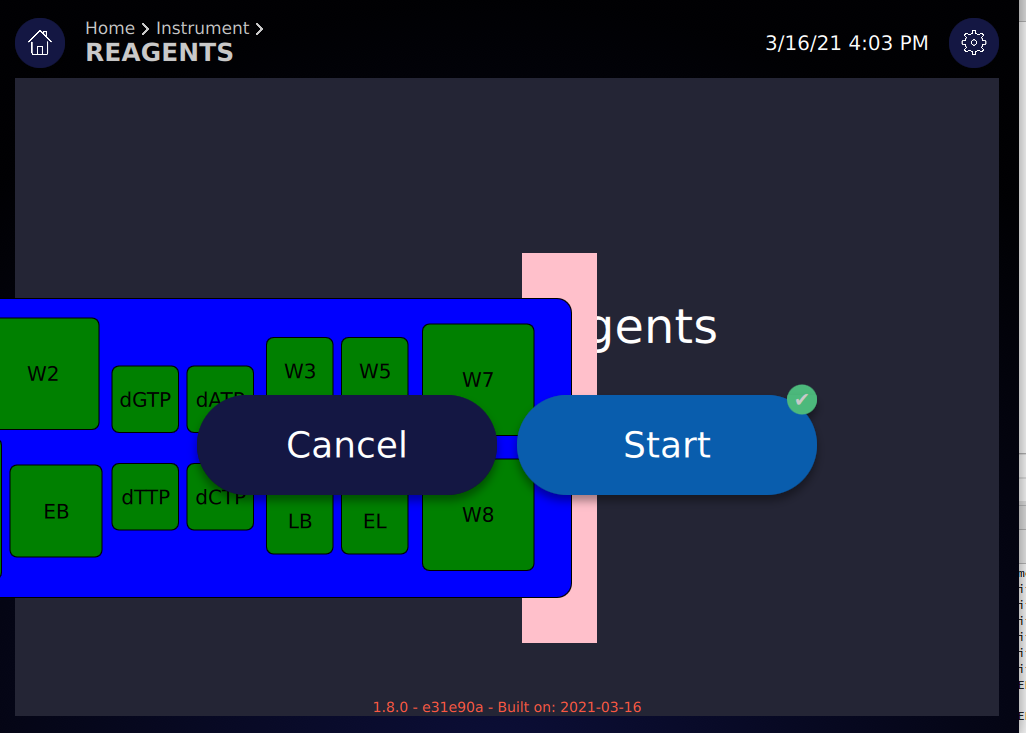
                  left.PNG

                  I assume that what's happening is the Item isn't recognized as a component of the Column; any idea why that might be?

                  Thanks.

                  ODБOïO 1 Reply Last reply
                  0
                  • mzimmersM mzimmers

                    @fcarney I misspoke; the positioners you specified do work, if both rectangles are enclosed within an Item. Unfortunately, the display looks like this:
                    left.PNG

                    I assume that what's happening is the Item isn't recognized as a component of the Column; any idea why that might be?

                    Thanks.

                    ODБOïO Offline
                    ODБOïO Offline
                    ODБOï
                    wrote on last edited by
                    #15

                    maybe this helps
                    https://tinyurl.com/yedtugnn

                    1 Reply Last reply
                    1
                    • mzimmersM Offline
                      mzimmersM Offline
                      mzimmers
                      wrote on last edited by
                      #16

                      Wow...that's quite a website. I had no idea such a tool existed.

                      I do think my problem comes from using Column instead of ColumnLayout, but I'll have to do some more experimentation to see. In any event, the original question has been answered very nicely, so I'm going to mark this solved.

                      Thanks to everyone for the help.

                      ODБOïO 1 Reply Last reply
                      0
                      • mzimmersM mzimmers

                        Wow...that's quite a website. I had no idea such a tool existed.

                        I do think my problem comes from using Column instead of ColumnLayout, but I'll have to do some more experimentation to see. In any event, the original question has been answered very nicely, so I'm going to mark this solved.

                        Thanks to everyone for the help.

                        ODБOïO Offline
                        ODБOïO Offline
                        ODБOï
                        wrote on last edited by
                        #17

                        @mzimmers said in "underlaying" a rectangle:

                        I do think my problem comes from using Column instead of ColumnLayout

                        i'm not saying that at all... i don't know where your problems come from since you don't show the code :)
                        the only relevant part of my example is the blue and pink rectangles with their parent, dont pay attention to my ColumnLayout please

                        1 Reply Last reply
                        0

                        • Login

                        • Login or register to search.
                        • First post
                          Last post
                        0
                        • Categories
                        • Recent
                        • Tags
                        • Popular
                        • Users
                        • Groups
                        • Search
                        • Get Qt Extensions
                        • Unsolved