
How to Build QIBASE on Win10 MSVC?
-
Hi,
Are you looking for these instructions ?
-
Hi,
I apllied now. I think Firebird Client is 32 bit. But I changed MSVC varshall.bat to amd64. I think below error is from x86-x64 conflict. True?...C:\Qt\5.14.2\Src\qtbase\src\plugins\sqldrivers>qmake -- IBASE_INCDIR="C:/Program Files (x86)/Firebird/Firebird_2_5/include" IBASE_LIBS=-lfbclient Running configuration tests... Checking for DB2 (IBM)... no Checking for InterBase... no Checking for MySQL... no Checking for OCI (Oracle)... no Checking for ODBC... yes Checking for PostgreSQL... no Checking for SQLite (version 2)... no Checking for TDS (Sybase)... no Done running configuration tests. Configure summary: Qt Sql Drivers: DB2 (IBM) .............................. no InterBase .............................. no MySql .................................. no OCI (Oracle) ........................... no ODBC ................................... yes PostgreSQL ............................. no SQLite2 ................................ no SQLite ................................. yes Using system provided SQLite ......... no TDS (Sybase) ........................... no Qt is now configured for building. Just run 'nmake'. Once everything is built, you must run 'nmake install'. Qt will be installed into 'C:\Qt\5.14.2\msvc2017_64'. Prior to reconfiguration, make sure you remove any leftovers from the previous build. C:\Qt\5.14.2\Src\qtbase\src\plugins\sqldrivers>nmake sub-ibase Microsoft (R) Program Maintenance Utility Sürümü 14.28.29335.0 Telif Hakkı (C) Microsoft Corporation. Tüm hakları saklıdır. NMAKE : fatal error U1073: 'sub-ibase' yapımı bilinmiyor Stop.Regards,
Mucip:) -
Hi,
No. I chaned to x86 with vcvarsall.bat x86But still same problem?!
C:\Qt\5.14.2\Src\qtbase\src\plugins\sqldrivers>qmake -- IBASE_INCDIR="C:/Program Files (x86)/Firebird/Firebird_2_5/include" IBASE_LIBS=-lfbclient

Running configuration tests...
Done running configuration tests.

Configure summary:

Qt Sql Drivers:
  DB2 (IBM) .............................. no
  InterBase .............................. no
  MySql .................................. no
  OCI (Oracle) ........................... no
  ODBC ................................... yes
  PostgreSQL ............................. no
  SQLite2 ................................ no
  SQLite ................................. yes
    Using system provided SQLite ......... no
  TDS (Sybase) ........................... no

Qt is now configured for building. Just run 'nmake'.
Once everything is built, you must run 'nmake install'.
Qt will be installed into 'C:\Qt\5.14.2\msvc2017'.

Prior to reconfiguration, make sure you remove any leftovers from
the previous build.


C:\Qt\5.14.2\Src\qtbase\src\plugins\sqldrivers>nmake sub-ibase

Microsoft (R) Program Maintenance Utility Sürümü 14.28.29335.0
Telif Hakkı (C) Microsoft Corporation.  Tüm hakları saklıdır.

NMAKE : fatal error U1073: 'sub-ibase' yapımı bilinmiyor
Stop.
Regards,
Mucip:) -
Please follow the documentation:
Note: If something goes wrong and you want qmake to recheck your available drivers, you must remove config.cache in <QTDIR>/qtbase/src/plugins/sqldrivers - otherwise qmake will not search for the available drivers again. If you encounter an error during the qmake stage, open config.log to see what went wrong.
Qt Online Installer direct download: https://download.qt.io/official_releases/online_installers/
Visit the Qt Academy at https://academy.qt.io/catalog -
Please follow the documentation:
Note: If something goes wrong and you want qmake to recheck your available drivers, you must remove config.cache in <QTDIR>/qtbase/src/plugins/sqldrivers - otherwise qmake will not search for the available drivers again. If you encounter an error during the qmake stage, open config.log to see what went wrong.
Hi @Christian-Ehrlicher ,
I could'not understand why I can not compile QIBASE in below config:C:\Qt\5.14.2\Src\qtbase\src\plugins\sqldrivers>qmake -- IBASE_INCDIR="C:/Program Files/Firebird/Firebird_2_5/include" IBASE_LIBS=-lfbclient.lib Running configuration tests... Done running configuration tests. Configure summary: Qt Sql Drivers: DB2 (IBM) .............................. no InterBase .............................. no MySql .................................. no OCI (Oracle) ........................... no ODBC ................................... yes PostgreSQL ............................. no SQLite2 ................................ no SQLite ................................. yes Using system provided SQLite ......... no TDS (Sybase) ........................... no Qt is now configured for building. Just run 'nmake'. Once everything is built, you must run 'nmake install'. Qt will be installed into 'C:\Qt\5.14.2\msvc2017_64'. Prior to reconfiguration, make sure you remove any leftovers from the previous build.I see newly builded Sqlite dll files in C:\Qt\5.14.2\msvc2017_64
I need QIBASE driver to connect Firebird x64. I ınstalled FirebirdX64 clients in "C:/Program Files/Firebird/Firebird_2_5"
Regards,
Mucip:) -
Hi @Christian-Ehrlicher ,
I could'not understand why I can not compile QIBASE in below config:C:\Qt\5.14.2\Src\qtbase\src\plugins\sqldrivers>qmake -- IBASE_INCDIR="C:/Program Files/Firebird/Firebird_2_5/include" IBASE_LIBS=-lfbclient.lib Running configuration tests... Done running configuration tests. Configure summary: Qt Sql Drivers: DB2 (IBM) .............................. no InterBase .............................. no MySql .................................. no OCI (Oracle) ........................... no ODBC ................................... yes PostgreSQL ............................. no SQLite2 ................................ no SQLite ................................. yes Using system provided SQLite ......... no TDS (Sybase) ........................... no Qt is now configured for building. Just run 'nmake'. Once everything is built, you must run 'nmake install'. Qt will be installed into 'C:\Qt\5.14.2\msvc2017_64'. Prior to reconfiguration, make sure you remove any leftovers from the previous build.I see newly builded Sqlite dll files in C:\Qt\5.14.2\msvc2017_64
I need QIBASE driver to connect Firebird x64. I ınstalled FirebirdX64 clients in "C:/Program Files/Firebird/Firebird_2_5"
Regards,
Mucip:)@Mucip Did you do what @Christian-Ehrlicher suggested: "If you encounter an error during the qmake stage, open config.log to see what went wrong."?
-
You're not telling qmake where the library can be found.
Interested in AI ? www.idiap.ch
Please read the Qt Code of Conduct - https://forum.qt.io/topic/113070/qt-code-of-conduct -
@Mucip said in How to Build QIBASE on Win10 MSVC?:
I mean how can I set it yes?
As we said frm the first post - you have to pass the correct IBASE parameters as explained in the documentation:
The configure script cannot detect the necessary libraries and include files if they are not in the standard paths, so it may be necessary to specify these paths using the *_INCDIR=, *_LIBDIR=, or *_PREFIX= command-line options.
Qt Online Installer direct download: https://download.qt.io/official_releases/online_installers/
Visit the Qt Academy at https://academy.qt.io/catalog -
@Mucip said in How to Build QIBASE on Win10 MSVC?:
I mean how can I set it yes?
As we said frm the first post - you have to pass the correct IBASE parameters as explained in the documentation:
The configure script cannot detect the necessary libraries and include files if they are not in the standard paths, so it may be necessary to specify these paths using the *_INCDIR=, *_LIBDIR=, or *_PREFIX= command-line options.
Hi @Christian-Ehrlicher ,
Now I am one step forward. Thanks.
I do what the document writeç Now I compiled but only Sqlite?! My command stor is below without error. :)C:\Qt\5.14.2\Src\qtbase\src\plugins\sqldrivers>qmake -version QMake version 3.1 Using Qt version 5.14.2 in C:/Qt/5.14.2/msvc2017_64/lib C:\Qt\5.14.2\Src\qtbase\src\plugins\sqldrivers>qmake -- IBASE_INCDIR="C:/Program Files/Firebird/Firebird_2_5/include" IBASE_LIBDIR="C:/Program Files/Firebird/Firebird_2_5/lib" Running configuration tests... Checking for DB2 (IBM)... no Checking for InterBase... no Checking for MySQL... no Checking for OCI (Oracle)... no Checking for ODBC... no Checking for PostgreSQL... no Checking for SQLite (version 2)... no Checking for TDS (Sybase)... no Done running configuration tests. Configure summary: Qt Sql Drivers: DB2 (IBM) .............................. no InterBase .............................. no MySql .................................. no OCI (Oracle) ........................... no ODBC ................................... no PostgreSQL ............................. no SQLite2 ................................ no SQLite ................................. yes Using system provided SQLite ......... no TDS (Sybase) ........................... no Qt is now configured for building. Just run 'nmake'. Once everything is built, you must run 'nmake install'. Qt will be installed into 'C:\Qt\5.14.2\msvc2017_64'. Prior to reconfiguration, make sure you remove any leftovers from the previous build.Then I arranged vcvarsall. bat like below,
C:\Qt\5.14.2\Src\qtbase\src\plugins\sqldrivers>cd C:\Program Files (x86)\Microsoft Visual Studio\2019\Community\VC\Auxiliary\Build

C:\Program Files (x86)\Microsoft Visual Studio\2019\Community\VC\Auxiliary\Build>vcvarsall.bat amd64
**********************************************************************
** Visual Studio 2019 Developer Command Prompt v16.8.3
** Copyright (c) 2020 Microsoft Corporation
**********************************************************************
[vcvarsall.bat] Environment initialized for: 'x64'
And I write nmake and nmake install
C:\Qt\5.14.2\Src\qtbase\src\plugins\sqldrivers>nmake

Microsoft (R) Program Maintenance Utility Sürümü 14.28.29335.0
Telif Hakkı (C) Microsoft Corporation.  Tüm hakları saklıdır.

        cd sqlite\ && ( if not exist Makefile C:\Qt\5.14.2\msvc2017_64\bin\qmake.exe -o Makefile C:\Qt\5.14.2\Src\qtbase\src\plugins\sqldrivers\sqlite\sqlite.pro ) && "C:\Program Files (x86)\Microsoft Visual Studio\2019\Community\VC\Tools\MSVC\14.28.29333\bin\HostX64\x64\nmake.exe" -f Makefile

Microsoft (R) Program Maintenance Utility Sürümü 14.28.29335.0
Telif Hakkı (C) Microsoft Corporation.  Tüm hakları saklıdır.

        "C:\Program Files (x86)\Microsoft Visual Studio\2019\Community\VC\Tools\MSVC\14.28.29333\bin\HostX64\x64\nmake.exe" -f Makefile.Release all

Microsoft (R) Program Maintenance Utility Sürümü 14.28.29335.0
Telif Hakkı (C) Microsoft Corporation.  Tüm hakları saklıdır.

        "C:\Program Files (x86)\Microsoft Visual Studio\2019\Community\VC\Tools\MSVC\14.28.29333\bin\HostX64\x64\nmake.exe" -f Makefile.Debug all

Microsoft (R) Program Maintenance Utility Sürümü 14.28.29335.0
Telif Hakkı (C) Microsoft Corporation.  Tüm hakları saklıdır.


C:\Qt\5.14.2\Src\qtbase\src\plugins\sqldrivers>nmake install

Microsoft (R) Program Maintenance Utility Sürümü 14.28.29335.0
Telif Hakkı (C) Microsoft Corporation.  Tüm hakları saklıdır.

        cd sqlite\ && ( if not exist Makefile C:\Qt\5.14.2\msvc2017_64\bin\qmake.exe -o Makefile C:\Qt\5.14.2\Src\qtbase\src\plugins\sqldrivers\sqlite\sqlite.pro ) && "C:\Program Files (x86)\Microsoft Visual Studio\2019\Community\VC\Tools\MSVC\14.28.29333\bin\HostX64\x64\nmake.exe" -f Makefile install

Microsoft (R) Program Maintenance Utility Sürümü 14.28.29335.0
Telif Hakkı (C) Microsoft Corporation.  Tüm hakları saklıdır.

        "C:\Program Files (x86)\Microsoft Visual Studio\2019\Community\VC\Tools\MSVC\14.28.29333\bin\HostX64\x64\nmake.exe" -f Makefile.Release install

Microsoft (R) Program Maintenance Utility Sürümü 14.28.29335.0
Telif Hakkı (C) Microsoft Corporation.  Tüm hakları saklıdır.

        copy /y ..\plugins\sqldrivers\qsqlite.dll C:\Qt\5.14.2\msvc2017_64\plugins\sqldrivers\qsqlite.dll
        1 file(s) copied.
        copy /y ..\plugins\sqldrivers\qsqlite.pdb C:\Qt\5.14.2\msvc2017_64\plugins\sqldrivers\qsqlite.pdb
        1 file(s) copied.
        C:\Qt\5.14.2\msvc2017_64\bin\qmake.exe -install qinstall C:\Qt\5.14.2\Src\qtbase\src\plugins\sqldrivers\lib\cmake\Qt5Sql\Qt5Sql_QSQLiteDriverPlugin.cmake C:\Qt\5.14.2\msvc2017_64\lib\cmake\Qt5Sql\Qt5Sql_QSQLiteDriverPlugin.cmake
        "C:\Program Files (x86)\Microsoft Visual Studio\2019\Community\VC\Tools\MSVC\14.28.29333\bin\HostX64\x64\nmake.exe" -f Makefile.Debug install

Microsoft (R) Program Maintenance Utility Sürümü 14.28.29335.0
Telif Hakkı (C) Microsoft Corporation.  Tüm hakları saklıdır.

        copy /y ..\plugins\sqldrivers\qsqlited.dll C:\Qt\5.14.2\msvc2017_64\plugins\sqldrivers\qsqlited.dll
        1 file(s) copied.
        copy /y ..\plugins\sqldrivers\qsqlited.pdb C:\Qt\5.14.2\msvc2017_64\plugins\sqldrivers\qsqlited.pdb
        1 file(s) copied.
        C:\Qt\5.14.2\msvc2017_64\bin\qmake.exe -install qinstall C:\Qt\5.14.2\Src\qtbase\src\plugins\sqldrivers\lib\cmake\Qt5Sql\Qt5Sql_QSQLiteDriverPlugin.cmake C:\Qt\5.14.2\msvc2017_64\lib\cmake\Qt5Sql\Qt5Sql_QSQLiteDriverPlugin.cmake

C:\Qt\5.14.2\Src\qtbase\src\plugins\sqldrivers>
Now I can see qsqlite.dll in location "C:\Qt\5.14.2\msvc2017_64\plugins\sqldrivers"
But I need QIBASE..
Regards,
Mucip:) -
@Mucip said in How to Build QIBASE on Win10 MSVC?:
But I need QIBASE..
Forth time: read the doc!
If you encounter an error during the qmake stage, open config.log to see what went wrong.
Ignoring this topic for now on...
Qt Online Installer direct download: https://download.qt.io/official_releases/online_installers/
Visit the Qt Academy at https://academy.qt.io/catalog -
@Mucip said in How to Build QIBASE on Win10 MSVC?:
But I need QIBASE..
Forth time: read the doc!
If you encounter an error during the qmake stage, open config.log to see what went wrong.
Ignoring this topic for now on...
Hi,
Well, I still trying to read document.
I used configure command like belowC:\Qt\5.14.2\Src\qtbase\src\plugins\sqldrivers>C:\Qt\5.14.2\Src\configure -sql-ibase -platform win32-msvcAnd the result is:
WARNING: Python version 2 (2.7.5 or later) is required to build QtWebEngine.

WARNING: QtWebEngine will not be built.

WARNING: QtPdf will not be built.

ERROR: Feature 'sql-ibase' was enabled, but the pre-condition 'libs.ibase' failed.

Check config.log for details.
The log details which I see in long file:
Trying source 1 (type inline) of library db2 ... => source failed condition '!config.win32'. test config.qtbase_sqldrivers.libraries.db2 FAILED loaded result for library config.qtbase_sqldrivers.libraries.ibase Trying source 0 (type inline) of library ibase ... + cd /d C:\Qt\5.14.2\Src\qtbase\src\plugins\sqldrivers\config.tests\ibase && C:\Qt\5.14.2\msvc2017_64\bin\qmake.exe "CONFIG -= qt debug_and_release app_bundle lib_bundle" "CONFIG += shared warn_off console single_arch" "QMAKE_LIBDIR += C:\\openssl\\lib C:\\Utils\\my_sql\\mysql-5.7.25-winx64\\lib C:\\Utils\\postgresql\\pgsql\\lib" "INCLUDEPATH += C:\\openssl\\include C:\\Utils\\my_sql\\mysql-5.7.25-winx64\\include C:\\Utils\\postgresql\\pgsql\\include" "QMAKE_USE += ibase" "QMAKE_LIBS_IBASE = \"-LC:/Program Files/Firebird/Firebird_2_5/lib\" -lgds32_ms" "QMAKE_INCDIR_IBASE = \"C:/Program Files/Firebird/Firebird_2_5/include\"" C:/Qt/5.14.2/Src/qtbase/src/plugins/sqldrivers/config.tests/ibase + cd /d C:\Qt\5.14.2\Src\qtbase\src\plugins\sqldrivers\config.tests\ibase && set MAKEFLAGS=& nmake clean && set MAKEFLAGS=& nmake > Microsoft (R) Program Maintenance Utility Sürümü 14.28.29335.0 > Telif Hakkı (C) Microsoft Corporation. Tüm hakları saklıdır. > del main.obj > Microsoft (R) Program Maintenance Utility Sürümü 14.28.29335.0 > Telif Hakkı (C) Microsoft Corporation. Tüm hakları saklıdır. > cl -c -nologo -Zc:wchar_t -FS -Zc:rvalueCast -Zc:inline -Zc:strictStrings -Zc:throwingNew -Zc:referenceBinding -Zc:__cplusplus -O2 -MD -W0 -EHsc -DUNICODE -D_UNICODE -DWIN32 -D_ENABLE_EXTENDED_ALIGNED_STORAGE -DWIN64 -DNDEBUG -I. -IC:\openssl\include -IC:\Utils\my_sql\mysql-5.7.25-winx64\include -IC:\Utils\postgresql\pgsql\include -I"C:\Program Files\Firebird\Firebird_2_5\include" -IC:\Qt\5.14.2\msvc2017_64\mkspecs\win32-msvc -Fo @C:\Users\Mucip\AppData\Local\Temp\nm4BBD.tmp > main.cpp > link /NOLOGO /DYNAMICBASE /NXCOMPAT /OPT:REF /INCREMENTAL:NO /SUBSYSTEM:CONSOLE "/MANIFESTDEPENDENCY:type='win32' name='Microsoft.Windows.Common-Controls' version='6.0.0.0' publicKeyToken='6595b64144ccf1df' language='*' processorArchitecture='*'" /MANIFEST:embed /OUT:ibase.exe @C:\Users\Mucip\AppData\Local\Temp\nm4C79.tmp > LINK : fatal error LNK1181: 'gds32_ms.lib' giriŸ dosyas a‡lamyor > NMAKE : fatal error U1077: '"C:\Program Files (x86)\Microsoft Visual Studio\2019\Community\VC\Tools\MSVC\14.28.29333\bin\HostX64\x64\link.EXE"' : Dönüş kodu '0x49d' > Stop. => source failed verification. Trying source 1 (type inline) of library ibase ... => source failed condition '!config.win32'. test config.qtbase_sqldrivers.libraries.ibase FAILEDRegards,
Mucip:) -
@Mucip said in How to Build QIBASE on Win10 MSVC?:
But I need QIBASE..
Forth time: read the doc!
If you encounter an error during the qmake stage, open config.log to see what went wrong.
Ignoring this topic for now on...
Dear @Christian-Ehrlicher ,
It's been more than 4 hours but I got it. I deep dived in the docs.
Now I can connect to Firebird. Thanks.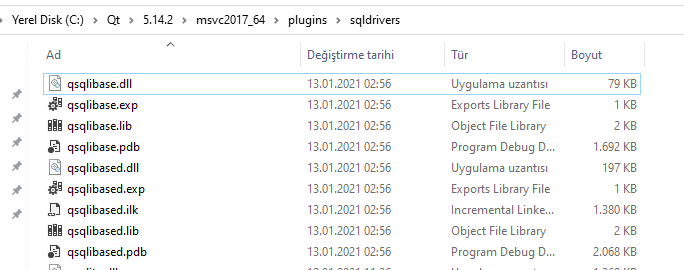
Regards,
Mucip:)


