
QCameraViewfinder in .ui file.
-
Thanks for your replies!
@SGaist, I don't quite get what you mean.I am sorry, here is the .ui file and some minimal code, using which one can reproduce the probelm.
The .ui file:
<?xml version="1.0" encoding="UTF-8"?>
<ui version="4.0">
 <class>MainWindow</class>
 <widget class="QMainWindow" name="MainWindow">
  <property name="geometry">
   <rect>
    <x>0</x>
    <y>0</y>
    <width>900</width>
    <height>667</height>
   </rect>
  </property>
  <property name="windowTitle">
   <string>MainWindow</string>
  </property>
  <widget class="QWidget" name="centralwidget">
   <widget class="QGroupBox" name="groupBox">
    <property name="geometry">
     <rect>
      <x>20</x>
      <y>10</y>
      <width>791</width>
      <height>581</height>
     </rect>
    </property>
    <property name="title">
     <string>GroupBox</string>
    </property>
    <widget class="QCameraViewfinder" name="viewfinder">
     <property name="geometry">
      <rect>
       <x>90</x>
       <y>70</y>
       <width>541</width>
       <height>361</height>
      </rect>
     </property>
     <property name="frameShape">
      <enum>QFrame::StyledPanel</enum>
     </property>
     <property name="frameShadow">
      <enum>QFrame::Raised</enum>
     </property>
    </widget>
   </widget>
  </widget>
  <widget class="QMenuBar" name="menubar">
   <property name="geometry">
    <rect>
     <x>0</x>
     <y>0</y>
     <width>900</width>
     <height>21</height>
    </rect>
   </property>
  </widget>
  <widget class="QStatusBar" name="statusbar"/>
 </widget>
 <customwidgets>
  <customwidget>
   <class>QCameraViewfinder</class>
   <extends>QFrame</extends>
   <header>qcameraviewfinder.h</header>
   <container>1</container>
  </customwidget>
 </customwidgets>
 <resources/>
 <connections/>
</ui>
And the code:
from PyQt5.Qt import * from PyQt5.uic import * import sys class MainWindow(QApplication, QMainWindow): def __init__(self): super(QApplication, self).__init__(sys.argv) path = 'C:/Users/admin/PycharmProjects/ExampleProject/GUI/main.ui' self.w = loadUi(path) self.w.show() if __name__ == '__main__': app = QApplication(sys.argv) w = MainWindow() sys.exit(app.exec_()) -
Thanks for your replies!
@SGaist, I don't quite get what you mean.I am sorry, here is the .ui file and some minimal code, using which one can reproduce the probelm.
The .ui file:
<?xml version="1.0" encoding="UTF-8"?>
<ui version="4.0">
 <class>MainWindow</class>
 <widget class="QMainWindow" name="MainWindow">
  <property name="geometry">
   <rect>
    <x>0</x>
    <y>0</y>
    <width>900</width>
    <height>667</height>
   </rect>
  </property>
  <property name="windowTitle">
   <string>MainWindow</string>
  </property>
  <widget class="QWidget" name="centralwidget">
   <widget class="QGroupBox" name="groupBox">
    <property name="geometry">
     <rect>
      <x>20</x>
      <y>10</y>
      <width>791</width>
      <height>581</height>
     </rect>
    </property>
    <property name="title">
     <string>GroupBox</string>
    </property>
    <widget class="QCameraViewfinder" name="viewfinder">
     <property name="geometry">
      <rect>
       <x>90</x>
       <y>70</y>
       <width>541</width>
       <height>361</height>
      </rect>
     </property>
     <property name="frameShape">
      <enum>QFrame::StyledPanel</enum>
     </property>
     <property name="frameShadow">
      <enum>QFrame::Raised</enum>
     </property>
    </widget>
   </widget>
  </widget>
  <widget class="QMenuBar" name="menubar">
   <property name="geometry">
    <rect>
     <x>0</x>
     <y>0</y>
     <width>900</width>
     <height>21</height>
    </rect>
   </property>
  </widget>
  <widget class="QStatusBar" name="statusbar"/>
 </widget>
 <customwidgets>
  <customwidget>
   <class>QCameraViewfinder</class>
   <extends>QFrame</extends>
   <header>qcameraviewfinder.h</header>
   <container>1</container>
  </customwidget>
 </customwidgets>
 <resources/>
 <connections/>
</ui>
And the code:
from PyQt5.Qt import * from PyQt5.uic import * import sys class MainWindow(QApplication, QMainWindow): def __init__(self): super(QApplication, self).__init__(sys.argv) path = 'C:/Users/admin/PycharmProjects/ExampleProject/GUI/main.ui' self.w = loadUi(path) self.w.show() if __name__ == '__main__': app = QApplication(sys.argv) w = MainWindow() sys.exit(app.exec_()) -
@igorr said in QCameraViewfinder in .ui file.:
QCameraViewfinderis a Qt-supplied class, yet you seem to be defining it as your own custom class deriving fromQFrame?@JonB well that was not really my intention. I just didn't find
QCameraViewFinderin the Qt Designer. As far as I understood, if I want to use some Qt element which is not in the designer, I can just promote other element.
So obviously it is not true, but I don't know then how to implementQCameraViewfinderin the Qt Designer. -
@JonB well that was not really my intention. I just didn't find
QCameraViewFinderin the Qt Designer. As far as I understood, if I want to use some Qt element which is not in the designer, I can just promote other element.
So obviously it is not true, but I don't know then how to implementQCameraViewfinderin the Qt Designer.I can just promote other element.
Yes, but it can't just be a random one :) [Unless I'm misunderstanding!]
QCameraViewfinderultimately derives fromQWidgetbut not fromQFrame.See the topic https://forum.qt.io/topic/93288/adding-qcameraviewfinder-in-ui-file, and the pic at https://postlmg.cc/vc81nsqj. Note how that example derives from/extends
QWidget. Try that! -
I can just promote other element.
Yes, but it can't just be a random one :) [Unless I'm misunderstanding!]
QCameraViewfinderultimately derives fromQWidgetbut not fromQFrame.See the topic https://forum.qt.io/topic/93288/adding-qcameraviewfinder-in-ui-file, and the pic at https://postlmg.cc/vc81nsqj. Note how that example derives from/extends
QWidget. Try that!As first I actually tried to promote a
QWidget, because I saw in the documentation thatQCameraViewfinderis derived from it. I don't remember, why I came to idea to try this with theQFrame(Maybe after some hours of frustration). But unfortunately it doesn't work withQWidgeteither:(
Here's the .ui file withQWidgetas base class<?xml version="1.0" encoding="UTF-8"?> <ui version="4.0"> <class>MainWindow</class> <widget class="QMainWindow" name="MainWindow"> <property name="geometry"> <rect> <x>0</x> <y>0</y> <width>900</width> <height>667</height> </rect> </property> <property name="windowTitle"> <string>MainWindow</string> </property> <widget class="QWidget" name="centralwidget"> <widget class="QGroupBox" name="groupBox"> <property name="geometry"> <rect> <x>20</x> <y>10</y> <width>791</width> <height>581</height> </rect> </property> <property name="title"> <string>GroupBox</string> </property> <widget class="QCameraViewfinder" name="widget" native="true"> <property name="geometry"> <rect> <x>340</x> <y>180</y> <width>371</width> <height>251</height> </rect> </property> </widget> </widget> </widget> <widget class="QMenuBar" name="menubar"> <property name="geometry"> <rect> <x>0</x> <y>0</y> <width>900</width> <height>21</height> </rect> </property> </widget> <widget class="QStatusBar" name="statusbar"/> </widget> <customwidgets> <customwidget> <class>QCameraViewfinder</class> <extends>QWidget</extends> <header>qcameraviewfinder.h</header> <container>1</container> </customwidget> </customwidgets> <resources/> <connections/> </ui>And here a screenshot:
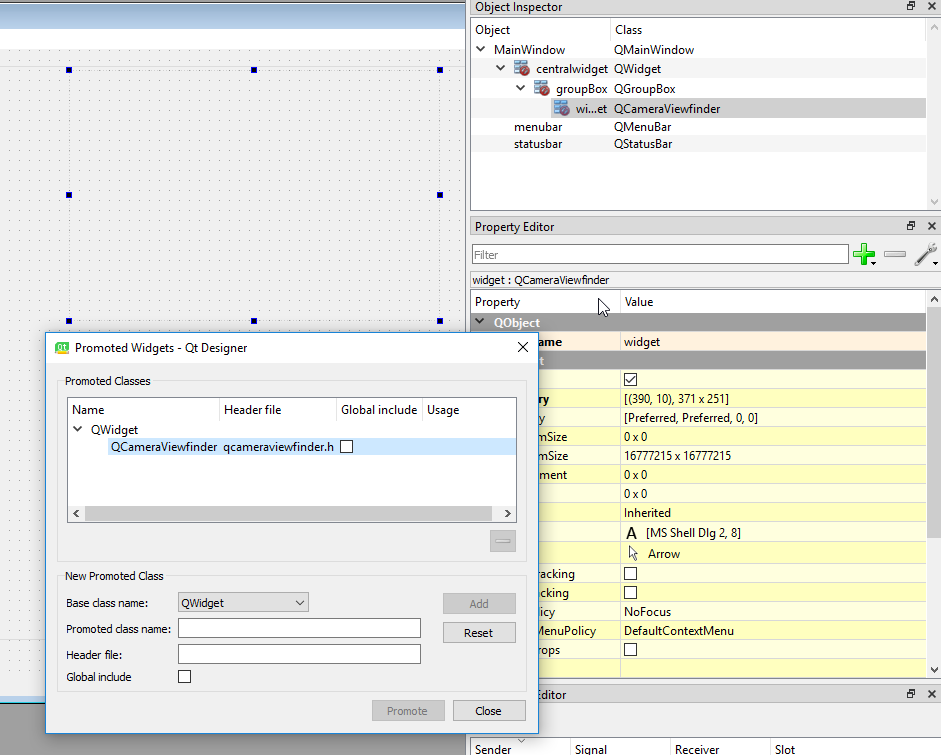
-
As first I actually tried to promote a
QWidget, because I saw in the documentation thatQCameraViewfinderis derived from it. I don't remember, why I came to idea to try this with theQFrame(Maybe after some hours of frustration). But unfortunately it doesn't work withQWidgeteither:(
Here's the .ui file withQWidgetas base class<?xml version="1.0" encoding="UTF-8"?> <ui version="4.0"> <class>MainWindow</class> <widget class="QMainWindow" name="MainWindow"> <property name="geometry"> <rect> <x>0</x> <y>0</y> <width>900</width> <height>667</height> </rect> </property> <property name="windowTitle"> <string>MainWindow</string> </property> <widget class="QWidget" name="centralwidget"> <widget class="QGroupBox" name="groupBox"> <property name="geometry"> <rect> <x>20</x> <y>10</y> <width>791</width> <height>581</height> </rect> </property> <property name="title"> <string>GroupBox</string> </property> <widget class="QCameraViewfinder" name="widget" native="true"> <property name="geometry"> <rect> <x>340</x> <y>180</y> <width>371</width> <height>251</height> </rect> </property> </widget> </widget> </widget> <widget class="QMenuBar" name="menubar"> <property name="geometry"> <rect> <x>0</x> <y>0</y> <width>900</width> <height>21</height> </rect> </property> </widget> <widget class="QStatusBar" name="statusbar"/> </widget> <customwidgets> <customwidget> <class>QCameraViewfinder</class> <extends>QWidget</extends> <header>qcameraviewfinder.h</header> <container>1</container> </customwidget> </customwidgets> <resources/> <connections/> </ui>And here a screenshot:
@igorr said in QCameraViewfinder in .ui file.:
But unfortunately it doesn't work with QWidget either:(
I don't really know, other than trying to follow what that other post said it did and worked.
As for "not work": you won't see anything in Designer, only at runtime?
Separately, in that Object Inspector you see "no entry" signs against 3 of your widgets. That means you have not assigned a layout in Designer to each of them, you should do that to make them look right at runtime.
-
@igorr said in QCameraViewfinder in .ui file.:
But unfortunately it doesn't work with QWidget either:(
I don't really know, other than trying to follow what that other post said it did and worked.
As for "not work": you won't see anything in Designer, only at runtime?
Separately, in that Object Inspector you see "no entry" signs against 3 of your widgets. That means you have not assigned a layout in Designer to each of them, you should do that to make them look right at runtime.
@JonB yes, I only encounter an error when running the python code. When looking at the Traceback, it seems for me like PyQt still tries to create a custom widget instead of using the existing QCameraViewfinder class.
Thanks for the hint about the layout! I wasn't aware of this issue.
Traceback (most recent call last): File "C:\Users\admin\PycharmProjects\ExampleProject\main1.py", line 22, in <module> w = MainWindow() File "C:\Users\admin\PycharmProjects\ExampleProject\main1.py", line 16, in __init__ self.w = loadUi(path) File "C:\Users\admin\PycharmProjects\newGUI\venv\lib\site-packages\PyQt5\uic\__init__.py", line 238, in loadUi return DynamicUILoader(package).loadUi(uifile, baseinstance, resource_suffix) File "C:\Users\admin\PycharmProjects\newGUI\venv\lib\site-packages\PyQt5\uic\Loader\loader.py", line 66, in loadUi return self.parse(filename, resource_suffix) File "C:\Users\admin\PycharmProjects\newGUI\venv\lib\site-packages\PyQt5\uic\uiparser.py", line 1037, in parse actor(elem) File "C:\Users\admin\PycharmProjects\newGUI\venv\lib\site-packages\PyQt5\uic\uiparser.py", line 828, in createUserInterface self.traverseWidgetTree(elem) File "C:\Users\admin\PycharmProjects\newGUI\venv\lib\site-packages\PyQt5\uic\uiparser.py", line 806, in traverseWidgetTree handler(self, child) File "C:\Users\admin\PycharmProjects\newGUI\venv\lib\site-packages\PyQt5\uic\uiparser.py", line 273, in createWidget self.traverseWidgetTree(elem) File "C:\Users\admin\PycharmProjects\newGUI\venv\lib\site-packages\PyQt5\uic\uiparser.py", line 806, in traverseWidgetTree handler(self, child) File "C:\Users\admin\PycharmProjects\newGUI\venv\lib\site-packages\PyQt5\uic\uiparser.py", line 273, in createWidget self.traverseWidgetTree(elem) File "C:\Users\admin\PycharmProjects\newGUI\venv\lib\site-packages\PyQt5\uic\uiparser.py", line 806, in traverseWidgetTree handler(self, child) File "C:\Users\admin\PycharmProjects\newGUI\venv\lib\site-packages\PyQt5\uic\uiparser.py", line 264, in createWidget self.stack.push(self.setupObject(widget_class, parent, elem)) File "C:\Users\admin\PycharmProjects\newGUI\venv\lib\site-packages\PyQt5\uic\uiparser.py", line 228, in setupObject obj = self.factory.createQObject(clsname, name, args, is_attribute) File "C:\Users\admin\PycharmProjects\newGUI\venv\lib\site-packages\PyQt5\uic\objcreator.py", line 100, in createQObject factory = self.findQObjectType(classname) File "C:\Users\admin\PycharmProjects\newGUI\venv\lib\site-packages\PyQt5\uic\objcreator.py", line 125, in findQObjectType w = module.search(classname) File "C:\Users\admin\PycharmProjects\newGUI\venv\lib\site-packages\PyQt5\uic\Loader\qobjectcreator.py", line 114, in search module = __import__(mname, {}, {}, (cls,)) ModuleNotFoundError: No module named 'qcameraviewfinder' -
@JonB yes, I only encounter an error when running the python code. When looking at the Traceback, it seems for me like PyQt still tries to create a custom widget instead of using the existing QCameraViewfinder class.
Thanks for the hint about the layout! I wasn't aware of this issue.
Traceback (most recent call last): File "C:\Users\admin\PycharmProjects\ExampleProject\main1.py", line 22, in <module> w = MainWindow() File "C:\Users\admin\PycharmProjects\ExampleProject\main1.py", line 16, in __init__ self.w = loadUi(path) File "C:\Users\admin\PycharmProjects\newGUI\venv\lib\site-packages\PyQt5\uic\__init__.py", line 238, in loadUi return DynamicUILoader(package).loadUi(uifile, baseinstance, resource_suffix) File "C:\Users\admin\PycharmProjects\newGUI\venv\lib\site-packages\PyQt5\uic\Loader\loader.py", line 66, in loadUi return self.parse(filename, resource_suffix) File "C:\Users\admin\PycharmProjects\newGUI\venv\lib\site-packages\PyQt5\uic\uiparser.py", line 1037, in parse actor(elem) File "C:\Users\admin\PycharmProjects\newGUI\venv\lib\site-packages\PyQt5\uic\uiparser.py", line 828, in createUserInterface self.traverseWidgetTree(elem) File "C:\Users\admin\PycharmProjects\newGUI\venv\lib\site-packages\PyQt5\uic\uiparser.py", line 806, in traverseWidgetTree handler(self, child) File "C:\Users\admin\PycharmProjects\newGUI\venv\lib\site-packages\PyQt5\uic\uiparser.py", line 273, in createWidget self.traverseWidgetTree(elem) File "C:\Users\admin\PycharmProjects\newGUI\venv\lib\site-packages\PyQt5\uic\uiparser.py", line 806, in traverseWidgetTree handler(self, child) File "C:\Users\admin\PycharmProjects\newGUI\venv\lib\site-packages\PyQt5\uic\uiparser.py", line 273, in createWidget self.traverseWidgetTree(elem) File "C:\Users\admin\PycharmProjects\newGUI\venv\lib\site-packages\PyQt5\uic\uiparser.py", line 806, in traverseWidgetTree handler(self, child) File "C:\Users\admin\PycharmProjects\newGUI\venv\lib\site-packages\PyQt5\uic\uiparser.py", line 264, in createWidget self.stack.push(self.setupObject(widget_class, parent, elem)) File "C:\Users\admin\PycharmProjects\newGUI\venv\lib\site-packages\PyQt5\uic\uiparser.py", line 228, in setupObject obj = self.factory.createQObject(clsname, name, args, is_attribute) File "C:\Users\admin\PycharmProjects\newGUI\venv\lib\site-packages\PyQt5\uic\objcreator.py", line 100, in createQObject factory = self.findQObjectType(classname) File "C:\Users\admin\PycharmProjects\newGUI\venv\lib\site-packages\PyQt5\uic\objcreator.py", line 125, in findQObjectType w = module.search(classname) File "C:\Users\admin\PycharmProjects\newGUI\venv\lib\site-packages\PyQt5\uic\Loader\qobjectcreator.py", line 114, in search module = __import__(mname, {}, {}, (cls,)) ModuleNotFoundError: No module named 'qcameraviewfinder'@igorr
I have never used promotion to get a supplied widget into designer, only one I create myself. So I don't know.If you were C++ the line in the
.uifile:<header>qcameraviewfinder.h</header>would require you to have created, or it to find, a
qcameraviewfinder.hheader file. From Python I think yourModuleNotFoundError: No module named 'qcameraviewfinder'is the equivalent. I think you will need a
qcamerafinderPython module to satisfy this.If you cannot figure how to deal with this, you do not have to put that
QCameraViewfinderin as a widget in Designer. You could just create it dynamically at runtime and put it into the right place in your UI. -
@igorr You have the following errors:
- The "header file" must be "PyQt5/QtMultimediaWidgets" or "PyQt5.QtMultimediaWidgets".
- When promoting, the base class must be used, but QFrame is not a base class of QCameraViewfinder so I had to change it to QWidget, which is one of its base classes.
- You cannot and should not inherit from 2 QObjects, in your case QApplication and QMainWindow.
main.ui
<?xml version="1.0" encoding="UTF-8"?> <ui version="4.0"> <class>MainWindow</class> <widget class="QMainWindow" name="MainWindow"> <property name="geometry"> <rect> <x>0</x> <y>0</y> <width>900</width> <height>667</height> </rect> </property> <property name="windowTitle"> <string>MainWindow</string> </property> <widget class="QWidget" name="centralwidget"> <widget class="QGroupBox" name="groupBox"> <property name="geometry"> <rect> <x>20</x> <y>10</y> <width>791</width> <height>581</height> </rect> </property> <property name="title"> <string>GroupBox</string> </property> <widget class="QCameraViewfinder" name="viewfinder" native="true"> <property name="geometry"> <rect> <x>90</x> <y>70</y> <width>541</width> <height>361</height> </rect> </property> </widget> </widget> </widget> <widget class="QMenuBar" name="menubar"> <property name="geometry"> <rect> <x>0</x> <y>0</y> <width>900</width> <height>30</height> </rect> </property> </widget> <widget class="QStatusBar" name="statusbar"/> </widget> <customwidgets> <customwidget> <class>QCameraViewfinder</class> <extends>QWidget</extends> <header>PyQt5.QtMultimediaWidgets</header> <container>1</container> </customwidget> </customwidgets> <resources/> <connections/> </ui>import os.path import sys from PyQt5.uic import loadUi from PyQt5.QtWidgets import QApplication, QMainWindow from PyQt5.QtMultimedia import QCamera CURRENT_DIRECTORY = os.path.dirname(os.path.realpath(__file__)) class MainWindow(QMainWindow): def __init__(self, parent=None): super(MainWindow, self).__init__(parent) path = os.path.join(CURRENT_DIRECTORY, "GUI", "main.ui") loadUi(path, self) self.qcamera = QCamera() self.qcamera.setViewfinder(self.viewfinder) self.qcamera.start() if __name__ == "__main__": app = QApplication(sys.argv) w = MainWindow() w.show() sys.exit(app.exec_()) -
@igorr You have the following errors:
- The "header file" must be "PyQt5/QtMultimediaWidgets" or "PyQt5.QtMultimediaWidgets".
- When promoting, the base class must be used, but QFrame is not a base class of QCameraViewfinder so I had to change it to QWidget, which is one of its base classes.
- You cannot and should not inherit from 2 QObjects, in your case QApplication and QMainWindow.
main.ui
<?xml version="1.0" encoding="UTF-8"?> <ui version="4.0"> <class>MainWindow</class> <widget class="QMainWindow" name="MainWindow"> <property name="geometry"> <rect> <x>0</x> <y>0</y> <width>900</width> <height>667</height> </rect> </property> <property name="windowTitle"> <string>MainWindow</string> </property> <widget class="QWidget" name="centralwidget"> <widget class="QGroupBox" name="groupBox"> <property name="geometry"> <rect> <x>20</x> <y>10</y> <width>791</width> <height>581</height> </rect> </property> <property name="title"> <string>GroupBox</string> </property> <widget class="QCameraViewfinder" name="viewfinder" native="true"> <property name="geometry"> <rect> <x>90</x> <y>70</y> <width>541</width> <height>361</height> </rect> </property> </widget> </widget> </widget> <widget class="QMenuBar" name="menubar"> <property name="geometry"> <rect> <x>0</x> <y>0</y> <width>900</width> <height>30</height> </rect> </property> </widget> <widget class="QStatusBar" name="statusbar"/> </widget> <customwidgets> <customwidget> <class>QCameraViewfinder</class> <extends>QWidget</extends> <header>PyQt5.QtMultimediaWidgets</header> <container>1</container> </customwidget> </customwidgets> <resources/> <connections/> </ui>import os.path import sys from PyQt5.uic import loadUi from PyQt5.QtWidgets import QApplication, QMainWindow from PyQt5.QtMultimedia import QCamera CURRENT_DIRECTORY = os.path.dirname(os.path.realpath(__file__)) class MainWindow(QMainWindow): def __init__(self, parent=None): super(MainWindow, self).__init__(parent) path = os.path.join(CURRENT_DIRECTORY, "GUI", "main.ui") loadUi(path, self) self.qcamera = QCamera() self.qcamera.setViewfinder(self.viewfinder) self.qcamera.start() if __name__ == "__main__": app = QApplication(sys.argv) w = MainWindow() w.show() sys.exit(app.exec_())@eyllanesc thanks a lot! Changing the header file name helped. I have also fixed the multiple inheritance.
I hope I will be able to avoid such problems in the future.

