Skip to content
  • Categories
  • Recent
  • Tags
  • Popular
  • Users
  • Groups
  • Search
  • Get Qt
  • Unsolved
Collapse
Brand Logo
  1. Home
  2. Qt Development
  3. General and Desktop
  4. Search and select item in QTreeWidget based on Search String
Qt 6.12 LTS is out! See what's new in the release blog

Search and select item in QTreeWidget based on Search String

Scheduled Pinned Locked Moved Solved General and Desktop
19 Posts 6 Posters 7.9k Views 3 Watching
  • Oldest to Newest
  • Newest to Oldest
  • Most Votes
Reply
  • Reply as topic
Log in to reply
This topic has been deleted. Only users with topic management privileges can see it.
  • SGaistS SGaist

    Hi,

    setCurrentItem is for one item.

    If you want to select several you are going to have to talk with the selection model.

    M Offline
    M Offline
    MostafaEzzat
    wrote on last edited by
    #3

    @SGaist

    Hi,

    I dunno if it's the best way to search in this treewidget but this Treewidget will maybe have thousand of items but the tree Widget have slot "ItemDoubleClicked" so i want to write something in the lineEdit then highlight it in the treeWidget and the user will see if he will add it or not so what's the best way to do it and how to pass this string to search in the treeWidget you just tell me which function and which class and i'll do the rest

    Thanks in Advance

    1 Reply Last reply
    0
    • SGaistS Offline
      SGaistS Offline
      SGaist
      Lifetime Qt Champion
      wrote on last edited by
      #4

      If you want high performance you should rather use your own tree data structure with a model on top of it.

      As for the highlighting, you can implement a custom QStyledItemDelegate and mark the tree items using a custom role. Then in the delegate paint method, check for that role and modify the color of the background of the item.

      Interested in AI ? www.idiap.ch
      Please read the Qt Code of Conduct - https://forum.qt.io/topic/113070/qt-code-of-conduct

      M 1 Reply Last reply
      0
      • SGaistS SGaist

        If you want high performance you should rather use your own tree data structure with a model on top of it.

        As for the highlighting, you can implement a custom QStyledItemDelegate and mark the tree items using a custom role. Then in the delegate paint method, check for that role and modify the color of the background of the item.

        M Offline
        M Offline
        MostafaEzzat
        wrote on last edited by
        #5

        @SGaist

        i'm sorry for bothering but i couldn't do this with

        • QItemSelectionModel

        i don't know how to pass QTreeWidget to QItemSelectionModel to use
        QItemSelectionModel::select or setCurrentIndex

        i'm sorry another normal Question

        • What is difference between QFrame and QMDIArea and OpenGl Widget that which case i should use them?

        i did it but if i've almost similar items it starts searching from the bottom and not go to the other similar item

        Thanks in Advance

        qtsad.PNG

        mrjjM 1 Reply Last reply
        0
        • M MostafaEzzat

          @SGaist

          i'm sorry for bothering but i couldn't do this with

          • QItemSelectionModel

          i don't know how to pass QTreeWidget to QItemSelectionModel to use
          QItemSelectionModel::select or setCurrentIndex

          i'm sorry another normal Question

          • What is difference between QFrame and QMDIArea and OpenGl Widget that which case i should use them?

          i did it but if i've almost similar items it starts searching from the bottom and not go to the other similar item

          Thanks in Advance

          qtsad.PNG

          mrjjM Offline
          mrjjM Offline
          mrjj
          Lifetime Qt Champion
          wrote on last edited by
          #6

          @MostafaEzzat

          Hi
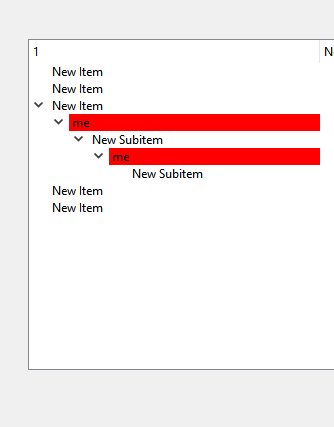
          If you are not looking for actually selecting the matched items,
          but merely highlight them
          you could do

          
              QList<QTreeWidgetItem*> clist = ui->treeWidget->findItems("me", Qt::MatchContains|Qt::MatchRecursive, 0);
              for (QTreeWidgetItem* item : clist) {
               item->setBackground(0,Qt::red);
              }
          

          alt text

          However, a delegate like @SGaist suggest would be more elegant and work better as with this
          the approach you have to loop over the same list again and set the background back to normal to clear the highlighting again.

          • What is difference between QFrame and QMDIArea and OpenGl Widget that which case i should use them?

          Well there are very different widgets.

          • QFrame can contain other widgets and provides a drawn frame that can be changed to different looks.
            Often use to divide an app into section for visual navigation.

          • QMDIArea allows having multiple inline windows that can be arranged and also contains widgets.
            Allows the app to have multiple documents active.
            A better choice for this would be
            https://doc.qt.io/qt-5/qdockwidget.html

          MDI look. They are drawn like in win 7. Also on win 10.

          alt text

          • OpenGl Widget
            Allows to use the OpenGL language to draw accelerated graphics. Much like a game would.
            The Widget allows having a section of the app showing these graphics in the versus being fullscreen.
            This would be used for special visualizations.
          M 1 Reply Last reply
          0
          • mrjjM mrjj

            @MostafaEzzat

            Hi
            If you are not looking for actually selecting the matched items,
            but merely highlight them
            you could do

            
                QList<QTreeWidgetItem*> clist = ui->treeWidget->findItems("me", Qt::MatchContains|Qt::MatchRecursive, 0);
                for (QTreeWidgetItem* item : clist) {
                 item->setBackground(0,Qt::red);
                }
            

            alt text

            However, a delegate like @SGaist suggest would be more elegant and work better as with this
            the approach you have to loop over the same list again and set the background back to normal to clear the highlighting again.

            • What is difference between QFrame and QMDIArea and OpenGl Widget that which case i should use them?

            Well there are very different widgets.

            • QFrame can contain other widgets and provides a drawn frame that can be changed to different looks.
              Often use to divide an app into section for visual navigation.

            • QMDIArea allows having multiple inline windows that can be arranged and also contains widgets.
              Allows the app to have multiple documents active.
              A better choice for this would be
              https://doc.qt.io/qt-5/qdockwidget.html

            MDI look. They are drawn like in win 7. Also on win 10.
            alt text

            • OpenGl Widget
              Allows to use the OpenGL language to draw accelerated graphics. Much like a game would.
              The Widget allows having a section of the app showing these graphics in the versus being fullscreen.
              This would be used for special visualizations.
            M Offline
            M Offline
            MostafaEzzat
            wrote on last edited by
            #7

            @mrjj

            Hi ,

            I Already have this function about QLineEndit to write in the LineEdit then search in TreeWidget

            void Profile3::on_lineEdit_textEdited(const QString &arg1)
            {
                QList<QTreeWidgetItem*> clist = ui->treeWidget_Medicine->findItems(arg1, Qt::MatchContains|Qt::MatchRecursive, 0);
            
              // QItemSelectionModel <QTreeWidgetItem*> select;
                for(QTreeWidgetItem* item: clist)
                {
            
                //    select->setCurrentIndex(select,Qt::MatchContains|Qt::MatchRecursive);
                    ui->treeWidget_Medicine->setCurrentItem(item,0);
                    item->setBackground(0,Qt::red) ;
                     qDebug() << endl <<  item->text(0) << "Medicine"  ;
                }
            
            }
            

            but it went this , so i just need to tell me about QItemSelectionModel that how to use with TreeWidget to select multiple chocies even if i made the loop to clear highlight

            qtrffaa.PNG

            1 Reply Last reply
            0
            • mrjjM Offline
              mrjjM Offline
              mrjj
              Lifetime Qt Champion
              wrote on last edited by
              #8

              Hi
              So it colored all items ???

              M 1 Reply Last reply
              0
              • mrjjM mrjj

                Hi
                So it colored all items ???

                M Offline
                M Offline
                MostafaEzzat
                wrote on last edited by MostafaEzzat
                #9

                @mrjj

                Yes it colored all the items after i delete and rewrite in QLineEdit so i guess as you said it needs also for loop to delete the highlight but i guess it will not be elegent i just need multiple selection like (I mean the way of selection) of

                •     ui->treeWidget_Medicine->setCurrentItem(item,0);
                  

                that when i search for something highlight the normal like

                • setCurrentItem

                Thanks in Advance appreciate

                mrjjM 1 Reply Last reply
                0
                • M MostafaEzzat

                  @mrjj

                  Yes it colored all the items after i delete and rewrite in QLineEdit so i guess as you said it needs also for loop to delete the highlight but i guess it will not be elegent i just need multiple selection like (I mean the way of selection) of

                  •     ui->treeWidget_Medicine->setCurrentItem(item,0);
                    

                  that when i search for something highlight the normal like

                  • setCurrentItem

                  Thanks in Advance appreciate

                  mrjjM Offline
                  mrjjM Offline
                  mrjj
                  Lifetime Qt Champion
                  wrote on last edited by mrjj
                  #10

                  @MostafaEzzat
                  Hi
                  Ah yes if you dont clear the background before each search that will happen.

                  Im not sure how we can do when its a TreeWidget as the function we need is protected

                  https://doc.qt.io/qt-5/qtreewidget.html#indexFromItem

                  so we could do

                  
                        auto sel = ui->treeWidget->selectionModel();
                        for(QTreeWidgetItem* item: clist)
                        {
                         QModelIndex index = ui->treeWidget->indexFromItem(item,0);
                         sel->select(index) ;
                        }


                  So you would need to subclass your TreeWidget to do this.

                  M 1 Reply Last reply
                  0
                  • mrjjM mrjj

                    @MostafaEzzat
                    Hi
                    Ah yes if you dont clear the background before each search that will happen.

                    Im not sure how we can do when its a TreeWidget as the function we need is protected

                    https://doc.qt.io/qt-5/qtreewidget.html#indexFromItem

                    so we could do

                    
                          auto sel = ui->treeWidget->selectionModel();
                          for(QTreeWidgetItem* item: clist)
                          {
                           QModelIndex index = ui->treeWidget->indexFromItem(item,0);
                           sel->select(index) ;
                          }


                    So you would need to subclass your TreeWidget to do this.

                    M Offline
                    M Offline
                    MostafaEzzat
                    wrote on last edited by
                    #11

                    @mrjj

                    I inherted QTreeWidget like this and still gives me it's protected or do you think i should rewrite QModel Index file to inhert QTreeWidgetItem in it

                    class Profile3 : public QWidget , public QTreeWidgetItem , public QModelIndex
                    {
                    
                    
                    • D:\New folder\Hospitaal\profile3.cpp:360: error: 'QModelIndex QTreeWidget::indexFromItem(QTreeWidgetItem*, int) const' is protected within this context

                    • ..\Hospitaal\profile3.cpp: In member function 'void Profile3::on_lineEdit_textEdited(const QString&)':

                    • ..\Hospitaal\profile3.cpp:360:71: error: 'QModelIndex QTreeWidget::indexFromItem(QTreeWidgetItem*, int) const' is protected within this context

                    •   QModelIndex index = ui->treeWidget_Medicine->indexFromItem(item,0);
                      
                    • D:\New folder\Hospitaal\profile3.cpp:361: error: no matching function for call to 'QItemSelectionModel::select(QModelIndex&)'

                    • ..\Hospitaal\profile3.cpp:361:23: error: no matching function for call to 'QItemSelectionModel::select(QModelIndex&)'

                    •   sel->select(index) ;
                      
                    mrjjM 1 Reply Last reply
                    0
                    • M MostafaEzzat

                      @mrjj

                      I inherted QTreeWidget like this and still gives me it's protected or do you think i should rewrite QModel Index file to inhert QTreeWidgetItem in it

                      class Profile3 : public QWidget , public QTreeWidgetItem , public QModelIndex
                      {
                      
                      
                      • D:\New folder\Hospitaal\profile3.cpp:360: error: 'QModelIndex QTreeWidget::indexFromItem(QTreeWidgetItem*, int) const' is protected within this context

                      • ..\Hospitaal\profile3.cpp: In member function 'void Profile3::on_lineEdit_textEdited(const QString&)':

                      • ..\Hospitaal\profile3.cpp:360:71: error: 'QModelIndex QTreeWidget::indexFromItem(QTreeWidgetItem*, int) const' is protected within this context

                      •   QModelIndex index = ui->treeWidget_Medicine->indexFromItem(item,0);
                        
                      • D:\New folder\Hospitaal\profile3.cpp:361: error: no matching function for call to 'QItemSelectionModel::select(QModelIndex&)'

                      • ..\Hospitaal\profile3.cpp:361:23: error: no matching function for call to 'QItemSelectionModel::select(QModelIndex&)'

                      •   sel->select(index) ;
                        
                      mrjjM Offline
                      mrjjM Offline
                      mrjj
                      Lifetime Qt Champion
                      wrote on last edited by mrjj
                      #12

                      @MostafaEzzat
                      Hi
                      Ehh that is nothing like I expected. o.O

                      You need a subclassed TreeWidget like code below
                      and use that instead of the standard one.

                      class MyTreeWidget : public QTreeWidget
                      {
                          Q_OBJECT
                      public:
                          explicit MyTreeWidget(QWidget *parent = nullptr) : QTreeWidget(parent)
                          {
                      
                          }
                      
                          void DoSearch(QString term) {
                      
                              QList<QTreeWidgetItem *> clist = findItems(term,Qt::MatchContains | Qt::MatchRecursive, 0);
                      
                              auto sel = selectionModel();
                              for (QTreeWidgetItem *item : clist) {
                                  QModelIndex index = indexFromItem(item, 0);
                                  sel->select(index,  QItemSelectionModel::Select) ;
                              }
                      
                          }
                      
                      };
                      
                      and use your new DoSearch
                      
                      ui->treeWidget->selectionModel()->clear(); // get rid of old selection
                      ui->treeWidget->DoSearch(ui->lineEdit->text());
                      

                      Then it will select them
                      alt text

                      Test Project
                      https://www.dropbox.com/s/zu5tc2hobdwt56i/justDefualt.zip?dl=0

                      Do note. I used the promotion feature of Creator to replace the normal one with my subclassed one.
                      That is why you dont see code that goes
                      MyTreeWidget * tree = new MyTreeWidget(this);
                      To insert into main form.

                      M 1 Reply Last reply
                      2
                      • mrjjM mrjj

                        @MostafaEzzat
                        Hi
                        Ehh that is nothing like I expected. o.O

                        You need a subclassed TreeWidget like code below
                        and use that instead of the standard one.

                        class MyTreeWidget : public QTreeWidget
                        {
                            Q_OBJECT
                        public:
                            explicit MyTreeWidget(QWidget *parent = nullptr) : QTreeWidget(parent)
                            {
                        
                            }
                        
                            void DoSearch(QString term) {
                        
                                QList<QTreeWidgetItem *> clist = findItems(term,Qt::MatchContains | Qt::MatchRecursive, 0);
                        
                                auto sel = selectionModel();
                                for (QTreeWidgetItem *item : clist) {
                                    QModelIndex index = indexFromItem(item, 0);
                                    sel->select(index,  QItemSelectionModel::Select) ;
                                }
                        
                            }
                        
                        };
                        
                        and use your new DoSearch
                        
                        ui->treeWidget->selectionModel()->clear(); // get rid of old selection
                        ui->treeWidget->DoSearch(ui->lineEdit->text());
                        

                        Then it will select them
                        alt text

                        Test Project
                        https://www.dropbox.com/s/zu5tc2hobdwt56i/justDefualt.zip?dl=0

                        Do note. I used the promotion feature of Creator to replace the normal one with my subclassed one.
                        That is why you dont see code that goes
                        MyTreeWidget * tree = new MyTreeWidget(this);
                        To insert into main form.

                        M Offline
                        M Offline
                        MostafaEzzat
                        wrote on last edited by
                        #13
                        This post is deleted!
                        M 1 Reply Last reply
                        0
                        • M MostafaEzzat

                          This post is deleted!

                          M Offline
                          M Offline
                          MostafaEzzat
                          wrote on last edited by
                          #14
                          This post is deleted!
                          1 Reply Last reply
                          0
                          • M Offline
                            M Offline
                            MostafaEzzat
                            wrote on last edited by
                            #15

                            @mrjj

                            Thanks i got it after a while , it works very well

                            Appreciated

                            mrjjM 1 Reply Last reply
                            1
                            • M MostafaEzzat

                              @mrjj

                              Thanks i got it after a while , it works very well

                              Appreciated

                              mrjjM Offline
                              mrjjM Offline
                              mrjj
                              Lifetime Qt Champion
                              wrote on last edited by
                              #16

                              @MostafaEzzat
                              Good to hear :)

                              1 Reply Last reply
                              0
                              • J Offline
                                J Offline
                                John H. BROOKS
                                wrote on last edited by
                                #17

                                Please Sir, it's almost a month I'm trying to know how to return a big text (10MB) in QTextWidget or in any suitable widget you would suject
                                (I'm trying to work on a similar project like esword, see here link text)

                                JonBJ 1 Reply Last reply
                                0
                                • J John H. BROOKS

                                  Please Sir, it's almost a month I'm trying to know how to return a big text (10MB) in QTextWidget or in any suitable widget you would suject
                                  (I'm trying to work on a similar project like esword, see here link text)

                                  JonBJ Offline
                                  JonBJ Offline
                                  JonB
                                  wrote on last edited by
                                  #18

                                  @John-H-BROOKS
                                  Hello and welcome.

                                  Open your own new thread with your question, it is different from this topic. Describe what you are trying to do and what the issues are.

                                  O 1 Reply Last reply
                                  1
                                  • JonBJ JonB

                                    @John-H-BROOKS
                                    Hello and welcome.

                                    Open your own new thread with your question, it is different from this topic. Describe what you are trying to do and what the issues are.

                                    O Offline
                                    O Offline
                                    OdinUci
                                    wrote on last edited by
                                    #19

                                    @Jmrjj please how can I make a filter to a tree

                                    1 Reply Last reply
                                    0

                                    • Login

                                    • Login or register to search.
                                    • First post
                                      Last post
                                    0
                                    • Categories
                                    • Recent
                                    • Tags
                                    • Popular
                                    • Users
                                    • Groups
                                    • Search
                                    • Get Qt
                                    • Unsolved