The CDB process terminated
-
In that post I wrote about two problems in did, with vcruntime140_app.dll and this one, The CBT process terminated.
The first problem is solved and I create another thread for second problem. Maybe I shouldn't did that.
Regarding your advice: "try running the CDB outside of Qt Creator"
I don't know what is mean, I haven't worked with Qt until now. And I searched about CDB info:


Found nothing. How can I run CDB outside of Qt creator ?
Thank you for your patience.
-
Hi @Flaviu-0,
Can you debug a minimal, "hello world" like program from Qt Creator with CDB?
That has to work first to prove everything is set up correctly.
Regards
-
Hi @Flaviu-0,
Can you debug a minimal, "hello world" like program from Qt Creator with CDB?
That has to work first to prove everything is set up correctly.
Regards
-
@aha_1980 But really I don't know if I debug the hello world app with CDB or with something else :) ... I can go through the code step by step with F9/F10, that's all I know.
-
Let me give another information. In the real app case, when I hit F5, before starting the debugger, I see in Application Output:
...
...
[ 95%] Built target edit_measure
[ 96%] Built target edit_mutualcorrs
[ 96%] Built target edit_paint
[ 97%] Built target edit_point
[ 98%] Built target edit_pickpoints
[ 99%] Built target edit_referencing
[ 99%] Built target edit_select
[100%] Built target edit_quality
Install the project...
-- Install configuration: "Debug"
-- Up-to-date: D:/Project/MyProject/src/install_debug/shaders/Cook-Torrance.frag
-- Up-to-date: D:/Project/MyProject/src/install_debug/shaders/Cook-Torrance.gdp
-- Up-to-date: D:/Project/MyProject/src/install_debug/shaders/Cook-Torrance.vert
-- Up-to-date: D:/Project/MyProject/src/install_debug/shaders/Hatch.frag
-- Up-to-date: D:/Project/MyProject/src/install_debug/shaders/Hatch.gdp
-- Up-to-date: D:/Project/MyProject/src/install_debug/shaders/Hatch.vert
...
...
I guess that is not normal ... right ?
-
you can open View > Views > Debugger Log and see what is printed there.
Can you Run your real app from Creator (i.e. without debugger)?
Regards
@aha_1980
I opened that log, I and see:MyProject loaded: MyProject.exe MyProject loaded: ntdll.dll MyProject loaded: C:\WINDOWS\System32\KERNEL32.DLL MyProject loaded: C:\WINDOWS\System32\KERNELBASE.dll MyProject loaded: C:\WINDOWS\System32\SHELL32.dll MyProject loaded: C:\WINDOWS\System32\ucrtbase.dll MyProject loaded: C:\WINDOWS\System32\cfgmgr32.dll MyProject loaded: C:\WINDOWS\System32\shcore.dll MyProject loaded: C:\WINDOWS\System32\msvcrt.dll MyProject loaded: C:\WINDOWS\System32\RPCRT4.dll MyProject loaded: C:\WINDOWS\System32\combase.dll MyProject loaded: C:\WINDOWS\System32\bcryptPrimitives.dll MyProject loaded: C:\WINDOWS\System32\windows.storage.dll MyProject loaded: C:\WINDOWS\System32\msvcp_win.dll MyProject loaded: C:\WINDOWS\System32\sechost.dll MyProject loaded: C:\WINDOWS\System32\advapi32.dll MyProject loaded: C:\WINDOWS\System32\profapi.dll MyProject loaded: C:\WINDOWS\System32\powrprof.dll MyProject loaded: C:\WINDOWS\System32\UMPDC.dll MyProject loaded: C:\WINDOWS\System32\shlwapi.dll MyProject loaded: C:\WINDOWS\System32\GDI32.dll MyProject loaded: C:\WINDOWS\System32\win32u.dll MyProject loaded: C:\WINDOWS\System32\gdi32full.dll MyProject loaded: C:\WINDOWS\System32\USER32.dll MyProject loaded: C:\WINDOWS\System32\kernel.appcore.dll MyProject loaded: C:\WINDOWS\System32\cryptsp.dll MyProject loaded: C:\WINDOWS\SYSTEM32\GLU32.dll MyProject loaded: D:\Project\MyProject\build-src-Desktop_Qt_5_12_10_MSVC2017_64bit-Debug\distrib\Qt5Networkd.dll MyProject loaded: C:\WINDOWS\System32\WS2_32.dll MyProject loaded: D:\Project\MyProject\build-src-Desktop_Qt_5_12_10_MSVC2017_64bit-Debug\distrib\Qt5OpenGLd.dll MyProject loaded: D:\Project\MyProject\build-src-Desktop_Qt_5_12_10_MSVC2017_64bit-Debug\distrib\Qt5Widgetsd.dll MyProject loaded: D:\Project\MyProject\build-src-Desktop_Qt_5_12_10_MSVC2017_64bit-Debug\distrib\Qt5Guid.dll MyProject loaded: D:\Project\MyProject\build-src-Desktop_Qt_5_12_10_MSVC2017_64bit-Debug\distrib\Qt5Xmld.dll MyProject loaded: C:\WINDOWS\SYSTEM32\OPENGL32.dll MyProject loaded: D:\Project\MyProject\build-src-Desktop_Qt_5_12_10_MSVC2017_64bit-Debug\distrib\Qt5Cored.dll MyProject loaded: C:\WINDOWS\SYSTEM32\MSVCP140D.dll MyProject loaded: C:\WINDOWS\SYSTEM32\VCRUNTIME140D.dll MyProject loaded: C:\WINDOWS\SYSTEM32\ucrtbased.dll MyProject loaded: C:\WINDOWS\SYSTEM32\ucrtbased.dll ERROR: Process crashed Debugger finished.and
************* Path validation summary ************** Response Time (ms) Location Error "" Symbol search path is: "" Executable search path is: Module loaded: MyProject.exe Module loaded: ntdll.dll Module loaded: C:\WINDOWS\System32\KERNEL32.DLL Module loaded: C:\WINDOWS\System32\KERNELBASE.dll Module loaded: C:\WINDOWS\System32\SHELL32.dll Module loaded: C:\WINDOWS\System32\ucrtbase.dll Module loaded: C:\WINDOWS\System32\cfgmgr32.dll Module loaded: C:\WINDOWS\System32\shcore.dll Module loaded: C:\WINDOWS\System32\msvcrt.dll Module loaded: C:\WINDOWS\System32\RPCRT4.dll Module loaded: C:\WINDOWS\System32\combase.dll Module loaded: C:\WINDOWS\System32\bcryptPrimitives.dll Module loaded: C:\WINDOWS\System32\windows.storage.dll Module loaded: C:\WINDOWS\System32\msvcp_win.dll Module loaded: C:\WINDOWS\System32\sechost.dll Module loaded: C:\WINDOWS\System32\advapi32.dll Module loaded: C:\WINDOWS\System32\profapi.dll Module loaded: C:\WINDOWS\System32\powrprof.dll Module loaded: C:\WINDOWS\System32\UMPDC.dll Module loaded: C:\WINDOWS\System32\shlwapi.dll Module loaded: C:\WINDOWS\System32\GDI32.dll Module loaded: C:\WINDOWS\System32\win32u.dll Module loaded: C:\WINDOWS\System32\gdi32full.dll Module loaded: C:\WINDOWS\System32\USER32.dll Module loaded: C:\WINDOWS\System32\kernel.appcore.dll Module loaded: C:\WINDOWS\System32\cryptsp.dll Module loaded: C:\WINDOWS\SYSTEM32\GLU32.dll Module loaded: D:\Project\MyProject\build-src-Desktop_Qt_5_12_10_MSVC2017_64bit-Debug\distrib\Qt5Networkd.dll Module loaded: C:\WINDOWS\System32\WS2_32.dll Module loaded: D:\Project\MyProject\build-src-Desktop_Qt_5_12_10_MSVC2017_64bit-Debug\distrib\Qt5OpenGLd.dll Module loaded: D:\Project\MyProject\build-src-Desktop_Qt_5_12_10_MSVC2017_64bit-Debug\distrib\Qt5Widgetsd.dll Module loaded: D:\Project\MyProject\build-src-Desktop_Qt_5_12_10_MSVC2017_64bit-Debug\distrib\Qt5Guid.dll Module loaded: D:\Project\MyProject\build-src-Desktop_Qt_5_12_10_MSVC2017_64bit-Debug\distrib\Qt5Xmld.dll Module loaded: C:\WINDOWS\SYSTEM32\OPENGL32.dll Module loaded: D:\Project\MyProject\build-src-Desktop_Qt_5_12_10_MSVC2017_64bit-Debug\distrib\Qt5Cored.dll Module loaded: C:\WINDOWS\SYSTEM32\MSVCP140D.dll Module loaded: C:\WINDOWS\SYSTEM32\VCRUNTIME140D.dll Module loaded: C:\WINDOWS\SYSTEM32\ucrtbased.dll Module loaded: C:\WINDOWS\SYSTEM32\ucrtbased.dll NatVis script unloaded from 'C:\Program Files (x86)\Windows Kits\10\Debuggers\x64\Visualizers\atlmfc.natvis' NatVis script unloaded from 'C:\Program Files (x86)\Windows Kits\10\Debuggers\x64\Visualizers\concurrency.natvis' NatVis script unloaded from 'C:\Program Files (x86)\Windows Kits\10\Debuggers\x64\Visualizers\cpp_rest.natvis' NatVis script unloaded from 'C:\Program Files (x86)\Windows Kits\10\Debuggers\x64\Visualizers\stl.natvis' NatVis script unloaded from 'C:\Program Files (x86)\Windows Kits\10\Debuggers\x64\Visualizers\Windows.Data.Json.natvis' NatVis script unloaded from 'C:\Program Files (x86)\Windows Kits\10\Debuggers\x64\Visualizers\Windows.Devices.Geolocation.natvis' NatVis script unloaded from 'C:\Program Files (x86)\Windows Kits\10\Debuggers\x64\Visualizers\Windows.Devices.Sensors.natvis' NatVis script unloaded from 'C:\Program Files (x86)\Windows Kits\10\Debuggers\x64\Visualizers\Windows.Media.natvis' NatVis script unloaded from 'C:\Program Files (x86)\Windows Kits\10\Debuggers\x64\Visualizers\windows.natvis' NatVis script unloaded from 'C:\Program Files (x86)\Windows Kits\10\Debuggers\x64\Visualizers\winrt.natvis' eERROR: Process crashed dCDB PROCESS FINISHED, status 1, exit code -1073741515 dNOTE: INFERIOR ILL dState changed from EngineSetupRequested(1) to InferiorShutdownRequested(13) dCALL: SHUTDOWN INFERIOR dINFERIOR FINISHED SHUT DOWN dState changed from InferiorShutdownRequested(13) to InferiorShutdownFinished(14) dState changed from InferiorShutdownFinished(14) to EngineShutdownRequested(15) dCALL: SHUTDOWN ENGINE dNOTE: ENGINE SHUTDOWN FINISHED dState changed from EngineShutdownRequested(15) to EngineShutdownFinished(16) Debugger finished. dState changed from EngineShutdownFinished(16) to DebuggerFinished(17) -
@aha_1980
I opened that log, I and see:MyProject loaded: MyProject.exe MyProject loaded: ntdll.dll MyProject loaded: C:\WINDOWS\System32\KERNEL32.DLL MyProject loaded: C:\WINDOWS\System32\KERNELBASE.dll MyProject loaded: C:\WINDOWS\System32\SHELL32.dll MyProject loaded: C:\WINDOWS\System32\ucrtbase.dll MyProject loaded: C:\WINDOWS\System32\cfgmgr32.dll MyProject loaded: C:\WINDOWS\System32\shcore.dll MyProject loaded: C:\WINDOWS\System32\msvcrt.dll MyProject loaded: C:\WINDOWS\System32\RPCRT4.dll MyProject loaded: C:\WINDOWS\System32\combase.dll MyProject loaded: C:\WINDOWS\System32\bcryptPrimitives.dll MyProject loaded: C:\WINDOWS\System32\windows.storage.dll MyProject loaded: C:\WINDOWS\System32\msvcp_win.dll MyProject loaded: C:\WINDOWS\System32\sechost.dll MyProject loaded: C:\WINDOWS\System32\advapi32.dll MyProject loaded: C:\WINDOWS\System32\profapi.dll MyProject loaded: C:\WINDOWS\System32\powrprof.dll MyProject loaded: C:\WINDOWS\System32\UMPDC.dll MyProject loaded: C:\WINDOWS\System32\shlwapi.dll MyProject loaded: C:\WINDOWS\System32\GDI32.dll MyProject loaded: C:\WINDOWS\System32\win32u.dll MyProject loaded: C:\WINDOWS\System32\gdi32full.dll MyProject loaded: C:\WINDOWS\System32\USER32.dll MyProject loaded: C:\WINDOWS\System32\kernel.appcore.dll MyProject loaded: C:\WINDOWS\System32\cryptsp.dll MyProject loaded: C:\WINDOWS\SYSTEM32\GLU32.dll MyProject loaded: D:\Project\MyProject\build-src-Desktop_Qt_5_12_10_MSVC2017_64bit-Debug\distrib\Qt5Networkd.dll MyProject loaded: C:\WINDOWS\System32\WS2_32.dll MyProject loaded: D:\Project\MyProject\build-src-Desktop_Qt_5_12_10_MSVC2017_64bit-Debug\distrib\Qt5OpenGLd.dll MyProject loaded: D:\Project\MyProject\build-src-Desktop_Qt_5_12_10_MSVC2017_64bit-Debug\distrib\Qt5Widgetsd.dll MyProject loaded: D:\Project\MyProject\build-src-Desktop_Qt_5_12_10_MSVC2017_64bit-Debug\distrib\Qt5Guid.dll MyProject loaded: D:\Project\MyProject\build-src-Desktop_Qt_5_12_10_MSVC2017_64bit-Debug\distrib\Qt5Xmld.dll MyProject loaded: C:\WINDOWS\SYSTEM32\OPENGL32.dll MyProject loaded: D:\Project\MyProject\build-src-Desktop_Qt_5_12_10_MSVC2017_64bit-Debug\distrib\Qt5Cored.dll MyProject loaded: C:\WINDOWS\SYSTEM32\MSVCP140D.dll MyProject loaded: C:\WINDOWS\SYSTEM32\VCRUNTIME140D.dll MyProject loaded: C:\WINDOWS\SYSTEM32\ucrtbased.dll MyProject loaded: C:\WINDOWS\SYSTEM32\ucrtbased.dll ERROR: Process crashed Debugger finished.and
************* Path validation summary ************** Response Time (ms) Location Error "" Symbol search path is: "" Executable search path is: Module loaded: MyProject.exe Module loaded: ntdll.dll Module loaded: C:\WINDOWS\System32\KERNEL32.DLL Module loaded: C:\WINDOWS\System32\KERNELBASE.dll Module loaded: C:\WINDOWS\System32\SHELL32.dll Module loaded: C:\WINDOWS\System32\ucrtbase.dll Module loaded: C:\WINDOWS\System32\cfgmgr32.dll Module loaded: C:\WINDOWS\System32\shcore.dll Module loaded: C:\WINDOWS\System32\msvcrt.dll Module loaded: C:\WINDOWS\System32\RPCRT4.dll Module loaded: C:\WINDOWS\System32\combase.dll Module loaded: C:\WINDOWS\System32\bcryptPrimitives.dll Module loaded: C:\WINDOWS\System32\windows.storage.dll Module loaded: C:\WINDOWS\System32\msvcp_win.dll Module loaded: C:\WINDOWS\System32\sechost.dll Module loaded: C:\WINDOWS\System32\advapi32.dll Module loaded: C:\WINDOWS\System32\profapi.dll Module loaded: C:\WINDOWS\System32\powrprof.dll Module loaded: C:\WINDOWS\System32\UMPDC.dll Module loaded: C:\WINDOWS\System32\shlwapi.dll Module loaded: C:\WINDOWS\System32\GDI32.dll Module loaded: C:\WINDOWS\System32\win32u.dll Module loaded: C:\WINDOWS\System32\gdi32full.dll Module loaded: C:\WINDOWS\System32\USER32.dll Module loaded: C:\WINDOWS\System32\kernel.appcore.dll Module loaded: C:\WINDOWS\System32\cryptsp.dll Module loaded: C:\WINDOWS\SYSTEM32\GLU32.dll Module loaded: D:\Project\MyProject\build-src-Desktop_Qt_5_12_10_MSVC2017_64bit-Debug\distrib\Qt5Networkd.dll Module loaded: C:\WINDOWS\System32\WS2_32.dll Module loaded: D:\Project\MyProject\build-src-Desktop_Qt_5_12_10_MSVC2017_64bit-Debug\distrib\Qt5OpenGLd.dll Module loaded: D:\Project\MyProject\build-src-Desktop_Qt_5_12_10_MSVC2017_64bit-Debug\distrib\Qt5Widgetsd.dll Module loaded: D:\Project\MyProject\build-src-Desktop_Qt_5_12_10_MSVC2017_64bit-Debug\distrib\Qt5Guid.dll Module loaded: D:\Project\MyProject\build-src-Desktop_Qt_5_12_10_MSVC2017_64bit-Debug\distrib\Qt5Xmld.dll Module loaded: C:\WINDOWS\SYSTEM32\OPENGL32.dll Module loaded: D:\Project\MyProject\build-src-Desktop_Qt_5_12_10_MSVC2017_64bit-Debug\distrib\Qt5Cored.dll Module loaded: C:\WINDOWS\SYSTEM32\MSVCP140D.dll Module loaded: C:\WINDOWS\SYSTEM32\VCRUNTIME140D.dll Module loaded: C:\WINDOWS\SYSTEM32\ucrtbased.dll Module loaded: C:\WINDOWS\SYSTEM32\ucrtbased.dll NatVis script unloaded from 'C:\Program Files (x86)\Windows Kits\10\Debuggers\x64\Visualizers\atlmfc.natvis' NatVis script unloaded from 'C:\Program Files (x86)\Windows Kits\10\Debuggers\x64\Visualizers\concurrency.natvis' NatVis script unloaded from 'C:\Program Files (x86)\Windows Kits\10\Debuggers\x64\Visualizers\cpp_rest.natvis' NatVis script unloaded from 'C:\Program Files (x86)\Windows Kits\10\Debuggers\x64\Visualizers\stl.natvis' NatVis script unloaded from 'C:\Program Files (x86)\Windows Kits\10\Debuggers\x64\Visualizers\Windows.Data.Json.natvis' NatVis script unloaded from 'C:\Program Files (x86)\Windows Kits\10\Debuggers\x64\Visualizers\Windows.Devices.Geolocation.natvis' NatVis script unloaded from 'C:\Program Files (x86)\Windows Kits\10\Debuggers\x64\Visualizers\Windows.Devices.Sensors.natvis' NatVis script unloaded from 'C:\Program Files (x86)\Windows Kits\10\Debuggers\x64\Visualizers\Windows.Media.natvis' NatVis script unloaded from 'C:\Program Files (x86)\Windows Kits\10\Debuggers\x64\Visualizers\windows.natvis' NatVis script unloaded from 'C:\Program Files (x86)\Windows Kits\10\Debuggers\x64\Visualizers\winrt.natvis' eERROR: Process crashed dCDB PROCESS FINISHED, status 1, exit code -1073741515 dNOTE: INFERIOR ILL dState changed from EngineSetupRequested(1) to InferiorShutdownRequested(13) dCALL: SHUTDOWN INFERIOR dINFERIOR FINISHED SHUT DOWN dState changed from InferiorShutdownRequested(13) to InferiorShutdownFinished(14) dState changed from InferiorShutdownFinished(14) to EngineShutdownRequested(15) dCALL: SHUTDOWN ENGINE dNOTE: ENGINE SHUTDOWN FINISHED dState changed from EngineShutdownRequested(15) to EngineShutdownFinished(16) Debugger finished. dState changed from EngineShutdownFinished(16) to DebuggerFinished(17) -
Hi @Flaviu-0,
Ok, you edited the post, that looks like the debugger log. Also, can you **run** the program? If not, you need to fix that first. RegardsWhen I ran the real app, I got:
14:47:35: Starting D:\Project\MyProject\build-src-Desktop_Qt_5_12_10_MSVC2017_64bit-Debug\distrib\MyProject.exe ...
14:47:35: The program has unexpectedly finished.
14:47:35: The process was ended forcefully.
14:47:35: D:\Project\MyProject\build-src-Desktop_Qt_5_12_10_MSVC2017_64bit-Debug\distrib\MyProject.exe crashed.
And the app didn't started.
-
Yes, I see that my program crashed, but how can I see where is the problem as long I cannot start the debugger ?
-
@aha_1980 said in The CDB process terminated:
Dependency Walker
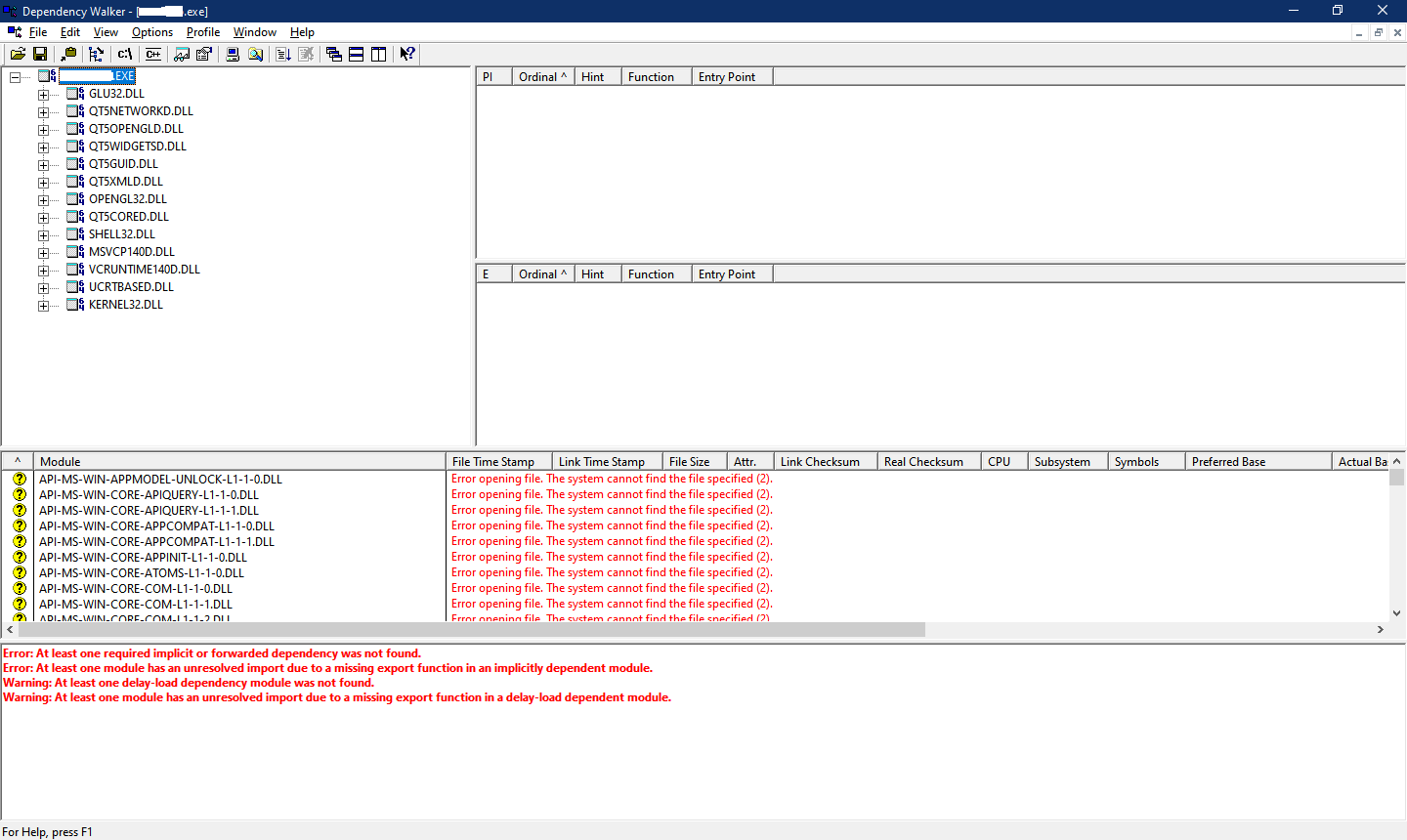
Thank you for your replay. It mean a lot for me. I am trying to figure out where is the problem:

Also, I got a direct message from Dependency Walker:
Error: At least one required implicit or forwarded dependency was not found. Warning: At least one delay-load dependency module was not found. Warning: At least one module has an unresolved import due to a missing export function in a delay-load dependent module. -
@aha_1980 said in The CDB process terminated:
Dependency Walker
Thank you for your replay. It mean a lot for me. I am trying to figure out where is the problem:
Also, I got a direct message from Dependency Walker:
Error: At least one required implicit or forwarded dependency was not found. Warning: At least one delay-load dependency module was not found. Warning: At least one module has an unresolved import due to a missing export function in a delay-load dependent module. -
@Flaviu-0 uhm, did you copy all of these DLLs to the build folder?
at least the Qt DLLs don't need to be copied there if you want to run/debug the program from Creator. Creator sets up the
PATHto the Qt installation directory for run.Not sure what happens if there is a version mismatch (i.e. correct DLL name, but wrong version, architecture, compiler...)
-
@Flaviu-0
Where isVCRUNTIME140.DLL? Is that correctly installed somewhere, with any dependencies, and findable byPATH? OrMSVCP140.DLL? And the directory you show does not have theQt5*.dllfiles shown required by Dependency Walker.I'm not saying they are not necessarily found --- DW might have shown something else if they had not been --- but they are not in the latest screenshot you have shown.
Looking back, I don't that the EXE you ran DW on 2 screenshots ago is the right one for the other screenshot and for the Module loaded log stuff you showed earlier.
-
@Flaviu-0
Where isVCRUNTIME140.DLL? Is that correctly installed somewhere, with any dependencies, and findable byPATH? OrMSVCP140.DLL? And the directory you show does not have theQt5*.dllfiles shown required by Dependency Walker.I'm not saying they are not necessarily found --- DW might have shown something else if they had not been --- but they are not in the latest screenshot you have shown.
Looking back, I don't that the EXE you ran DW on 2 screenshots ago is the right one for the other screenshot and for the Module loaded log stuff you showed earlier.
-
@JonB said in The CDB process terminated:
VCRUNTIME140.DLL
VCRUNTIME140.DLL is un level upper. Even if I copied into exe location, I have the same issue.
@Flaviu-0
Where? There is noVCRUNTIME140.DLLin your screenshot.[Now you have just changed your post while I'm writing...]
As I wrote yesterday, the Dependency Walker output you show is not for the executable for which you show the log and the screenshot of the DLLs in a folder.
-
@Flaviu-0
Where? There is noVCRUNTIME140.DLLin your screenshot.[Now you have just changed your post while I'm writing...]
As I wrote yesterday, the Dependency Walker output you show is not for the executable for which you show the log and the screenshot of the DLLs in a folder.