Skip to content
  • Categories
  • Recent
  • Tags
  • Popular
  • Users
  • Groups
  • Search
  • Get Qt
  • Unsolved
Collapse
Brand Logo
  1. Home
  2. Qt Development
  3. General and Desktop
  4. Apple Silicon
Qt 6.12 LTS is out! See what's new in the release blog

Apple Silicon

Scheduled Pinned Locked Moved Solved General and Desktop
15 Posts 2 Posters 3.7k Views
  • Oldest to Newest
  • Newest to Oldest
  • Most Votes
Reply
  • Reply as topic
Log in to reply
This topic has been deleted. Only users with topic management privileges can see it.
  • jsulmJ jsulm

    @JerryMazeyu Your link is broken.
    Do you see any errors/warnings when starting from a terminal?
    Also, you are talking about PySide, but in the code you posted you're using PyQt.

    J Offline
    J Offline
    JerryMazeyu
    wrote on last edited by
    #3

    Both pyside and pyqt have the same result.
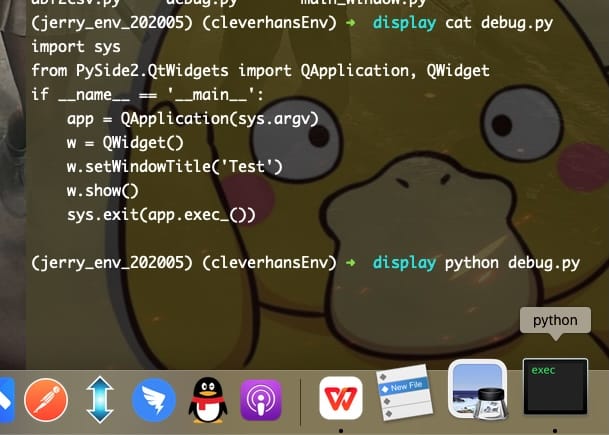
    When I run this code on latest MAC, this icon pop up but I cannot see any QT window. And my code does not report errors.
    I dont know why.

    jsulmJ 1 Reply Last reply
    0
    • J JerryMazeyu

      Both pyside and pyqt have the same result.
      When I run this code on latest MAC, this icon pop up but I cannot see any QT window. And my code does not report errors.
      I dont know why.

      jsulmJ Offline
      jsulmJ Offline
      jsulm
      Lifetime Qt Champion
      wrote on last edited by
      #4

      @JerryMazeyu Please start your app from a terminal and check there whether there are any errors/warnings.

      https://forum.qt.io/topic/113070/qt-code-of-conduct

      J 1 Reply Last reply
      0
      • jsulmJ jsulm

        @JerryMazeyu Please start your app from a terminal and check there whether there are any errors/warnings.

        J Offline
        J Offline
        JerryMazeyu
        wrote on last edited by
        #5

        @jsulm
        no warning or bugs. But no window pops up.

        jsulmJ 1 Reply Last reply
        0
        • J JerryMazeyu

          @jsulm
          no warning or bugs. But no window pops up.

          jsulmJ Offline
          jsulmJ Offline
          jsulm
          Lifetime Qt Champion
          wrote on last edited by
          #6

          @JerryMazeyu Is your python native ARM build or x86?

          https://forum.qt.io/topic/113070/qt-code-of-conduct

          1 Reply Last reply
          0
          • J Offline
            J Offline
            JerryMazeyu
            wrote on last edited by
            #7

            This Python virtual environment is migrated from x86 Macbook.

            jsulmJ 1 Reply Last reply
            0
            • J JerryMazeyu

              This Python virtual environment is migrated from x86 Macbook.

              jsulmJ Offline
              jsulmJ Offline
              jsulm
              Lifetime Qt Champion
              wrote on last edited by
              #8

              @JerryMazeyu But is the Python interpreter ARM or x86 build?

              https://forum.qt.io/topic/113070/qt-code-of-conduct

              J 1 Reply Last reply
              0
              • jsulmJ jsulm

                @JerryMazeyu But is the Python interpreter ARM or x86 build?

                J Offline
                J Offline
                JerryMazeyu
                wrote on last edited by
                #9

                @jsulm This python environment is built on x86, translated by Rosetta2 and run on the ARM architecture Mac.

                jsulmJ 1 Reply Last reply
                0
                • J JerryMazeyu

                  @jsulm This python environment is built on x86, translated by Rosetta2 and run on the ARM architecture Mac.

                  jsulmJ Offline
                  jsulmJ Offline
                  jsulm
                  Lifetime Qt Champion
                  wrote on last edited by
                  #10

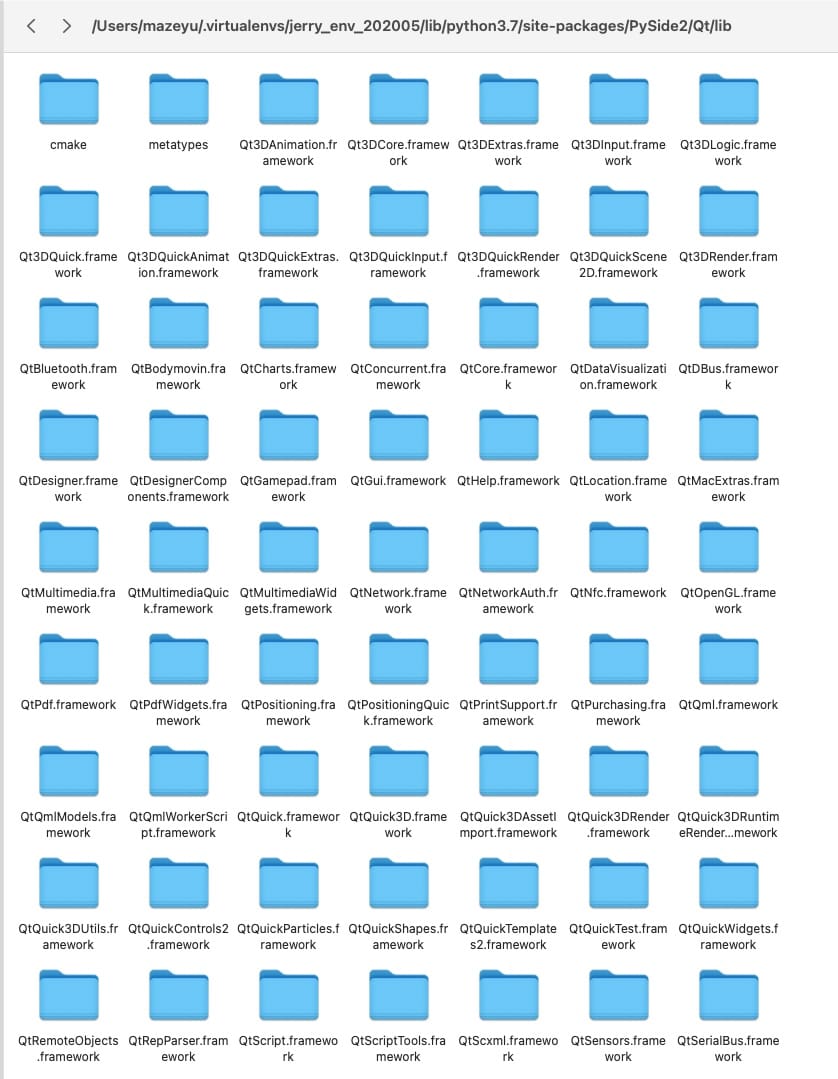
                  @JerryMazeyu You should check the Qt libs from PySide/PyQt you're using: whether those are also x86 (most probably they are).

                  https://forum.qt.io/topic/113070/qt-code-of-conduct

                  J 1 Reply Last reply
                  0
                  • jsulmJ jsulm

                    @JerryMazeyu You should check the Qt libs from PySide/PyQt you're using: whether those are also x86 (most probably they are).

                    J Offline
                    J Offline
                    JerryMazeyu
                    wrote on last edited by
                    #11

                    @jsulm Sorry, I dont know how to check the QT libs. Could you teach me how?thx!
                    jsulmJ 1 Reply Last reply
                    0
                    • J JerryMazeyu

                      @jsulm Sorry, I dont know how to check the QT libs. Could you teach me how?thx!

                      jsulmJ Offline
                      jsulmJ Offline
                      jsulm
                      Lifetime Qt Champion
                      wrote on last edited by
                      #12

                      @JerryMazeyu On Linux

                      file PATH_TO_A_LIB_FILE
                      

                      Should be same on MacOS.

                      https://forum.qt.io/topic/113070/qt-code-of-conduct

                      J 1 Reply Last reply
                      0
                      • jsulmJ jsulm

                        @JerryMazeyu On Linux

                        file PATH_TO_A_LIB_FILE
                        

                        Should be same on MacOS.

                        J Offline
                        J Offline
                        JerryMazeyu
                        wrote on last edited by
                        #13

                        @jsulm
                        That means QT libs is built on x86?

                        jsulmJ 1 Reply Last reply
                        0
                        • J JerryMazeyu

                          @jsulm
                          That means QT libs is built on x86?

                          jsulmJ Offline
                          jsulmJ Offline
                          jsulm
                          Lifetime Qt Champion
                          wrote on last edited by
                          #14

                          @JerryMazeyu Yes, so that is not the issue. You can try to run your script through the Python debugger.

                          https://forum.qt.io/topic/113070/qt-code-of-conduct

                          1 Reply Last reply
                          0
                          • J Offline
                            J Offline
                            JerryMazeyu
                            wrote on last edited by
                            #15

                            Well, I fix this bug... The problem seems to be in anaconda. I migrate my anaconda from old x86 MacBook. When I try to change the interpreter to my real system environment /usr/loacl/bin/python3.7, it works. Thx a lot!@jsulm

                            1 Reply Last reply
                            3

                            • Login

                            • Login or register to search.
                            • First post
                              Last post
                            0
                            • Categories
                            • Recent
                            • Tags
                            • Popular
                            • Users
                            • Groups
                            • Search
                            • Get Qt
                            • Unsolved