Skip to content
  • Categories
  • Recent
  • Tags
  • Popular
  • Users
  • Groups
  • Search
  • Get Qt Extensions
  • Unsolved
Collapse
Brand Logo
  1. Home
  2. Qt Development
  3. General and Desktop
  4. How to change color border QComboBox only?

How to change color border QComboBox only?

Scheduled Pinned Locked Moved Unsolved General and Desktop
11 Posts 4 Posters 4.2k Views 2 Watching
  • Oldest to Newest
  • Newest to Oldest
  • Most Votes
Reply
  • Reply as topic
Log in to reply
This topic has been deleted. Only users with topic management privileges can see it.
  • V Offline
    V Offline
    vinh
    wrote on last edited by
    #1

    I have QComboBox
    e4c3b853-a674-4685-9070-10815babe7fe-image.png

    , I change color it by code

    combobox->setStyleSheet( "border: 1px solid red;" );
    

    button down-row is change and height small too 346f549b-ba2d-48f0-8785-ffec2830fbd1-image.png
    how to change only color?

    J.HilkJ 1 Reply Last reply
    0
    • V vinh

      I have QComboBox
      e4c3b853-a674-4685-9070-10815babe7fe-image.png

      , I change color it by code

      combobox->setStyleSheet( "border: 1px solid red;" );
      

      button down-row is change and height small too 346f549b-ba2d-48f0-8785-ffec2830fbd1-image.png
      how to change only color?

      J.HilkJ Offline
      J.HilkJ Offline
      J.Hilk
      Moderators
      wrote on last edited by
      #2

      @vinh not surprising, you have with that overwritten all default stylesheet settings and only specified an universal border

      take a look at this extensive stylesheet example, what else you can modify in combination with what selector

      https://doc.qt.io/qt-5/stylesheet-examples.html#customizing-qcombobox


      Be aware of the Qt Code of Conduct, when posting : https://forum.qt.io/topic/113070/qt-code-of-conduct


      Q: What's that?
      A: It's blue light.
      Q: What does it do?
      A: It turns blue.

      V 1 Reply Last reply
      3
      • J.HilkJ J.Hilk

        @vinh not surprising, you have with that overwritten all default stylesheet settings and only specified an universal border

        take a look at this extensive stylesheet example, what else you can modify in combination with what selector

        https://doc.qt.io/qt-5/stylesheet-examples.html#customizing-qcombobox

        V Offline
        V Offline
        vinh
        wrote on last edited by
        #3

        @J-Hilk tks, I'm try

        combobox->setStyleSheet( "QComboBox {border: 1px solid red;}" );
        

        but it set all, what is correct syntax?

        1 Reply Last reply
        0
        • SGaistS Offline
          SGaistS Offline
          SGaist
          Lifetime Qt Champion
          wrote on last edited by
          #4

          Hi,

          When you use style sheets you have to do the complete styling. Style sheets ignores the original style used to draw the controls.

          Interested in AI ? www.idiap.ch
          Please read the Qt Code of Conduct - https://forum.qt.io/topic/113070/qt-code-of-conduct

          V 1 Reply Last reply
          2
          • SGaistS SGaist

            Hi,

            When you use style sheets you have to do the complete styling. Style sheets ignores the original style used to draw the controls.

            V Offline
            V Offline
            vinh
            wrote on last edited by
            #5

            @SGaist So is there any other way? full styling is unnecessary for only border color.

            1 Reply Last reply
            0
            • SGaistS Offline
              SGaistS Offline
              SGaist
              Lifetime Qt Champion
              wrote on last edited by
              #6

              Depending on what you want to use that border color for you could consider using a QRubberBand.

              Interested in AI ? www.idiap.ch
              Please read the Qt Code of Conduct - https://forum.qt.io/topic/113070/qt-code-of-conduct

              1 Reply Last reply
              3
              • mrjjM Offline
                mrjjM Offline
                mrjj
                Lifetime Qt Champion
                wrote on last edited by
                #7

                Hi
                You could also put the QComboBox in a QFrame+layout.
                (set all margins on layout to zero)

                alt text

                V 1 Reply Last reply
                4
                • mrjjM mrjj

                  Hi
                  You could also put the QComboBox in a QFrame+layout.
                  (set all margins on layout to zero)
                  alt text

                  V Offline
                  V Offline
                  vinh
                  wrote on last edited by
                  #8

                  @mrjj yes, I have formLayout and I'm try set margin 0px but it not work.

                  mrjjM 1 Reply Last reply
                  0
                  • V vinh

                    @mrjj yes, I have formLayout and I'm try set margin 0px but it not work.

                    mrjjM Offline
                    mrjjM Offline
                    mrjj
                    Lifetime Qt Champion
                    wrote on last edited by mrjj
                    #9

                    @vinh
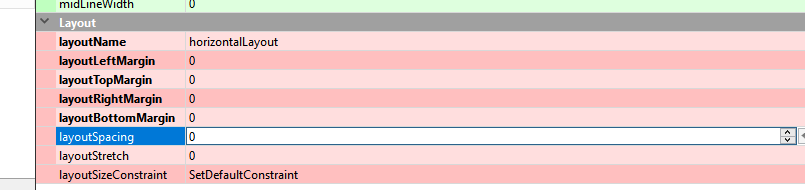
                    Ok I used a horizontal layout.
                    and sat all these to zero
                    alt text

                    V 1 Reply Last reply
                    4
                    • mrjjM mrjj

                      @vinh
                      Ok I used a horizontal layout.
                      and sat all these to zero
                      alt text

                      V Offline
                      V Offline
                      vinh
                      wrote on last edited by vinh
                      #10

                      @mrjj thank you very much, but QComboBox is change size and icon down-row, css on Qt not support custom only property :( I think

                      mrjjM 1 Reply Last reply
                      0
                      • V vinh

                        @mrjj thank you very much, but QComboBox is change size and icon down-row, css on Qt not support custom only property :( I think

                        mrjjM Offline
                        mrjjM Offline
                        mrjj
                        Lifetime Qt Champion
                        wrote on last edited by mrjj
                        #11

                        @vinh
                        Hi
                        Make sure to set the style sheet on the QFrame (ONLY)
                        and change it so it says
                        "QFrame {border: 1px solid red;}"

                        So you don't affect the Combobox inside. but only the QFrame.

                        So no stylesheet on Combobox but only on QFrame.

                        1 Reply Last reply
                        4

                        • Login

                        • Login or register to search.
                        • First post
                          Last post
                        0
                        • Categories
                        • Recent
                        • Tags
                        • Popular
                        • Users
                        • Groups
                        • Search
                        • Get Qt Extensions
                        • Unsolved