
Compilation successful but Qt executables do not start (designer.exe, linguist.exe...)
-
Hi,
I have downloaded the following zip file with the source code:
qt-everywhere-src-5.15.1.zipI have run the following steps,
.\configure -prefix ".\qtbase" -opensource -nomake examples -nomake tests -opengl desktop -confirm-license -debug -silentAnd afterwards:
mingw32-make -j 8No errrors, and after that I end up with a .\qtbase\bin folder with several executables, if I try to start any of them nothing happens (no missing DLL, error returned is zero in the command line), if I do this however:
designer.exe --helpI get a help window with some options, but I can't get any of the GUIs to start! I might be missing something... any ideas?
These are the tools I have been using, on Windows 10 x64:
(c_cpp) PS D:\Personal\PWEnvs> mingw32-make --version
GNU Make 4.2.1
Built for x86_64-w64-mingw32
(c_cpp) PS D:\Personal\PWEnvs> gcc --version
gcc.exe (x86_64-posix-seh-rev0, Built by MinGW-W64 project) 8.1.0
(c_cpp) PS D:\Personal\PWEnvs> g++ --version
g++.exe (x86_64-posix-seh-rev0, Built by MinGW-W64 project) 8.1.0
(c_cpp) PS D:\Personal\PWEnvs> python --version
Python 3.8.5
(c_cpp) PS D:\Personal\PWEnvs> ruby --version
ruby 2.7.2p137 (2020-10-01 revision 5445e04352) [x64-mingw32]
(c_cpp) PS D:\Personal\PWEnvs> perl --version
This is perl 5, version 32, subversion 0 (v5.32.0) built for MSWin32-x64-multi-thread
And the PATH variable:
(c_cpp) PS D:\Personal\PWEnvs> $env:PATH D:\Personal\PWEnvs\cenv\perl\perl\bin;D:\Personal\PWEnvs\cenv\git\bin;D:\Personal\PWEnvs\cenv\mingw64\bin;D:\Personal\PWEnvs\cenv\cmake\bin;D:\Personal\PWEnvs\cenv\cppcheck\bin;D:\Personal\PWEnvs\cenv\doxygen;D:\Personal\PWEnvs\cenv\astyle;D:\Personal\PWEnvs\cenv\vscode\bin;D:\Personal\PWEnvs\cenv\python\python-3.8.5.amd64;D:\Personal\PWEnvs\cenv\python\python-3.8.5.amd64\Scripts;D:\Personal\PWEnvs\cenv\vscode\bin;D:\Personal\PWEnvs\cenv\ruby\bin;D:\Personal\PWEnvs\cenv\7z\Files\7-Zip; -
Good news! I managed to track down the issue to compiling from a terminal without these in the environment PATH variable:
"C:\Windows;C:\Windows\System32;"I have it working fine now.
My fault, this is not something someone would get into under normal circumstances as those exist in the PATH variable by default, I am using a virtual environment to build that overwrites the environment path variable with a custom one.
-
Why do you want to compile Qt by your own?
I get a help window with some options
How does it look like?
-
@MalitheBIG said in Compilation successful but Qt executables do not start (designer.exe, linguist.exe...):
Are you using Windows or Linux?
Look at the paths, the compiler... it's Windows of course.
-
@MalitheBIG said in Compilation successful but Qt executables do not start (designer.exe, linguist.exe...):
Are you using Windows or Linux? Which Windows or Linux, which verison are you using of QT and Windows. Please give us more informations!
I am using Windows 10, x64. Latest version of Qt available, Qt 5.15.1.
@Christian-Ehrlicher said in Compilation successful but Qt executables do not start (designer.exe, linguist.exe...):
Why do you want to compile Qt by your own?
I get a help window with some options
How does it look like?
I am trying to build from source due to the lack of an offline installer, but if it gets too complicated I might consider the online installer an alternative, readme´s made it seem it would be straightforward!
This is the screen I get:
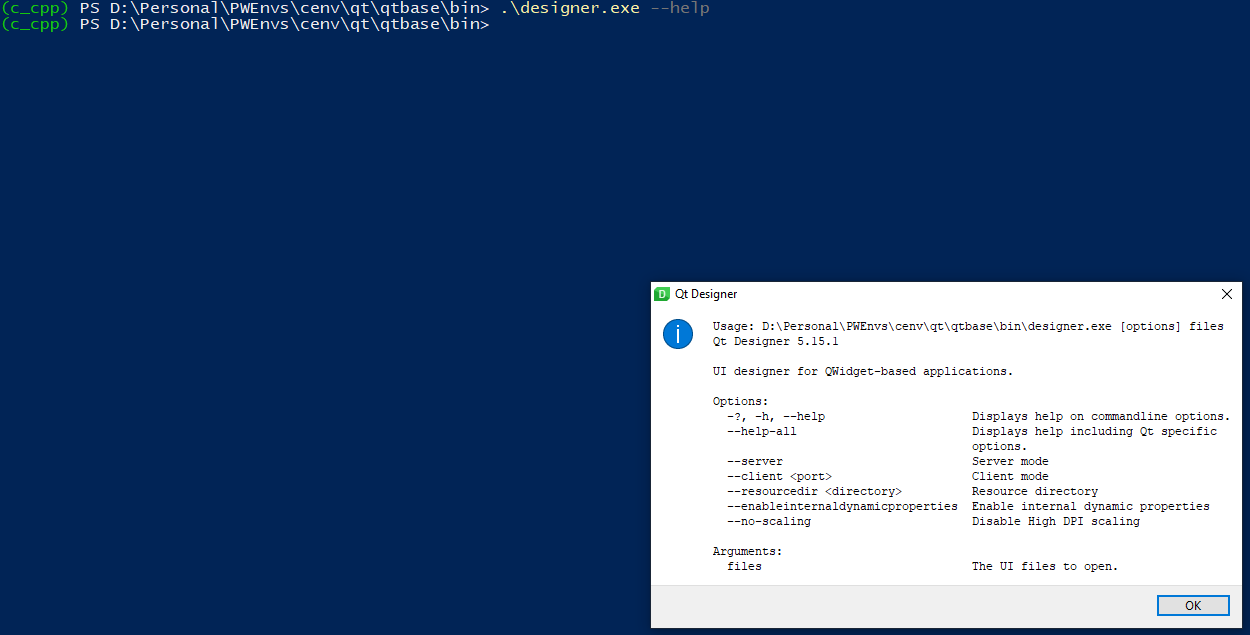
I just realized that if I move that window or press the OK button, Qt Designer just crashes or enters into "non responding" mode.
Thanks for your time/help.
-
And what happens when you don't start with '--help' ?
-
@MalitheBIG said in Compilation successful but Qt executables do not start (designer.exe, linguist.exe...):
Are you using Windows or Linux? Which Windows or Linux, which verison are you using of QT and Windows. Please give us more informations!
I am using Windows 10, x64. Latest version of Qt available, Qt 5.15.1.
@Christian-Ehrlicher said in Compilation successful but Qt executables do not start (designer.exe, linguist.exe...):
Why do you want to compile Qt by your own?
I get a help window with some options
How does it look like?
I am trying to build from source due to the lack of an offline installer, but if it gets too complicated I might consider the online installer an alternative, readme´s made it seem it would be straightforward!
This is the screen I get:
I just realized that if I move that window or press the OK button, Qt Designer just crashes or enters into "non responding" mode.
Thanks for your time/help.
@ads1234 said in Compilation successful but Qt executables do not start (designer.exe, linguist.exe...):
I might consider the online installer an alternative,
I can definitely recommend that, when installed with the installer, stuff generally "just works".
Regarding this:
if I try to start any of them nothing happens (no missing DLL, error returned is zero in the command line)
I think on Windows,
stderris automatically redirected to some system logs or something and does not appear in console output. Try to run like this:designer.exer 2>&1Maybe it will print some more information.
-
Hi,
It looks like you forgot to call
make installafter the build was done. -
@MalitheBIG said in Compilation successful but Qt executables do not start (designer.exe, linguist.exe...):
Are you using Windows or Linux? Which Windows or Linux, which verison are you using of QT and Windows. Please give us more informations!
I am using Windows 10, x64. Latest version of Qt available, Qt 5.15.1.
@Christian-Ehrlicher said in Compilation successful but Qt executables do not start (designer.exe, linguist.exe...):
Why do you want to compile Qt by your own?
I get a help window with some options
How does it look like?
I am trying to build from source due to the lack of an offline installer, but if it gets too complicated I might consider the online installer an alternative, readme´s made it seem it would be straightforward!
This is the screen I get:
I just realized that if I move that window or press the OK button, Qt Designer just crashes or enters into "non responding" mode.
Thanks for your time/help.
-
And what happens when you don't start with '--help' ?
@Christian-Ehrlicher said in Compilation successful but Qt executables do not start (designer.exe, linguist.exe...):
And what happens when you don't start with '--help' ?
Nothing, it does look like it starts something (mouse cursor changes to loading icon for a brief moment) but nothing starts or not shows up, and I also found interesting that the last error code is zero, which usually means no error per my understanding.
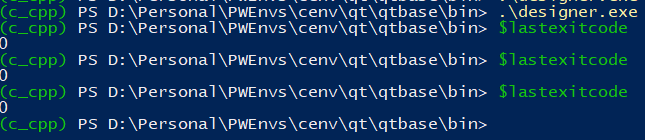
Other tools like qml.exe seem to work fine (I don't know if this one has a GUI):

@sierdzio said in Compilation successful but Qt executables do not start (designer.exe, linguist.exe...):
@ads1234 said in Compilation successful but Qt executables do not start (designer.exe, linguist.exe...):
I might consider the online installer an alternative,
I can definitely recommend that, when installed with the installer, stuff generally "just works".
Regarding this:
if I try to start any of them nothing happens (no missing DLL, error returned is zero in the command line)
I think on Windows,
stderris automatically redirected to some system logs or something and does not appear in console output. Try to run like this:designer.exer 2>&1Maybe it will print some more information.
Nothing on stdout or stderr.
@SGaist said in Compilation successful but Qt executables do not start (designer.exe, linguist.exe...):
Hi,
It looks like you forgot to call
make installafter the build was done.I ran the install after checking that no exe would start in the bin folder and attempting some other things, I might attempt to rebuild later though and do everything in order.
@jsulm said in Compilation successful but Qt executables do not start (designer.exe, linguist.exe...):
@ads1234 Try to set QT_DEBUG_PLUGINS to 1 before starting the app and check the output. Could be that some plug-in can't be loaded.
No luck, same behaviour.
-
One more idea - can you start one of the executables in the debugger (MSVC IDE or QtCreator) to see if you get some output?
-
Good news! I managed to track down the issue to compiling from a terminal without these in the environment PATH variable:
"C:\Windows;C:\Windows\System32;"I have it working fine now.
My fault, this is not something someone would get into under normal circumstances as those exist in the PATH variable by default, I am using a virtual environment to build that overwrites the environment path variable with a custom one.
-
Thanks for sharing the solution :-)


