
Set Color and background color of childs of custom QWidgetAction
-
Hi and welcome to devnet,
What is your issue ?
Which version of Qt ?
On which OS.?
Can you provide a minimal compilable example that shows your issue ? -
@SGaist Sorry for delay.
This is qss:
...

#customitem {
    color: palette(text);
    border: none;
}

#customitem > QWidget{
    color: palette(text);
}

#customitem:hover {
    background: palette(highlight);
    color: white;
}
and this is in my widget action:
...
    auto qlayout = new QHBoxLayout;
    qlayout->addLayout(llayout);
    qlayout->addLayout(rlayout);

    auto  widget = new QWidget;
    widget->setObjectName("customitem");
    widget->setLayout(qlayout);
    auto qWidgetAction = new QWidgetAction(this);
    qWidgetAction->setDefaultWidget(widget);
The background of the widget will change on hover but text colors of labels no.
-
This is my codes:
#include <QDebug>
#include <QString>
#include <QWidgetAction>
#include <QHBoxLayout>
#include <QLabel>
#include <QFont>
#include <QtGui/QDesktopServices>
#include <QUrl>
#include <QMouseEvent>


class ResultItem : public QWidgetAction{
Q_OBJECT
public:
    ResultItem(const QString &name, QObject *parent = nullptr)
            : QWidgetAction(parent) {
        QLabel *iLabel = new QLabel("*");
        QLabel *mUpLabel = new QLabel("UP Center " + name);
        mUpLabel->setAlignment(Qt::AlignLeft);

        QLabel *mDownLabel = new QLabel("Down Center");
        mDownLabel->setAlignment(Qt::AlignLeft);

        QLabel *timeLabel = new QLabel("20201015 - 10:15");

        auto *mLayout = new QVBoxLayout;
        mLayout->addWidget(mUpLabel);
        mLayout->addWidget(mDownLabel);
        mLayout->setAlignment(Qt::AlignLeft);

        auto *mainLayout = new QHBoxLayout;
        mainLayout->addWidget(iLabel);
        mainLayout->addLayout(mLayout);
        mainLayout->addWidget(timeLabel);
        mainLayout->setAlignment(Qt::AlignLeft);

        auto *widget = new QWidget;
        widget->setLayout(mainLayout);
        widget->setStyleSheet("QWidget:hover {background: blue; color: white;}");

        setDefaultWidget(widget);
        setText(name);
    }
};
and this is the result in GUI:
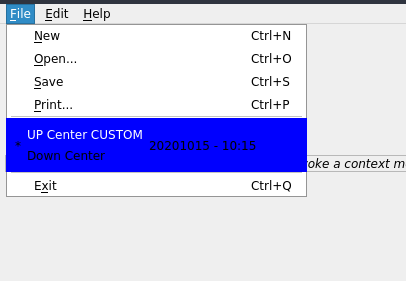

As you see the style doesn't apply on the whole of the qwidgetaction. The color of text in labels won't be changed but when I hover on the label the the text colors update.
-
You are showing two different pieces of code. As requested please provide a complete minimal example that shows the behaviour.
-
main.cpp
#include <QApplication>
#include "mainwindow.h"

int main(int argc, char *argv[])
{
    QApplication app(argc, argv);
    MainWindow window;
    window.show();
    return app.exec();
}
mainwindow.cpp
#include <QtWidgets>
#include "mainwindow.h"

MainWindow::MainWindow()
{
    QWidget *widget = new QWidget;
    setCentralWidget(widget);
    QWidget *topFiller = new QWidget;
    topFiller->setSizePolicy(QSizePolicy::Expanding, QSizePolicy::Expanding);

    infoLabel = new QLabel(tr("<i>Choose a menu option, or right-click to "
                              "invoke a context menu</i>"));
    infoLabel->setFrameStyle(QFrame::StyledPanel | QFrame::Sunken);
    infoLabel->setAlignment(Qt::AlignCenter);

    QWidget *bottomFiller = new QWidget;
    bottomFiller->setSizePolicy(QSizePolicy::Expanding, QSizePolicy::Expanding);

    QVBoxLayout *layout = new QVBoxLayout;
    layout->setContentsMargins(5, 5, 5, 5);
    layout->addWidget(topFiller);
    layout->addWidget(infoLabel);
    layout->addWidget(bottomFiller);
    widget->setLayout(layout);
    createActions();
    createMenus();

    QString message = tr("A context menu is available by right-clicking");
    statusBar()->showMessage(message);

    setWindowTitle(tr("Menus"));
    setMinimumSize(160, 160);
    resize(480, 320);
}

void MainWindow::createActions()
{
    exitAct = new QAction(tr("E&xit"), this);
    exitAct->setShortcuts(QKeySequence::Quit);
    exitAct->setStatusTip(tr("Exit the application"));
    connect(exitAct, &QAction::triggered, this, &QWidget::close);

}

void MainWindow::createMenus()
{
    fileMenu = menuBar()->addMenu(tr("&File"));
    auto ri = new ResultItem("CUSTOM", this);
    fileMenu->addAction(ri);
    fileMenu->addAction(exitAct);
}
mainwindow.h
#ifndef MAINWINDOW_H
#define MAINWINDOW_H

#include <QMainWindow>
#include "ResultItem.h"

QT_BEGIN_NAMESPACE
class QAction;
class QActionGroup;
class QLabel;
class QMenu;
QT_END_NAMESPACE

class MainWindow : public QMainWindow
{
    Q_OBJECT

public:
    MainWindow();

private:
    void createActions();
    void createMenus();

    QMenu *fileMenu;
    QAction *exitAct;
    QLabel *infoLabel;
};

#endif
menus.pro
QT += widgets

HEADERS       = mainwindow.h ResultItem.h
SOURCES       = mainwindow.cpp \
                main.cpp

# install
target.path = $$[QT_INSTALL_EXAMPLES]/widgets/mainwindows/menus
INSTALLS += target
ResultItem.h
#ifndef RESULTITEM_H #define RESULTITEM_H #include <QDebug> #include <QString> #include <QWidgetAction> #include <QHBoxLayout> #include <QLabel> #include <QFont> #include <QtGui/QDesktopServices> #include <QUrl> #include <QMouseEvent> class ResultItem : public QWidgetAction{ Q_OBJECT public: ResultItem(const QString &name, QObject *parent = nullptr) : QWidgetAction(parent) { QLabel *iLabel = new QLabel("*"); QLabel *mUpLabel = new QLabel("UP Center " + name); mUpLabel->setAlignment(Qt::AlignLeft); QLabel *mDownLabel = new QLabel("Down Center"); mDownLabel->setAlignment(Qt::AlignLeft); QLabel *timeLabel = new QLabel("20201015 - 10:15"); auto *mLayout = new QVBoxLayout; mLayout->addWidget(mUpLabel); mLayout->addWidget(mDownLabel); mLayout->setAlignment(Qt::AlignLeft); auto *mainLayout = new QHBoxLayout; mainLayout->addWidget(iLabel); mainLayout->addLayout(mLayout); mainLayout->addWidget(timeLabel); mainLayout->setAlignment(Qt::AlignLeft); auto *widget = new QWidget; widget->setLayout(mainLayout); // widget->setStyleSheet("QWidget { background-color: yellow }"); // widget->setStyleSheet("QWidget {background: yellow; color: blue;}"); widget->setStyleSheet("QWidget:hover {background: blue; color: white;}"); setDefaultWidget(widget); setText(name); } }; #endif -
main.cpp
#include <QApplication>
#include "mainwindow.h"

int main(int argc, char *argv[])
{
    QApplication app(argc, argv);
    MainWindow window;
    window.show();
    return app.exec();
}
mainwindow.cpp
#include <QtWidgets>
#include "mainwindow.h"

MainWindow::MainWindow()
{
    QWidget *widget = new QWidget;
    setCentralWidget(widget);
    QWidget *topFiller = new QWidget;
    topFiller->setSizePolicy(QSizePolicy::Expanding, QSizePolicy::Expanding);

    infoLabel = new QLabel(tr("<i>Choose a menu option, or right-click to "
                              "invoke a context menu</i>"));
    infoLabel->setFrameStyle(QFrame::StyledPanel | QFrame::Sunken);
    infoLabel->setAlignment(Qt::AlignCenter);

    QWidget *bottomFiller = new QWidget;
    bottomFiller->setSizePolicy(QSizePolicy::Expanding, QSizePolicy::Expanding);

    QVBoxLayout *layout = new QVBoxLayout;
    layout->setContentsMargins(5, 5, 5, 5);
    layout->addWidget(topFiller);
    layout->addWidget(infoLabel);
    layout->addWidget(bottomFiller);
    widget->setLayout(layout);
    createActions();
    createMenus();

    QString message = tr("A context menu is available by right-clicking");
    statusBar()->showMessage(message);

    setWindowTitle(tr("Menus"));
    setMinimumSize(160, 160);
    resize(480, 320);
}

void MainWindow::createActions()
{
    exitAct = new QAction(tr("E&xit"), this);
    exitAct->setShortcuts(QKeySequence::Quit);
    exitAct->setStatusTip(tr("Exit the application"));
    connect(exitAct, &QAction::triggered, this, &QWidget::close);

}

void MainWindow::createMenus()
{
    fileMenu = menuBar()->addMenu(tr("&File"));
    auto ri = new ResultItem("CUSTOM", this);
    fileMenu->addAction(ri);
    fileMenu->addAction(exitAct);
}
mainwindow.h
#ifndef MAINWINDOW_H
#define MAINWINDOW_H

#include <QMainWindow>
#include "ResultItem.h"

QT_BEGIN_NAMESPACE
class QAction;
class QActionGroup;
class QLabel;
class QMenu;
QT_END_NAMESPACE

class MainWindow : public QMainWindow
{
    Q_OBJECT

public:
    MainWindow();

private:
    void createActions();
    void createMenus();

    QMenu *fileMenu;
    QAction *exitAct;
    QLabel *infoLabel;
};

#endif
menus.pro
QT += widgets

HEADERS       = mainwindow.h ResultItem.h
SOURCES       = mainwindow.cpp \
                main.cpp

# install
target.path = $$[QT_INSTALL_EXAMPLES]/widgets/mainwindows/menus
INSTALLS += target
ResultItem.h
#ifndef RESULTITEM_H #define RESULTITEM_H #include <QDebug> #include <QString> #include <QWidgetAction> #include <QHBoxLayout> #include <QLabel> #include <QFont> #include <QtGui/QDesktopServices> #include <QUrl> #include <QMouseEvent> class ResultItem : public QWidgetAction{ Q_OBJECT public: ResultItem(const QString &name, QObject *parent = nullptr) : QWidgetAction(parent) { QLabel *iLabel = new QLabel("*"); QLabel *mUpLabel = new QLabel("UP Center " + name); mUpLabel->setAlignment(Qt::AlignLeft); QLabel *mDownLabel = new QLabel("Down Center"); mDownLabel->setAlignment(Qt::AlignLeft); QLabel *timeLabel = new QLabel("20201015 - 10:15"); auto *mLayout = new QVBoxLayout; mLayout->addWidget(mUpLabel); mLayout->addWidget(mDownLabel); mLayout->setAlignment(Qt::AlignLeft); auto *mainLayout = new QHBoxLayout; mainLayout->addWidget(iLabel); mainLayout->addLayout(mLayout); mainLayout->addWidget(timeLabel); mainLayout->setAlignment(Qt::AlignLeft); auto *widget = new QWidget; widget->setLayout(mainLayout); // widget->setStyleSheet("QWidget { background-color: yellow }"); // widget->setStyleSheet("QWidget {background: yellow; color: blue;}"); widget->setStyleSheet("QWidget:hover {background: blue; color: white;}"); setDefaultWidget(widget); setText(name); } }; #endif@hamzeh-nasajpour You really think this is MINIMAL example code reproducing the issue?!
Also, please format your code properly. -
Just to be sure I understand your issue, you want that in case you hover over any part of the widget that all its elements changes colour at the same time ?
-
Just to be sure I understand your issue, you want that in case you hover over any part of the widget that all its elements changes colour at the same time ?
Just to be sure I understand your issue, you want that in case you hover over any part of the widget that all its elements changes colour at the same time ?
@SGaist Yes, exactly. Hover over any part --> Change the text color and background color of all parts of related items.
-
any idea?
-
You can't directly apply your hover background to widgets that are not being hovered.
One thing you can do is to use a dynamic property and set it to all the widgets when you entering the main one and change its value when moving out of it.

