
Meaning of the purple gear icon for status Qt projects
-
Hi,
I would like to know the meaning of the icon which appears on the project view. Actually, I've a purple gear icon for each project I open. Usually it's always a green Qt icon. I don't know what I've changed in Qt creator. Please, if someone can help me. I'm a beginner.
Thank a lot,
Olivier. -
Hi,
I would like to know the meaning of the icon which appears on the project view. Actually, I've a purple gear icon for each project I open. Usually it's always a green Qt icon. I don't know what I've changed in Qt creator. Please, if someone can help me. I'm a beginner.
Thank a lot,
Olivier. -
Hi,
First, I'm sorry to give you a very late answer. I checked my post a lot of time but I never saw your answers... maybe a problem of refresh ???
So, to go back to my problem, @jsulm, here a screenshot of the icon :
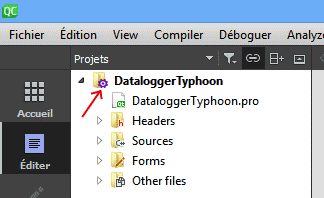
@Bonnie, I think you are right. It's a problem of Qt version. I tried to open a old Qt 5.6.3 project with a recent Qt 5.15.1 version. It was accompanied by an warning message when opening :

I tried to configure my project with the new environment and new kit in Qt creator but I failed to make it work. Finally, I solved my problem by installing a older version compatible with my project version.
I deduce this icon means the compatible level of your project ? a degraded mode ?I didn't find informations about this icon... but I found a solution to my problem.
So thank you a lot for your answers.
-
Hi,
First, I'm sorry to give you a very late answer. I checked my post a lot of time but I never saw your answers... maybe a problem of refresh ???
So, to go back to my problem, @jsulm, here a screenshot of the icon :
@Bonnie, I think you are right. It's a problem of Qt version. I tried to open a old Qt 5.6.3 project with a recent Qt 5.15.1 version. It was accompanied by an warning message when opening :
I tried to configure my project with the new environment and new kit in Qt creator but I failed to make it work. Finally, I solved my problem by installing a older version compatible with my project version.
I deduce this icon means the compatible level of your project ? a degraded mode ?I didn't find informations about this icon... but I found a solution to my problem.
So thank you a lot for your answers.
@Mulder78 said in Meaning of the purple gear icon for status Qt projects:
I tried to configure my project with the new environment and new kit in Qt creator but I failed to make it work
Would be good to know what exactly did not work.
The *.pro.user file can be deleted, you just need to reconfigure. Also this file should not be put into VCS if you use one. -
Actually, I can't reproduce the problem of opening a 5.6.3 project in a 5.15.1 as I talked in this topic because I changed my harddisk in the meantime and reinstalled 6.0.0 and 5.6.3 versions only. But now, as you can see on the screenshot below, I have a similar problem when I try to open a 5.15 project in Qt 6.0.0 :

But obviously this is normal because Qt 6.0.0 no longer integrates certain modules such as the serialport...As soon as I install 5.15 again I will try to reproduce the problem to give you more informations what exactly did not work.
Best regards,
Olivier.
