
QGraphicsView doesn't repaint correctly after scrolling with overwritten paintEvent
-
@Christian-Ehrlicher said in QGraphicsView doesn't repaint correctly after scrolling with overwritten paintEvent:
You should paint at the correct position instead the lower right corner of a rect which should be currently updated. This rect just informs you where painting is needed, you use it to place your text.
This means that this here should be working, right? I'm painting in the lower right corner of the view port rect, that should be the whole thing? But it behaves the same:
void AnnotationView::paintEvent(QPaintEvent *event)
{
	QGraphicsView::paintEvent(event);

	auto viewPort = viewport();
	if(viewPort != nullptr){
		QPainter painter(viewPort);
		auto rect = viewPort->rect().adjusted(0, 0, -2, -2);
		auto alignment = Qt::AlignRight | Qt::AlignBottom;
		auto value = qRound(mAnnotationViewZoomer->zoomValue() * 100);
		auto text = QString::number(value) + QLatin1Literal("%");
		painter.drawText(rect, alignment, text);
	}
}
Or how else can I get the bottom right corner of the viewport?
@dporobic I would guess yes, simply try it out.
Qt Online Installer direct download: https://download.qt.io/official_releases/online_installers/
Visit the Qt Academy at https://academy.qt.io/catalog -
@dporobic I would guess yes, simply try it out.
@Christian-Ehrlicher said in QGraphicsView doesn't repaint correctly after scrolling with overwritten paintEvent:
@dporobic I would guess yes, simply try it out.
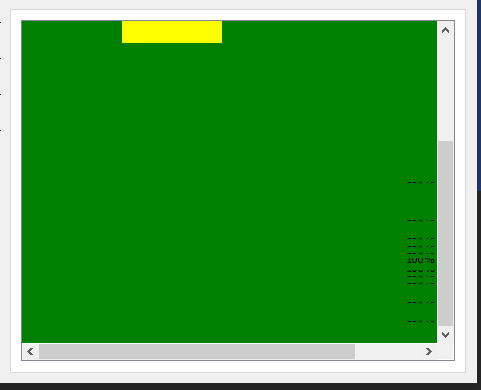
I have tried it out, even before I have posted here (and now again) and the result was the same, that's why I assumed the rect from viewport and event are the same.
Here how it looks like:
-
Did you print the coordinates of the rect? Please provide a minimal, compilable example.
Qt Online Installer direct download: https://download.qt.io/official_releases/online_installers/
Visit the Qt Academy at https://academy.qt.io/catalog -
Did you print the coordinates of the rect? Please provide a minimal, compilable example.
@Christian-Ehrlicher said in QGraphicsView doesn't repaint correctly after scrolling with overwritten paintEvent:
Did you print the coordinates of the rect?
Following code:
void AnnotationView::paintEvent(QPaintEvent *event)
{
	QGraphicsView::paintEvent(event);

	auto viewPort = viewport();
	if(viewPort != nullptr){
		QPainter painter(viewPort);
		auto rect = viewPort->rect().adjusted(0, 0, -2, -2);
		auto rect2 = event->rect();
		qDebug("ViewPort -> x: %s, y: %s, w: %s, h: %s", qPrintable(QString::number(rect.x())), qPrintable(QString::number(rect.y())), qPrintable(QString::number(rect.width())), qPrintable(QString::number(rect.height())));
		qDebug("Event -> x: %s, y: %s, w: %s, h: %s", qPrintable(QString::number(rect2.x())), qPrintable(QString::number(rect2.y())), qPrintable(QString::number(rect2.width())), qPrintable(QString::number(rect2.height())));
		auto alignment = Qt::AlignRight | Qt::AlignBottom;
		auto value = qRound(mAnnotationViewZoomer->zoomValue() * 100);
		auto text = QString::number(value) + QLatin1Literal("%");
		painter.drawText(rect, alignment, text);
	}
}
Gives me this output when scrolling to the bottom, as you said, the rects are not the same (those are the last four entires):
...
ViewPort -> x: 0, y: 0, w: 288, h: 229
Event -> x: 0, y: 224, w: 290, h: 7
ViewPort -> x: 0, y: 0, w: 288, h: 229
Event -> x: 0, y: 228, w: 290, h: 3
ViewPort -> x: 0, y: 0, w: 288, h: 229
Event -> x: 0, y: 0, w: 290, h: 231
ViewPort -> x: 0, y: 0, w: 288, h: 229
Event -> x: 0, y: 0, w: 290, h: 231
ViewPort -> x: 0, y: 0, w: 288, h: 229
Event -> x: 0, y: 0, w: 290, h: 231
And this is how the output looks like:
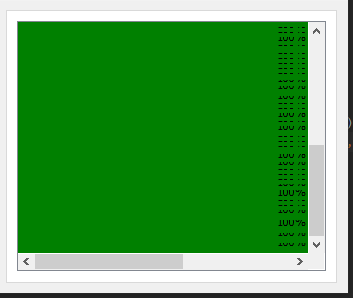
@Christian-Ehrlicher said in QGraphicsView doesn't repaint correctly after scrolling with overwritten paintEvent:
Please provide a minimal, compilable example.
I can provide one later.
-
@Christian-Ehrlicher said in QGraphicsView doesn't repaint correctly after scrolling with overwritten paintEvent:
Did you print the coordinates of the rect?
Following code:
void AnnotationView::paintEvent(QPaintEvent *event)
{
	QGraphicsView::paintEvent(event);

	auto viewPort = viewport();
	if(viewPort != nullptr){
		QPainter painter(viewPort);
		auto rect = viewPort->rect().adjusted(0, 0, -2, -2);
		auto rect2 = event->rect();
		qDebug("ViewPort -> x: %s, y: %s, w: %s, h: %s", qPrintable(QString::number(rect.x())), qPrintable(QString::number(rect.y())), qPrintable(QString::number(rect.width())), qPrintable(QString::number(rect.height())));
		qDebug("Event -> x: %s, y: %s, w: %s, h: %s", qPrintable(QString::number(rect2.x())), qPrintable(QString::number(rect2.y())), qPrintable(QString::number(rect2.width())), qPrintable(QString::number(rect2.height())));
		auto alignment = Qt::AlignRight | Qt::AlignBottom;
		auto value = qRound(mAnnotationViewZoomer->zoomValue() * 100);
		auto text = QString::number(value) + QLatin1Literal("%");
		painter.drawText(rect, alignment, text);
	}
}
Gives me this output when scrolling to the bottom, as you said, the rects are not the same (those are the last four entires):
...
ViewPort -> x: 0, y: 0, w: 288, h: 229
Event -> x: 0, y: 224, w: 290, h: 7
ViewPort -> x: 0, y: 0, w: 288, h: 229
Event -> x: 0, y: 228, w: 290, h: 3
ViewPort -> x: 0, y: 0, w: 288, h: 229
Event -> x: 0, y: 0, w: 290, h: 231
ViewPort -> x: 0, y: 0, w: 288, h: 229
Event -> x: 0, y: 0, w: 290, h: 231
ViewPort -> x: 0, y: 0, w: 288, h: 229
Event -> x: 0, y: 0, w: 290, h: 231
And this is how the output looks like:
@Christian-Ehrlicher said in QGraphicsView doesn't repaint correctly after scrolling with overwritten paintEvent:
Please provide a minimal, compilable example.
I can provide one later.
@dporobic what version of QT are you using, and can you try it against an other one (newer) ?
Be aware of the Qt Code of Conduct, when posting : https://forum.qt.io/topic/113070/qt-code-of-conduct
Q: What's that?
A: It's blue light.
Q: What does it do?
A: It turns blue. -
@dporobic what version of QT are you using, and can you try it against an other one (newer) ?
@J-Hilk said in QGraphicsView doesn't repaint correctly after scrolling with overwritten paintEvent:
@dporobic what version of QT are you using, and can you try it against an other one (newer) ?
I'm using 5.9.9 on a Windows machine. I can try later on my Linux which has 5.12.7.
-
Since you want to paint on a region which needs no update according to the paint event I would suggest you to call update on the complete viewport to see if this helps - just for testing of course.
Since the viewport is moving it's not a normal use case to paint something on a fixed (from the widget pov) position, therefore all the problems here.Qt Online Installer direct download: https://download.qt.io/official_releases/online_installers/
Visit the Qt Academy at https://academy.qt.io/catalog -
Since you want to paint on a region which needs no update according to the paint event I would suggest you to call update on the complete viewport to see if this helps - just for testing of course.
Since the viewport is moving it's not a normal use case to paint something on a fixed (from the widget pov) position, therefore all the problems here.@Christian-Ehrlicher said in QGraphicsView doesn't repaint correctly after scrolling with overwritten paintEvent:
Since you want to paint on a region which needs no update according to the paint event I would suggest you to call update on the complete viewport to see if this helps - just for testing of course.
Since the viewport is moving it's not a normal use case to paint something on a fixed (from the widget pov) position, therefore all the problems here.My View can be scrolled by dragging while holding down the middle mouse key, so that's where I put the repaint method:
void AnnotationView::mouseMoveEvent(QMouseEvent *event)
{
	if(mIsDragging) {
		qDebug("Scroll to");
		scrollTo(event->pos());
		qDebug("Repaint");
		repaint(viewport()->rect());   // Here the repaint
		return;
	}
	QGraphicsView::mouseMoveEvent(event);
}

void AnnotationView::scrollTo(const QPoint &pos)
{
	auto delta = pos - mLastPosition;
	scrollByDelta(horizontalScrollBar(), delta.x());
	scrollByDelta(verticalScrollBar(), delta.y());
	mLastPosition = pos;
}

void AnnotationView::scrollByDelta(QScrollBar *scrollBar, int delta) const
{
	scrollBar->setValue(scrollBar->value() - delta);
}
This is the output that I get:
...
ViewPort -> x: 0, y: 0, w: 288, h: 229
Event -> x: 0, y: 230, w: 290, h: 1
Scroll to
Repaint
ViewPort -> x: 0, y: 0, w: 288, h: 229
Event -> x: 0, y: 230, w: 290, h: 1
Scroll to
Repaint
Scroll to
Repaint
ViewPort -> x: 0, y: 0, w: 288, h: 229
Event -> x: 0, y: 230, w: 290, h: 1
Scroll to
Repaint
ViewPort -> x: 0, y: 0, w: 288, h: 229
Event -> x: 0, y: 230, w: 290, h: 1
Scroll to
Repaint
Scroll to
Repaint
ViewPort -> x: 0, y: 0, w: 288, h: 229
Event -> x: 0, y: 230, w: 290, h: 1
Scroll to
Repaint
Scroll to
Repaint
ViewPort -> x: 0, y: 0, w: 288, h: 229
Event -> x: 0, y: 230, w: 290, h: 1
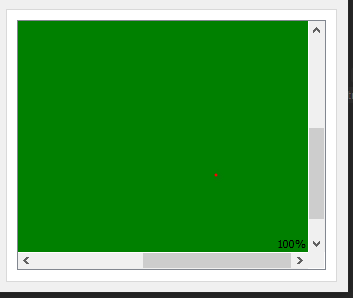
This is how it looks like in the application (the red arrow shows the direction of dragging):

When I do a single click on the view (where the red dot is), everything is repainted correctly:
Using update or repaint behaves the same, couldn't see any difference. Also same with passing the viewPort rect or calling them without parameter. I have also noticed that slowly dragging leaves less artifacts behind, almost non when you're really slow. Dragging fast leaves is like on the screenshot.
-
Hi
You can also try setting
ViewportUpdateMode to FullViewportUpdate for test.
Default is MinimalViewportUpdate@mrjj said in QGraphicsView doesn't repaint correctly after scrolling with overwritten paintEvent:
Hi
You can also try setting
ViewportUpdateMode to FullViewportUpdate for test.
Default is MinimalViewportUpdateThis works, the text is always written in the bottom right corner, no artifacts. I have also tested the other 4 mods, the FullViewportUpdate seems to be the only one working.
Is this effecting the repainting of the underlying Scene? -
@mrjj said in QGraphicsView doesn't repaint correctly after scrolling with overwritten paintEvent:
Hi
You can also try setting
ViewportUpdateMode to FullViewportUpdate for test.
Default is MinimalViewportUpdateThis works, the text is always written in the bottom right corner, no artifacts. I have also tested the other 4 mods, the FullViewportUpdate seems to be the only one working.
Is this effecting the repainting of the underlying Scene?@dporobic
Hi
yes, it switches from partial/clever updating to full redraw.
So it might have performance complications with a huge number of items.
You can test with the 40000 example and see how much/if it matters.
https://doc.qt.io/qt-5/qtwidgets-graphicsview-chip-example.html


