
Skip to content
  • Categories
  • Recent
  • Tags
  • Popular
  • Users
  • Groups
  • Search
  • Get Qt Extensions
  • Unsolved
Collapse
Brand Logo
  1. Home
  2. Qt Development
  3. General and Desktop
  4. Minimum height issues with QCalendarWidget
Qt 6.11 is out! See what's new in the release blog

Minimum height issues with QCalendarWidget

Scheduled Pinned Locked Moved Unsolved General and Desktop
3 Posts 2 Posters 440 Views 1 Watching
  • Oldest to Newest
  • Newest to Oldest
  • Most Votes
Reply
  • Reply as topic
Log in to reply
This topic has been deleted. Only users with topic management privileges can see it.
  • D Offline
    D Offline
    donquibeats
    wrote on last edited by
    #1

    Hello

    I've got a QGridLayout featuring a bunch of different widgets, including a pair of QCalendarWidget items. However I'm having problems with their minimum size. By default PyQt5 is squishing them down so they have barely any height at all. This is what the form looks like when it's opened:

    QCalendarWidget example 1

    As you can see, none of the dates are visible. What I want to see is something like this:
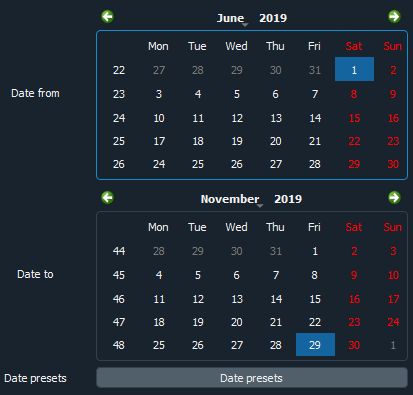
    QCalendarWidget example 2

    However, when I use setMinimumHeight on the two widgets, then instead of giving me that, what I get is this:


    QCalendarWidget example 3

    QCalendarWidget example 4

    So the minimum size seems to have been applied to the individual rows of the calendar grid, rather than to the overall QCalendarWidget object.

    Please can somebody tell me what I'm missing here, and how to go about setting a minimum height on the whole QCalendarWidget and not just on the individual rows?

    Thanks

    1 Reply Last reply
    0
    • SGaistS Offline
      SGaistS Offline
      SGaist
      Lifetime Qt Champion
      wrote on last edited by
      #2

      Hi,

      Which version of PyQt5 are you using ?
      On which platform ?
      Do you have the same issue with PySide2 ?
      Can you provide a minimal running example that shows that behaviour ?

      Interested in AI ? www.idiap.ch
      Please read the Qt Code of Conduct - https://forum.qt.io/topic/113070/qt-code-of-conduct

      1 Reply Last reply
      0
      • D Offline
        D Offline
        donquibeats
        wrote on last edited by
        #3

        Hello. Thanks for the response, and for prompting me for a reproducable example. I've tried and failed to reproduce it minimally so far, suggesting there's something else in my code or nested widgets causing the issue. I'm continuing to look into it and will respond if I get anywhere.

        1 Reply Last reply
        0

        • Login

        • Login or register to search.
        • First post
          Last post
        0
        • Categories
        • Recent
        • Tags
        • Popular
        • Users
        • Groups
        • Search
        • Get Qt Extensions
        • Unsolved