Skip to content
  • Categories
  • Recent
  • Tags
  • Popular
  • Users
  • Groups
  • Search
  • Get Qt Extensions
  • Unsolved
Collapse
Brand Logo
  1. Home
  2. Qt Development
  3. General and Desktop
  4. When i used QProcess it returns warning: 'parent' may be used uninitialized in this function [-Wmaybe-uninitialized]
Forum Updated to NodeBB v4.3 + New Features

When i used QProcess it returns warning: 'parent' may be used uninitialized in this function [-Wmaybe-uninitialized]

Scheduled Pinned Locked Moved General and Desktop
10 Posts 5 Posters 2.3k Views 2 Watching
  • Oldest to Newest
  • Newest to Oldest
  • Most Votes
Reply
  • Reply as topic
Log in to reply
This topic has been deleted. Only users with topic management privileges can see it.
  • stackprogramerS Offline
    stackprogramerS Offline
    stackprogramer
    wrote on last edited by A Former User
    #1

    i want to uses QProcess in my app. according below link:
    i added too below requirements:

    Header:	#include <QProcess>
    qmake:	QT += core
    

    http://doc.qt.io/qt-5/qprocess.html

    my os is ubuntu and Qt5.7, too my project is console project.
    can any guide?
    thanks in advance

     QObject *socket;
        ...
        QString program = "./path/to/Qt/examples/widgets/analogclock";
        QStringList arguments;
        arguments << "-style" << "fusion";
    
        QProcess *myProcess = new QProcess(socket);
        myProcess->start(program, arguments);
    

    it returns this errors:

    /home/sp/Documents/socket/UDPSocketConsole/main.cpp:21: warning: 'socket' may be used uninitialized in this function [-Wmaybe-uninitialized]
         QProcess *myProcess=new QProcess(socketradar);


    jsulmJ 1 Reply Last reply
    0
    • stackprogramerS stackprogramer

      i want to uses QProcess in my app. according below link:
      i added too below requirements:

      Header:	#include <QProcess>
      qmake:	QT += core
      

      http://doc.qt.io/qt-5/qprocess.html

      my os is ubuntu and Qt5.7, too my project is console project.
      can any guide?
      thanks in advance

       QObject *socket;
          ...
          QString program = "./path/to/Qt/examples/widgets/analogclock";
          QStringList arguments;
          arguments << "-style" << "fusion";
      
          QProcess *myProcess = new QProcess(socket);
          myProcess->start(program, arguments);
      

      it returns this errors:

      /home/sp/Documents/socket/UDPSocketConsole/main.cpp:21: warning: 'socket' may be used uninitialized in this function [-Wmaybe-uninitialized]
           QProcess *myProcess=new QProcess(socketradar);


      jsulmJ Offline
      jsulmJ Offline
      jsulm
      Lifetime Qt Champion
      wrote on last edited by jsulm
      #2

      @stackprogramer In the code you pasted you did not initialize socket! It should point to an object which you want to use as parent.

      https://forum.qt.io/topic/113070/qt-code-of-conduct

      N 1 Reply Last reply
      2
      • stackprogramerS Offline
        stackprogramerS Offline
        stackprogramer
        wrote on last edited by
        #3

        hi,yes i know it is warning. in my source instead parent is socket here is my typo.
        when i inserted qDebug() <<"part1" qDebug() <<"part2" qDebug() <<"part3"in my source:

        QObject *socket;
         qDebug() <<"part1" ;
            QString program = "./path/to/Qt/examples/widgets/analogclock";
            QStringList arguments;
            arguments << "-style" << "fusion";
        qDebug() <<"part2" ;
            QProcess *myProcess = new QProcess(socket);
        qDebug() <<"part3" ;
            myProcess->start(program, arguments);
        

        part 1 and 2 print in console but part 3 is can not print console. i want to use QProcess to communicate to a other c++ executable file.
        but QProcess doesn't work for me.
        thanks

        jsulmJ stackprogramerS 2 Replies Last reply
        0
        • stackprogramerS stackprogramer

          hi,yes i know it is warning. in my source instead parent is socket here is my typo.
          when i inserted qDebug() <<"part1" qDebug() <<"part2" qDebug() <<"part3"in my source:

          QObject *socket;
           qDebug() <<"part1" ;
              QString program = "./path/to/Qt/examples/widgets/analogclock";
              QStringList arguments;
              arguments << "-style" << "fusion";
          qDebug() <<"part2" ;
              QProcess *myProcess = new QProcess(socket);
          qDebug() <<"part3" ;
              myProcess->start(program, arguments);
          

          part 1 and 2 print in console but part 3 is can not print console. i want to use QProcess to communicate to a other c++ executable file.
          but QProcess doesn't work for me.
          thanks

          jsulmJ Offline
          jsulmJ Offline
          jsulm
          Lifetime Qt Champion
          wrote on last edited by
          #4

          @stackprogramer Your socket pointer is not initialized! You need to assign it a pointer to an existing object.

          https://forum.qt.io/topic/113070/qt-code-of-conduct

          1 Reply Last reply
          2
          • stackprogramerS stackprogramer

            hi,yes i know it is warning. in my source instead parent is socket here is my typo.
            when i inserted qDebug() <<"part1" qDebug() <<"part2" qDebug() <<"part3"in my source:

            QObject *socket;
             qDebug() <<"part1" ;
                QString program = "./path/to/Qt/examples/widgets/analogclock";
                QStringList arguments;
                arguments << "-style" << "fusion";
            qDebug() <<"part2" ;
                QProcess *myProcess = new QProcess(socket);
            qDebug() <<"part3" ;
                myProcess->start(program, arguments);
            

            part 1 and 2 print in console but part 3 is can not print console. i want to use QProcess to communicate to a other c++ executable file.
            but QProcess doesn't work for me.
            thanks

            stackprogramerS Offline
            stackprogramerS Offline
            stackprogramer
            wrote on last edited by stackprogramer
            #5

            Re: when i used QProcess it returns warning: 'parent' may be used uninitialized in this function [-Wmaybe-uninitialized]

            finally i change my method. i used this structure:
            i had a ddd exe file in ubuntu that when i execute it, it returns "Hello World!"
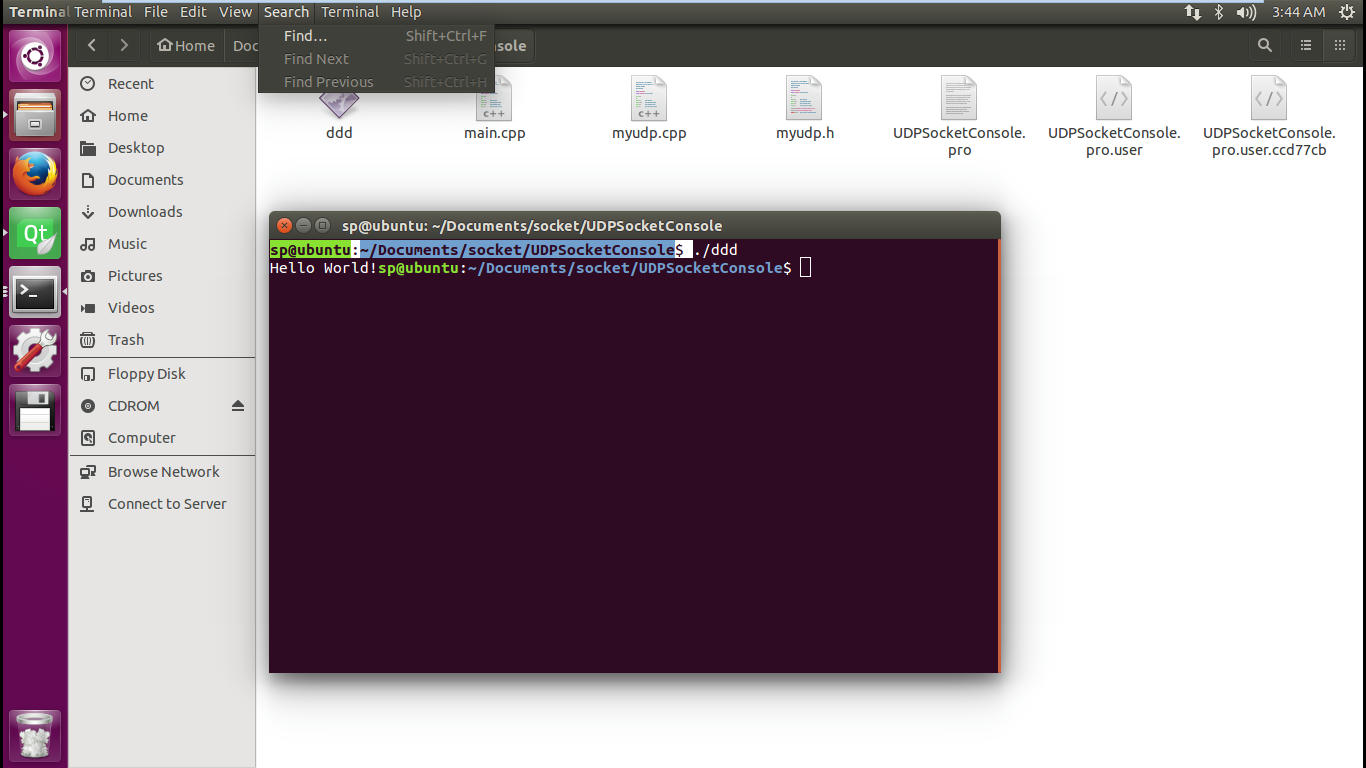
            ddd
            i used this source it works
            best regards stackprogramer

            #include <QCoreApplication>
            
            #include <myudp.h>
            #include <QProcess>
            #include <QObject>


            int main(int argc, char *argv[])
            {
                QCoreApplication a(argc, argv);
                qDebug()<<"hi";
            
            //    MyUDP test;
            //   test.HelloUDP();
            //   test.readyRead();
               // QObject *socketradar;
            
                QString program="/home/sp/Documents/socket/UDPSocketConsole/ddd";
                QStringList arguments;
                arguments<<"1";
                qDebug()<<"hi2";
            
                QProcess myProcess;
                qDebug()<<"hi3";
            
            
                myProcess.start(program,arguments);
            
                //qDebug()<< myProcess<<"hi";
              myProcess.waitForFinished();
              qDebug()<<"hi4";
              QByteArray  output=myProcess.readAllStandardOutput();
              qDebug()<<output;
               // return a.exec();
            }


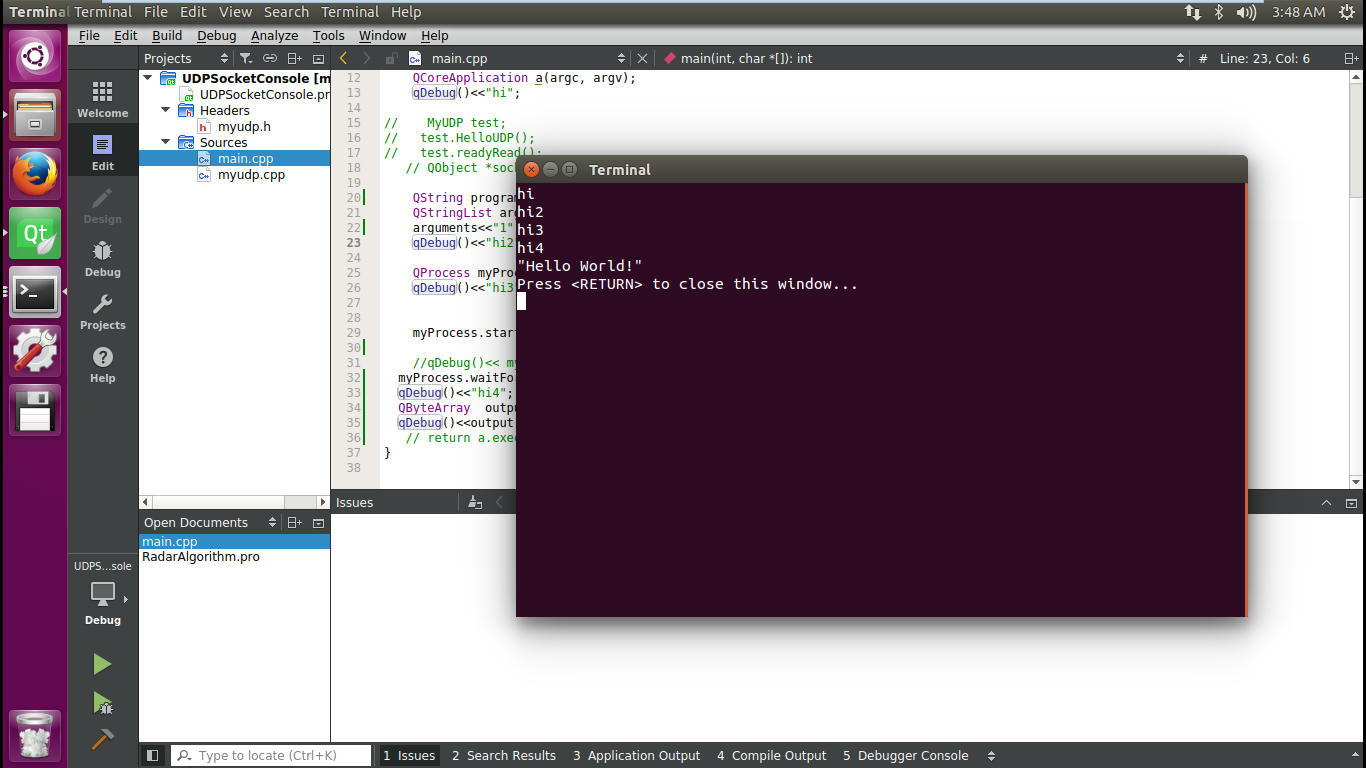
            now we can see our out exe file

            alt text

            1 Reply Last reply
            0
            • jsulmJ jsulm

              @stackprogramer In the code you pasted you did not initialize socket! It should point to an object which you want to use as parent.

              N Offline
              N Offline
              nanor
              wrote on last edited by
              #6

              @jsulm Could you please explain how to do that?
              Thank you

              JonBJ Pl45m4P 2 Replies Last reply
              0
              • N nanor

                @jsulm Could you please explain how to do that?
                Thank you

                JonBJ Offline
                JonBJ Offline
                JonB
                wrote on last edited by JonB
                #7

                @nanor
                How to do what "that"?

                N 1 Reply Last reply
                0
                • N nanor

                  @jsulm Could you please explain how to do that?
                  Thank you

                  Pl45m4P Offline
                  Pl45m4P Offline
                  Pl45m4
                  wrote on last edited by Pl45m4
                  #8

                  @nanor

                  This is very basic C++

                  Declaration

                  • QObject *socket;

                  Initialization could look like this:
                  (assigns an address to that pointer)

                  • socket = new QObject();

                  Otherwise socket is no valid parent for QProcess


                  If debugging is the process of removing software bugs, then programming must be the process of putting them in.

                  ~E. W. Dijkstra

                  N 1 Reply Last reply
                  1
                  • JonBJ JonB

                    @nanor
                    How to do what "that"?

                    N Offline
                    N Offline
                    nanor
                    wrote on last edited by
                    #9

                    @JonB The initialization. I set it to this and the code worked well. Thank you so much.

                    1 Reply Last reply
                    0
                    • Pl45m4P Pl45m4

                      @nanor

                      This is very basic C++

                      Declaration

                      • QObject *socket;

                      Initialization could look like this:
                      (assigns an address to that pointer)

                      • socket = new QObject();

                      Otherwise socket is no valid parent for QProcess

                      N Offline
                      N Offline
                      nanor
                      wrote on last edited by
                      #10

                      @Pl45m4 Thank you so much. I set it to "This" and my code worked well.

                      1 Reply Last reply
                      0

                      • Login

                      • Login or register to search.
                      • First post
                        Last post
                      0
                      • Categories
                      • Recent
                      • Tags
                      • Popular
                      • Users
                      • Groups
                      • Search
                      • Get Qt Extensions
                      • Unsolved