Mysql can't connect on MacBook
-
The application output shows one thing: you are misusing the QSqlDatabase class. It also does not show the plugin loading debug data.
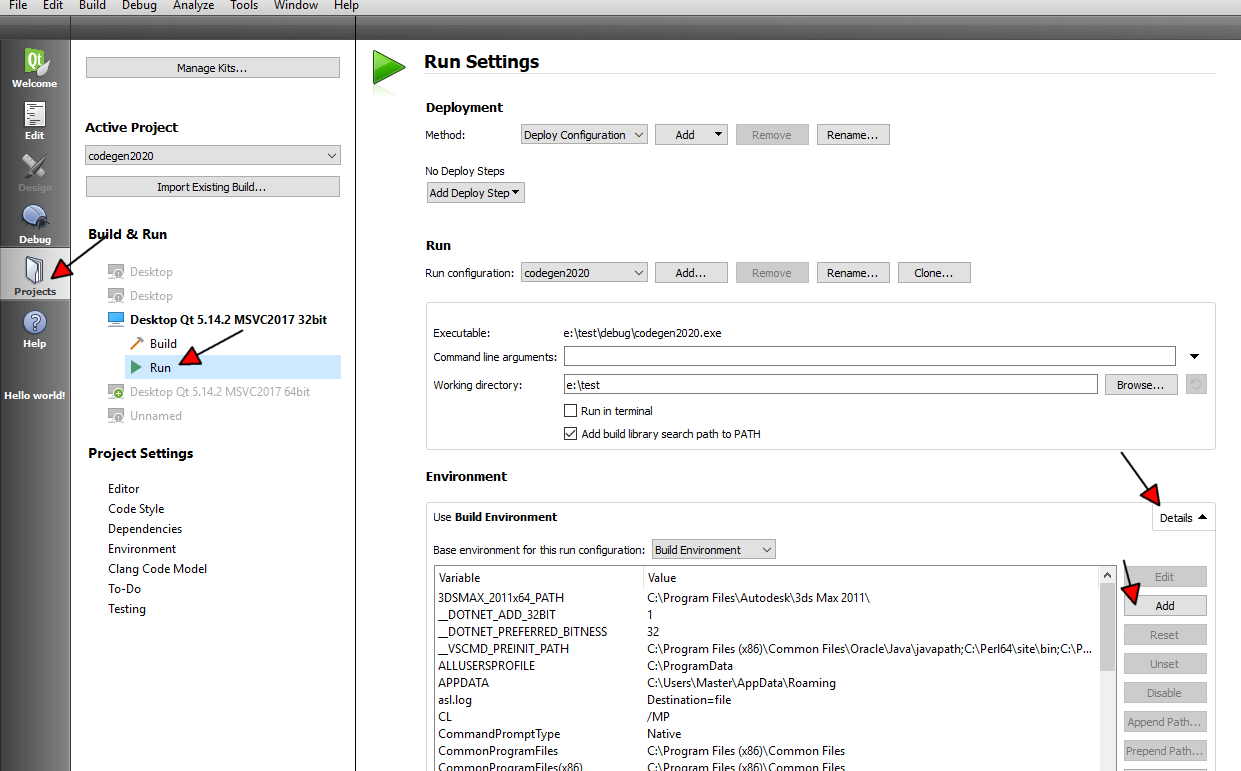
Did you add the QT_DEBUG_PLUGINS variable in Qt Creator like I suggested ? If so, did you set it to 1 ?
-
The application output shows one thing: you are misusing the QSqlDatabase class. It also does not show the plugin loading debug data.
Did you add the QT_DEBUG_PLUGINS variable in Qt Creator like I suggested ? If so, did you set it to 1 ?
-

and this is says me ..13:04:44: Starting /Users/macbook/Documents/Projekty_programovanie/QT_APPS/build-Test-Desktop_Qt_5_15_0_clang_64bit-Debug/Test.app/Contents/MacOS/Test ...
QFactoryLoader::QFactoryLoader() checking directory path "/Users/macbook/Documents/Qt/5.15.0/clang_64/plugins/platforms" ...
QFactoryLoader::QFactoryLoader() looking at "/Users/macbook/Documents/Qt/5.15.0/clang_64/plugins/platforms/libqcocoa.dylib"
Found metadata in lib /Users/macbook/Documents/Qt/5.15.0/clang_64/plugins/platforms/libqcocoa.dylib, metadata=
{
"IID": "org.qt-project.Qt.QPA.QPlatformIntegrationFactoryInterface.5.3",
"MetaData": {
"Keys": [
"cocoa"
]
},
"archreq": 0,
"className": "QCocoaIntegrationPlugin",
"debug": false,
"version": 331520
}Got keys from plugin meta data ("cocoa")
QFactoryLoader::QFactoryLoader() looking at "/Users/macbook/Documents/Qt/5.15.0/clang_64/plugins/platforms/libqminimal.dylib"
Found metadata in lib /Users/macbook/Documents/Qt/5.15.0/clang_64/plugins/platforms/libqminimal.dylib, metadata=
{
"IID": "org.qt-project.Qt.QPA.QPlatformIntegrationFactoryInterface.5.3",
"MetaData": {
"Keys": [
"minimal"
]
},
"archreq": 0,
"className": "QMinimalIntegrationPlugin",
"debug": false,
"version": 331520
}Got keys from plugin meta data ("minimal")
QFactoryLoader::QFactoryLoader() looking at "/Users/macbook/Documents/Qt/5.15.0/clang_64/plugins/platforms/libqoffscreen.dylib"
Found metadata in lib /Users/macbook/Documents/Qt/5.15.0/clang_64/plugins/platforms/libqoffscreen.dylib, metadata=
{
"IID": "org.qt-project.Qt.QPA.QPlatformIntegrationFactoryInterface.5.3",
"MetaData": {
"Keys": [
"offscreen"
]
},
"archreq": 0,
"className": "QOffscreenIntegrationPlugin",
"debug": false,
"version": 331520
}Got keys from plugin meta data ("offscreen")
QFactoryLoader::QFactoryLoader() looking at "/Users/macbook/Documents/Qt/5.15.0/clang_64/plugins/platforms/libqwebgl.dylib"
Found metadata in lib /Users/macbook/Documents/Qt/5.15.0/clang_64/plugins/platforms/libqwebgl.dylib, metadata=
{
"IID": "org.qt-project.Qt.QPA.QPlatformIntegrationFactoryInterface.5.3",
"MetaData": {
"Keys": [
"webgl"
]
},
"archreq": 0,
"className": "QWebGLIntegrationPlugin",
"debug": false,
"version": 331520
}Got keys from plugin meta data ("webgl")
QFactoryLoader::QFactoryLoader() checking directory path "/Users/macbook/Documents/Projekty_programovanie/QT_APPS/build-Test-Desktop_Qt_5_15_0_clang_64bit-Debug/Test.app/Contents/MacOS/platforms" ...
loaded library "/Users/macbook/Documents/Qt/5.15.0/clang_64/plugins/platforms/libqcocoa.dylib"
QFactoryLoader::QFactoryLoader() checking directory path "/Users/macbook/Documents/Qt/5.15.0/clang_64/plugins/platformthemes" ...
QFactoryLoader::QFactoryLoader() looking at "/Users/macbook/Documents/Qt/5.15.0/clang_64/plugins/platformthemes/libqxdgdesktopportal.dylib"
Found metadata in lib /Users/macbook/Documents/Qt/5.15.0/clang_64/plugins/platformthemes/libqxdgdesktopportal.dylib, metadata=
{
"IID": "org.qt-project.Qt.QPA.QPlatformThemeFactoryInterface.5.1",
"MetaData": {
"Keys": [
"xdgdesktopportal",
"flatpak",
"snap"
]
},
"archreq": 0,
"className": "QXdgDesktopPortalThemePlugin",
"debug": false,
"version": 331520
}Got keys from plugin meta data ("xdgdesktopportal", "flatpak", "snap")
QFactoryLoader::QFactoryLoader() checking directory path "/Users/macbook/Documents/Projekty_programovanie/QT_APPS/build-Test-Desktop_Qt_5_15_0_clang_64bit-Debug/Test.app/Contents/MacOS/platformthemes" ...
QFactoryLoader::QFactoryLoader() checking directory path "/Users/macbook/Documents/Qt/5.15.0/clang_64/plugins/styles" ...
QFactoryLoader::QFactoryLoader() looking at "/Users/macbook/Documents/Qt/5.15.0/clang_64/plugins/styles/libqmacstyle.dylib"
Found metadata in lib /Users/macbook/Documents/Qt/5.15.0/clang_64/plugins/styles/libqmacstyle.dylib, metadata=
{
"IID": "org.qt-project.Qt.QStyleFactoryInterface",
"MetaData": {
"Keys": [
"macintosh"
]
},
"archreq": 0,
"className": "QMacStylePlugin",
"debug": false,
"version": 331520
}Got keys from plugin meta data ("macintosh")
QFactoryLoader::QFactoryLoader() checking directory path "/Users/macbook/Documents/Projekty_programovanie/QT_APPS/build-Test-Desktop_Qt_5_15_0_clang_64bit-Debug/Test.app/Contents/MacOS/styles" ...
loaded library "/Users/macbook/Documents/Qt/5.15.0/clang_64/plugins/styles/libqmacstyle.dylib"
QFactoryLoader::QFactoryLoader() checking directory path "/Users/macbook/Documents/Qt/5.15.0/clang_64/plugins/imageformats" ...
QFactoryLoader::QFactoryLoader() looking at "/Users/macbook/Documents/Qt/5.15.0/clang_64/plugins/imageformats/libqgif.dylib"
Found metadata in lib /Users/macbook/Documents/Qt/5.15.0/clang_64/plugins/imageformats/libqgif.dylib, metadata=
{
"IID": "org.qt-project.Qt.QImageIOHandlerFactoryInterface",
"MetaData": {
"Keys": [
"gif"
],
"MimeTypes": [
"image/gif"
]
},
"archreq": 0,
"className": "QGifPlugin",
"debug": false,
"version": 331520
}Got keys from plugin meta data ("gif")
QFactoryLoader::QFactoryLoader() looking at "/Users/macbook/Documents/Qt/5.15.0/clang_64/plugins/imageformats/libqicns.dylib"
Found metadata in lib /Users/macbook/Documents/Qt/5.15.0/clang_64/plugins/imageformats/libqicns.dylib, metadata=
{
"IID": "org.qt-project.Qt.QImageIOHandlerFactoryInterface",
"MetaData": {
"Keys": [
"icns"
],
"MimeTypes": [
"image/x-icns"
]
},
"archreq": 0,
"className": "QICNSPlugin",
"debug": false,
"version": 331520
}Got keys from plugin meta data ("icns")
QFactoryLoader::QFactoryLoader() looking at "/Users/macbook/Documents/Qt/5.15.0/clang_64/plugins/imageformats/libqico.dylib"
Found metadata in lib /Users/macbook/Documents/Qt/5.15.0/clang_64/plugins/imageformats/libqico.dylib, metadata=
{
"IID": "org.qt-project.Qt.QImageIOHandlerFactoryInterface",
"MetaData": {
"Keys": [
"ico",
"cur"
],
"MimeTypes": [
"image/vnd.microsoft.icon",
"image/vnd.microsoft.icon"
]
},
"archreq": 0,
"className": "QICOPlugin",
"debug": false,
"version": 331520
}Got keys from plugin meta data ("ico", "cur")
QFactoryLoader::QFactoryLoader() looking at "/Users/macbook/Documents/Qt/5.15.0/clang_64/plugins/imageformats/libqjpeg.dylib"
Found metadata in lib /Users/macbook/Documents/Qt/5.15.0/clang_64/plugins/imageformats/libqjpeg.dylib, metadata=
{
"IID": "org.qt-project.Qt.QImageIOHandlerFactoryInterface",
"MetaData": {
"Keys": [
"jpg",
"jpeg"
],
"MimeTypes": [
"image/jpeg",
"image/jpeg"
]
},
"archreq": 0,
"className": "QJpegPlugin",
"debug": false,
"version": 331520
}Got keys from plugin meta data ("jpg", "jpeg")
QFactoryLoader::QFactoryLoader() looking at "/Users/macbook/Documents/Qt/5.15.0/clang_64/plugins/imageformats/libqmacheif.dylib"
Found metadata in lib /Users/macbook/Documents/Qt/5.15.0/clang_64/plugins/imageformats/libqmacheif.dylib, metadata=
{
"IID": "org.qt-project.Qt.QImageIOHandlerFactoryInterface",
"MetaData": {
"Keys": [
"heic",
"heif"
],
"MimeTypes": [
"image/heic",
"image/heif"
]
},
"archreq": 0,
"className": "QMacHeifPlugin",
"debug": false,
"version": 331520
}Got keys from plugin meta data ("heic", "heif")
QFactoryLoader::QFactoryLoader() looking at "/Users/macbook/Documents/Qt/5.15.0/clang_64/plugins/imageformats/libqmacjp2.dylib"
Found metadata in lib /Users/macbook/Documents/Qt/5.15.0/clang_64/plugins/imageformats/libqmacjp2.dylib, metadata=
{
"IID": "org.qt-project.Qt.QImageIOHandlerFactoryInterface",
"MetaData": {
"Keys": [
"jp2"
],
"MimeTypes": [
"image/jp2",
"image/jpx",
"image/jpm",
"video/mj2"
]
},
"archreq": 0,
"className": "QMacJp2Plugin",
"debug": false,
"version": 331520
}Got keys from plugin meta data ("jp2")
QFactoryLoader::QFactoryLoader() looking at "/Users/macbook/Documents/Qt/5.15.0/clang_64/plugins/imageformats/libqsvg.dylib"
Found metadata in lib /Users/macbook/Documents/Qt/5.15.0/clang_64/plugins/imageformats/libqsvg.dylib, metadata=
{
"IID": "org.qt-project.Qt.QImageIOHandlerFactoryInterface",
"MetaData": {
"Keys": [
"svg",
"svgz"
],
"MimeTypes": [
"image/svg+xml",
"image/svg+xml-compressed"
]
},
"archreq": 0,
"className": "QSvgPlugin",
"debug": false,
"version": 331520
}Got keys from plugin meta data ("svg", "svgz")
QFactoryLoader::QFactoryLoader() looking at "/Users/macbook/Documents/Qt/5.15.0/clang_64/plugins/imageformats/libqtga.dylib"
Found metadata in lib /Users/macbook/Documents/Qt/5.15.0/clang_64/plugins/imageformats/libqtga.dylib, metadata=
{
"IID": "org.qt-project.Qt.QImageIOHandlerFactoryInterface",
"MetaData": {
"Keys": [
"tga"
],
"MimeTypes": [
"image/x-tga"
]
},
"archreq": 0,
"className": "QTgaPlugin",
"debug": false,
"version": 331520
}Got keys from plugin meta data ("tga")
QFactoryLoader::QFactoryLoader() looking at "/Users/macbook/Documents/Qt/5.15.0/clang_64/plugins/imageformats/libqtiff.dylib"
Found metadata in lib /Users/macbook/Documents/Qt/5.15.0/clang_64/plugins/imageformats/libqtiff.dylib, metadata=
{
"IID": "org.qt-project.Qt.QImageIOHandlerFactoryInterface",
"MetaData": {
"Keys": [
"tiff",
"tif"
],
"MimeTypes": [
"image/tiff",
"image/tiff"
]
},
"archreq": 0,
"className": "QTiffPlugin",
"debug": false,
"version": 331520
}Got keys from plugin meta data ("tiff", "tif")
QFactoryLoader::QFactoryLoader() looking at "/Users/macbook/Documents/Qt/5.15.0/clang_64/plugins/imageformats/libqwbmp.dylib"
Found metadata in lib /Users/macbook/Documents/Qt/5.15.0/clang_64/plugins/imageformats/libqwbmp.dylib, metadata=
{
"IID": "org.qt-project.Qt.QImageIOHandlerFactoryInterface",
"MetaData": {
"Keys": [
"wbmp"
],
"MimeTypes": [
"image/vnd.wap.wbmp"
]
},
"archreq": 0,
"className": "QWbmpPlugin",
"debug": false,
"version": 331520
}Got keys from plugin meta data ("wbmp")
QFactoryLoader::QFactoryLoader() looking at "/Users/macbook/Documents/Qt/5.15.0/clang_64/plugins/imageformats/libqwebp.dylib"
Found metadata in lib /Users/macbook/Documents/Qt/5.15.0/clang_64/plugins/imageformats/libqwebp.dylib, metadata=
{
"IID": "org.qt-project.Qt.QImageIOHandlerFactoryInterface",
"MetaData": {
"Keys": [
"webp"
],
"MimeTypes": [
"image/webp"
]
},
"archreq": 0,
"className": "QWebpPlugin",
"debug": false,
"version": 331520
}Got keys from plugin meta data ("webp")
QFactoryLoader::QFactoryLoader() checking directory path "/Users/macbook/Documents/Projekty_programovanie/QT_APPS/build-Test-Desktop_Qt_5_15_0_clang_64bit-Debug/Test.app/Contents/MacOS/imageformats" ...
loaded library "/Users/macbook/Documents/Qt/5.15.0/clang_64/plugins/imageformats/libqgif.dylib"
loaded library "/Users/macbook/Documents/Qt/5.15.0/clang_64/plugins/imageformats/libqicns.dylib"
loaded library "/Users/macbook/Documents/Qt/5.15.0/clang_64/plugins/imageformats/libqico.dylib"
loaded library "/Users/macbook/Documents/Qt/5.15.0/clang_64/plugins/imageformats/libqjpeg.dylib"
loaded library "/Users/macbook/Documents/Qt/5.15.0/clang_64/plugins/imageformats/libqmacheif.dylib"
loaded library "/Users/macbook/Documents/Qt/5.15.0/clang_64/plugins/imageformats/libqmacjp2.dylib"
loaded library "/Users/macbook/Documents/Qt/5.15.0/clang_64/plugins/imageformats/libqsvg.dylib"
loaded library "/Users/macbook/Documents/Qt/5.15.0/clang_64/plugins/imageformats/libqtga.dylib"
loaded library "/Users/macbook/Documents/Qt/5.15.0/clang_64/plugins/imageformats/libqtiff.dylib"
loaded library "/Users/macbook/Documents/Qt/5.15.0/clang_64/plugins/imageformats/libqwbmp.dylib"
loaded library "/Users/macbook/Documents/Qt/5.15.0/clang_64/plugins/imageformats/libqwebp.dylib"
QFactoryLoader::QFactoryLoader() checking directory path "/Users/macbook/Documents/Qt/5.15.0/clang_64/plugins/iconengines" ...
QFactoryLoader::QFactoryLoader() looking at "/Users/macbook/Documents/Qt/5.15.0/clang_64/plugins/iconengines/libqsvgicon.dylib"
Found metadata in lib /Users/macbook/Documents/Qt/5.15.0/clang_64/plugins/iconengines/libqsvgicon.dylib, metadata=
{
"IID": "org.qt-project.Qt.QIconEngineFactoryInterface",
"MetaData": {
"Keys": [
"svg",
"svgz",
"svg.gz"
]
},
"archreq": 0,
"className": "QSvgIconPlugin",
"debug": false,
"version": 331520
}Got keys from plugin meta data ("svg", "svgz", "svg.gz")
QFactoryLoader::QFactoryLoader() checking directory path "/Users/macbook/Documents/Projekty_programovanie/QT_APPS/build-Test-Desktop_Qt_5_15_0_clang_64bit-Debug/Test.app/Contents/MacOS/iconengines" ...
QPixmap::scaled: Pixmap is a null pixmap
QFactoryLoader::QFactoryLoader() checking directory path "/Users/macbook/Documents/Qt/5.15.0/clang_64/plugins/accessible" ...
QFactoryLoader::QFactoryLoader() checking directory path "/Users/macbook/Documents/Projekty_programovanie/QT_APPS/build-Test-Desktop_Qt_5_15_0_clang_64bit-Debug/Test.app/Contents/MacOS/accessible" ...
QFactoryLoader::QFactoryLoader() checking directory path "/Users/macbook/Documents/Qt/5.15.0/clang_64/plugins/sqldrivers" ...
QFactoryLoader::QFactoryLoader() looking at "/Users/macbook/Documents/Qt/5.15.0/clang_64/plugins/sqldrivers/libqsqlite.dylib"
Found metadata in lib /Users/macbook/Documents/Qt/5.15.0/clang_64/plugins/sqldrivers/libqsqlite.dylib, metadata=
{
"IID": "org.qt-project.Qt.QSqlDriverFactoryInterface",
"MetaData": {
"Keys": [
"QSQLITE"
]
},
"archreq": 0,
"className": "QSQLiteDriverPlugin",
"debug": false,
"version": 331520
}Got keys from plugin meta data ("QSQLITE")
QFactoryLoader::QFactoryLoader() looking at "/Users/macbook/Documents/Qt/5.15.0/clang_64/plugins/sqldrivers/libqsqlodbc.dylib"
Found metadata in lib /Users/macbook/Documents/Qt/5.15.0/clang_64/plugins/sqldrivers/libqsqlodbc.dylib, metadata=
{
"IID": "org.qt-project.Qt.QSqlDriverFactoryInterface",
"MetaData": {
"Keys": [
"QODBC3",
"QODBC"
]
},
"archreq": 0,
"className": "QODBCDriverPlugin",
"debug": false,
"version": 331520
}Got keys from plugin meta data ("QODBC3", "QODBC")
QFactoryLoader::QFactoryLoader() looking at "/Users/macbook/Documents/Qt/5.15.0/clang_64/plugins/sqldrivers/libqsqlpsql.dylib"
Found metadata in lib /Users/macbook/Documents/Qt/5.15.0/clang_64/plugins/sqldrivers/libqsqlpsql.dylib, metadata=
{
"IID": "org.qt-project.Qt.QSqlDriverFactoryInterface",
"MetaData": {
"Keys": [
"QPSQL7",
"QPSQL"
]
},
"archreq": 0,
"className": "QPSQLDriverPlugin",
"debug": false,
"version": 331520
}Got keys from plugin meta data ("QPSQL7", "QPSQL")
QFactoryLoader::QFactoryLoader() checking directory path "/Users/macbook/Documents/Projekty_programovanie/QT_APPS/build-Test-Desktop_Qt_5_15_0_clang_64bit-Debug/Test.app/Contents/MacOS/sqldrivers" ...
QSqlDatabase: QMYSQL driver not loaded
QSqlDatabase: available drivers: QSQLITE QODBC QODBC3 QPSQL QPSQL7 -
Due to a change of licence by Oracle, the MySQL prebuilt plugin cannot be provided. You have to build it yourself.
-
Due to a change of licence by Oracle, the MySQL prebuilt plugin cannot be provided. You have to build it yourself.
-
Did you even try to read the related Qt's documentation ?
It's explained there.
There are also numerous thread on this forum about that subject. -
Did you even try to read the related Qt's documentation ?
It's explained there.
There are also numerous thread on this forum about that subject.@SGaist said in Mysql can't connect on MacBook:
documentation
i try this : https://forum.qt.io/topic/106565/mysql-qt-create-plugin-mysql-for-qt-on-mac
Then, we cd to mysql folder (folder inside sqldrivers) and make plugin through 2 commands
qmake
make installif i qmake and make install i dont have libsqlmysql.dylib in file sqldrivers i dont know why ..

-
And what about following the documentation I linked ?
Are you sure you are using the correct qmake executable ?
Did you check the qmake output ?
Did you check the make output ? -
And what about following the documentation I linked ?
Are you sure you are using the correct qmake executable ?
Did you check the qmake output ?
Did you check the make output ? -
@Eternus said in Mysql can't connect on MacBook:
this working..
Please remove all generated files (as explained in the documentation) and post the output of this command.
-
@Eternus said in Mysql can't connect on MacBook:
this working..
Please remove all generated files (as explained in the documentation) and post the output of this command.
@Christian-Ehrlicher said in Mysql can't connect on MacBook:
working..
Please remove all generated files (as explained in the documentation) and post the output of this
how ?? i cant find in documentation
-
By deleting the files that have been generated in the folder you are in.
-
@Eternus In the build directory, $QTDIR/qtbase/src/plugins/sqldrivers in your case.
This is now a good example why it is way better to use out of source builds... -
Look into config.tests to see what is happening.
-
@Eternus said in Mysql can't connect on MacBook:
this is config for mysql what there please ?
You should take a look at the config.log as described in the documentation
-
@Eternus said in Mysql can't connect on MacBook:
this is config for mysql what there please ?
You should take a look at the config.log as described in the documentation
@Christian-Ehrlicher
i cant find in documentation