Skip to content
  • Categories
  • Recent
  • Tags
  • Popular
  • Users
  • Groups
  • Search
  • Get Qt
  • Unsolved
Collapse
Brand Logo
  1. Home
  2. Qt Development
  3. General and Desktop
  4. CRLF QTextedit
Qt 6.12 LTS is out! See what's new in the release blog

CRLF QTextedit

Scheduled Pinned Locked Moved Solved General and Desktop
13 Posts 4 Posters 2.5k Views 1 Watching
  • Oldest to Newest
  • Newest to Oldest
  • Most Votes
Reply
  • Reply as topic
Log in to reply
This topic has been deleted. Only users with topic management privileges can see it.
  • AlbatorA Albator

    if you want i write a .txt with this Qtextedit
    and i want in the .txt
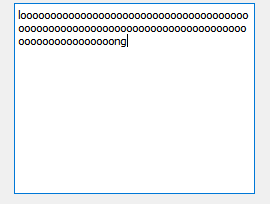
    looooooooooooooooooo
    oooooooooooog

    and i have
    loooooooooooooooooooooooooooooooooooooooooooooong

    jsulmJ Offline
    jsulmJ Offline
    jsulm
    Lifetime Qt Champion
    wrote on last edited by
    #4

    @Albator If you want to wrap long lines then simply set https://doc.qt.io/qt-5/qtextedit.html#lineWrapMode-prop

    https://forum.qt.io/topic/113070/qt-code-of-conduct

    1 Reply Last reply
    2
    • AlbatorA Offline
      AlbatorA Offline
      Albator
      wrote on last edited by Albator
      #5

      okay

      linewrap.png

      qtextedit2.png

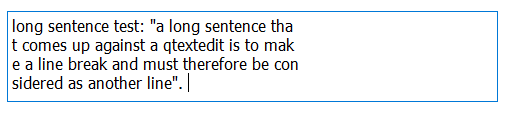
      visually it works but concretely it's always the same line because in my .txt i have :
      long sentence test: "a long sentence that comes up against a qtextedit is to make a line break and must therefore be considered as another line".

      and i want in my .txt :
      long sentence test: "a long sentence tha
      t comes up against a qtextedit is to mak
      e a line break and must therefore be con
      sidered as another line".

      jsulmJ 1 Reply Last reply
      0
      • AlbatorA Albator

        okay

        linewrap.png

        qtextedit2.png

        visually it works but concretely it's always the same line because in my .txt i have :
        long sentence test: "a long sentence that comes up against a qtextedit is to make a line break and must therefore be considered as another line".

        and i want in my .txt :
        long sentence test: "a long sentence tha
        t comes up against a qtextedit is to mak
        e a line break and must therefore be con
        sidered as another line".

        jsulmJ Offline
        jsulmJ Offline
        jsulm
        Lifetime Qt Champion
        wrote on last edited by
        #6

        @Albator said in CRLF QTextedit:

        and i want in my .txt :

        Can you please be more precise?
        Do you want to modify the content of your file now or what?

        https://forum.qt.io/topic/113070/qt-code-of-conduct

        1 Reply Last reply
        0
        • AlbatorA Offline
          AlbatorA Offline
          Albator
          wrote on last edited by Albator
          #7

          @jsulm said in CRLF QTextedit:

          Can you please be more precise?
          Do you want to modify the content of your file now or what?

          I want the same layout of the text in qtextedit i.e. with line breaks in my .txt

          but with this method "linewrap" the text have line break visually but not really but he stay the same line
          and when i put the text of the qtextedit in my .txt i have just one line...

          jsulmJ 1 Reply Last reply
          0
          • AlbatorA Albator

            @jsulm said in CRLF QTextedit:

            Can you please be more precise?
            Do you want to modify the content of your file now or what?

            I want the same layout of the text in qtextedit i.e. with line breaks in my .txt

            but with this method "linewrap" the text have line break visually but not really but he stay the same line
            and when i put the text of the qtextedit in my .txt i have just one line...

            jsulmJ Offline
            jsulmJ Offline
            jsulm
            Lifetime Qt Champion
            wrote on last edited by
            #8

            @Albator Then you have to modify the content of your file to split long lines into shorter lines.

            https://forum.qt.io/topic/113070/qt-code-of-conduct

            1 Reply Last reply
            1
            • AlbatorA Offline
              AlbatorA Offline
              Albator
              wrote on last edited by Albator
              #9

              i don't want touch my .txt, i would like found a solution in the qtextedit directly

              for example when i write and put in enter i obtain :

              with_enter.png

              it's impossible to make a "enter keybord" automaticly to the end of frame ?

              mrjjM 1 Reply Last reply
              0
              • AlbatorA Albator

                i don't want touch my .txt, i would like found a solution in the qtextedit directly

                for example when i write and put in enter i obtain :
                with_enter.png

                it's impossible to make a "enter keybord" automaticly to the end of frame ?

                mrjjM Offline
                mrjjM Offline
                mrjj
                Lifetime Qt Champion
                wrote on last edited by
                #10

                @Albator
                Hi
                QTextEdit will not alter the original text so it will always be one long line even if it shows it
                "wrapped"

                So even if we see this on-screen.
                alt text

                When we ask it

                   auto doc = ui->textEdit->document();
                   for (QTextBlock it = doc->begin(); it != doc->end(); it = it.next())
                           qDebug() << it.text();


                it gives the original text as it purely visual drawn. no newline was inserted.

                "loooooooooooooooooooooooooooooooooooooooooooooooooooooooooooooooooooooooooooooooooooooooooooong"
                

                So I don't think you can use TextEdit for this. You have to split it manually by inserting \n into the text.

                1 Reply Last reply
                3
                • AlbatorA Offline
                  AlbatorA Offline
                  Albator
                  wrote on last edited by
                  #11

                  @mrjj said in CRLF QTextedit:

                  So I don't think you can use TextEdit for this. You have to split it manually by inserting \n into the text.

                  okay :'(
                  i'm a little bit sad

                  Since I want a line break every 40 characters on average, I'll force the integration of the "every 40"...

                  thanks you all :))

                  JonBJ 1 Reply Last reply
                  0
                  • AlbatorA Albator

                    @mrjj said in CRLF QTextedit:

                    So I don't think you can use TextEdit for this. You have to split it manually by inserting \n into the text.

                    okay :'(
                    i'm a little bit sad

                    Since I want a line break every 40 characters on average, I'll force the integration of the "every 40"...

                    thanks you all :))

                    JonBJ Offline
                    JonBJ Offline
                    JonB
                    wrote on last edited by
                    #12

                    @Albator
                    Why sad? It's just insert a \n every 40 characters, two lines of code. A couple more lines to detect where it already has line breaks and restart the count to 40 from there. QTextEdit isn't doing anything magic/more complicated than that.

                    1 Reply Last reply
                    3
                    • AlbatorA Offline
                      AlbatorA Offline
                      Albator
                      wrote on last edited by
                      #13

                      Yes thanks
                      that's what I said to myself right after "my sad mood" :)

                      1 Reply Last reply
                      1

                      • Login

                      • Login or register to search.
                      • First post
                        Last post
                      0
                      • Categories
                      • Recent
                      • Tags
                      • Popular
                      • Users
                      • Groups
                      • Search
                      • Get Qt
                      • Unsolved